1. Introduzione
This manual provides comprehensive instructions for setting up, operating, and maintaining your Microsoft Surface Go 2 tablet. The Surface Go 2 is a versatile 10.5-inch touch-screen device, powered by an Intel Pentium processor, 8GB of RAM, and a 128GB SSD, running Windows 10. It is designed for portability and efficiency, suitable for various tasks from productivity to entertainment.
2. Componenti e porte
Familiarize yourself with the physical components and connection ports of your Surface Go 2.
2.1 Dispositivo suview
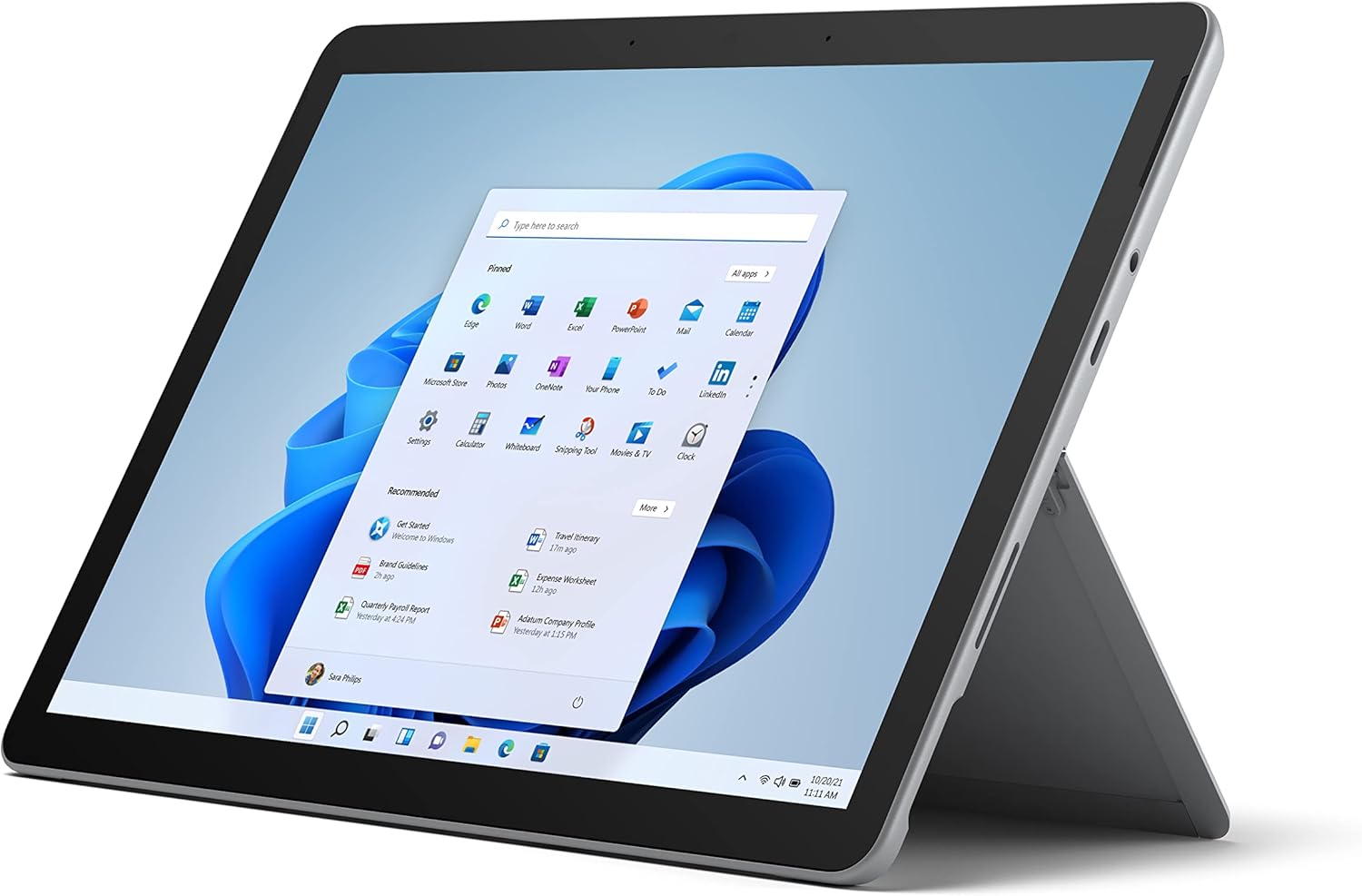
Figure 2.1: Microsoft Surface Go 2 tablet in landscape orientation, showcasing the Windows desktop interface.
2.2 Side Ports and Buttons
- Porta USB di tipo C: Per il trasferimento dati, l'uscita video e la ricarica.
- Jack per cuffie da 3.5 mm: Per collegare cuffie o dispositivi audio esterni.
- Porta di connessione a Surface: Magnetic port for charging and connecting to Surface Dock (sold separately).
- Lettore di schede MicroSD: Per espandere la memoria con una scheda microSD.
- Pulsanti del volume: Per regolare il volume audio.
- Pulsante di accensione: Per accendere/spegnere il dispositivo o metterlo in modalità sospensione.

Figura 2.2: Un lato profile of the Surface Go 2, illustrating the various ports and buttons along its edge.
2.3 Cavalletto integrato
The Surface Go 2 features an integrated kickstand on the back, allowing for multiple viewing angles. This enables comfortable use in various modes, such as tablet, laptop (with Type Cover), or studio mode.

Figure 2.3: The Surface Go 2 with its Type Cover keyboard attached and the kickstand deployed, demonstrating its laptop-like configuration.
3. Configurazione iniziale
Follow these steps to set up your Surface Go 2 for the first time.
3.1 Accensione e configurazione di base
- Carica il dispositivo: Connect the included power adapter to the Surface Connect port on your device and plug it into a power outlet.
- Accensione: Press and hold the power button located on the top edge of the device until the Microsoft logo appears on the screen.
- Segui le istruzioni sullo schermo: The device will guide you through selecting your region, language, and connecting to a Wi-Fi network.
- Microsoft Account Setup: Sign in with an existing Microsoft account or create a new one. This is essential for accessing Microsoft services and applications.
- Impostazioni sulla privacy: Review and adjust your privacy settings as prompted.
- Windows Hello: Set up facial recognition for faster and more secure sign-in (optional).
4. Istruzioni per l'uso
The Surface Go 2 offers flexible interaction methods.
4.1 Navigazione touchscreen
The 10.5-inch PixelSense display supports 10-point multi-touch. You can navigate Windows 10 using gestures similar to a smartphone or tablet:
- Rubinetto: Seleziona elementi o apri applicazioni.
- Scorri: Scorri i contenuti o naviga tra le schermate.
- Pizzica per ingrandire: Ingrandisci o riduci le dimensioni del contenuto.
- Premere e tenere premuto: Access context menus (right-click equivalent).
4.2 Using the Type Cover Keyboard (Sold Separately)
Attach the Type Cover keyboard to transform your Surface Go 2 into a laptop. The keyboard connects magnetically to the bottom edge of the tablet.
- Allegato: Align the Type Cover with the magnetic connector at the bottom of the Surface Go 2 until it snaps into place.
- Digitando: Use the physical keys for efficient text input.
- Trackpad: The integrated trackpad allows for precise cursor control and multi-touch gestures.

Figure 4.1: The Surface Go 2 tablet separated from its Type Cover keyboard, illustrating the modular design.
4.3 Using the Surface Pen (Sold Separately)
The Surface Pen (sold separately) enhances creativity and productivity, allowing for natural writing and drawing directly on the screen.

Figure 4.2: The Surface Go 2 tablet displayed with a compatible Surface Pen, highlighting its digital inking capabilities.
5. Manutenzione
Proper care ensures the longevity and performance of your Surface Go 2.
- Pulizia dello schermo: Utilizzare un panno morbido e privo di lanugine leggermente dampcon acqua o un detergente per schermi approvato. Evitare prodotti chimici aggressivi.
- Pulizia del corpo del dispositivo: Pulisci l'esterno con un panno morbido e asciutto.
- Aggiornamenti software: Controlla e installa regolarmente gli aggiornamenti di Windows per garantire prestazioni e sicurezza ottimali. Vai a Impostazioni > Aggiornamento e sicurezza > Windows Update.
- Cura della batteria: Per massimizzare la durata della batteria, evitare temperature estreme e cercare di mantenere la carica della batteria tra il 20% e l'80%, quando possibile.
- Gestione della memoria: Periodicamente cancellare temporaneamente files and unnecessary data to free up storage space. Go to Impostazioni > Sistema > Archiviazione.
6. Risoluzione Dei Problemi
Problemi comuni e relative soluzioni.
- Dispositivo non si accende: Assicurati che il dispositivo sia carico. Collega l'adattatore di alimentazione e attendi qualche minuto prima di riprovare ad accenderlo.
- Touchscreen non reattivo: Restart the device. If the issue persists, check for pending Windows updates or consider a system restore.
- Problemi di connessione Wi-Fi: Verify your Wi-Fi network is active. Restart your router and the Surface Go 2. Check Wi-Fi settings on the device.
- Prestazioni lente: Close unnecessary applications. Check for background processes consuming high resources (Task Manager). Ensure sufficient free storage space.
- La batteria si scarica rapidamente: Adjust screen brightness, disable unnecessary background apps, and ensure all software is up to date.
7. Specifiche
| Caratteristica | Dettaglio |
|---|---|
| Display | 10.5" PixelSense 10-Point Touch Display |
| Risoluzione | 1920 x 1280 (216 ppi) |
| Processore | 1.6 GHz Intel Pentium 4425Y Dual-Core Processor |
| Memoria RAM | 8 GB |
| Magazzinaggio | SSD da 128 GB |
| Grafica | Grafica Intel HD 615 integrata |
| Senza fili | Wi-Fi 5 (802.11ac) | Bluetooth 4.1 |
| Telecamere | 8MP Rear Camera | 5MP Front Camera |
| Porti | USB Type-C, 3.5 mm Headphone Jack, Surface Connect, MicroSD Card Reader |
| Durata della batteria | Fino a 9 ore (utilizzo tipico) |
| Sistema operativo | Finestre 10 |
| Peso | 1.15 libbre (circa) |
| Dimensioni | 6.8 x 9.64 x 0.32 pollici |
8. Garanzia e supporto
This Microsoft Surface Go 2 is a renewed product. Renewed products are eligible for replacement or refund under the Amazon Renewed Guarantee if you are not satisfied with your purchase. For specific terms and conditions, please refer to the Amazon Renewed program details.
For further technical support or inquiries, please visit the official Microsoft Surface support websito o contattare il loro servizio clienti.


