1. Introduzione
The YABER V3 Mini Bluetooth Projector is designed to provide a versatile and high-quality viewing experience for home entertainment and outdoor use. Featuring native 1280x720p resolution with 1080P support, a 6000:1 contrast ratio, and an advanced German LED light source, it delivers clear and accurate images. This projector also includes Bluetooth 5.0 for wireless audio connectivity and supports wireless screen mirroring via Anycast or Chromecast (adapters sold separately).
2. Cosa c'è nella scatola
- YABER V3 Mini Bluetooth Projector
- Cavo HDMI
- Cavo di alimentazione
- Manuale d'uso
- cavo AV
- Panno per la pulizia delle lenti
- Telecomando (batterie non incluse)
3. Caratteristiche del prodotto
- Native 720P & 1080P Supported: Offers a native resolution of 1280x720 pixels, supporting up to 1080P input for clear images.
- Alto rapporto di contrasto: Features a 6000:1 contrast ratio for enhanced image depth and detail.
- Connettività Bluetooth 5.0: Allows wireless connection to Bluetooth headsets, speakers, and Airpods for enhanced audio.
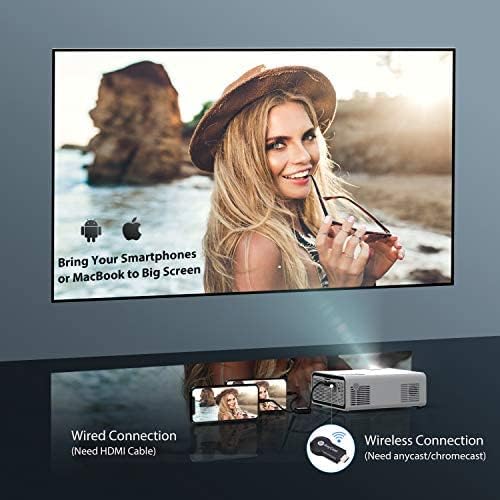
- Mirroring dello schermo wireless: Supports Anycast and Chromecast for mirroring content from smartphones and other devices (adapters required).
- Funzione zoom: Adjusts image size from 100% to 50% using the remote control without moving the projector.
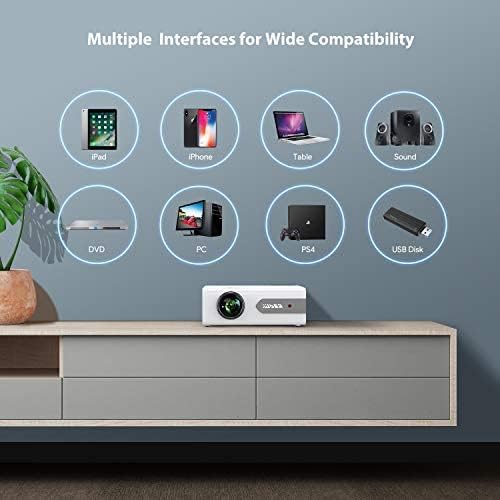
- Interfacce multiple: Equipped with HDMI, USB, VGA, AV, and Audio ports for wide compatibility with various devices.
- Suono stereo HIFI: Built-in dual stereo speakers with an SRS sound system provide a good auditory experience.
- Sistema di raffreddamento avanzato: Designed to minimize lamp power consumption and extend lamp vita fino a 100,000 ore.


4. Impostazione
4.1 Posizionamento iniziale
Place the projector on a stable, flat surface or mount it to the ceiling. Ensure there is adequate ventilation around the projector to prevent overheating. The projection distance and screen size can be adjusted based on your viewambiente di lavoro.

4.2 Collegamento di alimentazione
Collegare il cavo di alimentazione all'ingresso di alimentazione del proiettore e quindi collegarlo a una presa di corrente.
4.3 Accensione/spegnimento
Premere il pulsante di accensione sul proiettore o sul telecomando per accendere o spegnere l'unità.
5. Istruzioni per l'uso
5.1 Correzione della messa a fuoco e della distorsione trapezoidale
Adjust the focus ring on the projector lens until the image is clear. Use the keystone correction feature (manual or digital, if available) to correct any trapezoidal distortion of the image.
5.2 Selezione della sorgente di input
Use the 'Source' button on the remote or projector to select the desired input source (HDMI, USB, VGA, AV).
5.3 Connessione Bluetooth
To connect to a Bluetooth audio device:
- Ensure your Bluetooth speaker or headset is in pairing mode.
- Accedere alle impostazioni Bluetooth del proiettore.
- Seleziona il tuo dispositivo dall'elenco dei dispositivi disponibili per l'associazione.
- Once connected, audio will play through the Bluetooth device.
Nota: The V3 mini projector supports Bluetooth output devices (speakers, headphones) but does not connect to phones/pads via Bluetooth for mirroring. Turn off Bluetooth when not in use to avoid potential issues.
5.4 Mirroring dello schermo wireless
The YABER V3 supports wireless screen mirroring from iOS and Android devices using an external Anycast or Chromecast dongle (purchased separately). Connect the dongle to an HDMI port and follow the dongle's instructions for mirroring.
5.5 Funzione Zoom
To adjust the image size without moving the projector, use the zoom function via the remote control. This allows you to shrink the image from 100% down to 50%.
5.6 Scenari di utilizzo
The YABER V3 projector is suitable for various applications:
- Teatro domestico: Enjoy movies and shows on a large screen.
- Gioco: Collega le console di gioco per un'esperienza immersiva.
- Film all'aperto: Perfect for backyard movie nights in dark environments.

6. Manutenzione
6.1 Pulizia delle lenti
Regularly clean the projector lens using the provided lens cleaning cloth or a soft, lint-free cloth. Avoid using abrasive cleaners or harsh chemicals.
6.2 Pulizia del filtro dell'aria
Check and clean the air filter periodically to ensure proper airflow and prevent dust buildup, which can affect performance and lamp vita.
6.3 Lamp Vita
Il LED del proiettore lamp has a lifespan of up to 100,000 hours. Proper maintenance, including adequate ventilation and cleaning, helps maximize its longevity.
7. Risoluzione Dei Problemi
- Nessuna immagine:
- Controllare che il cavo di alimentazione sia collegato saldamente.
- Assicurarsi che sia selezionata la sorgente di input corretta.
- Verify that the connected device (e.g., TV Stick, PC) is powered on and outputting a signal.
- Regola la messa a fuoco e la distorsione trapezoidale.
- Nessun suono:
- Controllare le impostazioni del volume sia sul proiettore che sul dispositivo collegato.
- Se si utilizza il Bluetooth, assicurarsi che il dispositivo sia correttamente associato e connesso.
- If using an external speaker via AUX, ensure the cable is fully inserted.
- Some content (e.g., certain streaming services) may have audio format incompatibilities; try a different source or content.
- Immagine sfocata:
- Regolare la ghiera di messa a fuoco sull'obiettivo.
- Assicurarsi che la superficie di proiezione sia piana e che il proiettore sia stabile.
- Pulisci la lente del proiettore.
- Il telecomando non funziona:
- Sostituire le batterie del telecomando.
- Assicurarsi che non vi siano ostacoli tra il telecomando e il ricevitore IR del proiettore.
- Surriscaldamento:
- Assicurare un'adeguata ventilazione attorno al proiettore.
- Clean the air filter and vents to remove dust.
- Avoid operating in excessively hot environments.
8. Specifiche
| Numero di modello | V3 |
| Risoluzione dello schermo | Native 1280 x 720 (Supports 1080P) |
| Rapporto di contrasto | 6000:1 |
| Proporzioni | 16:9 / 4:3 |
| Sorgente luminosa | GUIDATO |
| Lamp Vita | Fino a 100,000 ore |
| Tecnologia di connettività | 3.5mm Jack, Bluetooth, HDMI, USB, VGA, AV |
| Versione Bluetooth | 5.0 |
| Dimensioni del prodotto | 8.19 x 6.61 x 3.07 pollici |
| Peso dell'articolo | 2.2 libbre |
| Usi consigliati | Home Cinema, Gaming, Business (not recommended for professional presentations) |
9. Garanzia e supporto
YABER provides a 6-month return policy and 3-year repair service for the V3 Mini Bluetooth Projector. Lifetime professional technical support is also available. For any issues or inquiries, please contact YABER customer service.


