1. Introduzione
This manual provides comprehensive instructions for the assembly, operation, and maintenance of your Yaheetech MM-00601 Computer Desk. Please read all instructions carefully before assembly and retain this manual for future reference. This compact home office computer desk is designed to keep your work items organized and within reach, featuring a spacious tabletop, shelf organizer, keyboard tray, compact drawer, and adjustable compartments. Its elegant design and smooth finish make it suitable for various home office environments.
2. Informazioni sulla sicurezza
- Always assemble the desk on a clean, soft surface to prevent scratches.
- Assicurarsi che tutte le viti e gli elementi di fissaggio siano ben serrati prima dell'uso. Controllare periodicamente e serrare nuovamente se necessario.
- Do not overload the desk or its components. Refer to the 'Specifications' section for maximum load capacities.
- Evita di stare in piedi o seduto sulla scrivania.
- Per evitare rischi di soffocamento, tenere le parti di piccole dimensioni e i materiali di imballaggio lontano dalla portata dei bambini.
- Per il montaggio utilizzare solo la ferramenta fornita.
3. Contenuto della confezione
Verificare che tutti i componenti e l'hardware siano presenti prima di iniziare il montaggio. Se qualche parte risulta mancante o danneggiata, contattare l'assistenza clienti.
- Desk components (panels, shelves, drawer parts)
- Keyboard tray slides and components
- Drawer slides and handle
- Ferramenta di montaggio (viti, tasselli, serrature a camma, ecc.)
- Guida per l'utente (questo documento)
4. Installazione e assemblaggio
Assembly typically requires two adults. Follow the included graphical assembly instructions for detailed step-by-step guidance. The general process involves:
- Preparare l'area di lavoro: Clear a spacious area and lay down a blanket or cardboard to protect the desk components and your floor.
- Identificare i componenti: Unpack all parts and identify them using the parts list in the separate assembly guide.
- Assemblare il telaio principale: Begin by connecting the side panels to the main desktop using the provided hardware.
- Installare ripiani e divisori: Secure the fixed shelves and any internal dividers within the main structure.
- Assemblaggio e installazione del cassetto: Construct the drawer box and attach the drawer slides. Install the drawer into its designated slot, ensuring smooth operation.
- Fissare il vassoio della tastiera: Mount the keyboard tray slides to the underside of the desktop and then attach the keyboard tray itself.
- Install Upper Hutch: Secure the upper hutch to the main desktop.
- Controlli finali: Ensure all connections are tight and the desk is stable.

Image 4.1: Fully assembled Yaheetech Computer Desk, showcasinil suo design generale e la sua funzionalità.
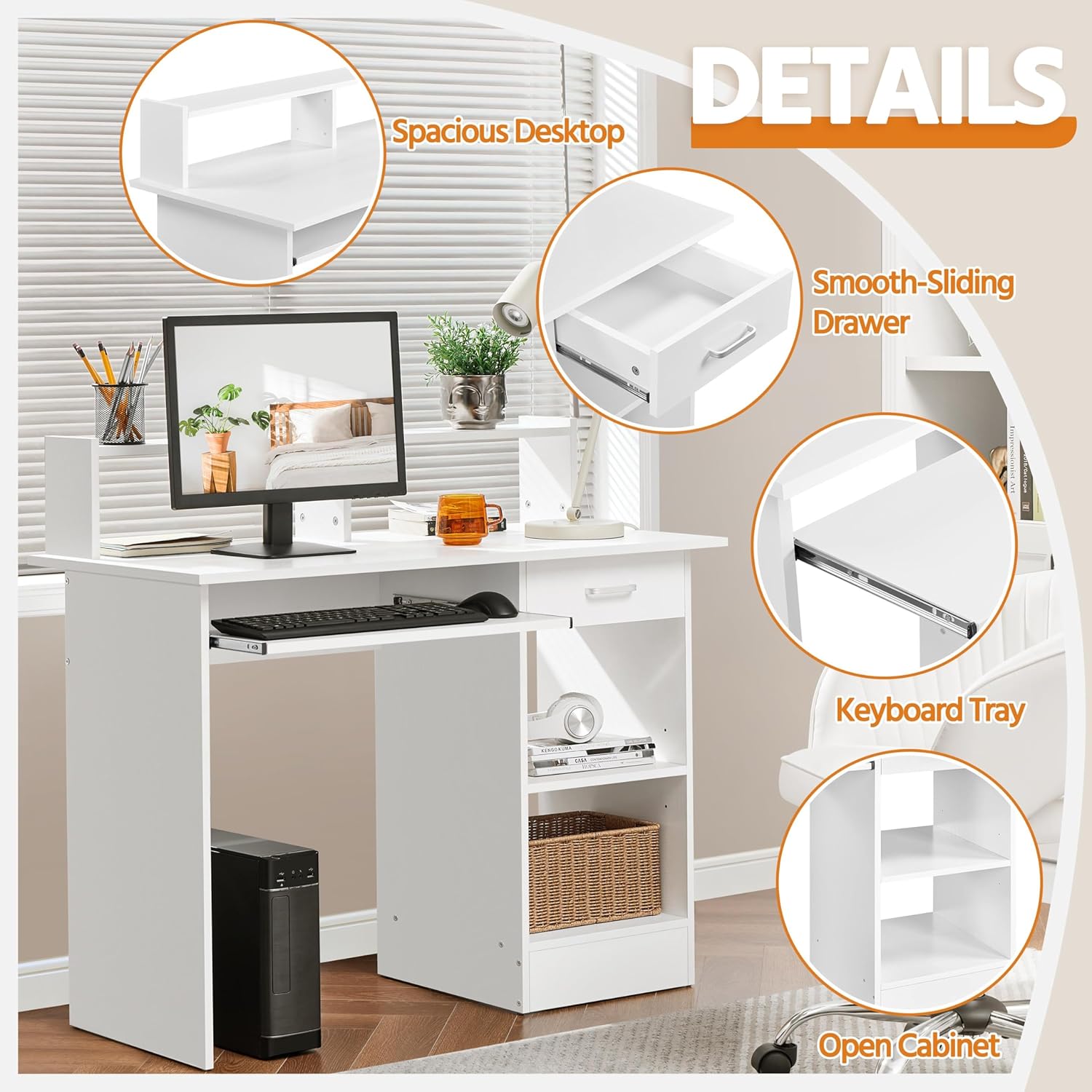
Immagine 4.2: Dettagliata view of the desk's features, including the desktop, drawer, keyboard tray, and open storage.
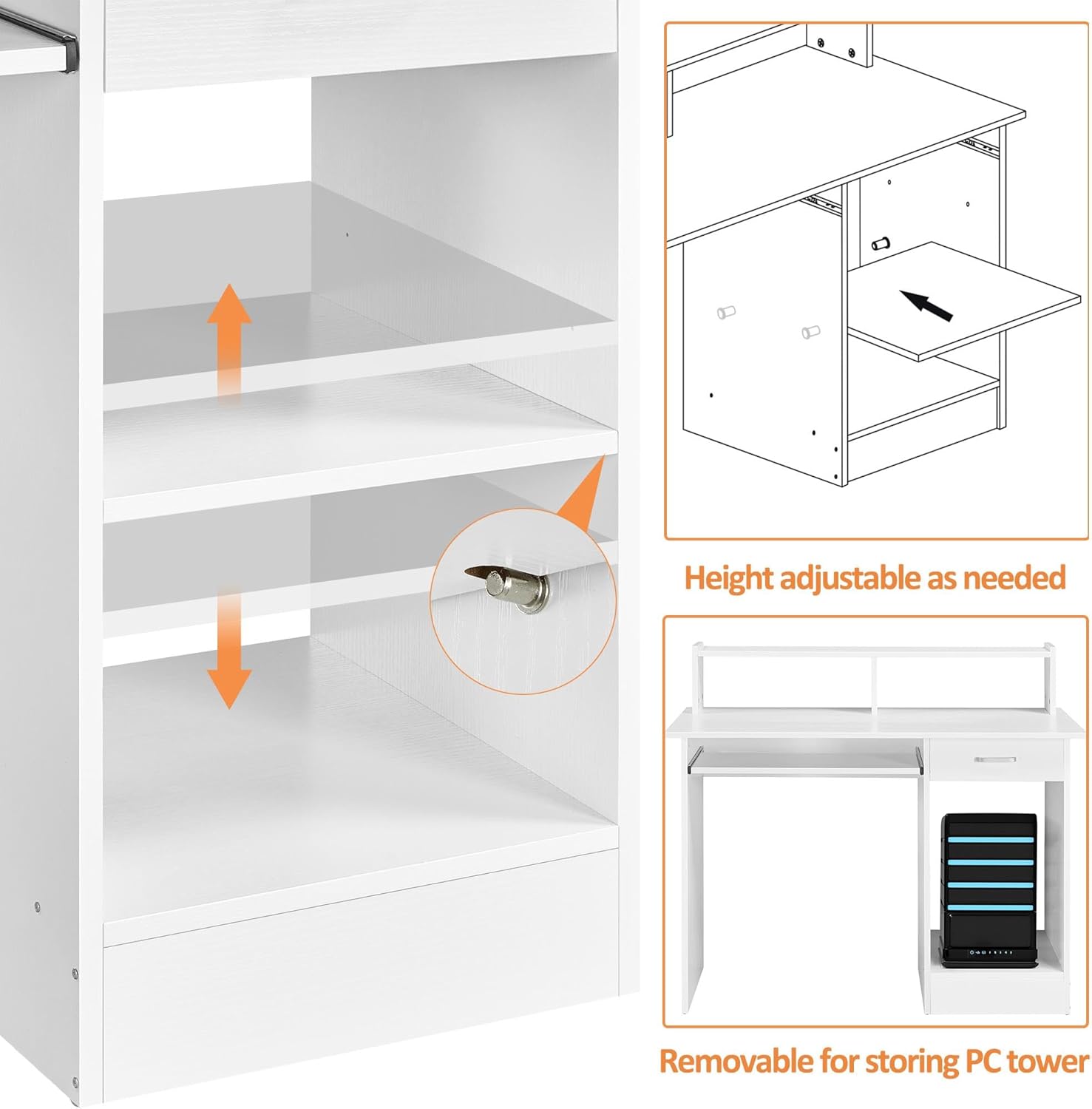
Image 4.3: Illustration of the adjustable shelf and the removable panel for accommodating a PC tower.
5. Istruzioni per l'uso
- Utilizzo desktop: The main desktop surface (106 x 50 cm) is designed for your computer monitor, laptop, and other essential work items.
- Vassoio per tastiera: The smooth-sliding keyboard tray can be pulled out for use and pushed back in to save space when not needed. It accommodates most standard keyboards and mice.
- Cassetto portaoggetti: Utilize the compact drawer with full extension slides for storing office supplies, documents, or personal items.
- Scaffali aperti: The open shelves provide additional storage for books, binders, or decorative items. The internal shelf is adjustable in height to suit your storage needs.
- PC Tower Space: A dedicated space is available for a PC tower, with a removable panel for easy access and cable management.
- Hutch superiore: The elevated hutch offers extra space for small items, a lamp, or a monitor stand, and includes open space for cable routing.
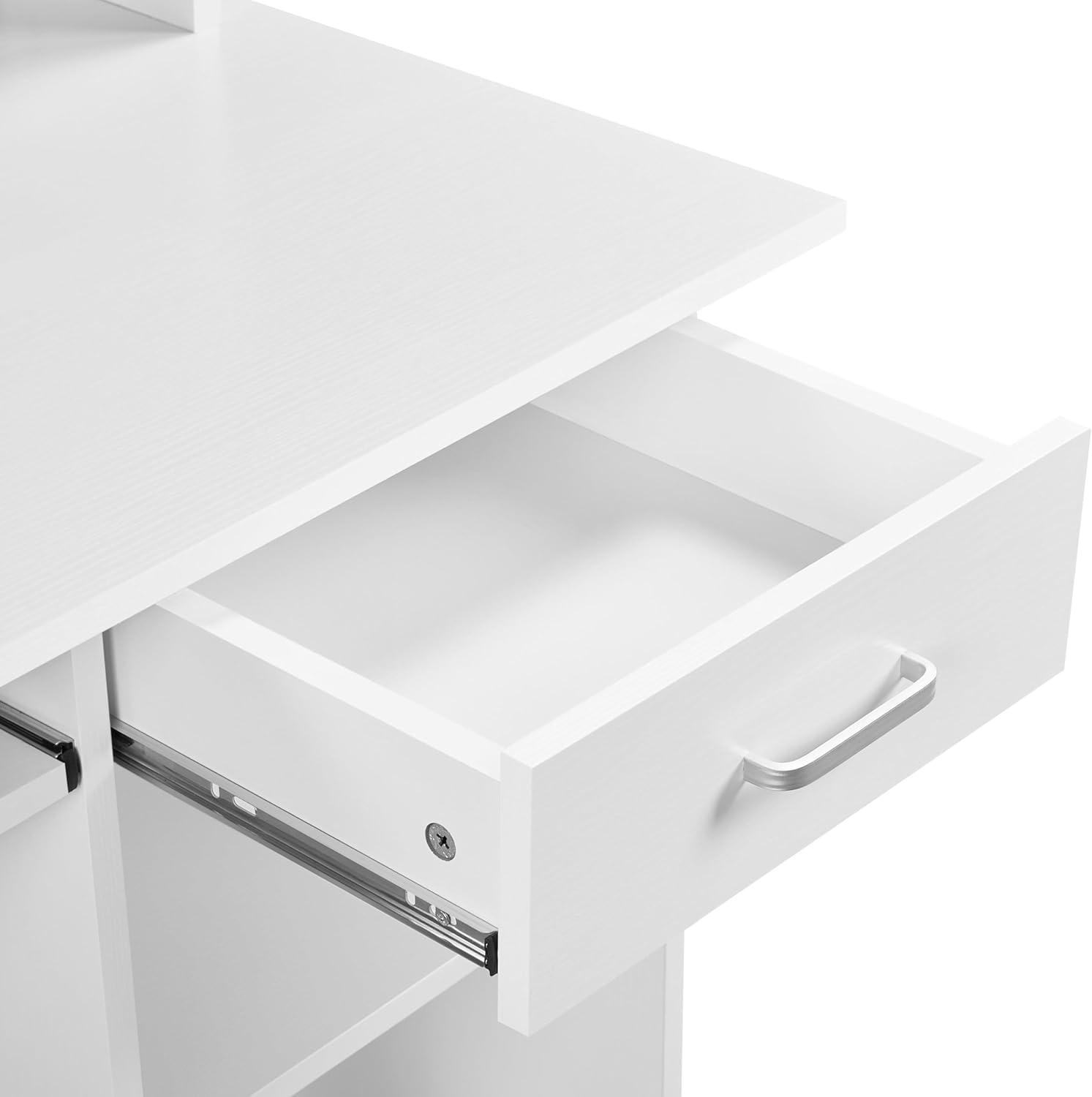
Image 5.1: Close-up of the drawer, illustrating its smooth operation and storage capacity.
6. Manutenzione
- Pulizia: Pulisci le superfici della scrivania con un panno morbido eamp cloth. Avoid abrasive cleaners or harsh chemicals that may damage the melamine finish.
- Fuoriuscite: Pulire immediatamente eventuali fuoriuscite per evitare macchie o danni alla superficie.
- Hardware: Controllare periodicamente tutte le viti e gli elementi di fissaggio per assicurarsi che siano ben serrati. Serrarli nuovamente se necessario per mantenere la stabilità.
- Evitare la luce solare diretta: L'esposizione prolungata alla luce solare diretta può causare sbiadimento o scolorimento.
- Protezione dal calore: Utilizzare sottobicchieri o cuscinetti protettivi sotto gli oggetti caldi per evitare che il calore danneggi la scrivania.
7. Risoluzione Dei Problemi
- Scrivania traballante: Ensure all screws and connections are fully tightened. Check that the desk is on a level surface. If necessary, use furniture pads under the legs to stabilize.
- Il cassetto non scorre fluidamente: Verify that the drawer slides are correctly installed and aligned. Ensure no obstructions are in the drawer tracks. Lubricate slides with a silicone-based spray if needed.
- Parti mancanti: If any parts are missing upon unboxing, refer to the 'Package Contents' section and contact Yaheetech customer support with your model number and a description of the missing part.
- Difficoltà di montaggio: Double-check the assembly instructions. Ensure you are using the correct hardware for each step. Do not force components together.
8. Specifiche
| Numero di modello | MM-00601 |
| Dimensioni complessive (LxPxA) | 106 x 50 x 94 cm (41.7 x 19.7 x 37 pollici) |
| Materiale | CARB P2 MDF, Melamine, Metal |
| Colore | Bianco |
| Peso netto | 27.2 kg (60 libbre) |
| Peso lordo | 29.3 kg (64.6 libbre) |
| Spessore della tavola | 15 mm (0.6 pollici) |
| Capacità di carico massima (da tavolo) | 50 kg (110 libbre) |
| Capacità di carico massima (cassetto) | 5 kg (11 libbre) |
| Max. Load Capacity (Shelf Space) | 10 kg (22 libbre) |
| Max. Load Capacity (Keyboard Tray) | 5 kg (11 libbre) |
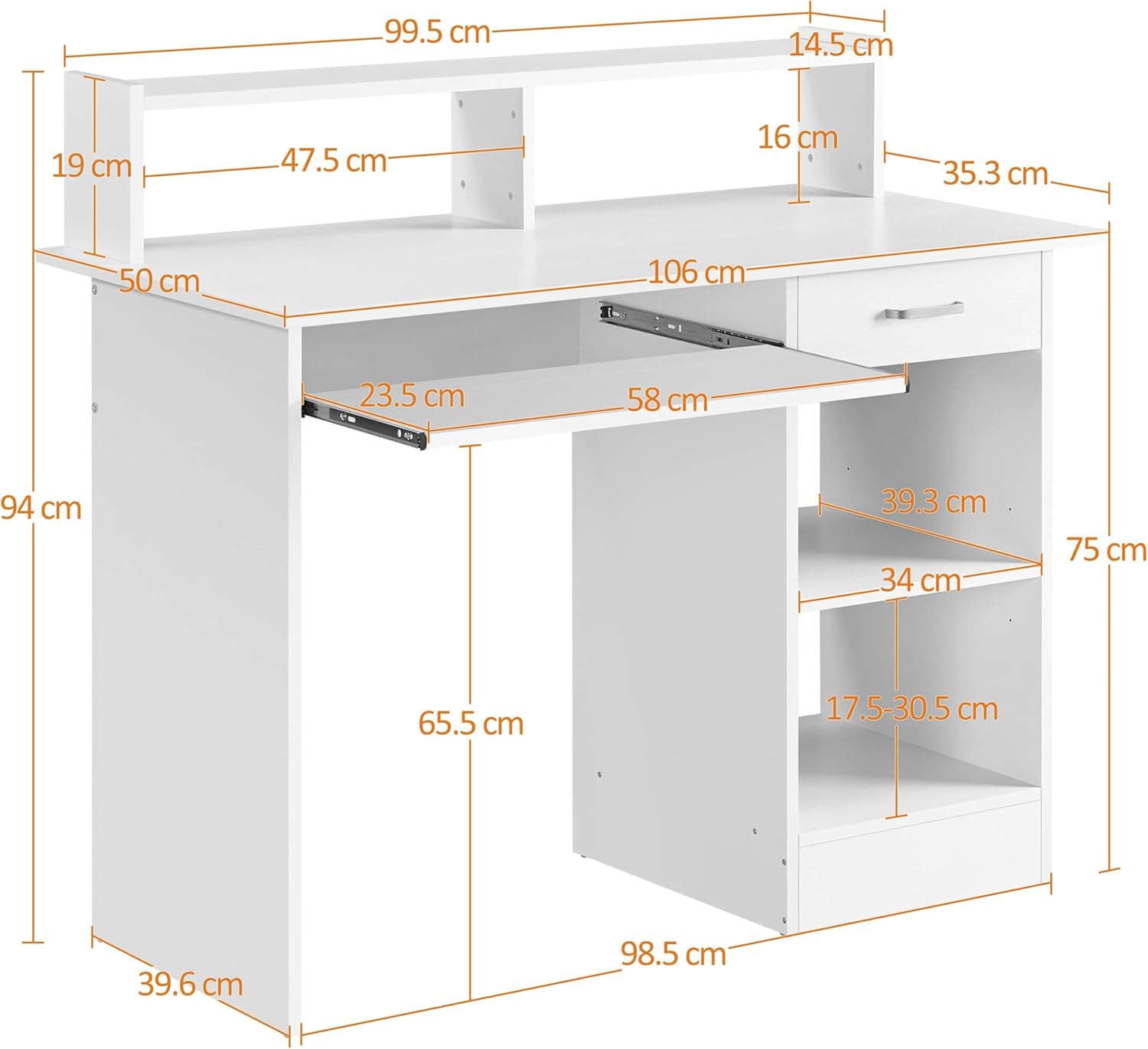
Image 8.1: Dimensional drawing of the Yaheetech Computer Desk.
9. Garanzia e supporto
For warranty information, missing parts, or technical support, please contact Yaheetech customer service directly. Please have your model number (MM-00601) and purchase details available when contacting support.
Per ulteriore assistenza, visita il sito ufficiale Yaheetech websito o contattare il rivenditore.


