1. Introduzione
Thank you for choosing the CECOTEC Surface Precision ECOPOWER 10200 Smart Healthy White Digital Bathroom Scale. This advanced scale is designed to provide accurate weight measurements and bio-impedance analysis for comprehensive body development tracking. Featuring an innovative EcoPower push button for battery-free operation, Bluetooth connectivity, and a sleek tempered glass design, this scale offers convenience and precision for your health monitoring needs. Please read this manual thoroughly before use to ensure proper operation and maintenance.

Image: The CECOTEC Surface Precision ECOPOWER 10200 Smart Healthy White Digital Bathroom Scale, showcasing its sleek design and the accompanying smartphone app interface.
2. Informazioni sulla sicurezza
Please observe the following safety precautions to ensure safe and optimal use of your scale:
- Non utilizzare questa bilancia se si è portatori di pacemaker o altri dispositivi medici interni.
- Do not use this scale if you are pregnant.
- Posizionare sempre la bilancia su una superficie dura e piana. L'utilizzo su superfici morbide come i tappeti può compromettere la precisione.
- The scale surface is made of tempered glass. It can be slippery when wet. Ensure the surface is dry before stepping on it.
- Do not jump on the scale or drop heavy objects on it, as this may damage the glass or internal components.
- Tenere la bilancia lontana dall'acqua e da umidità elevata.
- Questa bilancia è destinata esclusivamente all'uso domestico e non a scopi medici o commerciali.
- Tenere fuori dalla portata dei bambini.
- Non tentare di smontare o riparare la bilancia da soli. Contattare personale qualificato per assistenza.
3. Cosa c'è nella scatola
Dopo aver disimballato, assicurarsi che tutti i seguenti articoli siano presenti e in buone condizioni:
- Bilancia digitale da bagno CECOTEC Surface Precision ECOPOWER 10200
- Manuale dell'utente (questo documento)
- Note: The product description mentions "cable or connector." For this EcoPower model, no charging cable is typically required for operation. If a cable is included, it may be for specific data transfer or a different product variant.
4. Prodotto finitoview
Familiarize yourself with the main components of your CECOTEC Surface Precision ECOPOWER 10200 scale.
- Piattaforma in vetro temperato: La superficie di pesatura principale.
- Schermo LCD: Mostra le misurazioni del peso e altri indicatori.
- Pulsante EcoPower: Generates power for the scale's operation.
- Electrodes (Metal Strips): Used for bio-impedance analysis. Ensure bare feet are in contact with these for full body composition data.
- Sensors (Underneath): Sensori ad alta precisione per misurazioni accurate.
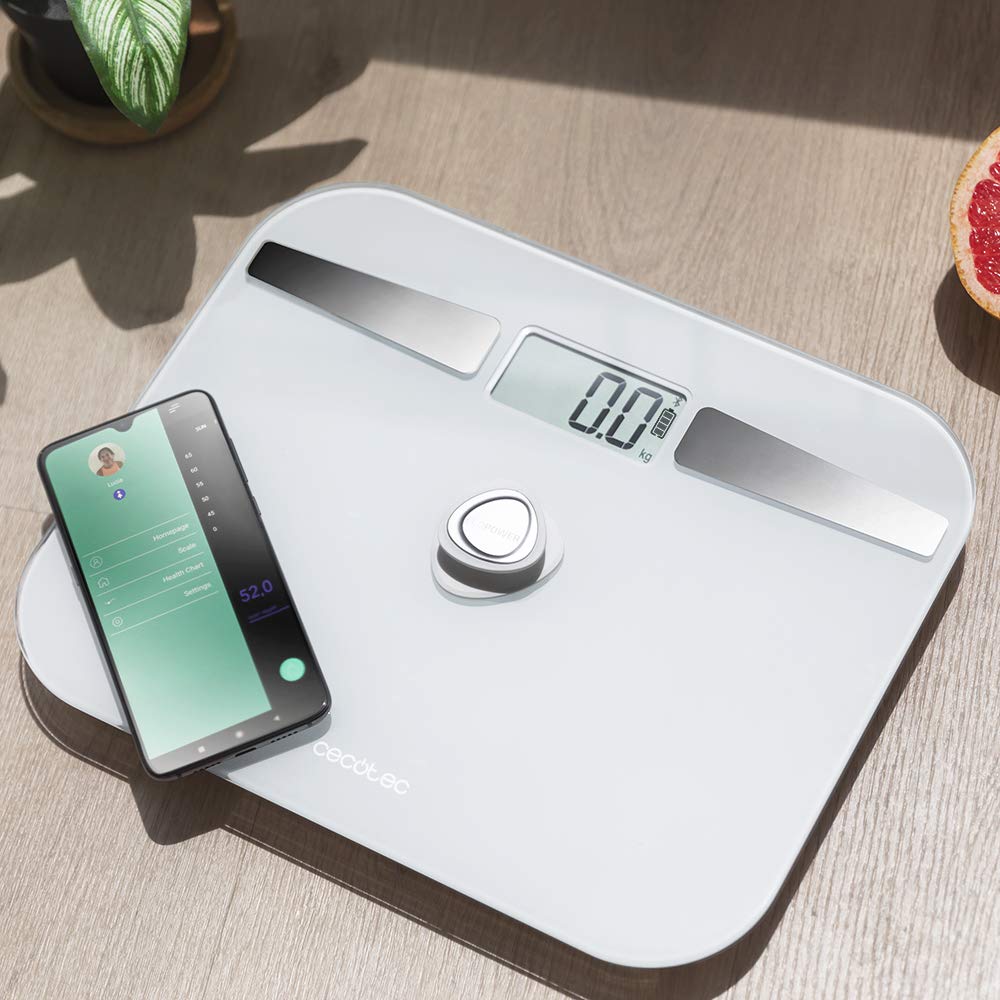
Immagine: una vista dall'alto view of the scale, highlighting its display, EcoPower button, and the metal electrodes, with a smartphone showing the connected app.
5. Impostazione
5.1 Posizionamento iniziale
Place the scale on a hard, flat, and stable surface. Avoid carpets, rugs, or uneven flooring, as this can affect measurement accuracy.

Image: The scale positioned on a hard floor surface, demonstrating ideal placement for accurate readings.
5.2 Powering On (EcoPower)
The CECOTEC Surface Precision ECOPOWER 10200 scale utilizes an innovative EcoPower system, eliminating the need for traditional batteries. To power on the scale:
- Locate the EcoPower push button, typically in the center of the scale.
- Press the EcoPower button firmly with your foot or hand. This action generates the necessary power for the scale to operate.
- The LCD display will light up, indicating the scale is ready for use.
Note: While the product specifications mention "1 AA batteries required," the primary power mechanism for this specific model, as indicated by its name and description, is the EcoPower push button. No external battery installation is typically needed for its core function.
5.3 Connecting to the App (Bluetooth)
To utilize the smart features and bio-impedance analysis, download the official CECOTEC health app on your smartphone and connect via Bluetooth.
- Scarica l'App: Cercare the official "Cecotec" or "Cecotec Healthy" app in your smartphone's app store (Google Play Store for Android, Apple App Store for iOS).
- Abilita Bluetooth: Assicurati che il Bluetooth sia abilitato sul tuo smartphone.
- Apri l'app: Launch the downloaded app and follow the on-screen instructions to create a user profile.
- Abbina la scala:
- Per attivarla, premere il pulsante EcoPower sulla bilancia.
- Within the app, navigate to the "Device Management" or "Add Device" section.
- The app should detect the "CECOTEC ECOPOWER 10200" scale. Select it to pair.
- Una volta effettuata l'associazione, l'app confermerà la connessione.
- Registrazione Utente: The scale supports 4 user registrations. Set up individual profiles within the app for each user to track their data separately.
6. Utilizzo della bilancia
6.1 Misurazione del peso
- Assicurarsi che la bilancia sia posizionata su una superficie dura e piana.
- Press the EcoPower button to activate the scale. Wait for the display to show "0.0 kg" or "0.0 lb".
- Step onto the scale with bare feet, ensuring your feet are centered and in contact with the metal electrodes for bio-impedance analysis. Stand still.
- Your weight will be displayed on the LCD screen. If connected to the app, the data will automatically sync to your profile.
- Step off the scale. The scale will automatically shut down after a few seconds of inactivity.

Image: A user stepping onto the scale, demonstrating the correct posture for measurement.
6.2 Bio-impedance Measurement and App Usage
For detailed body composition analysis (body fat, muscle mass, water percentage, etc.), ensure you are connected to the app and step on the scale with bare feet.
- Open the Cecotec health app on your smartphone.
- Activate the scale by pressing the EcoPower button.
- Step onto the scale with bare feet, ensuring good contact with the metal electrodes.
- The scale will measure your weight, and the app will simultaneously collect bio-impedance data.
- View your comprehensive body composition data, historical trends, and progress reports directly within the app.

Image: A close-up of the smartphone app interface, showing various body composition metrics like weight, body fat, muscle mass, and water percentage.
7. Manutenzione
7.1 Pulizia
- Pulisci la superficie della bilancia con un panno morbido eamp stoffa.
- Do not use abrasive cleaners or chemical solvents, as these may damage the glass or electronic components.
- Assicurarsi che la bilancia sia completamente asciutta prima di riporla o di utilizzarla nuovamente.
7.2 Conservazione
- Conservare la bilancia in un luogo fresco e asciutto.
- Avoid storing it vertically or placing heavy objects on top of it.
8. Risoluzione Dei Problemi
| Problema | Possibile causa | Soluzione |
|---|---|---|
| La bilancia non si accende. | EcoPower button not pressed firmly enough. | Press the EcoPower button firmly and completely. |
| Letture imprecise. | Scale on uneven or soft surface; user not standing still; scale not calibrated. | Place scale on a hard, flat surface. Stand still and centered. Step off and on again to re-calibrate to "0.0". |
| Connessione Bluetooth fallita. | Bluetooth not enabled on phone; app not open; scale not active; interference. | Ensure phone Bluetooth is on. Open the app. Press EcoPower button to activate scale. Move closer to the scale. Restart phone/app. |
| No body composition data in app. | Not standing with bare feet on electrodes; poor contact; app not connected. | Ensure bare feet are making full contact with the metal electrodes. Check app connection. Ensure user profile is set up correctly. |
| Viene visualizzato "Lo" o "Err". | Low power (for models with backup battery, if applicable); overload. | Press EcoPower button again. If "Err" for overload, ensure weight is within specified range (max 180 kg). |
9. Specifiche
| Caratteristica | Dettaglio |
|---|---|
| Numero di modello | 4254 |
| Marca | Cecotec |
| Campo di misura | Da 8 kg a 180 kg (grado 100 g) |
| Fonte di alimentazione | EcoPower push button (self-generating) |
| Connettività | Bluetooth |
| Sensori | 4 sensori ad alta precisione |
| Registrazione utente | Fino a 4 utenti |
| Progetto | Extra flat, 5mm thick high-security tempered glass |
| Tipo di visualizzazione | LCD |
| Dimensioni | 10.31 x 12.6 x 0.79 pollici |
| Peso | 3.31 libbre |
| Caratteristiche speciali | Automatic shutdown, instant on, overcharge indicator, auto reset |
| Uso consigliato | Adulti |
10. Garanzia e supporto
10.1 Informazioni sulla garanzia
This CECOTEC product comes with a Garanzia di tre anni against manufacturing defects. Please retain your proof of purchase for warranty claims. The warranty does not cover damage caused by misuse, accidents, unauthorized modifications, or normal wear and tear.
10.2 Assistenza clienti
For technical assistance, troubleshooting, or warranty inquiries, please contact Cecotec customer support.
- Websito: Visita il sito ufficiale Cecotec websito per risorse di supporto, FAQ e informazioni di contatto.
- E-mail/Telefono: Fare riferimento al Cecotec website or product packaging for specific contact details in your region.
When contacting support, please have your product model number (4254) and proof of purchase ready.


