Introduzione
The Renkforce USB-C RF-DKS-650 is a versatile universal docking station designed to expand the connectivity of your laptop, convertible, or tablet equipped with a USB-C port. It enables multitasking by supporting up to four monitors simultaneously and offers a wide array of ports for various peripherals. The docking station is powered by the included AC/DC power adapter, ensuring stable performance for all connected devices.
To optimize cable management and maintain a tidy workspace, the 15 available ports are thoughtfully distributed across the front and rear panels. Thicker cables for monitors and power are typically connected to the rear, while frequently accessed devices like headsets, USB drives, or smartphones can be conveniently plugged into the front.
This docking station also includes a practical charging function for smartphones and other small devices. Please note that for charging your laptop via USB-C, a separate power supply with sufficient wattage (not included) is required.
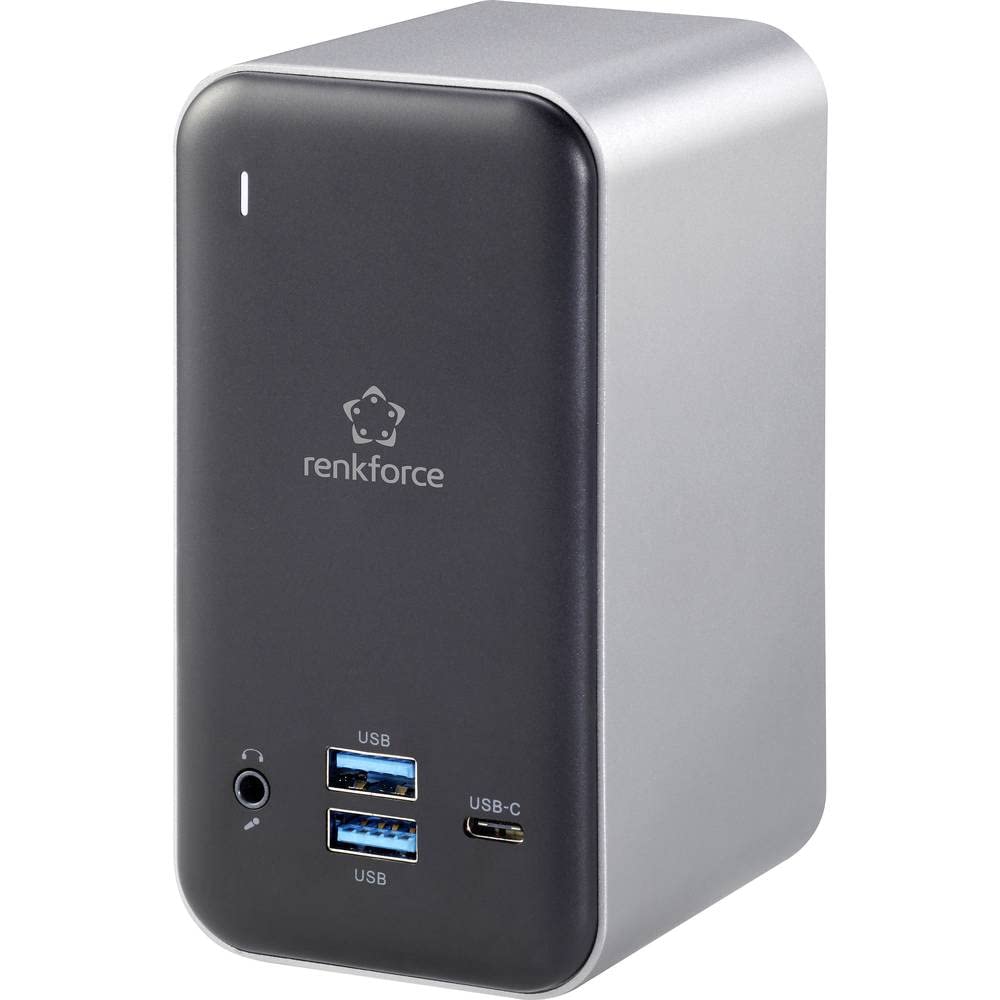
Figure 1: Renkforce USB-C RF-DKS-650 Universal Laptop Docking Station - Overall View
Istruzioni di installazione
Follow these steps to set up your Renkforce RF-DKS-650 docking station:
- Connetti alimentazione: Plug the supplied AC/DC power adapter (12V 3A @36W) into the 'POWER' port on the rear of the docking station and then into a wall outlet.
- Connetti al dispositivo host: Use a USB-C cable to connect your laptop, convertible, or tablet to the 'HOST' USB-C port on the docking station.
- Collega i monitor: Connect your monitors to the available HDMI (3 ports) and/or VGA (1 port) outputs on the docking station. The rear panel is ideal for these connections.
- Connetti le periferiche: Connect your USB devices (e.g., keyboard, mouse, external drives) to the USB-A (USB 3.0) ports or additional USB-C ports. For audio, connect your headset or speakers to the 3.5mm microphone/audio jack.
- Connetti rete (facoltativo): For a wired network connection, plug an Ethernet cable into the LAN port on the docking station.
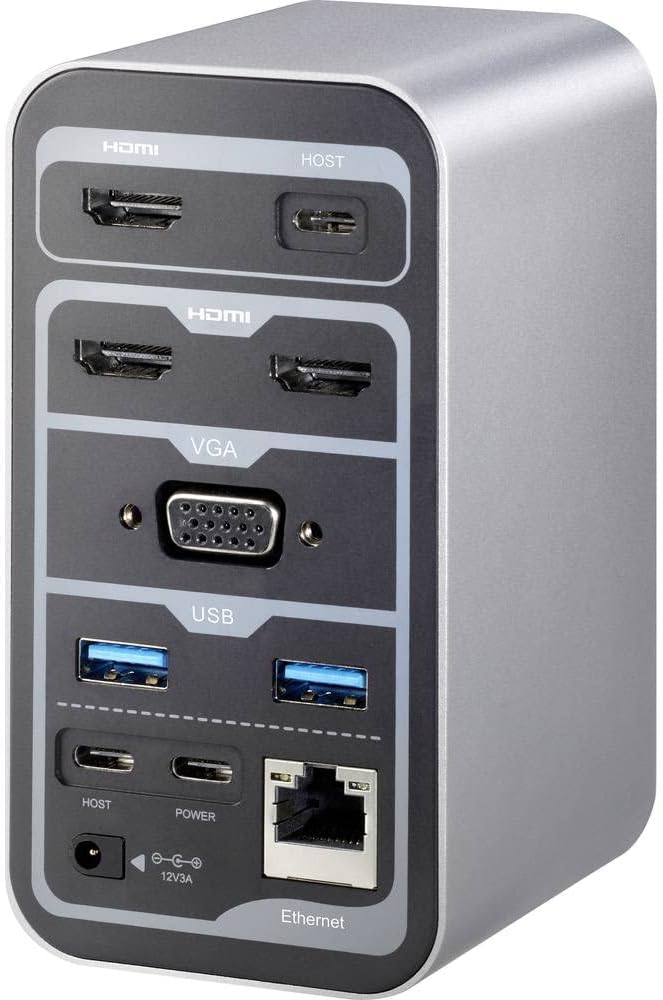
Figure 2: Rear Panel Connections (HDMI, VGA, USB, Ethernet, Power Input)

Figure 3: Front Panel Connections (USB, USB-C, Audio Jack)
Istruzioni per l'uso
Multi-Monitor Display
The RF-DKS-650 supports various multi-monitor configurations depending on your operating system:
- Windows 8 o versioni successive: Supports 1 or 3 simultaneous display outputs. Mirroring and extension modes are supported.
- MAC OS 10.12 or higher: Supports up to 4 simultaneous display outputs. Mirroring and extension modes are supported. For Intel and M1 chips, specific configurations like HDMI1 or HDMI2+HDMI3+VGA are possible.
- iPad OS 13 or higher: Supports 1 or 3 simultaneous display outputs. Mirroring is supported, but extension mode is not.
- Sistema operativo Android: Supports 1 or 3 simultaneous display outputs. Mirroring is supported, but extension mode is not.
Adjust display settings (resolution, arrangement, mirroring/extension) through your operating system's display settings menu.
Dispositivo di ricarica
The docking station provides a convenient charging function for smartphones and other small USB-powered devices through its USB ports. Simply connect your device to an available USB-A or USB-C port.
Nota importante: While the docking station can charge small devices, it does not provide sufficient power to charge your laptop via its USB-C connection. For laptop charging, you must use your laptop's original power adapter or a separate, sufficiently powerful USB-C PD (Power Delivery) charger (not included).
Manutenzione
To ensure the longevity and optimal performance of your Renkforce RF-DKS-650 docking station, follow these simple maintenance guidelines:
- Pulizia: Disconnect the docking station from power and all devices before cleaning. Use a soft, dry, lint-free cloth to wipe the exterior. Avoid using liquid cleaners, aerosols, or solvents, as these can damage the finish or internal components.
- Gestione dei cavi: Utilize the strategic port placement to keep cables organized. Regularly check cable connections to ensure they are secure and free from kinks or damage.
- Ventilazione: Assicurarsi che la docking station sia posizionata in un'area ben ventilata per evitare il surriscaldamento. Non ostruire le aperture di ventilazione.
- Magazzinaggio: Quando non viene utilizzata per lunghi periodi, conservare la docking station in un luogo fresco e asciutto, lontano dalla luce solare diretta e da temperature estreme.
Risoluzione dei problemi
If you encounter issues with your Renkforce RF-DKS-650 docking station, refer to the following common problems and solutions:
- Nessuna visualizzazione sul monitor:
- Assicurarsi che la docking station sia accesa e che l'adattatore di alimentazione sia collegato saldamente.
- Verify that the USB-C cable connecting the docking station to your host device is properly seated.
- Check that the HDMI/VGA cables are securely connected to both the docking station and the monitors.
- Confirm that your monitor is set to the correct input source (e.g., HDMI 1, VGA).
- Prova a riavviare il dispositivo host.
- Aggiorna i driver grafici sul dispositivo host.
- Dispositivi USB non riconosciuti:
- Ensure the docking station is properly connected to your host device via USB-C.
- Prova a collegare il dispositivo USB a una porta diversa della docking station.
- Connect the USB device directly to your host device to confirm it is functional.
- Riavvia il dispositivo host.
- Problemi di connessione di rete:
- Verificare che il cavo Ethernet sia collegato saldamente sia alla docking station sia al router/modem.
- Controlla le impostazioni di rete sul tuo dispositivo host.
- Try connecting your host device directly to the router/modem to isolate the issue.
- Charging Function Not Working for Laptop:
- As noted, the docking station does not provide power to charge your laptop. Use your laptop's dedicated power adapter or a separate USB-C PD charger.
Specifiche tecniche
| Marca | Renkforce |
| Numero modello articolo | Numero di modello: RF-4499452 |
| ASIN | B08DJ112NF |
| Colore | Vario |
| Connectivity / Interface Types | HDMI, USB |
| Dispositivi compatibili | Laptops, Convertibles, Tablets with USB-C, iPad |
| Number of Display Outputs | 4 |
| Numero di porte HDMI | 3 |
| Numero di porte VGA | 1 |
| Risoluzione massima | 3840 x 2160 pixel |
| Potenza in ingresso | AC/DC 12V 3A (36W) |
| Compatibilità del sistema operativo | Windows 8 or higher, MAC OS 10.12 or higher, iPad OS 13 or higher, Android OS |
| Data di prima disponibilità su Amazon.com.be | 18 maggio 2022 |
Garanzia e supporto
The Renkforce RF-DKS-650 Universal Laptop Docking Station comes with a Disponibilità di pezzi di ricambio per 1 anno guarantee from the manufacturer.
For technical support, warranty claims, or further assistance, please contact Renkforce customer service or refer to the official Renkforce websito per le informazioni di contatto.


