Introduzione
This manual provides comprehensive instructions for the Plantronics Voyager Focus B825 wireless Bluetooth headset. It covers setup, operation, maintenance, and troubleshooting to ensure optimal performance and user experience.
The Plantronics Voyager Focus B825 is designed for clear communication and immersive audio, featuring active noise cancellation and versatile connectivity options.

Immagine 1: The Plantronics Voyager Focus B825 headset shown with its accompanying USB dongle. The headset features an over-ear design with a microphone boom.
Caratteristiche principali
- Funzionalità senza fili: Bluetooth 5.0 for seamless wireless connection.
- Cancellazione attiva del rumore (ANC): Reduces background noise for focused audio.
- Doppia connettività: Supports 3.5 mm and 6.35 mm audio connections for wired use.
- Controllo chiamate: Integrated controls for managing calls.
- Design confortevole: Lightweight (5.5 ounces) with an over-ear form factor for extended wear.
Impostare
1. Caricare l'auricolare
Before first use, fully charge your headset. Connect the charging cable (not explicitly listed but implied for a wireless headset) to the headset and a power source. The LED indicator will show charging status.
2. Connecting via Bluetooth (Wireless)
- Ensure the headset is powered on and in pairing mode. Refer to the headset's specific button combination for pairing (usually holding the power button).
- On your device (PC, laptop, mobile phone), navigate to Bluetooth settings.
- Select "Plantronics Voyager Focus B825" from the list of available devices.
- Una volta effettuata l'associazione, l'auricolare indicherà una connessione riuscita.
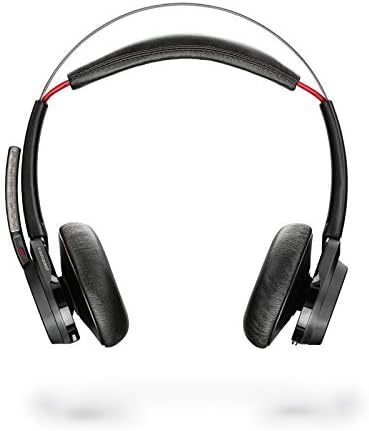
Immagine 2: Un primo piano view of the Plantronics USB Bluetooth dongle, used for connecting the headset wirelessly to a computer.
3. Connecting via Audio Cable (Wired)
The headset supports 3.5 mm and 6.35 mm audio connections. Use the appropriate audio cable (not included in "Camera Body, Battery Pack" but implied by specifications) to connect the headset directly to your audio source. This provides a wired alternative when wireless is not preferred or available.
Utilizzo dell'auricolare
Accensione/spegnimento
Press and hold the power button (location not specified, general instruction) for a few seconds to turn the headset on or off.
Controllo delle chiamate
Use the integrated call control buttons (location not specified, general instruction) to answer, end, or reject calls. Specific functions may vary based on the connected device and application.

Immagine 3: The right earcup of the Plantronics Voyager Focus B825 headset, displaying the volume adjustment ring and media playback control buttons.
Active Noise Cancellation (ANC)
Activate or deactivate the ANC feature to reduce ambient noise. This is particularly useful in noisy environments to enhance focus during calls or while listening to audio.
Riproduzione audio
Control media playback (play, pause, skip tracks) using the dedicated buttons on the headset. Adjust volume using the volume controls.
1 video: An official product video demonstrating the features and usage of the Plantronics Voyager Focus UC Headset. This video highlights key functionalities and design aspects.
Manutenzione
- Pulizia: Per pulire le cuffie, utilizzare un panno morbido e asciutto. Evitare prodotti chimici aggressivi o materiali abrasivi.
- Magazzinaggio: Conservare le cuffie in un luogo fresco e asciutto, lontano dalla luce solare diretta e da temperature estreme.
- Cura della batteria: Per una durata ottimale della batteria, evitare di scaricarla completamente frequentemente. Caricarla regolarmente.
Risoluzione dei problemi
- Nessun potere: Assicurarsi che l'auricolare sia completamente carico.
- Nessun audio/Qualità audio scarsa:
- Controllare i livelli del volume sia sull'auricolare che sul dispositivo collegato.
- Ensure the headset is properly paired via Bluetooth or the audio cable is securely connected.
- Se si utilizza il Bluetooth, provare ad associare nuovamente il dispositivo.
- Avvicinarsi alla sorgente Bluetooth per evitare interferenze.
- Microfono non funzionante:
- Assicurarsi che il braccio del microfono sia posizionato correttamente.
- Controlla le impostazioni del microfono sul dispositivo connesso.
Specifiche
| Caratteristica | Dettaglio |
|---|---|
| Nome del modello | Messa a fuoco del Voyager UC |
| Numero modello articolo | 202652-103 |
| Marca | Plantronica |
| Tecnologia di connettività | Bluetooth |
| Tecnologia di comunicazione wireless | Bluetooth |
| Versione Bluetooth | 5.0 |
| Controllo del rumore | Cancellazione attiva del rumore |
| Presa per cuffie | 3.5 millimetri, 6.35 millimetri |
| Posizionamento dell'orecchio | Sopra l'orecchio |
| Fattore di forma | Sopra l'orecchio |
| Materiale | Plastica |
| Peso dell'articolo | 5.5 once |
| Dimensioni del prodotto | 10 x 2 x 2.7 pollici |
| Componenti inclusi | Camera Body, Battery Pack (Note: "Camera Body" is likely a data entry error; refers to headset components) |
| Batterie | È necessaria 1 batteria ai polimeri di litio (inclusa) |
| Dispositivi compatibili | PCs, Laptops, Mobile Phones |
Garanzia e supporto
For warranty information and technical support, please refer to the official Plantronics (Poly) websito o contattare direttamente il servizio clienti. I termini di garanzia specifici possono variare a seconda della regione e del rivenditore.
Puoi trovare maggiori informazioni e risorse di supporto su Plantronics official websito.


