1. Introduzione
The Korg SoundLink MW-1608 is a 16-channel hybrid mixer designed for a wide range of audio applications, including studio recording and live sound reinforcement. This mixer integrates both analog and digital processing to provide comprehensive control over audio signals. It features high-quality components such as HiVolt microphone preamps, Velvet Sound AD/DA converters, and ALPS faders.
Key functionalities include per-channel 3-band equalizers, 1-knob compressors, mute groups, a dedicated monitor section, feedback suppression, all-XLR speaker outputs, a built-in spectrum analyzer, and a suite of Korg digital effects. This manual provides essential information for the proper setup, operation, maintenance, and troubleshooting of your MW-1608 mixer.
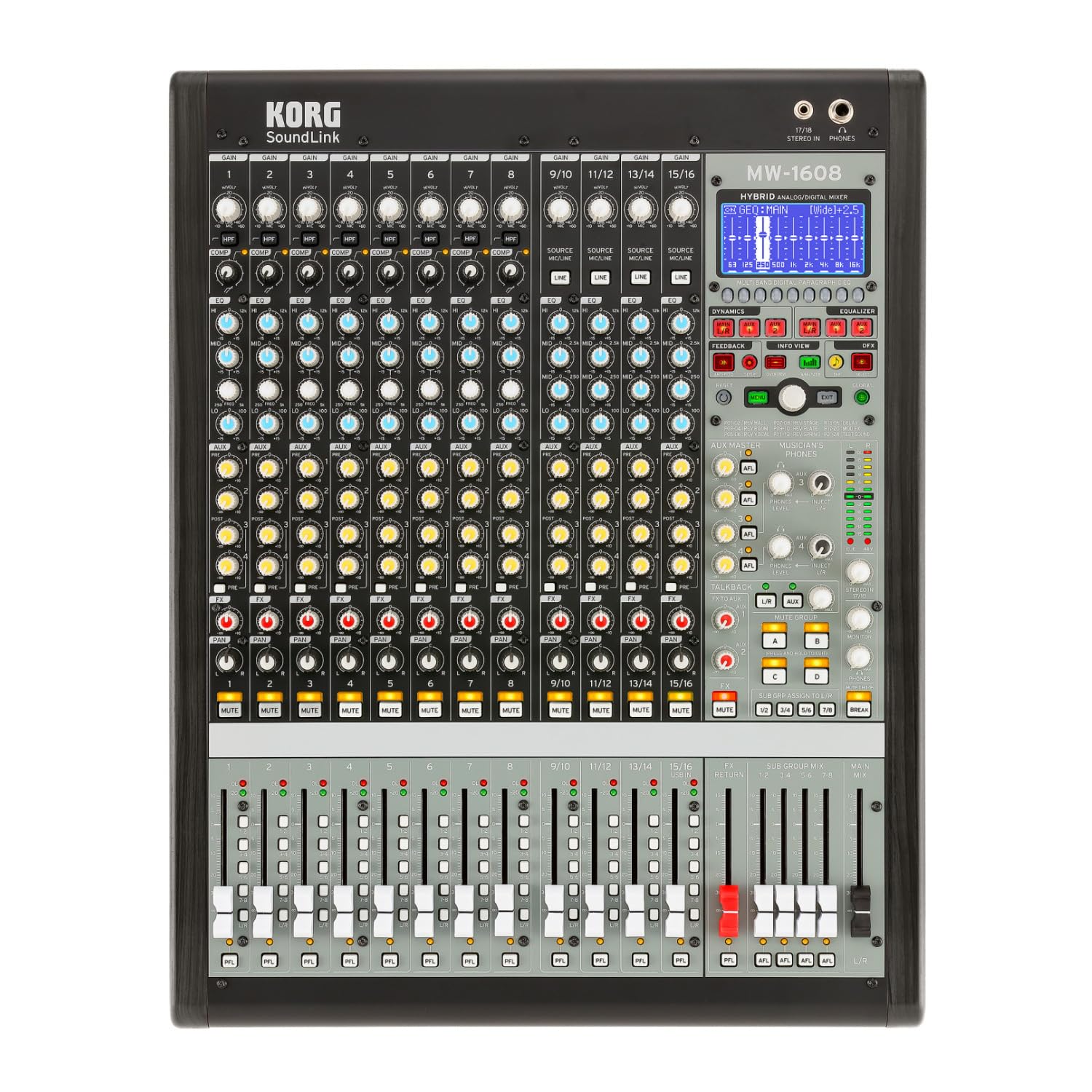
Figura 1: Fronte view of the Korg SoundLink MW-1608 mixer, showing the control surface with faders, knobs, and display.
2. Impostazione
Before operating the Korg SoundLink MW-1608, ensure all connections are made correctly and securely. This section outlines the basic steps for setting up your mixer.
2.1 Disimballaggio e posizionamento
- Estrarre con cautela il mixer dall'imballaggio. Conservare tutto il materiale di imballaggio per eventuali trasporti o stoccaggio futuri.
- Place the mixer on a stable, flat surface with adequate ventilation. Avoid placing it near heat sources or in direct sunlight.
- Ensure sufficient space around the unit for cable connections and heat dissipation.
2.2 Collegamento di alimentazione
- The MW-1608 operates on a "Corded Electric" power source.
- Connect the supplied AC power cord to the mixer's power input on the rear panel.
- Plug the other end of the power cord into a suitable electrical outlet. Ensure the power switch is in the OFF position before connecting.
2.3 Collegamenti audio
The MW-1608 offers various input and output options. Refer to the rear panel diagram below for connection points.

Figura 2: Posteriore view of the Korg SoundLink MW-1608 mixer, showing various input and output connectors.
- Ingressi microfono: Connect microphones to the XLR inputs (channels 1-12, 15/16, 13/14, 11/12, 9/10, 7, 6, 5, 4, 3, 2, 1) using balanced XLR cables.
- Ingressi di linea: Connect line-level devices (e.g., keyboards, media players) to the 1/4-inch TRS or RCA line inputs.
- Uscite principali: Collega i tuoi altoparlanti principali o l'alimentazione amplifier to the MAIN OUT (XLR L/R) connectors. The mixer features "XLR" output connector type.
- Uscite ausiliarie: Use the AUX OUT (XLR) connectors for monitor mixes or external effects processors.
- Group Outputs: Utilize the GROUP OUT (XLR) for sub-mixes.
- Connettività USB: The USB port allows for connection to a computer for recording or playback.
3. Istruzioni per l'uso
Questa sezione fornisce una panoramicaview of the Korg SoundLink MW-1608's operational features and controls.
3.1 Controlli dei canali
- Guadagno in ingresso: Adjust the input sensitivity for each channel to achieve optimal signal levels.
- Equalizzatore a 3 bande: Each channel features a 3-band equalizer for tone shaping. Adjust the HIGH, MID, and LOW frequency bands as needed.
- 1-Knob Compressor: Engage and adjust the built-in compressor on individual channels to control dynamics and add punch.
- Invii Aux: Route channel signals to auxiliary outputs for monitor mixes or external effects.
- Controllo panoramica: Position the channel's signal within the stereo field.
- Tasto muto: Disattiva l'uscita del canale.
- Fader di canale: Controls the volume level of the individual channel in the main mix.
3.2 Sezione Master
- Fader del mix principale: Controlla il livello di uscita complessivo del mix stereo principale.
- Fader di gruppo: Adjust the output levels of the 8-bus groups.
- Sezione Monitor: Provides control over headphone and control room outputs. The "Musician's Phone Feature" allows for dedicated monitoring.
- Effetti digitali: Access and apply Korg's studio-quality digital effects to your mix.
- Soppressione del feedback: Utilize the integrated feedback suppression system to prevent unwanted audio feedback.
- Analizzatore di spettro: The built-in spectrum analyzer provides visual feedback on the frequency content of your audio.
4. Manutenzione
Proper maintenance ensures the longevity and optimal performance of your Korg SoundLink MW-1608 mixer.
- Pulizia: Use a soft, dry cloth to wipe down the exterior of the mixer. For stubborn dirt, a slightly damp È possibile utilizzare un panno imbevuto di sapone neutro, seguito da un panno asciutto. Evitare detergenti abrasivi o solventi.
- Protezione dalla polvere: When not in use, cover the mixer with a dust cover to prevent dust and debris from accumulating on controls and inside the unit.
- Condizioni ambientali: Operate and store the mixer in a clean, dry environment. Avoid extreme temperatures, high humidity, and direct exposure to liquids.
- Gestione dei cavi: Assicurarsi che i cavi siano disposti ordinatamente e non sottoposti a sollecitazioni per evitare danni ai connettori e alle porte.
5. Risoluzione Dei Problemi
This section addresses common issues you might encounter with your MW-1608 mixer. If the problem persists after attempting these solutions, contact Korg customer support.
- Nessun potere:
- Ensure the power cord is securely connected to both the mixer and a working electrical outlet.
- Controllare l'interruttore di alimentazione sul pannello posteriore.
- Verificare che la presa elettrica funzioni collegandovi un altro dispositivo.
- Nessuna uscita audio:
- Controllare tutti i collegamenti dei cavi di ingresso e di uscita.
- Ensure channel faders, group faders, and main mix faders are raised.
- Verify that channels are not muted.
- Check the gain settings for each input channel.
- Confirm that connected speakers or ampi lifiers sono accesi e funzionanti.
- Audio distorto:
- Reduce input gain levels if the signal is clipping (indicated by peak LEDs).
- Check for damaged cables or faulty connectors.
- Ensure output levels are not overdriving connected devices.
- Channel or Group Functionality Issues:
- Verify routing assignments for channels to groups or main mix.
- Ensure mute buttons are disengaged for relevant channels/groups.
- Check if any effects or processing are inadvertently applied.
6. Specifiche
| Caratteristica | Dettaglio |
|---|---|
| Numero di modello | MW-1608 |
| Marca | KORG |
| Numero di canali | 16 |
| Tecnologia di connettività | Ausiliario |
| Tipo di connettore di uscita | XLR |
| Fonte di alimentazione | Elettrico con cavo |
| Peso dell'articolo | 3.41 libbre |
| Dimensioni del prodotto (L x P x A) | 18.9 x 7.36 x 20.91 pollici |
| ASIN | B08FSYXMW9 |
7. Garanzia e supporto
Per informazioni dettagliate sulla garanzia, fare riferimento alla scheda di garanzia inclusa con il prodotto o visitare il sito ufficiale Korg websito. I termini e le condizioni della garanzia possono variare in base alla regione.
For technical support, service, or additional product information, please visit the official Korg support website or contact their customer service department. Keep your product's model number (MW-1608) and serial number (if applicable) ready when seeking support.
Korg ufficiale Websito: www.korg.com