Introduzione
Thank you for choosing the AGFA PHOTO Realiview APF700 Digital Photo Frame. This device allows you to display your favorite photos with a clear 1024 x 600 LED screen. It also includes convenient features such as a clock, calendar, and programmable on/off times for energy saving. This manual provides essential information for setting up, operating, and maintaining your digital photo frame.
Prodotto finitoview
Caratteristiche principali
- 7-inch (17.8 cm) HD LED Screen (1024 x 600 resolution)
- Photo Display Functionality
- Integrated Clock and Calendar Modes
- Programmable Auto On/Off for Energy Saving
- Supports SD, SDHC, MMC cards (up to 32GB) and USB 2.0
- Compatible with JPEG, JPG, and BMP image formats
Davanti View
The front of the digital photo frame features the 7-inch LED display, designed to showcase your photos with clarity.

Immagine: Frontale view of the AGFA PHOTO Realiview APF700, highlighting its photo display, clock, and calendar features.
Indietro View e porti
The back of the frame houses all necessary ports and control buttons for operation.

Immagine: Posteriore view of the digital photo frame, illustrating the SD, SDHC, MMC card slots, and USB port for memory input.
- SD/SDHC/MMC Card Slot: Inserisci qui la tua scheda di memoria.
- Porta USB: Collega un'unità flash USB.
- DC IN: Collegamento dell'adattatore di alimentazione.
- Pulsanti di controllo: Per la navigazione del menu e la regolazione delle impostazioni.
- Pulsante di accensione: Per accendere o spegnere il dispositivo.
Impostare
- Disimballaggio: Carefully remove the digital photo frame and all accessories from the packaging. Ensure all components are present: the photo frame, power adapter, and quick start guide.
- Collegamento elettrico: Connect the power adapter to the DC IN port on the back of the frame. Plug the other end of the adapter into a standard electrical outlet (100-240V).
- Inserisci la scheda di memoria/unità USB:
- Insert an SD, SDHC, or MMC memory card (up to 32GB) into the designated card slot until it clicks into place.
- Alternatively, insert a USB flash drive into the USB port.
- Ensure your photos are in JPEG, JPG, or BMP format.
- Accensione: Press the Power button on the back of the frame to turn it on. The device will typically start displaying photos automatically from the inserted memory source.
- Impostazioni iniziali: Upon first use, you may need to set the language, time, and date using the control buttons and on-screen menu.
Istruzioni per l'uso
Navigazione di base
Use the buttons on the back of the frame to navigate through menus and adjust settings. Typically, there are directional buttons (Up, Down, Left, Right) and an OK/Enter button. A Menu button allows access to main settings.
Photo Display and Slideshow
Once a memory card or USB drive with photos is inserted, the frame will usually begin a slideshow automatically. You can customize slideshow settings:
- Velocità della presentazione: Adjust the duration each photo is displayed (e.g., 3s, 5s, 10s, 1min).
- Effetti di transizione: Select different visual effects between photos.
- Modalità di ripetizione: Choose to repeat a single file, a directory, or all files.
Clock and Calendar Functions
The Realiview APF700 includes a built-in clock and calendar. These can be accessed via the main menu. You can set the time and date, and choose to display them alongside your photos or as a standalone screen.
Programmable Auto On/Off (Energy Saving)
To conserve energy and for convenience, you can program specific times for the frame to automatically turn on and off.

Image: The digital photo frame illustrating its energy-saving programmable auto on/off feature.
- Access the 'Settings' or 'System' menu.
- Locate the 'Timer' or 'Auto On/Off' option.
- Set your desired 'Power On Time' and 'Power Off Time'.
- Save your settings. The frame will now power on and off according to your schedule.
Manutenzione
- Pulizia dello schermo: Utilizzare un panno morbido e privo di lanugine per pulire delicatamente lo schermo. Per macchie ostinate, leggermente dampImmergere il panno in acqua o in una soluzione detergente per schermi. Evitare prodotti chimici aggressivi o materiali abrasivi.
- Pulizia del telaio: Pulire il corpo della cornice con un panno asciutto e morbido.
- Magazzinaggio: When not in use for extended periods, disconnect the power adapter and store the frame in a cool, dry place, away from direct sunlight and extreme temperatures.
- Evitare i liquidi: Non esporre il dispositivo all'acqua o ad altri liquidi.
Risoluzione dei problemi
| Problema | Possibile causa | Soluzione |
|---|---|---|
| Il telaio non si accende. | Adattatore di alimentazione non collegato o difettoso; problema con la presa di corrente. | Assicurarsi che l'adattatore di alimentazione sia collegato saldamente al telaio e a una presa elettrica funzionante. Provare una presa diversa. |
| No photos displayed. | No memory card/USB inserted; unsupported file format; card/USB faulty or empty. | Insert a memory card or USB drive with photos. Ensure photos are JPEG, JPG, or BMP. Check if the card/USB contains actual photo files. Try a different memory source. |
| Photos appear cropped or distorted. | Image aspect ratio does not match frame's 16:10 ratio. | The frame displays images at a 16:10 aspect ratio. Images with different ratios may be cropped to fit. Adjust image aspect ratio on your computer if necessary. |
| I pulsanti non rispondono. | Problema temporaneo del software. | Turn off the frame, disconnect the power, wait a few seconds, then reconnect and power on again. |
Specifiche
Detailed technical specifications for the AGFA PHOTO Realiview APF700 Digital Photo Frame.
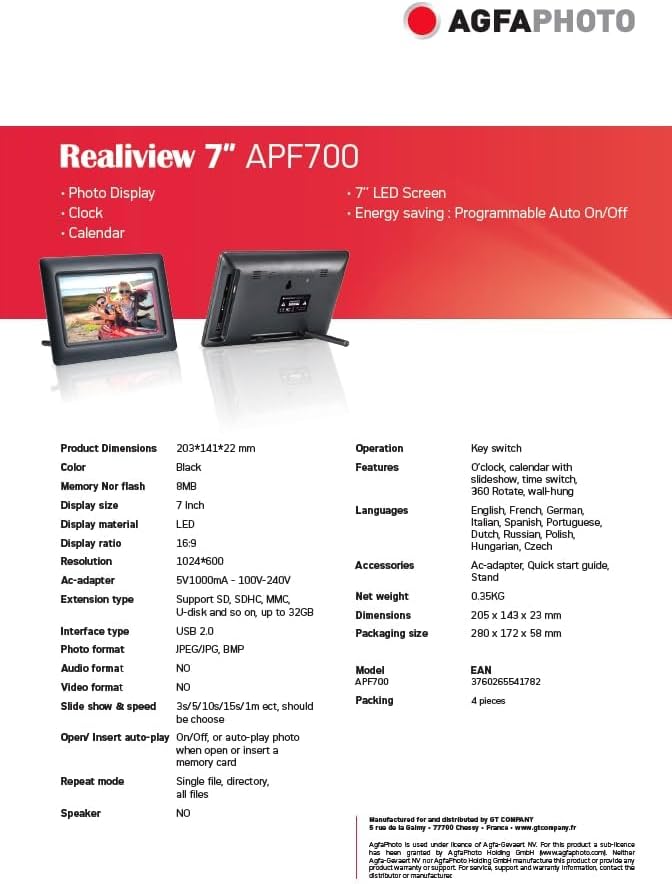
Image: Official specification sheet for the Realiview 7" APF700.
| Caratteristica | Dettaglio |
|---|---|
| Marca | AgfaFoto |
| Modello | APF700 |
| Dimensioni dello schermo | 7 pollici (17.8 cm) |
| Tipo di visualizzazione | GUIDATO |
| Risoluzione | 1024 x 600 pixel |
| Rapporto di visualizzazione | 16:9 |
| Formati foto supportati | JPEG, JPG, BMP |
| Tipo di interfaccia | USB 2.0 |
| Extension Type (Memory) | Supports SD, SDHC, MMC (up to 32GB) |
| Ingresso adattatore CA | 100-240 V |
| Uscita adattatore CA | 5V/1000mA |
| Dimensioni del prodotto (L x P x A) | Dimensioni: 20.5 x 14.2 x 2.5 cm |
| Peso dell'articolo | 350 grammi |
| Materiale del telaio | Plastica |
| Input dell'interfaccia umana | Pulsanti |
Garanzia e supporto
Information regarding specific warranty details and availability of spare parts for the AGFA PHOTO Realiview APF700 is not available in the provided product data. For support inquiries, please refer to the contact information provided with your purchase or visit the official AgfaPhoto websito.
Software update information is also not available.


