Introduzione
This manual provides comprehensive instructions for setting up, operating, and maintaining your Macally Bluetooth Keyboard. Designed for multi-device compatibility, this wireless keyboard features a built-in stand, a rechargeable battery, and 78 keys for efficient typing across various devices including tablets, smartphones, and computers.

Image: The Macally Bluetooth Keyboard in white, with a tablet securely docked in its integrated stand, showcasing its compact design and functionality.
Cosa c'è nella scatola
Upon unboxing your Macally Bluetooth Keyboard, please ensure all the following items are present:
- Macally Bluetooth Keyboard
- Cavo di ricarica USB
- Manuale dell'utente (questo documento)
If any items are missing or damaged, please contact Macally customer support.
Caratteristiche del prodotto
The Macally Bluetooth Keyboard is designed for versatility and convenience, offering several key features:
- Connettività multi-dispositivo: Seamlessly switch between up to 3 Bluetooth-enabled devices (e.g., tablet, smartphone, computer).
- Supporto per dispositivo integrato: Features a built-in 10.5-inch slot to securely hold your smartphone or tablet.
- Compatto e portatile: Small enough to fit into most bags, making it ideal for on-the-go use.
- Batteria ricaricabile: Equipped with a 280mAh rechargeable battery for extended use.
- Efficient Layout: Includes 78 quiet scissor-switch keys and 13 convenient shortcut/media keys for enhanced productivity.

Image: The keyboard demonstrating seamless Bluetooth connectivity with a 30ft wireless range, compatible with Apple, Windows, iOS, and Android operating systems.

Image: A visual representation of the keyboard's multi-device capability, showing it paired with a laptop, a desktop computer, and a smartphone simultaneously.

Image: The keyboard positioned on a desk, with both a tablet and a smartphone docked in its integrated 10.5-inch stand, highlighting its "setup anywhere" convenience.
Impostare
Caricamento della tastiera
Before first use, fully charge your Macally Bluetooth Keyboard. Connect the provided USB charging cable to the keyboard's charging port and the other end to a USB power source (e.g., computer USB port, USB wall adapter). The charging indicator light will show the charging status.

Image: The keyboard with its charging cable connected, illustrating the rechargeable 280mAh battery and the included charging cable.
Accoppiamento Bluetooth
Per associare la tastiera a un dispositivo, segui questi passaggi:
- Assicurati che la tastiera sia carica e accesa. L'interruttore di accensione si trova in alto a destra della tastiera.
- On your device (tablet, smartphone, computer), enable Bluetooth.
- Premere e tenere premuto il tasto Fn chiave e uno dei tasti del canale Bluetooth (B1, B2, O B3) simultaneously for a few seconds until the corresponding Bluetooth indicator light starts blinking rapidly. This indicates the keyboard is in pairing mode.
- On your device, search for "Macally Keyboard" or a similar name in the Bluetooth device list and select it to connect.
- Once connected, the indicator light will stop blinking and remain solid for a moment before turning off, indicating successful pairing.
To pair additional devices, repeat steps 3-5 using a different Bluetooth channel key (B1, B2, or B3).
Istruzioni per l'uso
Passaggio da un dispositivo all'altro
Per passare da un dispositivo associato all'altro, premere semplicemente il tasto Fn tasto insieme al tasto del canale Bluetooth corrispondente (B1, B2, O B3) for the desired device. The keyboard will quickly connect to the selected device.
Using Shortcut Keys
The keyboard features 13 dedicated shortcut/media keys for quick access to common functions. These keys are typically located on the top row (F1-F12 and an additional key). Functions may vary slightly depending on the operating system of your connected device.
Le funzioni di scelta rapida più comuni includono:
- Media playback controls (play/pause, next/previous track)
- Controllo del volume (muto, volume su/giù)
- Regolazione della luminosità dello schermo
- Home screen/desktop access
- Funzione di ricerca
Refer to your device's operating system documentation for specific compatibility and functionality of these keys.

Immagine: Un dettaglio view of the keyboard's layout, emphasizing its 78 quiet scissor-switch keys and the 13 dedicated shortcut/media keys for efficient use.
Manutenzione
To ensure the longevity and optimal performance of your Macally Bluetooth Keyboard, follow these maintenance guidelines:
- Pulizia: Utilizzare un panno morbido, asciutto e privo di lanugine per pulire la superficie della tastiera. Per lo sporco ostinato, leggermente dampPulire il panno con acqua o con un detergente delicato e non abrasivo. Evitare l'eccessiva umidità.
- Magazzinaggio: Quando non viene utilizzata per lunghi periodi, conservare la tastiera in un luogo fresco e asciutto, lontano dalla luce solare diretta e da temperature estreme.
- Cura della batteria: To preserve battery life, avoid fully discharging the keyboard frequently. Recharge it when the low battery indicator appears. If storing for a long time, charge it to about 50% every few months.
- Evitare fuoriuscite: Keep liquids away from the keyboard to prevent internal damage.
Risoluzione dei problemi
If you encounter issues with your Macally Bluetooth Keyboard, try the following solutions:
| Problema | Possibile soluzione |
|---|---|
| La tastiera non si accende. | Assicurati che la tastiera sia carica. Collegala a una fonte di alimentazione tramite il cavo USB. |
| Impossibile associare la tastiera. |
|
| La tastiera si disconnette frequentemente. |
|
| I tasti non rispondono. |
|
If these solutions do not resolve the issue, please contact Macally customer support for further assistance.
Specifiche
| Caratteristica | Dettaglio |
|---|---|
| Numero di modello | BTTABKEYBAT |
| Tecnologia di connettività | Bluetooth |
| Numero di chiavi | 78 |
| Tipo di batteria | 1 batteria agli ioni di litio (inclusa) |
| Peso dell'articolo | 1.92 libbre |
| Dimensioni del pacco | 13.98 x 7.91 x 2.48 pollici |
| Produttore | Mace Group Inc / Macally Peripherals |
| Dispositivi compatibili | PC, Tablet, Apple devices, Windows Desktop/Laptop, Surface, Chromebook, Smartphones, TVs (any device with Bluetooth) |
| Usi consigliati | Office, School, Everyday Use, Personal, Education, Business |
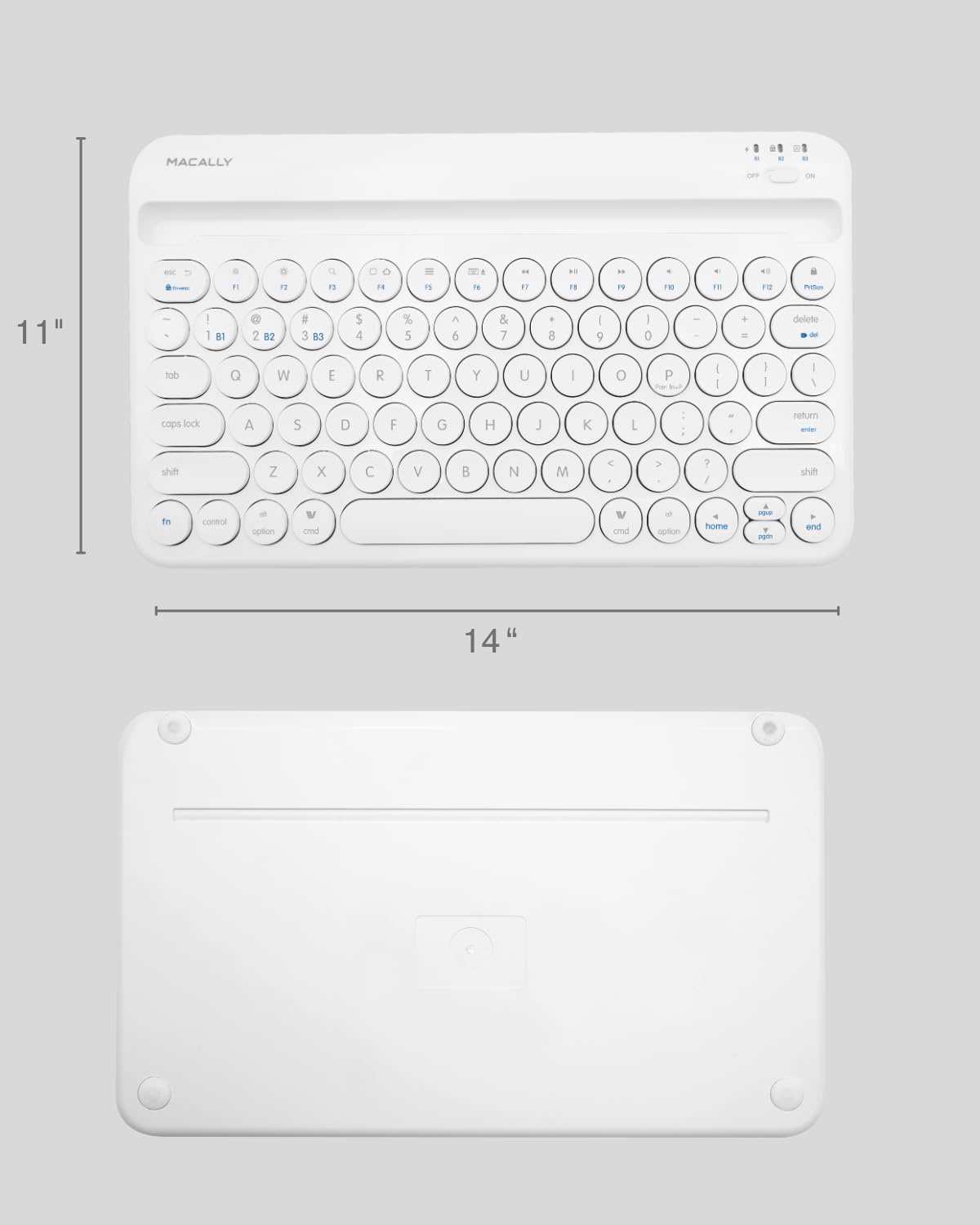
Image: The physical dimensions of the keyboard, measuring approximately 11 inches in width and 14 inches in length.

Image: The keyboard fitting easily into a backpack, demonstrating its compact size and suitability for travel and on-the-go use.
Garanzia e supporto
Macally products are designed for quality and reliability. For information regarding product warranty, technical support, or service, please visit the official Macally webo contattare il servizio clienti. Conservare la ricevuta d'acquisto come prova d'acquisto per eventuali reclami in garanzia.
Puoi trovare maggiori informazioni e supporto su Negozio Macally su Amazon.


