1. Prodotto finitoview
The Yottamaster M.2 NVMe Dual Bay Enclosure is a versatile device designed for both offline cloning of M.2 NVMe SSDs and functioning as a high-speed external docking station. It supports two M.2 NVMe SSDs simultaneously and offers data transfer rates up to 10Gbps via USB 3.1 Gen2 Type-C. Its robust aluminum construction aids in efficient heat dissipation.

2. Contenuto della confezione
- Yottamaster M.2 NVMe Dual Bay Enclosure
- Cavo da USB-C a USB-C
- Cavo da USB-C a USB-A
- 5V/4A Power Adapter with multiple international plug adapters (CN, US, EU, UK, JP)
- Thermal Silicone Pads (2x)
- SSD Fixing Screws/Rubber Plugs
- Piccolo cacciavite
- Manuale dell'utente (questo documento)
3. Configurazione e installazione
3.1 Installing M.2 NVMe SSDs
- Gently slide open the enclosure cover to access the M.2 slots.
- Insert your M.2 NVMe SSDs into the designated slots (Source and Target). Ensure the SSDs are fully seated.
- Secure the SSDs using the provided rubber plugs or screws, depending on the SSD length (supports 2230, 2242, 2260, 2280 form factors).
- Apply the thermal silicone pads onto the SSDs for optimal heat dissipation.
- Chiudere bene il coperchio dell'involucro.

3.2 Collegamento dell'alimentazione
Connect the provided 5V/4A power adapter to the DC input port on the enclosure and then to a power outlet. The external power supply is crucial for stable operation, especially during cloning.

4. Istruzioni per l'uso
4.1 Offline Cloning (Stand-alone Duplication)
This feature allows you to clone an M.2 NVMe SSD without connecting the enclosure to a computer.
- Preparazione:
- Assicurarsi che il recinto sia NON connected to any computer.
- Inserire il Fonte M.2 NVMe SSD into the 'Source' slot.
- Inserire il Bersaglio M.2 NVMe SSD into the 'Target' slot.
- Importante: The capacity of the Target SSD must be equal to or larger than the Source SSD. All data on the Target SSD will be overwritten during the cloning process.
- Collegare l'adattatore di alimentazione da 5 V/4 A all'alloggiamento e a una presa di corrente.
- Avviare la clonazione:
- Premere e Presa the 'START' button on the enclosure.
- While holding the 'START' button, turn on the power switch.
- Continue to hold the 'START' button until the 25% progress indicator LED begins to blink. This typically takes 15-20 seconds after the initial power-on sequence where all four LEDs light up and then turn off.
- Once the 25% LED is blinking, you can release the 'START' button.
- Monitoraggio dei progressi:
- The progress indicator LEDs (25%, 50%, 75%, 100%) will illuminate sequentially to show the cloning status.
- When all four LEDs are solid (100%), the cloning process is complete.
- Completamento:
- Once cloning is finished, turn off the power switch and safely remove the SSDs.
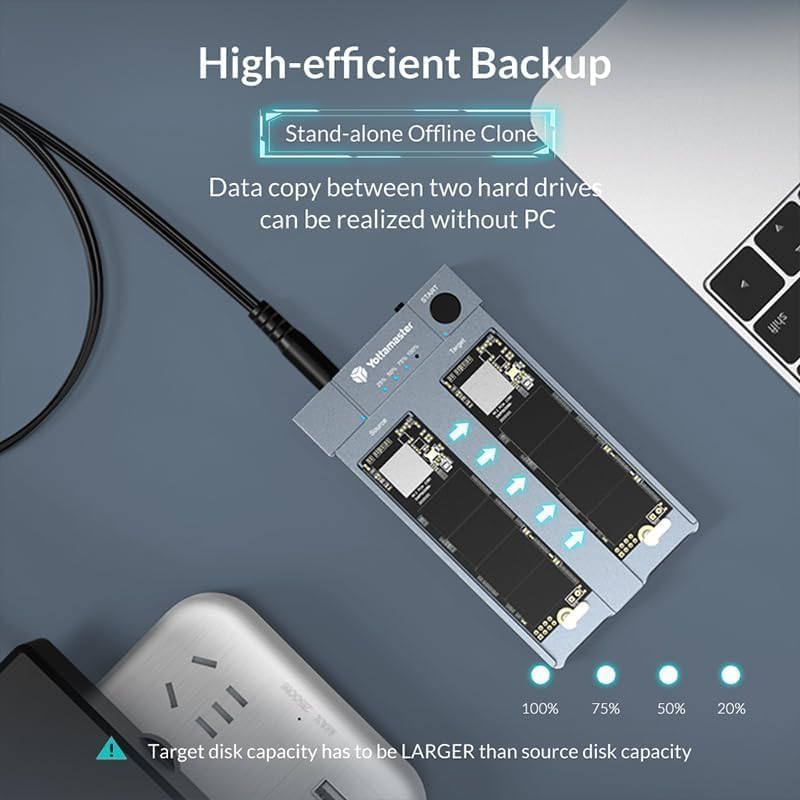
4.2 Online Enclosure Mode (Connecting to PC)
The enclosure can be used as an external dual-bay M.2 NVMe SSD docking station.
- Ensure SSDs are properly installed in the enclosure.
- Collegare l'adattatore di alimentazione da 5 V/4 A all'alloggiamento e a una presa di corrente.
- Connect the enclosure to your computer using either the USB-C to USB-C cable or the USB-C to USB-A cable. For optimal performance (up to 10Gbps), use the USB-C to USB-C cable with a USB 3.2 Gen 2 compatible port on your PC.
- The SSDs will appear as external drives on your computer. You may need to initialize and format new SSDs via your operating system's disk management utility before use.

5. Manutenzione
5.1 Dissipazione del calore
The enclosure features an all-aluminum design and includes thermal silicone pads to facilitate heat dissipation from the NVMe SSDs. While operating, especially during intensive tasks like cloning or large data transfers, the enclosure may become warm. This is normal and indicates effective heat transfer. Ensure adequate airflow around the device.

5.2 Cura generale
- Mantenere il dispositivo pulito e privo di polvere. Utilizzare un panno morbido e asciutto per la pulizia.
- Evitare di esporre il dispositivo a temperature estreme, umidità o luce solare diretta.
- Non far cadere né sottoporre il dispositivo a forti impatti.
6. Risoluzione Dei Problemi
6.1 Cloning Issues
- Cloning Fails or Stops:
- Target Disk Capacity: Ensure the target disk's actual capacity is equal to or greater than the source disk's actual capacity. Even a single byte less can cause failure.
- Holding START Button: Make sure you press and Presa the 'START' button continuously until the 25% progress LED starts blinking, then release. Releasing too early will prevent cloning from starting.
- No PC Connection: The enclosure must not be connected to a computer during offline cloning.
- Bad Sectors: If the source SSD contains bad sectors, the cloning process may stop. Scan the SSD for errors before attempting to clone.
- SSD Initialization: For new target NVMe SSDs, it is recommended to initialize them and ensure they are 'online' in Disk Management before cloning, if using them in enclosure mode first.
6.2 Problemi di connessione e prestazioni
- Dispositivo non riconosciuto:
- Ensure the power adapter is securely connected and providing power.
- Prova un cavo USB o una porta USB diversi sul tuo computer.
- Verify that the SSDs are correctly seated in their slots.
- Trasferimento dati lento:
- Ensure you are using a USB 3.1 Gen2 (10Gbps) compatible port on your computer. Older USB 2.0 or 3.0 ports will result in lower speeds.
- Use the provided USB-C to USB-C cable for best performance.
- Check the performance of your SSDs; slower SSDs will limit transfer speeds.
7. Specifiche
| Caratteristica | Specificazione |
|---|---|
| Numero di modello | Yottamaster-HC1-C3-GY-EU |
| Interfaccia | USB 3.1 Gen2 Tipo-C |
| Velocità di trasferimento dati | Fino a 10 Gbps |
| SSD supportati | M.2 NVMe PCIe SSDs (M Key / B&M Key) |
| Dimensioni SSD supportate | 2230, 2242, 2260, 2280 |
| Max Capacity per Slot | Up to 4TB (8TB total) |
| Materiale | Alluminio |
| Alimentazione elettrica | External 5V/4A DC Power Adapter |
| Sistemi operativi | Windows, macOS, Linux |
8. Garanzia e supporto
8.1 Informazioni sulla garanzia
Yottamaster products typically come with a manufacturer's warranty. Please refer to the warranty card included with your product or visit the official Yottamaster websito per termini e condizioni di garanzia dettagliati specifici per la tua regione.
8.2 Assistenza clienti
If you encounter any issues or have questions regarding your Yottamaster M.2 NVMe Dual Bay Enclosure, please contact Yottamaster customer support through their official website or the contact information provided in your product packaging. When contacting support, please have your model number (Yottamaster-HC1-C3-GY-EU) and purchase details ready.


