1. Introduzione
This manual provides detailed instructions for the IPEGA PG-SW023 Bluetooth Wireless Game Controller. This versatile controller is designed to enhance your gaming experience across multiple platforms, including N-S consoles, PlayStation 3 (PS3), Android devices, and personal computers running Windows 7, 8, or 10.
Si prega di leggere attentamente il presente manuale prima di utilizzare il prodotto per garantirne il corretto funzionamento e sfruttarne al massimo le funzionalità.
2. Caratteristiche del prodotto
- Compatibilità multipiattaforma: Suitable for gaming on N-S consoles, PS3, Android devices, and PCs (Windows 7/8/10).
- Esperienza di gioco migliorata: Supports vibration feedback and a six-axis gyroscope function for immersive gameplay and precise control.
- Customizable Macro Function: Rear buttons can be configured as common keys or combination keys for simplified actions.
- Continuous TURBO Function: Features a dedicated TURBO button for rapid-fire actions, compatible with N-S Pro gamepads.
- Design ergonomico: Engineered for comfort during extended gaming sessions, fitting securely in the palm.

Image: The IPEGA PG-SW023 Wireless Game Controller highlighting its key features: two vibrating motors, six-axis design, high-sensitive buttons, and Turbo function.
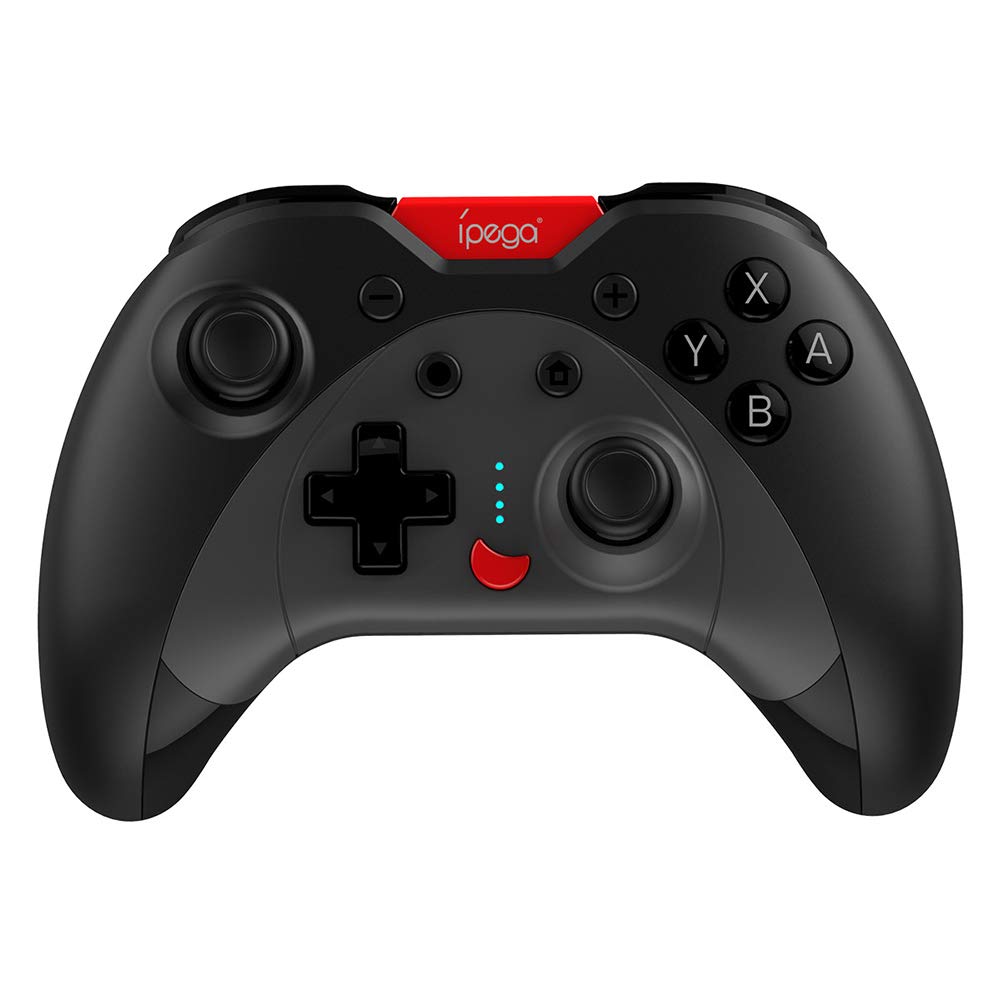
Image: A green IPEGA PG-SW023 controller illustrating its built-in six-axis gyroscope design for improved body feeling and accurate targeting.
3. Contenuto della confezione
Si prega di verificare che tutti gli articoli siano presenti nel pacco:
- 1 x IPEGA PG-SW023 Wireless Game Controller
- 1 x Cavo di ricarica di tipo C
- 1 x Manuale utente
4. Specifiche
| Caratteristica | Specificazione |
|---|---|
| Marca | Ipega |
| Modello | PG-SW023 |
| Opzioni colore | Black, Green, Blue, Yellow |
| Volume di eserciziotage | CC 3.7V |
| Corrente di esercizio | <30mA |
| Corrente statica | <20uA |
| Tempo di riproduzione continua | Circa 15 ore |
| Ingresso volumetage/corrente | CC 5V/500mA |
| Tempo di ricarica | Circa 2 ore |
| Versione Bluetooth | 3.0 |
| Distanza di trasmissione | ≤8 metri |
| Capacità della batteria | 400mAh |
| Dimensioni del prodotto | 15 x 10 x 5.5 cm (5.91 x 3.94 x 2.17 pollici) |
| Peso del prodotto | Circa 215 g (7.58 once) |
| Dispositivi compatibili | N-S Console, PS3, Android, PC (Win 7/8/10) |
| Connettività | Wireless (Bluetooth) |
| Fonte di alimentazione | Alimentato a batteria |
5. Impostazione
5.1 Ricarica del controller
- Connect the provided Type-C charging cable to the controller's charging port.
- Collegare l'altra estremità del cavo a una fonte di alimentazione USB (ad esempio, PC, adattatore USB da parete).
- The indicator lights on the controller will show charging status. Once fully charged (approx. 2 hours), the lights will indicate completion or turn off.
5.2 Associazione con i dispositivi
The pairing method varies slightly depending on the device. Ensure the controller is sufficiently charged before attempting to pair.

Image: A blue IPEGA PG-SW023 controller positioned in front of a Nintendo Switch, PlayStation 3, and a laptop, illustrating its multi-platform compatibility.
5.2.1 Pairing with N-S Console
- On your N-S console, go to the HOME Menu.
- Seleziona "Controller" > "Cambia impugnatura/ordine".
- Press and hold the pairing button on the IPEGA controller (refer to controller diagram for exact location) until the indicator lights begin to flash rapidly.
- The console will detect the controller. Once paired, the indicator light will become solid.
5.2.2 Pairing with PS3
- Connect the controller to the PS3 console using the Type-C cable.
- Premi il pulsante HOME sul controller.
- Once recognized, you can disconnect the cable and the controller should remain paired wirelessly.
5.2.3 Associazione con dispositivi Android
- Abilita il Bluetooth sul tuo dispositivo Android.
- On the controller, press and hold the Android pairing button combination (refer to controller diagram or quick start guide for specific button combination, usually 'A' + HOME or 'X' + HOME) until the indicator lights flash rapidly.
- On your Android device, search for new Bluetooth devices and select 'IPEGA PG-SW023' (or similar name) from the list.
- Una volta effettuata l'associazione, la spia luminosa sul controller diventerà fissa.
5.2.4 Pairing with PC (Windows 7/8/10)
- Assicurati che il tuo PC abbia il Bluetooth abilitato.
- Go to 'Settings' > 'Devices' > 'Bluetooth & other devices' and click 'Add Bluetooth or other device'.
- Selezionare 'Bluetooth'.
- On the controller, press and hold the PC pairing button combination (refer to controller diagram or quick start guide for specific button combination, usually 'L1' + HOME or 'Y' + HOME) until the indicator lights flash rapidly.
- Select 'IPEGA PG-SW023' (or similar name) from the list of available devices on your PC.
- Una volta effettuata l'associazione, la spia luminosa sul controller diventerà fissa.
6. Istruzioni per l'uso
6.1 Funzioni base dei pulsanti
The controller features standard gaming buttons including directional pad, analog sticks, action buttons (A, B, X, Y), shoulder buttons (L1, R1), and triggers (L2, R2). Specific button mapping may vary by game and platform.

Image: Hands comfortably gripping a black IPEGA PG-SW023 controller, showcasing its ergonomic design for comfortable and convenient use.
6.2 Funzione TURBO
The TURBO function allows for continuous rapid input of a selected button. This can be useful in games requiring fast, repeated button presses.
- To activate TURBO: Press and hold the desired action button (e.g., A, B, X, Y) and then press the TURBO button simultaneously. The button will now continuously input as long as it's held down.
- To deactivate TURBO: Repeat the same process (press the action button and TURBO button simultaneously).

Image: A yellow IPEGA PG-SW023 controller with its prominent TURBO button, shown with a Nintendo Switch console, illustrating the auto-fire feature.
6.3 Funzione Macro
The macro function allows you to assign a sequence of button presses or a single common button to the programmable rear buttons. This can simplify complex in-game actions.
- Refer to the specific instructions provided in the quick start guide or on the manufacturer's website for detailed steps on programming macro buttons, as this process can vary.
6.4 Vibration and Gyroscope
The controller features dual motors for vibration feedback, providing tactile sensations that correspond to in-game events. The built-in six-axis gyroscope allows for motion control in supported games, offering a more immersive and precise aiming experience.

Image: A blue IPEGA PG-SW023 controller in use, with visual cues indicating its double motor vibrating design for immersive feedback during gameplay.
7. Manutenzione
Proper care will extend the life of your controller:
- Pulizia: Utilizzare un panno morbido e asciutto per pulire il controller. Per lo sporco ostinato, leggermente dampPulisci il panno con acqua o una soluzione detergente delicata. Evita prodotti chimici aggressivi.
- Magazzinaggio: Conservare il controller in un luogo fresco e asciutto, lontano dalla luce solare diretta e da temperature estreme.
- Evitare l'impatto: Non far cadere il controller né sottoporlo a forti urti, poiché ciò potrebbe danneggiare i componenti interni.
- Esposizione al liquido: Tenere il controller lontano dai liquidi. In caso di contatto con liquidi, spegnerlo immediatamente e lasciarlo asciugare completamente prima di riutilizzarlo.
8. Risoluzione Dei Problemi
If you encounter issues with your IPEGA PG-SW023 controller, try the following solutions:
- Il controller non si connette:
- Assicurarsi che il controller sia completamente carico.
- Verifica che il Bluetooth sia abilitato sul tuo dispositivo.
- Try re-pairing the controller by following the setup instructions for your specific device.
- Move the controller closer to the device to ensure it is within the 8-meter transmission range.
- Riavvia sia il controller che il dispositivo di gioco.
- I pulsanti non rispondono:
- Check if the controller is properly connected and paired.
- Test the controller with another game or application to rule out software-specific issues.
- Assicurarsi che non vi siano detriti incastrati sotto i pulsanti.
- Vibrazione non funzionante:
- Verify that the game or system settings have vibration enabled.
- Alcuni giochi potrebbero non supportare il feedback tramite vibrazione.
- Durata breve della batteria:
- Assicurarsi che il controller sia completamente carico prima dell'uso.
- Battery life can vary based on usage intensity (e.g., continuous vibration).
- Evitare di caricare in ambienti estremamente caldi o freddi.
9. Garanzia e supporto
For warranty information, technical support, or service inquiries regarding your IPEGA PG-SW023 Bluetooth Wireless Game Controller, please refer to the product packaging or contact the manufacturer directly through their official websito o tramite i canali di assistenza clienti. Conservare la ricevuta d'acquisto come prova d'acquisto per eventuali reclami in garanzia.


