Introduzione
The Mksutary XF-508 Walkie Talkies are designed to provide reliable communication for indoor and outdoor use, ideal for keeping families connected. This manual provides essential information for setting up, operating, and maintaining your walkie talkies, ensuring optimal performance and longevity.

Figure 1: Mksutary XF-508 Walkie Talkies (4-pack)
This image displays four Mksutary XF-508 walkie talkies, featuring an orange body with black accents and an LCD screen. They are shown alongside charging cables and a power adapter, indicating they are ready for use.
Caratteristiche principali
- 8 canali: Offers a wide range of communication options.
- Gamma estesa: Provides an impressive range of up to 5 kilometers (approximately 3 miles) in open outdoor environments without obstructions.
- Qualità del suono chiara: Delivers good audio clarity for effective communication.
- 10 Ring Tones: Multiple alert tones for incoming calls.
- Modalità VOX: Enables hands-free operation for convenience.
- Display LCD di facile lettura: Provides clear visibility of channel and settings.
- Blocco tastiera: Prevents accidental changes to settings during use.
- Design compatto e durevole: Perfectly sized for children (5.8 x 3.8 x 16.5 cm) with an anti-fall construction for enhanced durability.
- Volume regolabile: Allows users to set the listening volume to their preference.
- Allarme batteria scarica: Notifies users when battery levels are low, prompting a recharge or replacement.
- 122 Codici sulla privacy: Each channel can utilize 122 sub-codes to ensure private conversations.
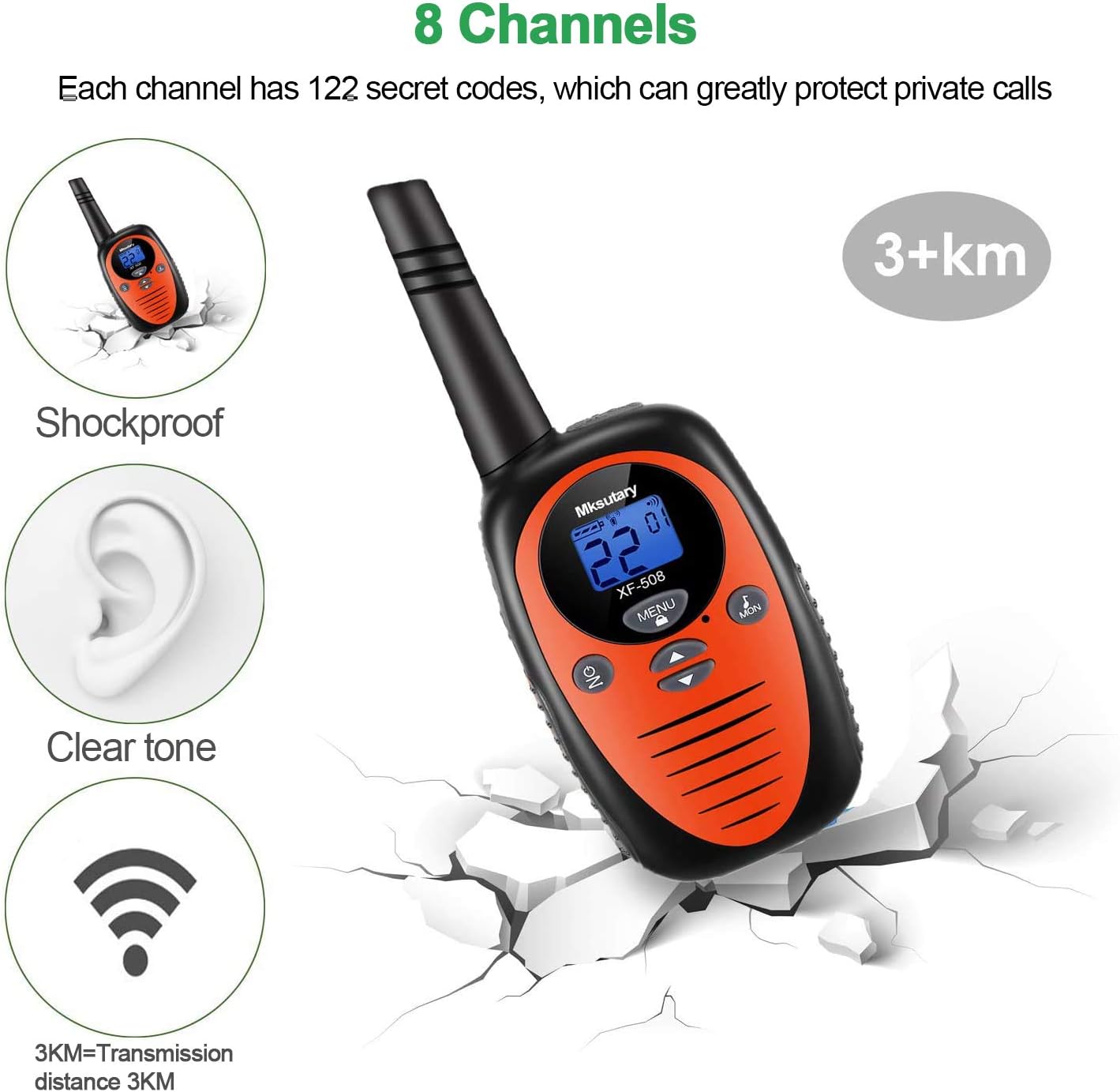
Figura 2: Caratteristiche principaliview
This image highlights several key features of the Mksutary XF-508 walkie talkie, including its shockproof design, clear tone, 8 channel capability, and a transmission range of over 3 kilometers. The device is depicted against a cracked ground background, emphasizing its durability.

Figure 3: Sound Quality and Range Illustration
This illustration emphasizes the excellent sound quality and transmission distance of the Mksutary XF-508 walkie talkie. It shows a curved line representing the signal path from a walkie talkie to a distant location, indicating a transmission range of 3KM (up to 5KM).
Componenti e controlli del prodotto
Familiarize yourself with the various parts and controls of your Mksutary XF-508 Walkie Talkie:
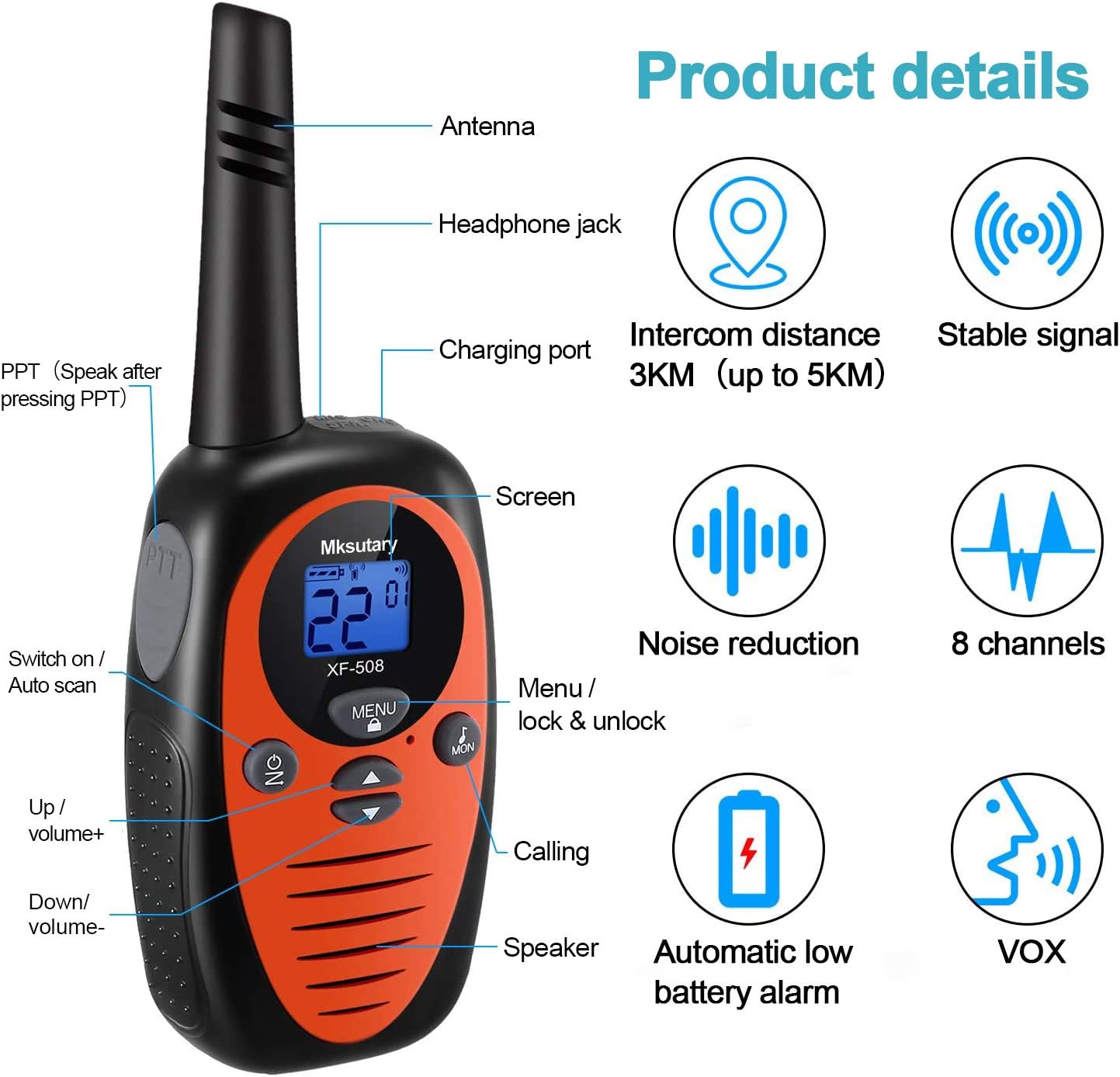
Figura 4: Componenti del walkie-talkie
This detailed diagram labels the key components of the Mksutary XF-508 walkie talkie, including the Antenna, Headphone jack, Charging port, Screen, PTT (Push-to-Talk) button, Switch on/Auto scan button, Menu/lock & unlock button, Up/volume+ button, Down/volume- button, Calling button, and Speaker. It also highlights features like intercom distance, stable signal, noise reduction, 8 channels, automatic low battery alarm, and VOX function.
- Antenna: Per trasmettere e ricevere segnali.
- Jack per cuffie: For connecting external headphones (not included) for private listening.
- Porta di ricarica: Per collegare il cavo di ricarica.
- Screen (LCD Display): Mostra il numero del canale, lo stato della batteria e altri indicatori.
- Pulsante PTT (premi per parlare): Tieni premuto per trasmettere la tua voce.
- Pulsante ON/OFF: Powers the unit on or off. Also functions as Auto Scan.
- Pulsante MENU: Accesses settings and locks/unlocks the keypad.
- Up/Volume+ Button: Increases volume and navigates menu options upwards.
- Down/Volume- Button: Decreases volume and navigates menu options downwards.
- Pulsante di chiamata: Sends a call tone to other walkie talkies on the same channel.
- Oratore: Emette l'audio in ingresso.
Guida all'installazione
Installazione della batteria
Each Mksutary XF-508 Walkie Talkie requires 3 AA batteries (regular or rechargeable). Batteries are included with the product.
- To remove the belt clip, press the small button on the back of the walkie-talkie and pull the belt clip upwards.
- Locate the battery box button on the back of the unit. Press this button and pull upwards to open the battery compartment cover.
- Insert 3 AA batteries into the compartment, ensuring correct polarity (+ and - ends match the diagram inside).
- Chiudere saldamente il coperchio del vano batteria finché non scatta in posizione.
- Reattach the belt clip by sliding it back into position until it locks.

Figura 5: Passaggi per l'installazione della batteria
This image provides visual instructions for accessing the battery compartment. It shows how to press the small button on the back to remove the belt clip and how to press the battery box button to open the battery cover, revealing the empty battery slots.
Accensione/spegnimento
Premere e tenere premuto il tasto ON button (located on the front, below the screen) to turn the walkie talkie on or off. The LCD screen will illuminate when powered on.
Istruzioni per l'uso
1. Selezione di un canale
To communicate with other walkie talkies, all units must be set to the same channel.
- Con il walkie-talkie acceso, premere il tasto MENU button. The channel number on the LCD display will start blinking.
- Utilizzare il Up or Giù pulsanti per selezionare il canale desiderato (1-8).
- Premere il tasto PTT pulsante (sul lato del walkie-talkie) per confermare e salvare il canale selezionato.
2. Transmitting (Talking)
To speak to another person:
- Ensure your walkie talkie is on the same channel as the recipient's unit.
- Premere e tenere premuto il tasto PTT button firmly. Speak clearly into the microphone (located near the speaker).
- Rilasciare il PTT button when you have finished speaking to allow the other person to respond.
3. Receiving (Listening)
When not pressing the PTT button, your walkie talkie is in receive mode, listening for incoming transmissions on the selected channel.
4. Regolazione del volume
Utilizzare il Up pulsante per aumentare il volume e il Giù pulsante per diminuire il volume.
5. Activating VOX (Voice Operated Exchange)
VOX mode allows for hands-free transmission when your voice is detected.
- Premere e tenere premuto contemporaneamente il tasto ON pulsante e il PTT pulsante.
- Release both buttons once VOX is activated. The VOX icon will appear on the LCD screen.
- To deactivate VOX, repeat the same steps.
6. Blocco tastiera
The keypad lock feature prevents accidental changes to your settings. To activate or deactivate the keypad lock, press and hold the MENU button until the lock icon appears or disappears on the screen.
Specifiche tecniche
| Marca | Mksutario |
| Modello | XF-508 |
| Tecnologia sintonizzatore | Frequenza ultra-alta |
| Numero di canali | 8 |
| Portata massima di conversazione | Up to 5 Kilometers (in open air) |
| Batterie richieste | 3 AA batteries per unit (included) |
| Dimensioni del prodotto | 17 x 8 x 6 cm (6.7 x 3.1 x 2.4 pollici) |
| Peso del prodotto | 476 g (1.05 libbre) |
| ASIN | B08HHVN8TS |

Figura 6: Dimensioni del prodotto
This image shows two Mksutary XF-508 walkie talkies side-by-side, with one displaying its height (6.5 inches) and the other its width (2.3 inches) and depth (1.5 inches) at the base, providing a clear understanding of the product's compact size.
Manutenzione
- Pulizia: Pulisci il walkie talkie con un panno morbido eamp stoffa. Non utilizzare prodotti chimici aggressivi o detergenti abrasivi.
- Magazzinaggio: Store the walkie talkie in a cool, dry place when not in use. If storing for extended periods, remove the batteries to prevent leakage.
- Evitare l'acqua: These walkie talkies are not waterproof. Avoid exposing them to rain, splashes, or submersion in water.
- Cura della batteria: If using rechargeable batteries, follow the manufacturer's guidelines for charging. Dispose of old batteries responsibly according to local regulations.
Risoluzione dei problemi
If you encounter issues with your Mksutary XF-508 Walkie Talkies, refer to the common problems and solutions below:
- Problem: No voice or very low volume.
- Soluzione: Ensure the volume is not set to minimum. You can adjust the volume by pressing the Up or Giù buttons. Also, check if the walkie talkie is powered on and has sufficient battery.
- Problem: Multiple units (2 or 4) cannot communicate with each other.
- Soluzione: Ensure that all walkie talkies you wish to communicate with are set to the exact same channel and sub-code (e.g., "3 01" on the display). If the two characters on the display are identical and they still do not work together, please contact Mksutary technical support for assistance.
Garanzia e supporto
Mksutary provides a one-year manufacturer's warranty for all Mksutary products, effective from the date of purchase.
For any technical assistance, warranty claims, or further inquiries, please contact Mksutary technical support via email:
Please include your product model (XF-508) and a detailed description of your issue when contacting support to ensure a prompt resolution.


