1. Prodotto finitoview
The Ortizan Bluetooth Speaker X20 is a portable wireless speaker designed to deliver high-quality audio with deep bass. It features Bluetooth 5.0 connectivity, IPX6 waterproof rating, and a power bank function for charging other devices. This manual provides detailed instructions for its setup, operation, and maintenance.

Immagine 1.1: anteriore view of the Ortizan Bluetooth Speaker X20, showcasing il suo design cilindrico e il pannello di controllo.
2. Contenuto della confezione
Si prega di controllare la confezione per verificare la presenza dei seguenti elementi:
- Ortizan Bluetooth Speaker X20
- Portable Soft Cord
- Cavo di ricarica (USB-C)
- Manuale d'uso
3. Controlli e indicatori
Per un utilizzo ottimale, familiarizza con i pulsanti e le porte dell'altoparlante.
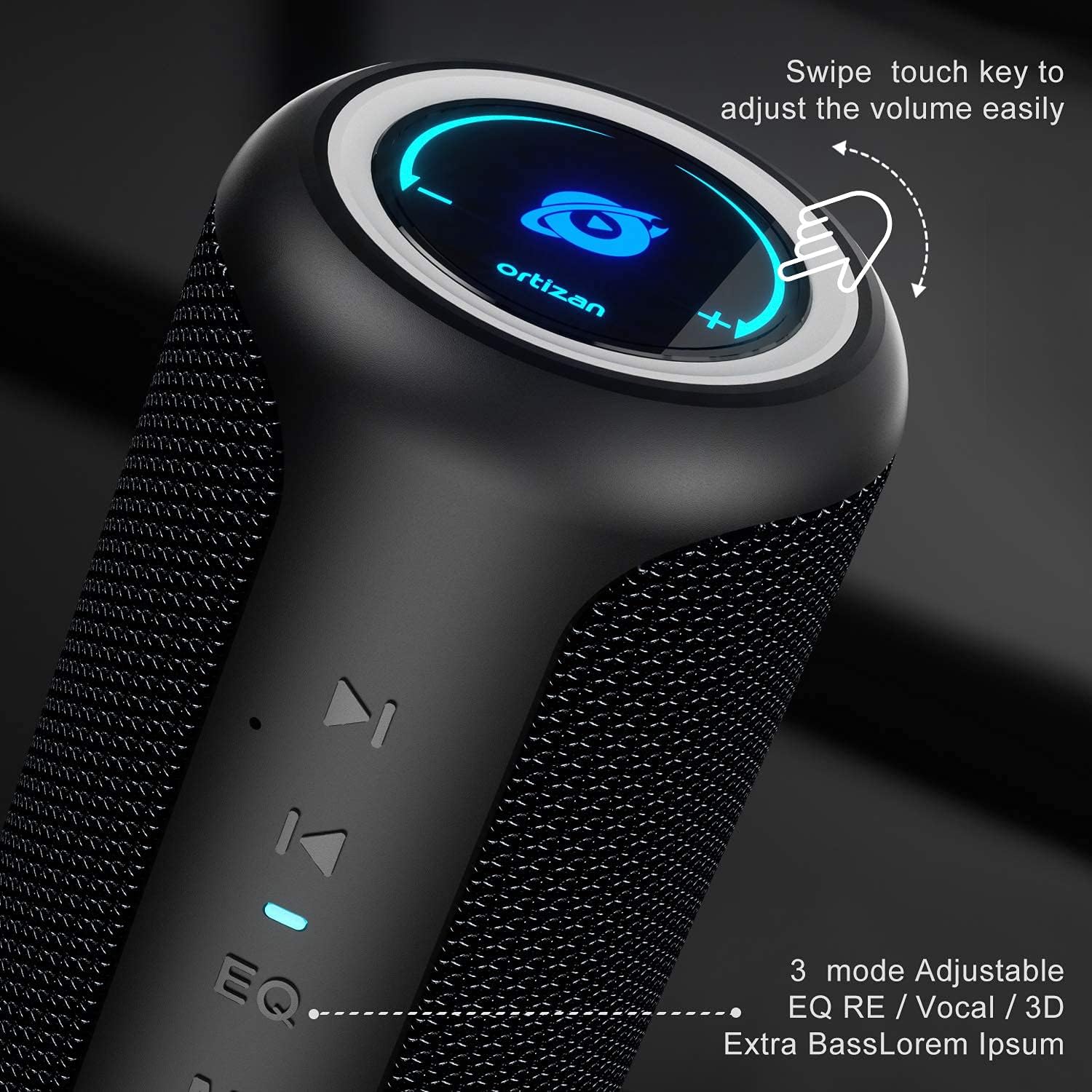
Immagine 3.1: Primo piano view of the speaker's control panel, highlighting the touch-sensitive volume ring and EQ button.
- Pulsante di accensione (⑂): Tenere premuto per accendere/spegnere.
- Pulsante modalità (M): Press to switch between Bluetooth, AUX, and TF Card modes.
- Pulsante EQ (EQ): Press to cycle through sound effects (Balanced, 3D, Deep Bass).
- Riproduci/Pausa (⏸): Premere per riprodurre o mettere in pausa l'audio.
- Traccia precedente (⏮): Press to go to the previous track.
- Next Track (⏴): Press to go to the next track.
- Anello del volume: Swipe clockwise to increase volume, counter-clockwise to decrease volume.
- Porta USB: For power bank function.
- Slot per schede TF: For playing music from a MicroSD card.
- Porta di ingresso AUX: Per la connessione audio cablata.
- Porta di ricarica di tipo C: Per caricare l'altoparlante.
4. Ricarica dell'altoparlante
Before first use, fully charge the speaker. A full charge provides up to 15 hours of playtime at moderate volume.
- Connect the provided USB-C charging cable to the Type-C port on the speaker.
- Collegare l'altra estremità del cavo a un adattatore di alimentazione USB (non incluso) o alla porta USB di un computer.
- La spia di carica si accenderà durante la ricarica e si spegnerà quando la carica sarà completamente completata.

Image 4.1: Visual representation of the speaker's 15-hour playtime capability after a full charge.
5. Accoppiamento Bluetooth
Follow these steps to connect your speaker to a Bluetooth-enabled device.
- Power on the speaker by pressing and holding the Power button. The Bluetooth indicator will flash, indicating it is in pairing mode.
- Sul tuo dispositivo (smartphone, tablet, ecc.), attiva il Bluetooth e cerca i dispositivi disponibili.
- Select "Ortizan X20" from the list of devices.
- Once connected, the Bluetooth indicator will stop flashing and remain solid. You can now play audio through the speaker.
6. Accoppiamento True Wireless Stereo (TWS)
To achieve a stereo surround sound experience, you can pair two Ortizan X20 speakers together.
- Assicurarsi che entrambi gli altoparlanti siano accesi e non connessi ad altri dispositivi Bluetooth.
- On one speaker (this will be the primary speaker), press and hold the Play/Pause button for 2-3 seconds until you hear a prompt sound.
- The two speakers will automatically search for and connect to each other. Once connected, you will hear a confirmation sound, and the Bluetooth indicator on the primary speaker will flash, while the secondary speaker's indicator will be solid.
- Now, connect your device to the primary speaker via Bluetooth as described in Section 5. The audio will play in stereo across both speakers.

Image 6.1: Diagram illustrating two Ortizan X20 speakers wirelessly paired for an immersive 360-degree surround sound experience.
7. Funzionamento dell'altoparlante
7.1. Accensione/spegnimento
- Per accendere o spegnere l'altoparlante, tenere premuto il pulsante di accensione per circa 3 secondi.
7.2. Controllo del volume
- Swipe your finger clockwise along the top ring to increase the volume.
- Swipe your finger counter-clockwise along the top ring to decrease the volume.
7.3. Controllo della riproduzione
- Premere il pulsante Riproduci/Pausa per riprodurre o mettere in pausa il brano corrente.
- Press the Previous Track button (⏮) to go to the beginning of the current track or to the previous track.
- Press the Next Track button (⏴) to skip to the next track.
7.4. Modalità EQ
The speaker offers three equalizer modes to customize your listening experience.
- Press the EQ button to cycle through the modes: Equilibrato, Surround 3D, E Bassi profondi.

Image 7.1: The speaker's design, emphasizing the EQ button for selecting different audio effects.
8. Funzione Power Bank
The Ortizan X20 can be used to charge other devices in an emergency.
- Collega il cavo di ricarica del tuo dispositivo alla porta di uscita USB-A dell'altoparlante.
- L'altoparlante inizierà a caricare il dispositivo.

Image 8.1: The Ortizan X20 speaker connected via USB to a smartphone, demonstrating its power bank functionality.
9. Altre opzioni di connettività
In addition to Bluetooth, the speaker supports AUX-in and TF card playback.

Image 9.1: Icons representing the speaker's compatibility with various devices and input methods, including built-in mic, TF card, AUX-in, Bluetooth 5.0, and hands-free calling.
9.1. Modalità AUX-in
- Collegare un cavo audio da 3.5 mm (non incluso) dalla sorgente audio alla porta AUX-in dell'altoparlante.
- Press the Mode button (M) to switch to AUX mode. The speaker will automatically play audio from the connected device.
9.2. Modalità scheda TF
- Inserire una scheda MicroSD (TF) con audio MP3 files nello slot per schede TF.
- Press the Mode button (M) to switch to TF Card mode. The speaker will automatically begin playing music from the card.
10. Waterproof Information (IPX6)
The Ortizan X20 speaker features an IPX6 waterproof rating, meaning it is protected against high-pressure water jets from any direction. This makes it suitable for outdoor use and environments where it might be exposed to splashes or rain.
- NON fare immergere l'altoparlante in acqua.
- Assicurarsi che tutti i coperchi delle porte siano ben chiusi prima di esporre l'altoparlante all'acqua.
- Dopo l'esposizione all'acqua, asciugare l'altoparlante con un panno morbido.

Image 10.1: The speaker shown with water droplets, indicating its waterproof capabilities. Note: The product is rated IPX6.
11. Manutenzione
Proper maintenance ensures the longevity of your speaker.
- Pulizia: Per pulire l'altoparlante, utilizzare un panno morbido e asciutto. Non utilizzare detergenti abrasivi o solventi.
- Magazzinaggio: Conservare l'altoparlante in un luogo fresco e asciutto, lontano dalla luce solare diretta e da temperature estreme.
- Cura della batteria: If not used for extended periods, charge the speaker at least once every three months to maintain battery health.
12. Risoluzione Dei Problemi
Se riscontri problemi con l'altoparlante, fai riferimento ai seguenti problemi comuni e alle relative soluzioni.
| Problema | Possibile causa | Soluzione |
|---|---|---|
| L'altoparlante non si accende. | Batteria scarica. | Caricare completamente l'altoparlante. |
| Impossibile effettuare l'associazione tramite Bluetooth. | Speaker not in pairing mode; device's Bluetooth off; too far from device. | Ensure speaker is in pairing mode (flashing indicator). Turn device's Bluetooth off/on. Move speaker closer to device (within 20m). |
| Nessun suono o volume basso. | Volume troppo basso sull'altoparlante o sul dispositivo; modalità di input errata. | Increase volume on both speaker and connected device. Press 'M' button to select correct input mode (Bluetooth, AUX, TF Card). |
| L'associazione TWS non riesce. | Altoparlanti già collegati ad altri dispositivi; procedura di associazione errata. | Ensure both speakers are disconnected from other devices. Follow TWS pairing steps precisely (Section 6). |
| La funzione power bank non funziona. | Batteria dell'altoparlante troppo scarica; cavo errato. | Ensure speaker has sufficient charge. Use a compatible charging cable for your device. |
13. Specifiche
Technical details of the Ortizan Bluetooth Speaker X20.
| Caratteristica | Dettaglio |
|---|---|
| Marca | Ortizano |
| Nome del modello | KWSS4548 (X20) |
| Tecnologia di connettività | Bluetooth 5.0 |
| wireless Range | Up to 20 meters (66 feet) without barriers |
| Potenza massima di uscita dell'altoparlante | 40 Watt |
| Risposta in frequenza | 20 Hz - 16,000 Hz |
| Modalità di uscita audio | Stereo |
| Grado di impermeabilità | Grado di protezione IPX6 |
| Fonte di alimentazione | Alimentato a batteria (1 batteria agli ioni di litio inclusa) |
| Tempo di gioco | Fino a 15 ore (a volume moderato) |
| Dispositivi compatibili | Smartphone, TV, Laptop, etc. |
| Opzioni di input | Bluetooth, AUX-in, TF Card |
| Materiale | Silicone TPU |
| Dimensioni del prodotto (L x P x A) | Dimensioni: 18 x 18 x 27 cm |
| Peso | 830 grammi |
14. Informazioni sulla sicurezza
Si prega di leggere e seguire queste linee guida di sicurezza:
- Non esporre l'altoparlante a temperature estreme o alla luce solare diretta per periodi prolungati.
- Evitare di far cadere o di sottoporre l'altoparlante a forti urti.
- Tenere l'altoparlante lontano da dispositivi medici, poiché contiene magneti.
- Non tentare di smontare, riparare o modificare autonomamente l'altoparlante. Contattare personale di assistenza qualificato.
- Smaltire l'altoparlante e la batteria in modo responsabile, nel rispetto delle normative locali.
15. Garanzia e supporto
Ortizan products are designed and manufactured to the highest quality standards. For warranty information or technical support, please refer to the contact details provided on the product packaging or the official Ortizan websito. Conservare la prova d'acquisto per eventuali reclami in garanzia.


