1. Prodotto finitoview
The Fractal Design Pop Mini Air RGB PC Case (Model: FD-C-POR1M-01) is a mini-tower computer case designed to accommodate mATX and Mini ITX motherboards. It features a tempered glass side panel, three pre-installed 120mm Aspect RGB fans, and a mesh front panel for optimal airflow. The case also includes convenient storage solutions and cable management features.

Davanti view of the Fractal Design Pop Mini Air RGB PC Case, showcasing the mesh panel and illuminated RGB fans.

Interno view of the Fractal Design Pop Mini Air RGB PC Case, highlighting the spacious layout and component compatibility.
2. Configurazione e installazione
2.1 Unpacking the Case
Estrarre con cautela il case del PC dalla confezione. Verificare che non vi siano danni durante il trasporto. Conservare tutto il materiale di imballaggio per eventuali trasporti futuri o richieste di garanzia.
2.2 Rimozione dei pannelli laterali
The tempered glass side panel is secured by two thumbscrews at the rear. Unscrew these and gently pull the panel away from the chassis. The opposite side panel can be removed similarly.

Rear angle view of the PC case, showing the thumbscrews for the tempered glass side panel.
2.3 Installazione della scheda madre
The Pop Mini Air supports mATX and Mini ITX motherboards. Install your motherboard onto the pre-installed standoffs. Ensure all screws are tightened securely.
2.4 Installazione dell'alimentatore
The power supply mounts at the bottom rear of the case. Slide the power supply into its designated bay and secure it with screws from the rear. The case supports ATX power supplies up to 170mm in length.
2.5 Installazione dell'unità di archiviazione
La custodia offre versatili opzioni di archiviazione:
- SSD Trays: Two SSD trays are located behind the motherboard tray. These trays can be easily removed for installation and can also be mounted on the power supply cover for display.
- HDD/SSD Bays: Two removable storage trays are located in the bottom section of the case, supporting both 3.5-inch and 2.5-inch drives.
- 5.25" Bays: Two neatly concealed 5.25" bays with a storage drawer and magnetic cover are accessible at the front bottom of the case.

Interno posteriore view showing SSDs mounted on the motherboard tray.
2.6 Installazione della scheda grafica e del dissipatore della CPU
The case supports graphics cards as long as 405mm and CPU coolers up to 170mm tall. Install these components according to their respective manufacturer's instructions.
2.7 Gestione dei cavi
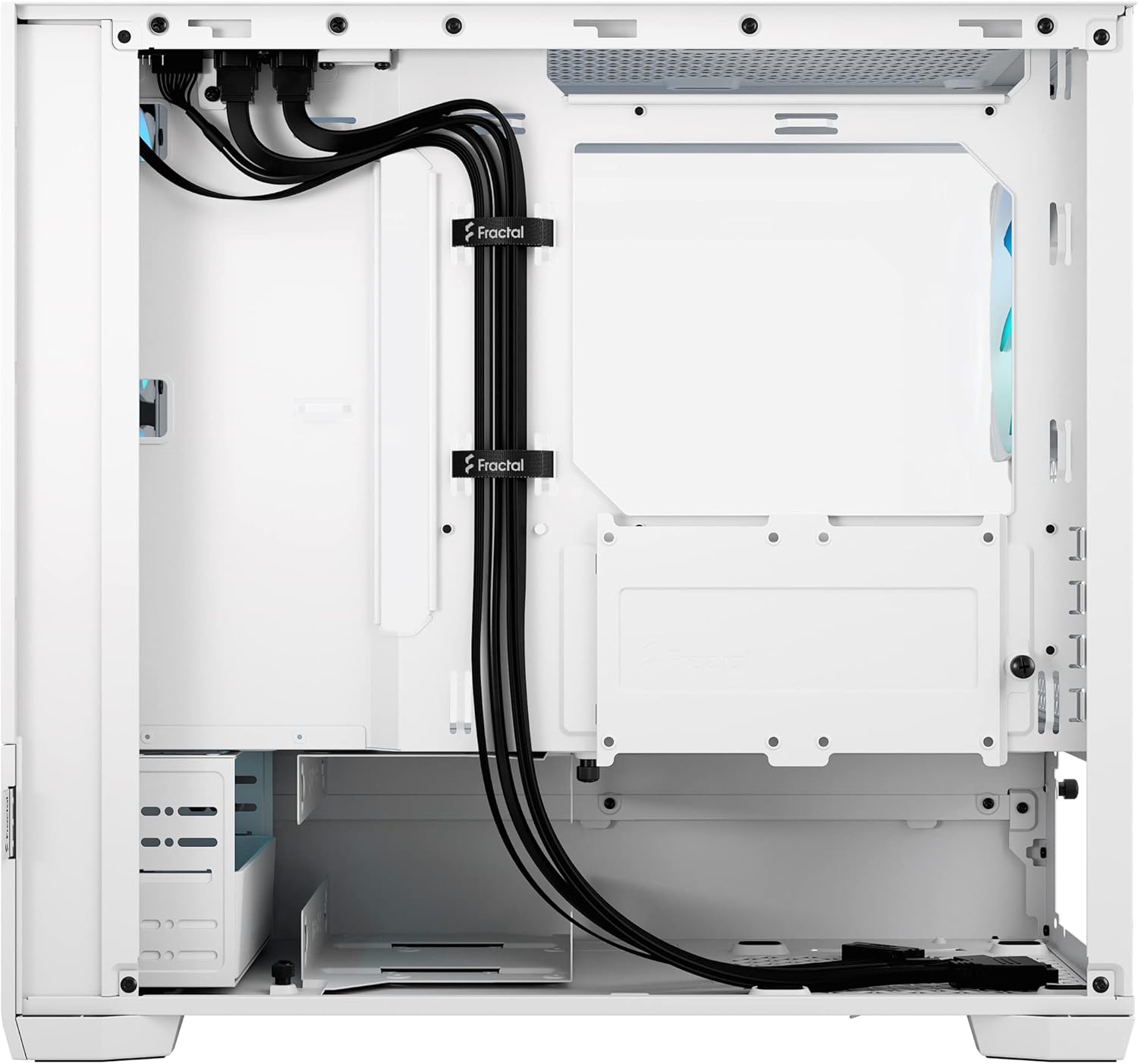
Utilize the multiple large cable routing channels and pre-installed Velcro cable ties behind the motherboard tray to manage cables effectively. This ensures optimal airflow and a clean build appearance.

Interno posteriore view demonstrating cable management options.
3. Funzionamento del case del PC
3.1 Pannello I/O frontale
The front I/O panel is located on the top right side of the case and includes:
- 1 x USB Type-C connection (Note: May require an optional accessory for full functionality)
- 2 porte USB 3.0
- 1 porte USB 2.0
- Presa per cuffie
- Presa per microfono
- Small button for RGB controller
- Larger power button

Close-up of the top I/O panel with USB ports, audio jacks, and power/RGB buttons.
Controllo ventola RGB 3.2
The three pre-installed Aspect RGB fans can be controlled via a dedicated button on the top I/O panel or connected to your motherboard's ARGB header for software control. Pressing the button cycles through various colors and lighting effects. Pressing and holding the button will stop on the current color.
Mostra video ufficiale del prodottoasing the Fractal Design Pop series, including RGB lighting effects and design features.
4. Manutenzione
4.1 Pulizia del filtro antipolvere
The case features a removable magnetic dust filter on the top panel and a pull-out filter at the rear for the power supply. Regularly clean these filters to maintain optimal airflow and prevent dust buildup inside the case.
Top dust filter being removed for cleaning, revealing the fan mounts underneath.
4.2 Pulizia generale
Use a soft, dry cloth to wipe down the exterior of the case. For the tempered glass panel, use a glass cleaner and a microfiber cloth to avoid scratches.
5. Risoluzione Dei Problemi
5.1 Fans Not Spinning/RGB Not Lighting Up
- Check all fan power connections to the motherboard or power supply.
- Ensure ARGB cables are securely connected to the motherboard header or the case's integrated RGB controller.
- If using the integrated controller, press the RGB button on the I/O panel to cycle through modes or ensure it's not turned off.
5.2 Scarso flusso d'aria/temperature elevate
- Verify that all fans are spinning correctly and oriented for proper airflow (front fans intake, rear/top fans exhaust).
- Clean all dust filters to ensure unrestricted airflow.
- Ensure no cables are obstructing fan blades or airflow paths.
5.3 Porte I/O anteriori non funzionanti
- Check that all front I/O cables (USB, audio) are correctly connected to the corresponding headers on your motherboard.
- Ensure the USB Type-C cable is connected to a compatible header on your motherboard (if applicable, as some models may require an optional accessory).
6. Specifiche
| Caratteristica | Dettaglio |
|---|---|
| Nome del modello | Pop Mini Air RGB White Core - Tempered Glass Clear Tint |
| Numero di modello | FD-C-POR1M-01 |
| Compatibilità della scheda madre | mATX / Mini ITX |
| Tipo di caso | Mini-torre |
| Dimensioni (LxWxH) | 17.01 x 8.46 x 15.47 pollici (circa 432 x 215 x 393 mm) |
| Peso dell'articolo | 15.93 libbre (circa 7.23 kg) |
| Materiale | Vetro temperato, acciaio |
| Ventole preinstallate | 3 x 120mm Aspect RGB fans |
| Lunghezza massima della GPU | 405 millimetri |
| Altezza massima del dissipatore della CPU | 170 millimetri |
| Tipo di montaggio dell'alimentatore | Rear Mount (ATX up to 170mm) |
| Alloggiamenti unità | Up to 2 x 3.5" HDD, 6 x 2.5" SSD (or 1 x 3.5" HDD and 5 x 2.5" SSD with one optical bay in use), 2 x 5.25" ODD |
| I/O frontale | 1 x USB Type-C, 2 x USB 3.0, 1 x USB 2.0, Audio In/Out, RGB Control Button, Power Button |

Diagram showing the dimensions of the Fractal Design Pop Mini Air RGB PC Case.
7. Garanzia e supporto
For warranty information and technical support, please visit the official Fractal Design website or contact their customer service. Keep your purchase receipt and product model number (FD-C-POR1M-01) handy for any inquiries.
I piani di protezione possono essere acquistati separatamente:
- Piano di protezione biennale: $ 13.49
- Piano di protezione biennale: $ 17.99
- Protezione completa: $ 16.99/mese (copre tutti gli acquisti idonei passati e futuri)


