1. Introduzione
This manual provides detailed instructions for the setup, operation, and maintenance of your Epson PowerLite 982W LCD Projector. Designed for classroom and educational environments, this projector delivers bright, clear images and offers versatile connectivity options. Please read this manual thoroughly before using the projector to ensure optimal performance and safety.
2. Cosa c'è nella scatola
Verifica che tutti gli articoli elencati di seguito siano inclusi nel tuo pacchetto:
- PowerLite 982W 3LCD WXGA Classroom Projector with Dual HDMI
- Cavo di alimentazione
- Cavo VGA
- Telecomando del proiettore
- Batteria
- Software CD
- Manuale dell'utente (questo documento)
- Scheda di garanzia
3. Prodotto finitoview
Familiarize yourself with the physical components and controls of your Epson PowerLite 982W projector.

Figura 3.1: Fronte View. This image displays the front of the projector, highlighting the main projection lens and the large ventilation grille on the left side. The Epson logo is prominently featured above the lens.
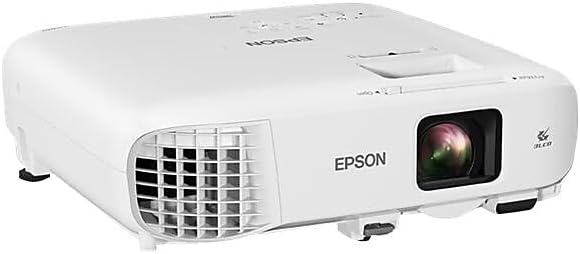
Figura 3.2: Angolato View. An angled perspective of the projector, providing a view of both the top panel and the front lens area. This view helps in understanding the overall compact design.

Figura 3.3: Pannello di controllo superiore. This image shows the top surface of the projector, featuring the control panel with various buttons for navigation, source selection, menu access, and power. The focus and zoom rings are also visible near the lens opening.

Figura 3.4: Pannello di connettività posteriore. The rear panel of the projector is shown, detailing the comprehensive array of input and output ports, including HDMI, VGA, USB, Audio In/Out, Video, and LAN connections.
4. Istruzioni per l'installazione
Proper setup ensures optimal projection quality and longevity of your device.
4.1 Posizionamento e montaggio
The PowerLite 982W is designed for versatile placement, including ceiling mounting, as commonly seen in classroom installations. Ensure the projector is securely mounted and positioned to project onto your screen or wall without obstruction.
4.2 Collegamento dei dispositivi
Il proiettore offre molteplici opzioni di connettività:
- HDMI: Connect devices like laptops, Blu-ray players, or streaming devices using an HDMI cable to either HDMI1 or HDMI2 port.
- VGA (Computer): Use a VGA cable to connect to a computer's VGA output. There are two VGA input ports (Computer1, Computer2) and one VGA output port (Monitor Out).
- USB: Connect USB devices for display or control.
- LAN: Per la connettività e il controllo della rete.
- Audio: Separate audio input (Audio1, Audio2, Mic) and output ports are available for external audio systems.
Ensure all cables are securely connected to prevent signal loss.
4.3 Accensione
- Collegare il cavo di alimentazione al proiettore e a una presa di corrente.
- Press the power button on the projector's control panel or the remote control. The projector will emit a beeping sound and begin its warm-up sequence.
- Wait for the projector to fully warm up and display the input source.
Video 4.1: Projector Installation and Basic Operation. This video demonstrates the Epson PowerLite 982W projector mounted in a classroom setting. It shows the physical controls on the projector, the various input ports, and the use of the remote control to power on the device and select input sources. The video also illustrates the projection quality on a screen with ambient lighting.
5. Istruzioni per l'uso
Learn how to effectively use your projector for presentations and media display.
5.1 Selezione della sorgente
Per passare da una sorgente di input all'altra:
- Press the 'Source Search' button on the remote control or the 'Source' button on the projector's control panel.
- Use the arrow keys to navigate through the available sources (HDMI1, HDMI2, Computer1, Computer2, Video, USB Display, LAN).
- Press 'Enter' to select the desired source. The projector will search for a signal from the selected input.
5.2 Regolazione dell'immagine
- Messa a fuoco: Ruotare l'anello di messa a fuoco attorno all'obiettivo per rendere l'immagine più nitida.
- Ingrandisci: Adjust the zoom ring to enlarge or reduce the image size.
- Correzione trapezoidale: Use the keystone correction buttons on the control panel or remote to correct trapezoidal distortion if the projector is not perfectly perpendicular to the screen.
- Modalità colore: Select different color modes (e.g., Dynamic, Presentation, Cinema) from the menu to optimize image quality for various content types and ambient lighting conditions.
5.3 Funzionalità avanzate
- Moderator Function: Connects up to 50 devices, allowing multiple users to share content from laptops or mobile devices.
- Funzionalità schermo diviso: Display content from two different sources side-by-side simultaneously.
- Proiezione senza fili: Project wirelessly from compatible laptops and mobile devices (PC, Mac, Chromebook, iOS, Android).
6. Caratteristiche principali
The Epson PowerLite 982W projector is equipped with several features to enhance your viewing and presentation experience:
- Utilizes 3 LCD panels and 4,200 lumens of color and white brightness for vivid images.
- Provides WXGA resolution (1280 x 800) for a bright, wide-screen experience.
- Features a long lamp life of up to 17,000 hours in ECO mode.
- Includes optical zoom for clear, sharp images without digital distortion.
- Supports connectivity for up to 50 devices to display a variety of content or compare students' work side-by-side.
7. Manutenzione
Una manutenzione regolare contribuisce a garantire la longevità e le prestazioni ottimali del proiettore.
- Pulizia della lente: Gently wipe the lens with a soft, lint-free cloth designed for optical surfaces. Do not use abrasive cleaners.
- Pulizia del filtro dell'aria: Periodically clean or replace the air filter to prevent dust buildup, which can affect cooling and image quality. Refer to the full user manual for specific instructions on filter access.
- Lamp Sostituzione: The projector features a long-life lamp. When replacement is necessary, a notification will appear. Always use genuine Epson replacement lamps.
- Magazzinaggio: Quando non viene utilizzato per lunghi periodi, conservare il proiettore in un luogo fresco e asciutto, al riparo dalla polvere e dalle temperature estreme.
8. Risoluzione Dei Problemi
Se riscontri problemi con il proiettore, fai riferimento alle seguenti soluzioni comuni:
- Nessuna immagine visualizzata:
- Assicurarsi che il proiettore sia acceso e che la sorgente di ingresso sia selezionata correttamente.
- Controllare tutti i collegamenti dei cavi (HDMI, VGA) tra il proiettore e il dispositivo sorgente.
- Verify that the source device (e.g., laptop) is outputting a signal.
- L'immagine è sfocata:
- Regolare l'anello di messa a fuoco sull'obiettivo del proiettore.
- Assicurarsi che la superficie di proiezione sia piana e che il proiettore si trovi a una distanza adeguata.
- L'immagine è distorta (forma trapezoidale):
- Use the keystone correction function on the projector or remote control to adjust the image shape.
- Nessun suono:
- Controllare le impostazioni del volume sia sul proiettore che sul dispositivo sorgente.
- Ensure audio cables are correctly connected if using separate audio inputs.
- Avviso di surriscaldamento:
- Assicurarsi che le prese d'aria del proiettore non siano ostruite.
- Pulire o sostituire il filtro dell'aria se è sporco.
For more complex issues, consult the full user manual or contact Epson support.
9. Specifiche
| Caratteristica | Dettaglio |
|---|---|
| Dimensioni del prodotto | 11.1 x 12.1 x 3.5 pollici |
| Peso dell'articolo | 6.83 libbre |
| Numero modello articolo | 982W |
| Produttore | Epson Corporation |
| Risoluzione dello schermo | Risoluzione 1280 x 800 (WXGA) |
| Tecnologia di connettività | HDMI, USB, VGA, LAN |
| Usi consigliati | Aula, Istruzione |
| Caratteristica speciale | UHE (Ultra High Efficiency lamp) |
| Lamp Life (ECO Mode) | Fino a 17,000 ore |
10. Garanzia e supporto
Your Epson PowerLite 982W projector comes with a warranty. Please refer to the included Warranty Card in your product package for specific terms and conditions. For technical support, service, or additional information, please visit the official Epson support websito o contattare il loro servizio clienti.


