1. Introduzione
The Pure Elan Connect is a versatile portable radio offering a wide range of listening options including DAB+, FM, and Internet Radio. It features Bluetooth 5.0 connectivity for streaming audio from external devices, a clear TFT color display, and can be powered by mains or batteries for portability. This manual provides detailed instructions for setting up, operating, and maintaining your Elan Connect radio.
2. Informazioni sulla sicurezza
- Non esporre l'unità alla pioggia o all'umidità per evitare incendi o scosse elettriche.
- Assicurare una ventilazione adeguata. Non ostruire le aperture di ventilazione.
- Use only power adapters specified by the manufacturer. The unit does not include a power adapter; use a standard USB charger (5V, 0.5A to 2A output).
- Non tentare di smontare o modificare l'unità. Per qualsiasi intervento di manutenzione, rivolgersi a personale qualificato.
- Tenere lontano dalla luce solare diretta, da fonti di calore e da forti campi magnetici.
- When using batteries, ensure they are inserted with correct polarity. Remove batteries if the unit will not be used for a long period.
- Smaltire le batterie in modo responsabile, nel rispetto delle normative locali.
3. Contenuto della confezione
Si prega di verificare che tutti gli elementi siano presenti:
- Pure Elan Connect Radio
- Cavo di ricarica USB (adattatore di alimentazione non incluso)
- Manuale dell'utente (questo documento)
4. Prodotto finitoview
Familiarize yourself with the main components of your Pure Elan Connect radio.
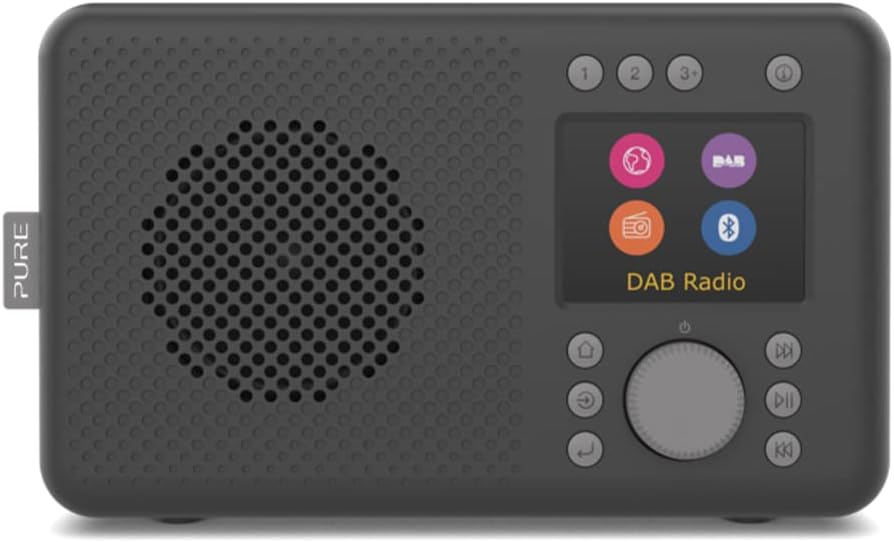
Figura 4.1: Davanti view of the Pure Elan Connect radio in Charcoal Black. It features a speaker grille on the left, a color TFT display on the right, and control buttons and a rotary dial below the display.

Figura 4.2: Posteriore view of the Pure Elan Connect radio. It shows the extendable telescopic antenna, a battery compartment cover, a 3.5mm headphone jack, and a micro USB power input port.

Figura 4.3: Dimensions of the Pure Elan Connect radio. The radio measures approximately 21.2 cm in length, 8.9 cm in width, and 12 cm in height.
5. Impostazione
5.1 Accensione
The Elan Connect can be powered using the supplied USB cable connected to a USB power adapter (not included) or by inserting 4 AA batteries (not included) into the battery compartment on the rear of the unit.
- Alimentazione di rete: Connect the micro USB end of the cable to the 'Input 5V 2.0A' port on the back of the radio and the other end to a suitable USB power adapter. Plug the adapter into a wall socket.
- Potenza della batteria: Open the battery compartment cover on the rear. Insert 4 AA batteries, ensuring correct polarity. Close the cover securely.
5.2 Procedura guidata di configurazione iniziale
The first time you power on the radio, it will guide you through an initial setup wizard.
- Selezione della lingua: Use the rotary dial to scroll through the available languages and press the dial to confirm your selection.
- Configurazione di rete (per radio Internet): The radio will prompt you to connect to a Wi-Fi network.
- Select 'Scan' to find available networks.
- Scegli la tua rete Wi-Fi dall'elenco.
- Enter the Wi-Fi password using the rotary dial to navigate characters and press to select.
- Una volta effettuata la connessione, la radio confermerà la connessione.
- Ora e data: The radio can automatically set the time and date via DAB or Internet connection. You can also set it manually.
6. Istruzioni per l'uso
6.1 video: This video demonstrates the physical overview of the Pure Elan Connect radio, including its compact size, the extendable antenna, and the basic interaction with the rotary dial and display for selecting modes and adjusting volume.
6.1 Passaggio da una modalità all'altra
The Elan Connect supports multiple listening modes: Internet Radio, DAB+, FM, and Bluetooth. Press the 'Mode' button (usually labeled with a house icon or 'Menu') to cycle through the available modes or access the main menu to select your desired source.
6.2 Radio Internet
Accedi a migliaia di stazioni radio Internet da tutto il mondo.
- Select 'Internet Radio' from the mode menu.
- È possibile sfogliare le stazioni in base alla posizione, al genere o cercare stazioni specifiche.
- Use the rotary dial to navigate and select stations.
- To save a station as a preset, press and hold one of the preset buttons (1, 2, 3+) until the display confirms the save.
Radio DAB+ 6.3
Goditi trasmissioni radiofoniche digitali di alta qualità.
- Per una ricezione ottimale, estendere completamente l'antenna telescopica.
- Select 'DAB+' from the mode menu.
- La radio cercherà automaticamente le stazioni DAB+ disponibili.
- Use the rotary dial to browse and select stations.
- Save stations to presets as described for Internet Radio.
6.4 Radio FM
Sintonizzati sulle trasmissioni FM tradizionali.
- Estendere completamente l'antenna telescopica.
- Select 'FM' from the mode menu.
- Use the rotary dial to manually tune or press the 'Scan' button to auto-scan for stations.
- Save stations to presets as described previously.
6.5 Connettività Bluetooth
Stream audio wirelessly from your smartphone, tablet, or other Bluetooth-enabled device.
- Select 'Bluetooth' from the mode menu. The radio will enter pairing mode and become discoverable.
- On your external device, enable Bluetooth and search for 'Pure Elan Connect'.
- Select the radio from the list to pair. Once paired, you can play audio through the radio's speaker.
6.6 Utilizzo dei preset
The Elan Connect allows you to save up to 20 presets for each source (DAB+, FM, Internet Radio).
- Salvataggio di un preset: While listening to a station, press and hold one of the numbered preset buttons (1, 2, or 3+). If you press 3+, the display will show a list of available preset slots (3-20). Use the rotary dial to select a slot and press to confirm.
- Richiamo di un preset: Briefly press the corresponding numbered preset button (1, 2, or 3+). If you press 3+, use the rotary dial to select the desired preset from the list and press to confirm.
6.7 Display and Volume Control
- Volume: Rotate the main dial to adjust the volume level.
- Luminosità dello schermo: Navigate to 'System Settings' > 'Display' to adjust the brightness level of the TFT color display.
7. Manutenzione
- Pulizia: Utilizzare un panno morbido e asciutto per pulire la superficie della radio. Non utilizzare detergenti abrasivi o solventi.
- Antenna: Maneggiare l'antenna telescopica con cura per evitare piegature o rotture.
- Aggiornamenti software: The radio supports over-the-air software updates. Check for updates periodically via 'System Settings' > 'Software Update' to ensure optimal performance and access to new features.
8. Risoluzione Dei Problemi
| Problema | Possibile causa/soluzione |
|---|---|
| Nessuna alimentazione / L'unità non si accende. |
|
| Nessun suono. |
|
| Ricezione DAB+/FM scadente. |
|
| Cannot connect to Wi-Fi / Internet Radio not working. |
|
| Problemi di associazione Bluetooth. |
|
9. Specifiche
| Caratteristica | Specificazione |
|---|---|
| Numero di modello | 248482 |
| Dimensioni (L x P x A) | Dimensioni: 21.2 x 8.9 x 12 cm |
| Peso | 460 grammi |
| Sintonizzatori radio | DAB+, FM, radio Internet |
| Versione Bluetooth | 5.0 |
| Display | Display TFT a colori da 2.4 pollici |
| Preimpostazioni | 20 per source (DAB+, FM, Internet Radio) |
| Uscita audio | Altoparlante integrato, jack per cuffie da 3.5 mm |
| Fonte di alimentazione | Micro USB (5V, 0.5A-2A), 4x AA Batteries |
10. Garanzia e supporto
Pure products are designed and manufactured to the highest standards. For warranty information and technical support, please refer to the official Pure websito o contattare il rivenditore locale.
Ufficiale Puro Websito: www.puro.com
Conservare la prova d'acquisto per eventuali richieste di garanzia.


