1. Introduzione
Grazie per l'acquistoasing the ELEPHAS Mini Portable Projector. This compact and versatile projector is designed to provide an immersive viewing experience for movies, videos, and games, whether at home or on the go. Its small size and multiple connectivity options make it an ideal entertainment solution for various environments. Please read this manual thoroughly before using the projector to ensure proper operation and to maximize its lifespan.
Cosa c'è nella scatola:
- ELEPHAS Mini Portable Projector
- Cavo HDMI
- cavo AV
- Telecomando
- Cavo di alimentazione
- Manuale dell'utente (questo documento)
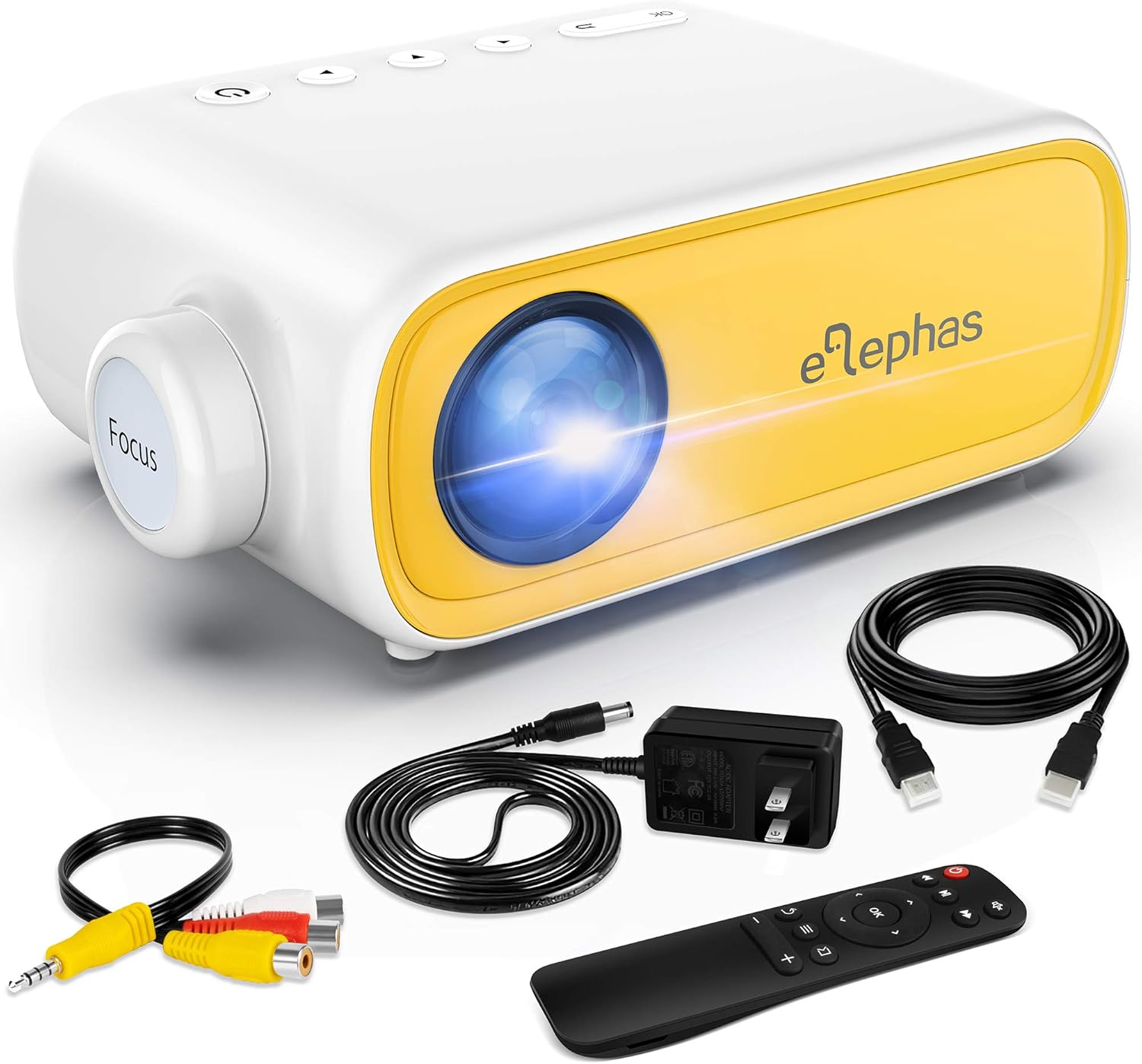
Figure 1.1: ELEPHAS Mini Portable Projector with its accessories including HDMI cable, AV cable, remote control, and power cord.
2. Informazioni sulla sicurezza
To ensure safe and optimal operation of your projector, please observe the following safety precautions:
- Alimentazione elettrica: Use only the original power adapter and cord provided with the projector. Ensure the power outlet matches the voltage requisiti.
- Ventilazione: Do not block the ventilation openings on the projector. Ensure adequate airflow around the device to prevent overheating.
- Posizionamento: Posizionare il proiettore su una superficie stabile e piana. Evitare di posizionarlo alla luce diretta del sole, vicino a fonti di calore o in ambienti con elevata umidità o polvere.
- Sicurezza degli occhi: Non guardare direttamente nell'obiettivo del proiettore quando lamp is on. The bright light can cause eye strain or damage.
- Pulizia: Scollegare l'alimentazione prima della pulizia. Utilizzare un panno morbido e asciutto per la pulizia esterna. Per la lente, utilizzare un panno specifico per la pulizia delle lenti.
- Bambini: Keep the projector and its accessories out of reach of small children. Adult supervision is recommended when children are using the device.
- Smontaggio: Non tentare di smontare o riparare il proiettore da soli. Per qualsiasi intervento di assistenza, rivolgersi a personale qualificato.
3. Prodotto finitoview e componenti
Familiarize yourself with the various parts and interfaces of your ELEPHAS Mini Portable Projector.

Figura 3.1: Posteriore e laterale view of the projector highlighting its input/output ports.
Componenti chiave:
- Lente: Proietta l'immagine sullo schermo.
- Anello di messa a fuoco: Regola la nitidezza dell'immagine proiettata.
- Porta DC-IN: Per collegare l'adattatore di alimentazione.
- Porta AV: Per collegare i dispositivi tramite il cavo AV incluso.
- Porta HDMI: For connecting devices with HDMI output (e.g., laptops, game consoles, TV boxes).
- Porta USB: Per collegare unità USB per riprodurre contenuti multimediali files.
- Porta di uscita audio (3.5 mm): Per collegare altoparlanti esterni o cuffie.
- Slot per scheda Micro SD/TF: Per la riproduzione di contenuti multimediali filedirettamente da una scheda Micro SD.
- Altoparlante incorporato: Fornisce uscita audio.
- Pulsanti di controllo: Power, navigation, and input selection buttons on top of the projector.
- Sensore del telecomando: Riceve i segnali dal telecomando.
4. Impostazione
4.1 Collegamento all'alimentazione:
- Collegare il cavo di alimentazione all'adattatore di corrente.
- Plug the power adapter into the DC-IN port on the projector.
- Collegare l'altra estremità del cavo di alimentazione a una presa a muro.
4.2 Placement and Projection Distance:
Place the projector on a stable surface. The optimal projection distance ranges from 0.8 to 2 meters (approximately 31 to 79 inches) for a screen size of 24 to 60 inches. Adjust the distance to achieve your desired screen size.

Figura 4.1: Distanze di proiezione consigliate e dimensioni dello schermo.
4.3 Focus Adjustment:
After powering on the projector, rotate the focus ring on the front of the projector until the image appears clear and sharp on the projection surface.
5. Istruzioni per l'uso
5.1 Accensione/Spegnimento:
- Per accendere: Premere il pulsante di accensione sul proiettore o sul telecomando. La spia si accenderà.
- Per spegnere: Premere nuovamente il pulsante di accensione. Il proiettore si spegnerà.
5.2 Input Source Selection:
After connecting your device, press the "Source" button on the projector or remote control to select the correct input source (e.g., HDMI, AV, USB, Micro SD).
5.3 Controllo del volume:
Use the volume buttons on the remote control to adjust the audio output level. You can also connect external speakers or headphones to the 3.5mm audio out port for enhanced sound.
6. Connettività
6.1 Connecting to Laptops/PCs/Game Consoles (HDMI):
- Connect one end of the HDMI cable to the HDMI port on your device.
- Connect the other end of the HDMI cable to the HDMI port on the projector.
- Select "HDMI" as the input source on the projector.
6.2 Connecting to USB Drives/Micro SD Cards:
- Insert your USB drive into the USB port or your Micro SD card into the TF card slot.
- Select "USB" or "Micro SD" as the input source.
- Navigare attraverso i media files using the remote control and select the desired content to play.
6.3 Connecting to Smartphones/Tablets:
To connect your smartphone or tablet, you will need an appropriate adapter (not included):
- For iOS devices (iPhone/iPad): A Lightning to HDMI adapter is required.
- For Android devices: A Micro USB to HDMI or Type-C to HDMI adapter is required.
- For wireless connection: A Wi-Fi network adapter (dongle) is needed.
Once connected via the adapter, select "HDMI" as the input source.

Figure 6.1: Smartphone connectivity options using HDMI adapters (adapters not included).
6.4 Streaming Services Note:
Due to HDCP copyright restrictions, this mini projector does not directly support streaming from apps like Netflix, Amazon Prime Video, or Hulu when connected via smartphone mirroring. To watch content from these services, you can use an external streaming device such as an Amazon Fire Stick or Roku Stick, connected to the projector's HDMI port.
7. Manutenzione
- Pulizia delle lenti: Gently wipe the projector lens with a soft, lint-free cloth specifically designed for optical lenses. Do not use abrasive cleaners or harsh chemicals.
- Pulizia esterna: Utilizzare un panno morbido e asciutto per pulire l'esterno del proiettore. Per macchie ostinate, utilizzare un panno leggermenteamp è possibile utilizzare un panno e poi asciugare con un panno asciutto.
- Ventilazione: Regularly check that the ventilation openings are free from dust and debris to ensure proper heat dissipation.
- Magazzinaggio: Quando non viene utilizzato per lunghi periodi, conservare il proiettore in un luogo fresco e asciutto, lontano dalla luce solare diretta e da temperature estreme. Si consiglia di utilizzare l'imballaggio originale per la conservazione.
8. Risoluzione Dei Problemi
| Problema | Possibile causa | Soluzione |
|---|---|---|
| Nessun potere | Cavo di alimentazione non collegato; problema con la presa di corrente. | Assicurarsi che il cavo di alimentazione sia collegato saldamente. Provare una presa di corrente diversa. |
| Nessuna immagine | Incorrect input source selected; device not connected properly. | Select the correct input source (HDMI, AV, USB). Check all cable connections. |
| Immagine sfocata | Focus not adjusted; projection distance incorrect. | Rotate the focus ring until the image is clear. Adjust the projector's distance from the screen. |
| Nessun suono | Volume too low; external speakers not connected; audio format not supported. | Increase volume. Ensure external speakers are connected correctly or disconnect them to use built-in speaker. Check audio format compatibility. |
| Il telecomando non funziona | Batteries low/dead; sensor blocked. | Replace batteries. Ensure no obstructions between remote and projector sensor. |
9. Specifiche
| Caratteristica | Dettaglio |
|---|---|
| Numero di modello | JingHuier |
| Marca | ELEFE |
| Dimensioni del prodotto | 5 x 3.6 x 2.16 pollici |
| Peso dell'articolo | 10.4 once |
| Risoluzione dello schermo | 1920 x 1080 (supportato) |
| Tecnologia di connettività | HDMI, USB, AV, 3.5mm Audio, Micro SD/TF |
| Caratteristica speciale | Altoparlante incorporato, portatile |
| Produttore | ELEFE |
| Prima data disponibile | 28 ottobre 2020 |

Figure 9.1: The compact dimensions of the projector, emphasizing its portability.
10. Garanzia e supporto
ELEPHAS products are manufactured to the highest quality standards. For information regarding warranty coverage, please refer to the warranty card included with your product or visit the official ELEPHAS websito.
If you encounter any issues or have questions about your ELEPHAS Mini Portable Projector, please contact our customer support team. Provide your model number (JingHuier) and a detailed description of the issue for prompt assistance.
Per ulteriore assistenza, puoi visitare il Negozio ELEPHAS su Amazon.


