Introduzione
The Wireless Bluetooth Pro Earbuds are designed to provide a high-quality audio experience with advanced features for daily use. These true wireless stereo earbuds offer enhanced bass and clear sound, making them suitable for music playback, phone calls, and active lifestyles. Featuring Bluetooth 5.0 technology, they ensure stable connectivity and efficient power consumption. The lightweight design and included charging case provide convenience and portability.
Cosa c'è nella scatola
- Wireless Bluetooth Pro Earbuds (Left and Right)
- Custodia di ricarica portatile
- Cavo di ricarica USB di tipo C
Prodotto finitoview

The Wireless Bluetooth Pro Earbuds shown inside their open charging case. A small green indicator light is visible on the front of the case, indicating power or charging status.

The two Wireless Bluetooth Pro Earbuds are displayed above their closed charging case, illustrating the compact design of both components.
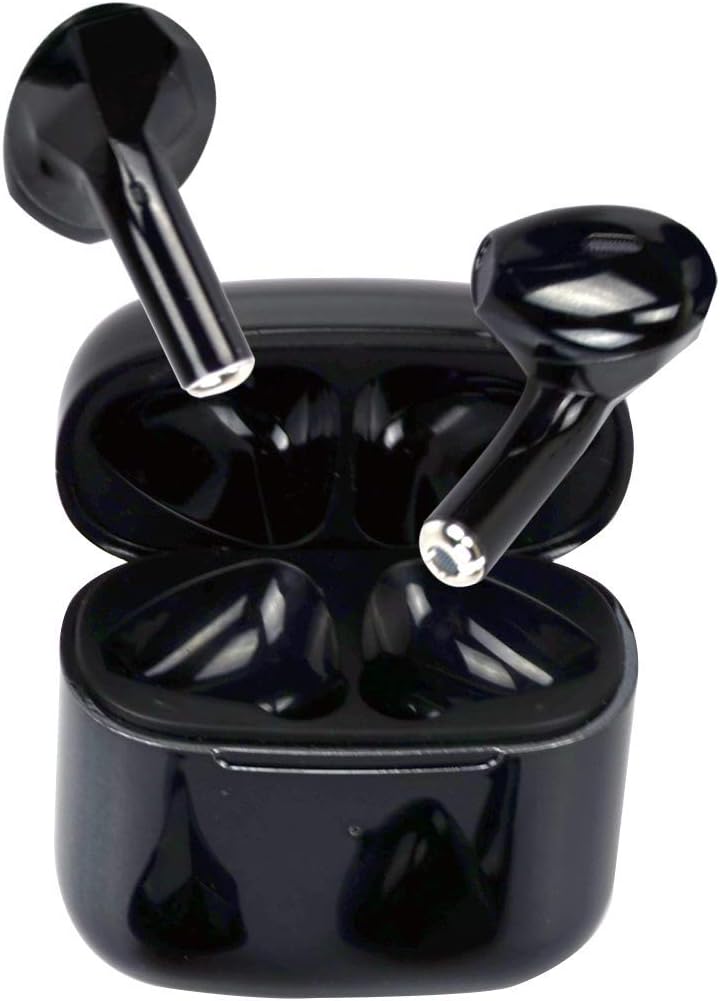
A view of the Wireless Bluetooth Pro Earbuds positioned at an angle within their open charging case, highlighting the internal design and charging contacts.
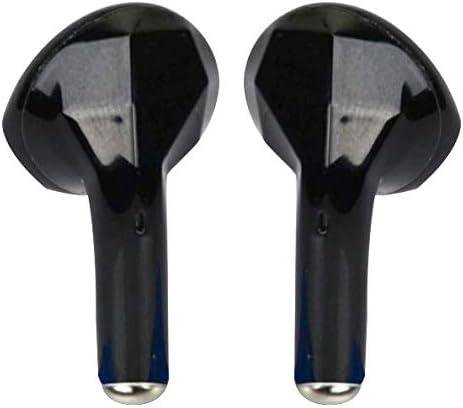
A close-up image of the two individual Wireless Bluetooth Pro Earbuds, showcasing their sleek black finish and ergonomic shape.

The compact charging case for the Wireless Bluetooth Pro Earbuds is shown resting in the palm of a hand, demonstrating its small and portable size.
Impostare
1. Ricarica iniziale
Before first use, fully charge the earbuds and the charging case. Connect the provided USB Type-C charging cord to the charging case and a power source. The charging case can be fully charged in approximately 90 minutes. The earbuds will charge automatically when placed inside the case.
2. Associazione con il tuo dispositivo
- Assicurarsi che gli auricolari siano carichi e inseriti nella custodia di ricarica.
- Aprire la custodia di ricarica. Gli auricolari entreranno automaticamente in modalità di associazione.
- Sul tuo dispositivo (smartphone, tablet, ecc.), vai alle impostazioni Bluetooth.
- Cercare new devices and select "Pro" or "Wireless Express Pro" from the list of available devices.
- Una volta effettuata la connessione, sentirai un tono di conferma e gli auricolari saranno pronti per l'uso.
Gli auricolari utilizzano la tecnologia Bluetooth 5.0 per una connessione stabile ed efficiente.
Istruzioni per l'uso
Controlli touch
The Wireless Bluetooth Pro Earbuds feature intuitive touch controls for managing audio playback and calls. Specific touch gestures for functions like play/pause, skip track, answer/end call, and activating voice assistant (Siri) are detailed below. Refer to the quick start guide included with your product for a full list of touch commands.
Effettuare e ricevere chiamate
The earbuds are equipped with a built-in microphone, allowing for clear hands-free communication. Use the touch controls to answer, end, or reject calls. The noise-cancelling function helps ensure clear phone calls.
Assistente vocale (Siri)
The earbuds support voice assistant activation, including Siri. Consult your quick start guide for the specific touch command to activate your device's voice assistant.
Resistenza all'acqua
With an IPX6 waterproof rating, these earbuds are protected against sweat and rain, making them suitable for workouts and outdoor activities. While resistant to splashes and light rain, they are not designed for submersion in water.
Manutenzione
Pulizia
Regularly clean your earbuds and charging case with a soft, dry, lint-free cloth. Do not use abrasive cleaners, alcohol, or chemical solvents. Ensure no moisture enters the charging ports or speaker grilles.
Magazzinaggio
When not in use, store the earbuds in their charging case to protect them and keep them charged. Store the case and earbuds in a cool, dry place away from extreme temperatures and direct sunlight.
Risoluzione dei problemi
- Gli auricolari non si associano: Ensure both earbuds are charged and removed from the case. Turn off and on your device's Bluetooth, then try pairing again. If issues persist, try resetting the earbuds (refer to your quick start guide for reset instructions).
- Sound cutting out or unstable connection: Ensure the earbuds are within the Bluetooth range (up to 10 meters) of your device. Avoid physical obstructions between the earbuds and your device. Fully charge both earbuds and the case.
- Un auricolare non funziona: Riposiziona entrambi gli auricolari nella custodia di ricarica, chiudi il coperchio, attendi qualche secondo, quindi apri il coperchio e riprova. Assicurati che entrambi gli auricolari siano carichi.
- Gli auricolari non si caricano: Verificare che il cavo di ricarica sia saldamente collegato sia alla custodia che alla fonte di alimentazione. Assicurarsi che i contatti di ricarica sugli auricolari e all'interno della custodia siano puliti e privi di detriti.
Specifiche
| Nome del modello | Professionista |
| Tecnologia di connettività | Wireless (Bluetooth) |
| Versione Bluetooth | 5.0 |
| Portata Bluetooth | Fino a 10 metri |
| Durata della batteria (auricolari) | 3-5 hours playtime per single charge |
| Tempo di riproduzione della custodia di ricarica | Up to 20 hours cyclic playtime (with case recharges) |
| Tempo di ricarica (custodia) | Approx. 90 minutes (Type-C) |
| Livello di resistenza all'acqua | IPX6 (impermeabile) |
| Peso degli auricolari | 2.9 g (ciascuno) |
| Peso della custodia di ricarica | 23.7g |
| Tipo di controllo | Controllo touch |
| Tipo di driver audio | Driver dinamico |
| Materiale | Plastica |
| Codice UPC | 850460007985 |
Garanzia e supporto
For warranty information and customer support, please refer to the documentation included with your purchase or contact Wireless Express directly through their official websito o tramite i canali di assistenza clienti. Conservare la prova d'acquisto per eventuali reclami in garanzia.


