Introduzione
This manual provides detailed instructions for the installation, operation, and maintenance of your Feit Electric Smart Security Camera (Model: CAM/WM/WiFi/BAT). This battery-powered, 1080p HD camera offers motion detection, night vision, and two-way audio, designed for outdoor use to enhance your home security.

Image: The Feit Electric Smart Security Camera, white in color, shown with its retail packaging. The camera features two antennas and a wall-mount base. The packaging highlights features like WiFi connectivity, Alexa and Google Home compatibility, and no monthly fees.
Contenuto della confezione
- 1 x Feit Electric Smart Security Camera (CAM/WM/WiFi/BAT)
- Hardware di montaggio (viti, tasselli)
- Cavo di ricarica USB
- Manuale dell'utente (questo documento)
Guida all'installazione
1. Caricare la fotocamera
Before initial use, fully charge the camera's battery using the provided USB charging cable. Connect the cable to the camera's charging port and a standard USB power adapter (not included). The charging indicator light will show the charging status.
2. Downloading the Feit Electric App
The Feit Electric Smart Security Camera operates via the Feit Electric mobile application. Download the app from the Apple App Store (for iOS devices) or Google Play Store (for Android devices).

Image: A smartphone screen displaying the Feit Electric app interface, with icons for playback, album, night vision, motion detection, siren, light, message, direction, and features. Below the phone, logos for the App Store and Google Play are visible, indicating where to download the app.
3. Associazione della fotocamera all'app
- Open the Feit Electric app and create an account or log in.
- Tocca l'icona "+" per aggiungere un nuovo dispositivo.
- Select "Security Camera" from the device list.
- Follow the on-screen instructions to connect the camera to your 2.4GHz Wi-Fi network. Ensure your smartphone is connected to the same 2.4GHz network during setup.
- The app will guide you through scanning a QR code with the camera to complete the pairing process.
4. Montaggio della fotocamera
Scegliere una posizione esterna adatta per il montaggio della telecamera, assicurandosi che abbia una visuale libera view of the area you wish to monitor and is within range of your Wi-Fi network. The camera is designed for wall mounting and is water-resistant (IP65 rated).
- Mark the desired drilling spots using the mounting bracket as a template.
- Praticare dei fori pilota e, se necessario, inserire i tasselli a muro.
- Fissare la staffa di montaggio alla parete utilizzando le viti fornite.
- Attach the camera to the mounting bracket, ensuring it is securely locked in place. The camera features an easy twist-and-lock base for secure attachment and removal for recharging.
- Regolare l'angolazione della telecamera in modo ottimale viewing.

Image: A white Feit Electric Smart Security Camera mounted on the exterior wall of a house, overlooking a patio area. The image emphasizes the camera's completely wireless nature and suitability for outdoor installation.

Immagine: un primo piano view of the Feit Electric Smart Security Camera mounted on a wall, highlighting its twist and lock base mechanism for easy removal and recharging. The background shows a blurred indoor setting.
Istruzioni per l'uso
1. Vivere View
Access the Feit Electric app to view cibo vivotage from your camera at any time. Select the camera from your device list to open the live stream. You can monitor your property remotely from anywhere with an internet connection.
2 Rilevamento del movimento e avvisi
The camera features adjustable motion detection. When motion is detected within the configured area, the camera will begin recording and send an alert notification to your smartphone. You can customize sensitivity and detection zones within the app.
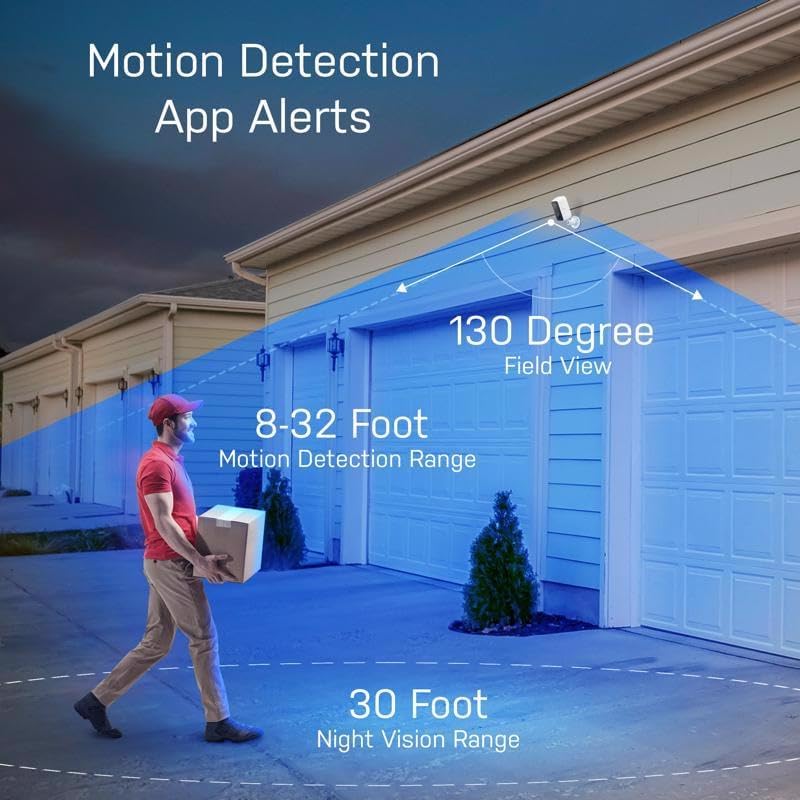
Image: An illustration showing the Feit Electric Smart Security Camera's motion detection capabilities. It indicates a 130-degree field of view, an 8-32 foot motion detection range, and a 30-foot night vision range, with a person walking in the detection zone.
3. Audio bidirezionale
Utilize the built-in microphone and speaker for two-way communication. This allows you to hear what's happening near the camera and speak through the camera from your smartphone, useful for interacting with visitors or deterring unwanted activity.

Image: A hand holding a smartphone displaying the Feit Electric app, showing a live view from the camera. Speech bubbles indicate two-way audio communication, with phrases like "Hi, your package is here." and "Please leave at the door, thank you."
4. Visione notturna
The integrated IR sensor provides clear visibility in low-light conditions and complete darkness, with a night vision range of up to 30 feet. The camera automatically switches to night vision mode when ambient light is insufficient.
5. Registrazione e archiviazione video
Recorded events triggered by motion detection can be stored on a MicroSD card (up to 128GB, not included). You can access and download recorded videos wirelessly through the Feit Electric app. No monthly fees or subscriptions are required for local storage.
6. App Features and Integration
The Feit Electric app allows for comprehensive management of your camera and other Feit Electric smart devices. Features include:
- Accesso remoto: Control and monitor your camera from anywhere.
- Raggruppamento: Combine multiple cameras for a unified view della tua proprietà.
- Pianificazione: Set schedules for camera operation, such as turning on/off motion detection.
- Controllo vocale: Compatible with Amazon Alexa and Google Assistant for voice commands when connected through the Feit app.
- Condivisione dispositivi: Condividi l'accesso alla telecamera con i membri della famiglia.

Image: A smartphone screen displaying the Feit Electric app with multiple camera feeds, illustrating the ability to combine cameras for a whole home view. Feeds are labeled 'Nursery', 'Living Room', 'Doorbell', and 'Backyard'.

Image: A smartphone screen showing the scheduling interface within the Feit Electric app, demonstrating how users can set specific times for device actions, such as turning on/off.

Image: A smart speaker (resembling an Amazon Echo Dot or Google Nest Mini) with the Feit Electric logo and text indicating compatibility with Alexa and Hey Google, illustrating the voice control feature for the camera.
Manutenzione
1. Ricarica della batteria
The camera is powered by a detachable battery pack. When the battery level is low, remove the camera from its mount using the twist-and-lock base and recharge it using the USB cable. Ensure the camera is fully charged for optimal performance and battery life.
2. Pulizia della fotocamera
Pulire periodicamente l'obiettivo e il corpo della fotocamera con un panno morbido eamp cloth to remove dust, dirt, or smudges that may affect video clarity. Do not use harsh chemicals or abrasive cleaners.
3. Considerazioni ambientali
The camera has an IP65 rating, meaning it is protected against dust ingress and low-pressure water jets from any direction. While designed for outdoor use, avoid submerging the camera in water or exposing it to extreme weather conditions beyond its rated capabilities.

Image: A Feit Electric Smart Security Camera mounted on an outdoor wall, with simulated rain falling, illustrating its water-resistant design suitable for various weather conditions.
Risoluzione dei problemi
- Fotocamera non in linea: Ensure the camera is charged and within range of your 2.4GHz Wi-Fi network. Restart your Wi-Fi router and the camera. Check if the Wi-Fi signal strength is adequate in the camera's location.
- Avvisi di movimento non ricevuti: Verify that motion detection is enabled in the app settings and that app notifications are allowed on your smartphone. Adjust motion sensitivity if necessary.
- Durata breve della batteria: Rilevamento frequente del movimento, in tempo reale view streaming, and two-way audio usage can drain the battery faster. Ensure the camera is fully charged. Consider reducing motion detection sensitivity or frequency if alerts are excessive.
- Scarsa qualità video: Check your Wi-Fi signal strength. Ensure the camera lens is clean and free from obstructions. If using a MicroSD card, ensure it is functioning correctly.
- Problemi di accoppiamento: Confirm your Wi-Fi network is 2.4GHz. Ensure your phone is connected to the same 2.4GHz network during setup. Reset the camera to factory settings (refer to app instructions for reset procedure) and try pairing again.
Specifiche
| Caratteristica | Dettaglio |
|---|---|
| Numero di modello | CAM/WM/WIFI/BAT |
| Risoluzione video | Risoluzione 1080p |
| Connettività | Wi-Fi a 2.4 GHz |
| Fonte di alimentazione | Battery Powered (Lithium Ion, 9600 mAh) |
| Uso interno/esterno | All'aperto |
| Rilevamento del movimento | Sì (sensore di movimento) |
| Gamma di visione notturna | Fino a 30 piedi |
| Audio bidirezionale | SÌ |
| Magazzinaggio | Scheda MicroSD (fino a 128 GB, non inclusa) |
| Campo di View | 130 gradi |
| Resistenza alle intemperie | Grado di protezione IP65 |
| Dimensioni (L x P x A) | 7.2 x 2.7 x 9.1 pollici |
| Peso dell'articolo | 1.1 libbre |
| Dispositivi compatibili | Android, iOS (Feit App) |
| Compatibilità con il controllo vocale | Amazon Alexa, Assistente Google |
Informazioni sulla garanzia
This Feit Electric Smart Security Camera comes with a one-year warranty. For warranty claims or service, please contact Feit Electric customer service.
Assistenza clienti
For further assistance, technical support, or customer service inquiries, please contact Feit Electric:
- E-mail: info@feit.com
- Numero verde: 1-866-326-BULB (1-866-326-2852)
- Centro assistenza in linea: Visita help.feit.com/hc/en-us for FAQs and support articles.

Image: A graphic indicating "24/7 HELP" and instructing users to visit feit.com/help for customer support, accompanied by a QR code.
Nota importante sui video
While this product may have associated instructional videos, the necessary video URLs were not provided in the product data. Therefore, no videos could be embedded in this manual.


