1. Impostazione
1.1 Cosa è incluso
Il pacchetto contiene i seguenti articoli:
- 1 Smart Security Camera (CAM/PAN/WIFI)
- 1 Power Adapter
- 1 USB Cord (1 meter)

Figure 1: Packaging for the Feit Electric Smart Indoor Camera with Pan & Tilt, illustrating included components.
1.2 Prima di iniziare
Ensure you have the following before proceeding with installation:
- A stable 2.4 GHz Wi-Fi network. The camera is not compatible with 5 GHz networks.
- A smartphone or tablet with the Feit Electric App installed (available on Android and iOS app stores).
- An available standard electrical outlet for power.
- Optional: A Micro-SD card (up to 128GB) for local video storage (not included).
1.3 Passaggi di installazione
- Download the Feit Electric App: Cercare "Feit Electric" in your device's app store and install the application.
- Creare un account: Apri l'app e segui le istruzioni sullo schermo per creare un nuovo account utente o per effettuare l'accesso se ne hai già uno.
- Accendere la fotocamera: Connect the provided USB cord to the camera and the power adapter. Plug the power adapter into a standard electrical outlet. The camera will power on and indicate readiness for pairing (refer to the camera's LED indicator for status).
- Aggiungi dispositivo nell'app: In the Feit Electric App, tap the "+" icon to add a new device. Select the "Security Camera" category and follow the app's instructions to connect your camera to your 2.4 GHz Wi-Fi network. You may need to scan a QR code displayed on your phone with the camera lens.
- Posizionamento: Position the camera indoors on a flat surface or mount it using appropriate hardware (not included) in your desired location. Ensure it has a clear line of sight to the area you wish to monitor.
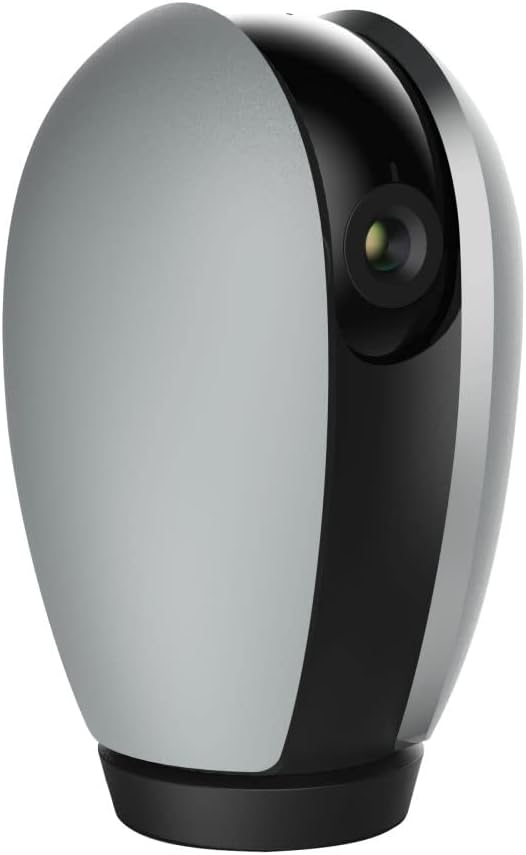
Figura 2: Fronte view of the Feit Electric Indoor Security Camera, ready for placement.
2. Utilizzo della fotocamera
2.1 Controllo app e Live View
Once connected, you can access your camera from anywhere using the Feit Electric App. Open the app and select your camera from the device list to view a live feed. Multiple users can be granted access to control the camera through app sharing features.
2.2 Funzionalità di panoramica e inclinazione
The camera features remote pan and tilt capabilities, allowing you to adjust the field of vision. Within the live view in the Feit Electric App, use the directional controls to:
- Pan: Rotate the camera horizontally from 0° to 355°.
- Inclinazione: Regolare la telecamera verticalmente da -10° a 75°.
2.3 Rilevamento del movimento e visione notturna
The camera is equipped with advanced motion detection, capable of detecting activity up to 32 feet away. You can configure the app to send push notifications to your mobile device when motion is detected. The camera also features night vision, providing clear visibility in low-light conditions up to 30 feet using Night Color technology.
2.4 Audio bidirezionale
Utilize the built-in microphone and speaker for two-way communication. This allows you to listen to audio from the camera's location and speak through the camera from your mobile device via the app.
2.5 Registrazione e archiviazione video
The camera records video in 1080p HD resolution. Recorded events can be stored locally on a Micro-SD card (up to 128GB, sold separately). A 128GB card can store approximately 14,400 minutes (10 days) of video. There are no monthly fees or subscriptions required for local storage. Videos can be downloaded wirelessly through the Feit Electric App.
2.6 Integrazione della casa intelligente
The Feit Electric Indoor Security Camera is compatible with Amazon Alexa and Google Assistant. Follow the instructions within the Feit Electric App or your smart home assistant's app to link your devices and enable voice control for certain camera functions.

Figure 3: The camera integrates with Amazon Alexa and Google Assistant for enhanced smart home control.
3. Manutenzione
3.1 Pulizia
To maintain optimal performance, periodically clean the camera lens and body with a soft, dry cloth. Avoid using liquid cleaners or abrasive materials that could damage the camera's surfaces.
3.2 Aggiornamenti software
Regularly check the Feit Electric App for available firmware updates for your camera. Keeping the firmware updated ensures you have the latest features, security enhancements, and bug fixes.
3.3 Gestione scheda SD
If using a Micro-SD card for storage, it is recommended to periodically format the card through the Feit Electric App to ensure stable recording and prevent data corruption. Replace the SD card if you experience consistent recording issues or if the card reaches its end of life.
4. Risoluzione Dei Problemi
If you encounter issues with your Feit Electric Indoor Security Camera, refer to the following common troubleshooting steps:
- La fotocamera non si connette al Wi-Fi:
- Assicurati che la tua rete Wi-Fi sia a 2.4 GHz. La fotocamera non supporta reti a 5 GHz.
- Verifica che la password Wi-Fi sia stata inserita correttamente nell'app.
- Avvicina la telecamera al router Wi-Fi per migliorare la potenza del segnale.
- Riavvia il router Wi-Fi e la telecamera.
- Niente dal vivo View or Offline Status:
- Controlla la tua connessione Internet domestica.
- Assicurarsi che la fotocamera sia accesa e che l'adattatore di alimentazione sia collegato saldamente.
- Restart the Feit Electric App.
- Recording Issues (with SD Card):
- Ensure the Micro-SD card is correctly inserted into the camera.
- Check if the SD card is full. Format the card via the app if necessary (this will erase all data).
- Verificare che la scheda SD non sia danneggiata o difettosa.
- Il rilevamento del movimento non funziona:
- Check the motion detection settings in the Feit Electric App to ensure it is enabled and sensitivity is adjusted appropriately.
- Assicurarsi che non vi siano ostacoli che bloccano la telecamera view.
- Problemi audio bidirezionali:
- Ensure your phone's microphone and speaker permissions are granted to the Feit Electric App.
- Controlla le impostazioni del volume sul tuo telefono e all'interno dell'app.
For further assistance, consult the help section within the Feit Electric App or contact customer support.
5. Specifiche
| Caratteristica | Specificazione |
|---|---|
| Numero di modello | CAM/PAN/WIFI |
| Uso interno/esterno | Al chiuso |
| Fonte di alimentazione | Elettrico con cavo (120 volt, 10 watt) |
| Protocollo di connettività | Wi-Fi (solo 2.4 GHz) |
| Risoluzione di acquisizione video | 1080p HD (25 fotogrammi al secondo) |
| Gamma di visione notturna | 30 Feet (Night Color technology) |
| Viewangolo di ing | 115 gradi |
| Pan Range | 0° - 355° |
| Gamma di inclinazione | -10° - 75° |
| Audio bidirezionale | SÌ |
| Sensore di movimento | Yes (up to 32ft detection) |
| Magazzinaggio | Micro-SD card (up to 128GB, not included) |
| Dimensioni (L x P x A) | 6.6 x 3.6 x 3.7 pollici |
| Peso dell'articolo | 11.2 once |
| Dispositivi compatibili | Smartphone, Amazon Alexa, Assistente Google |
| Codice UPC | 017801722208 |
| Materiale | Plastica |
| Certificazione | ETL |
6. Garanzia e supporto
6.1 Informazioni sulla garanzia
This Feit Electric Indoor Security Camera comes with a one-year warranty from the date of purchase. Please retain your proof of purchase for warranty claims.
6.2 Assistenza clienti
For technical support, warranty inquiries, or any questions regarding your Feit Electric product, please contact Feit Electric customer service:
- E-mail: info@feit.com
- Numero verde: 1-866-326-BULB (1-866-326-2852)
Puoi anche visitare il sito ufficiale Negozio Feit Electric su Amazon per maggiori informazioni e risorse sui prodotti.


