1. Introduzione
This manual provides detailed instructions for the installation, operation, maintenance, and troubleshooting of your Palit GeForce RTX 3060 Ti Dual OC graphics card. Please read this manual thoroughly before installing and using the product to ensure proper functionality and to prevent damage.
The Palit GeForce RTX 3060 Ti Dual OC is a high-performance graphics card designed for gaming and demanding graphical applications. It features 8GB of GDDR6 memory, a dual-fan cooling system, and supports PCI Express 4.0.
2. Informazioni sulla sicurezza
Per evitare lesioni e danni alle apparecchiature, attenersi alle seguenti linee guida di sicurezza:
- Scollegare sempre l'alimentatore dal computer prima di installare o rimuovere qualsiasi componente.
- Wear an anti-static wrist strap or frequently touch a grounded metal object to discharge static electricity before handling the graphics card. Static discharge can damage electronic components.
- Handle the graphics card by its edges. Avoid touching the gold-plated PCI Express connector or other components on the board.
- Ensure your computer case has adequate ventilation to prevent overheating.
- Non esporre la scheda grafica a umidità o temperature estreme.
- Keep the graphics card away from children.
3. Contenuto della confezione
Verifica che tutti gli articoli siano presenti nella confezione del prodotto:
- Palit GeForce RTX 3060 Ti Dual OC Graphics Card
- Guida all'installazione rapida (questo documento)
- Driver CD (or instructions for online download)
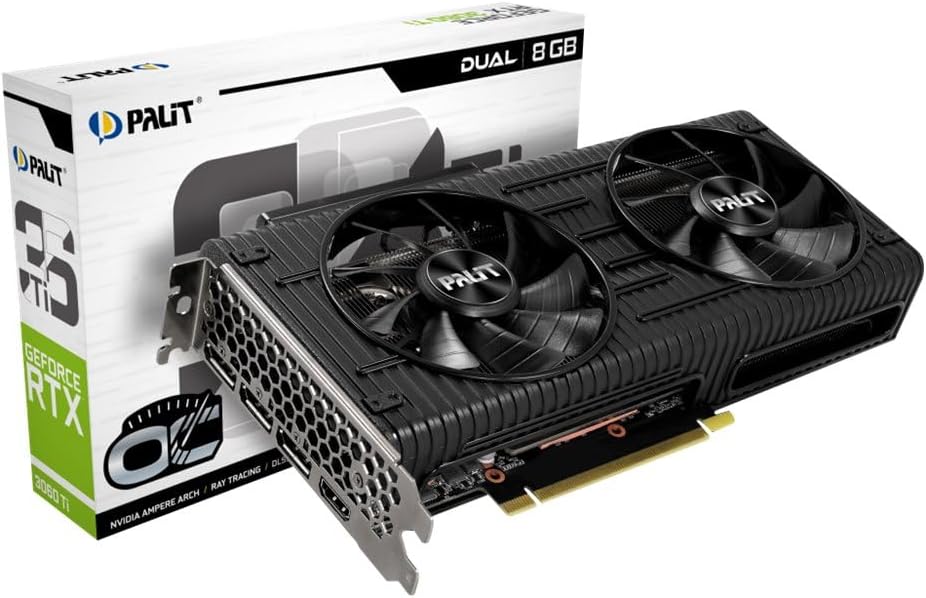
Image: The Palit GeForce RTX 3060 Ti Dual OC graphics card shown alongside its retail packaging.
4. Impostazione
4.1. Requisiti di sistema
Prima dell'installazione, assicurati che il tuo sistema soddisfi i seguenti requisiti minimi:
- Scheda madre compatibile con PCI Express con uno slot grafico x16.
- Alimentatore minimo da 600 W con un connettore di alimentazione PCIe a 8 pin.
- Microsoft Windows 10 64-bit or Linux 64-bit operating system.
- Memoria di sistema da 8 GB (consigliati 16 GB).
- Connessione Internet per scaricare e aggiornare i driver.
4.2. Installazione fisica
Follow these steps to install the graphics card into your computer:
- Spegnere il computer e scollegare il cavo di alimentazione dalla presa a muro.
- Open your computer case. Refer to your computer case manual for specific instructions.
- Individua uno slot PCI Express x16 disponibile sulla scheda madre. Rimuovi eventuali coperchi degli slot di espansione che li bloccano.
- Carefully align the graphics card with the PCI Express x16 slot. Press down firmly until the card is securely seated in the slot.
- Secure the graphics card to the computer case with the screw from the expansion slot cover.
- Connect the 8-pin PCIe power connector from your power supply to the corresponding port on the graphics card. Ensure a secure connection.
- Chiudere il case del computer e ricollegare il cavo di alimentazione.

Immagine: dall'alto verso il basso view of the Palit GeForce RTX 3060 Ti graphics card, highlighting its dual cooling fans and the heatsink assembly.
4.3. Installazione del driver
After physical installation, you must install the graphics drivers:
- Accendi il computer.
- If an internet connection is available, Windows may automatically install a basic display driver. For optimal performance, download the latest drivers from the official NVIDIA webposto (www.nvidia.com/drivers) or the Palit webposto (www.palit.com/download).
- Eseguire il programma di installazione del driver scaricato e seguire le istruzioni visualizzate sullo schermo.
- Riavviare il computer una volta completata l'installazione del driver.
5. Operativo
5.1. Collegamento dei display
The Palit GeForce RTX 3060 Ti Dual OC graphics card features multiple display outputs:
- 3x DisplayPort
- 1x HDMI
Connect your monitor(s) to the available ports on the graphics card. Ensure your display cables are securely connected to both the graphics card and your monitor.

Immagine: Un angolo view of the graphics card, highlighting the DisplayPort and HDMI output connectors on the rear I/O bracket.
5.2. Configurazione software
After driver installation, you can access the NVIDIA Control Panel or Palit ThunderMaster utility for advanced settings. These tools allow you to:
- Regola le risoluzioni dello schermo e le frequenze di aggiornamento.
- Configure multi-monitor setups.
- Optimize 3D settings for games and applications.
- Monitor GPU temperature and fan speed (ThunderMaster).
- Perform overclocking (ThunderMaster, use with caution).
6. Manutenzione
Proper maintenance ensures the longevity and performance of your graphics card:
- Pulizia: Periodically clean dust from the fans and heatsink using compressed air. Ensure the computer is powered off and unplugged before cleaning. Hold the fan blades gently to prevent them from spinning rapidly during cleaning, which can damage the bearings.
- Aggiornamenti driver: Regularly check for and install the latest graphics drivers from NVIDIA to ensure optimal performance, stability, and access to new features.
- Monitoraggio della temperatura: Use monitoring software (e.g., Palit ThunderMaster, MSI Afterburner) to keep an eye on GPU temperatures, especially during heavy loads. Ensure temperatures remain within safe operating limits.
7. Risoluzione Dei Problemi
In caso di problemi, fare riferimento ai seguenti problemi comuni e alle relative soluzioni:
| Problema | Possibile soluzione |
|---|---|
| Nessuna visualizzazione sullo schermo dopo l'installazione. |
|
| Il sistema si blocca o si arresta in modo anomalo durante l'uso. |
|
| Poor performance in games or applications. |
|
| I ventilatori non girano. | Many modern graphics cards feature a 0dB fan mode, where fans only spin up when the GPU reaches a certain temperature (e.g., 50°C). This is normal behavior for silent operation under light loads. If fans do not spin under heavy load and temperatures are high, check power connections and driver installation. |
8. Specifiche tecniche
Key specifications for the Palit GeForce RTX 3060 Ti Dual OC graphics card:
| Caratteristica | Specificazione |
|---|---|
| Coprocessore grafico | NVIDIA GeForce RTX 3060 Ti |
| Graphics Ram Size | 8 GB GDDR6 |
| Orologio di potenziamento | 1695 MHz |
| Interfaccia di uscita video | 3x DisplayPort, 1x HDMI |
| Interfaccia | PCI Express 4.0 |
| Dimensioni del prodotto | 9.72 x 4.72 x 1.57 pollici (24.7 x 12.0 x 4.0 cm) |
| Peso dell'articolo | 7 once (198 grammi) |
| Numero di modello | NE6306TS19P2-190AD |
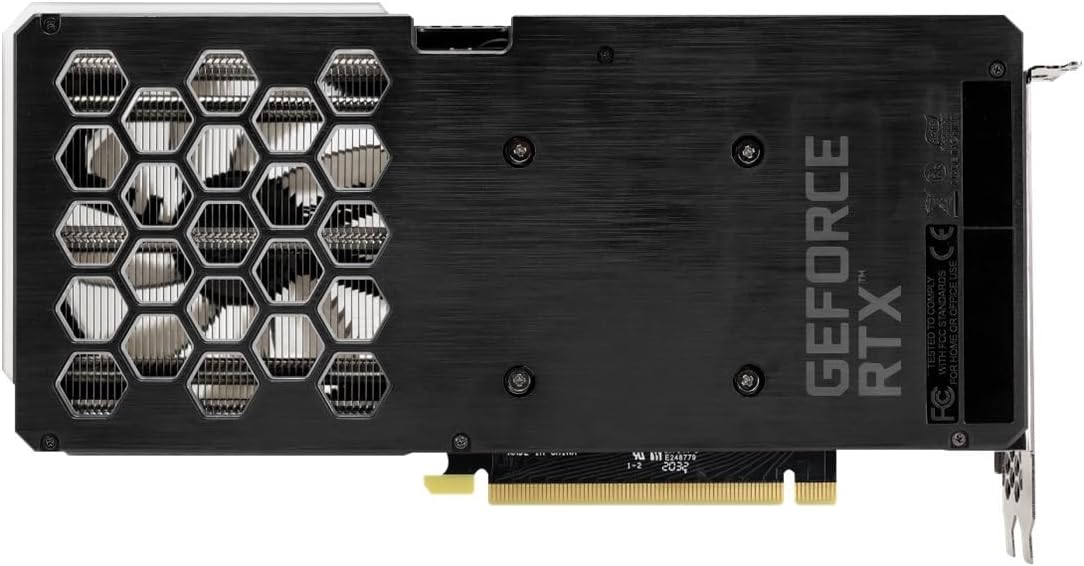
Image: The backplate of the Palit GeForce RTX 3060 Ti graphics card, showing its design and ventilation.
9. Garanzia e supporto
9.1. Informazioni sulla garanzia
This Palit GeForce RTX 3060 Ti Dual OC graphics card is backed by Palit's 2-year manufacturer's warranty. This warranty covers defects in materials and workmanship under normal use. For full warranty terms and conditions, please refer to the official Palit website or contact Palit customer support.
9.2. Assistenza clienti
If you require technical assistance or have questions regarding your product, please visit the official Palit websito per risorse di supporto, FAQ e informazioni di contatto:
- Palit Official Websito: www.palit.com
- Pagina di supporto: Look for a 'Support' or 'Contact Us' section on the websito.
When contacting support, please have your product model number (NE6306TS19P2-190AD) and purchase information readily available.


