Introduzione
The Risebass Portable Karaoke Machine is a versatile and compact audio system designed for entertainment. It features Bluetooth connectivity, FM radio, and support for various media inputs, along with integrated LED party lights and a wired microphone for an immersive karaoke experience. Its portable design makes it suitable for use in various settings.
Cosa c'è nella scatola
Si prega di controllare il contenuto del pacco per assicurarsi che siano presenti tutti gli articoli:
- Risebass Portable Karaoke Machine (Bluetooth Speaker)
- Microfono cablato
- Tracolla
- Cavo del microfono
- Cavo di ricarica

Istruzioni di installazione
- Ricarica dell'unità: Before first use, fully charge the karaoke machine using the provided charging cable. Connect the small end of the charging cable to the 'DC 5V/AUX-in' port on the unit and the USB end to a compatible USB power adapter (not included). The charging indicator light will show charging status.
- Fissaggio della tracolla: Locate the two attachment points on the sides of the karaoke machine. Securely clip each end of the shoulder strap to these points for easy portability.
- Collegamento del microfono: Insert the microphone cable's XLR end (the larger, round end) into the microphone's input port. Then, insert the 6.35mm (1/4 inch) jack end of the microphone cable into the 'MIC' input port on the karaoke machine.
Istruzioni per l'uso
Accensione/spegnimento
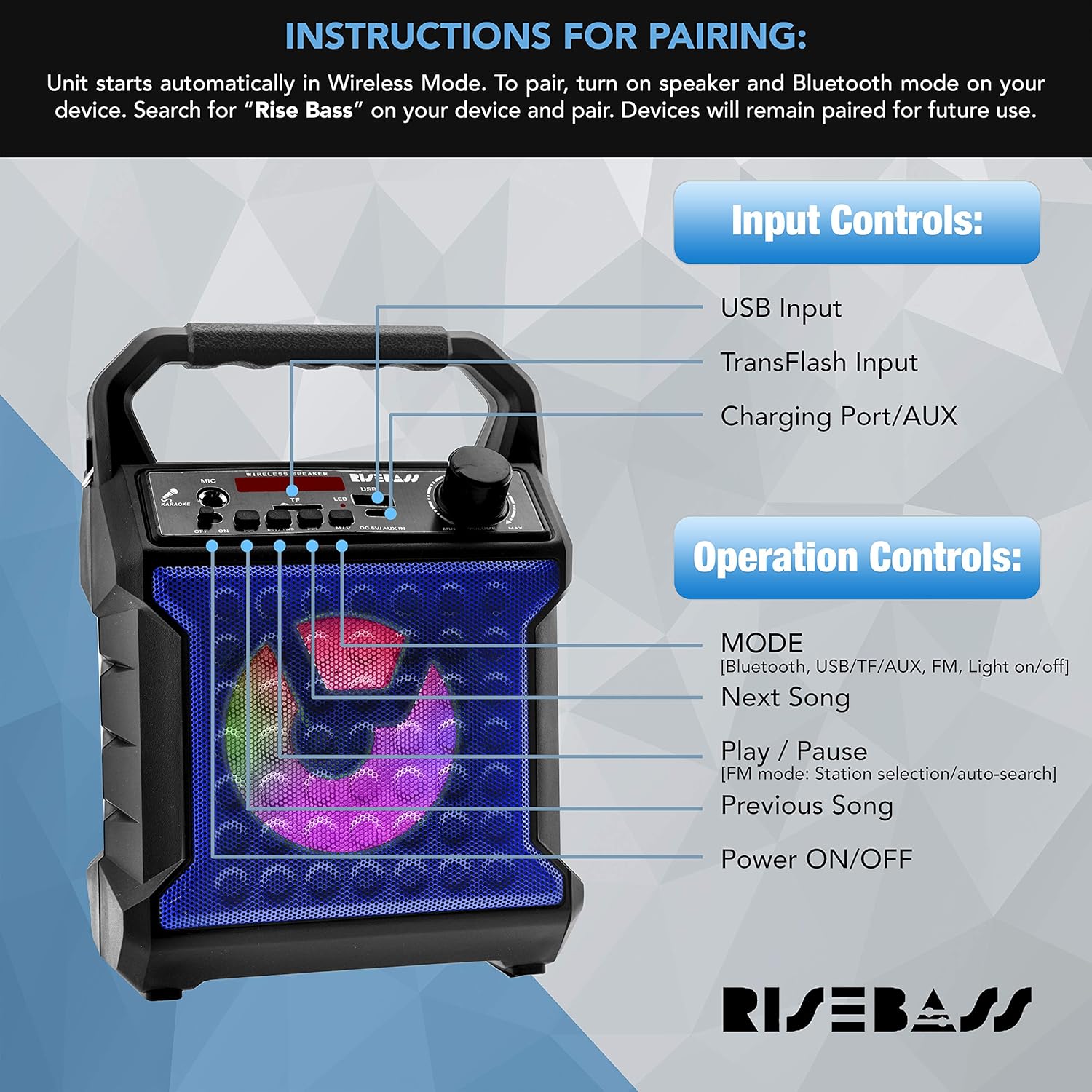
Per accendere l'unità, tenere premuto il tasto Accensione/spegnimento button. Press and hold again to power off.
Selezione della modalità
Premere il tasto MODALITÀ button to cycle through available modes: Bluetooth, USB, TF Card, FM Radio, and AUX input.
Accoppiamento Bluetooth
- Turn on the karaoke machine. It will automatically enter Wireless (Bluetooth) Mode.
- Sul tuo dispositivo (smartphone, tablet, ecc.), attiva il Bluetooth e cerca i dispositivi disponibili.
- Select "Rise Bass" from the list of devices to pair. Once paired, the unit will confirm the connection. Devices will remain paired for future use.
Funzionamento della radio FM
- Passare alla modalità Radio FM utilizzando il MODALITÀ pulsante.
- Premere il tasto Riproduci/Pausa button to initiate an automatic station search. The unit will scan and save available FM stations.
- Utilizzare il Prossima canzone E Canzone precedente pulsanti per navigare tra le stazioni salvate.
Riproduzione USB/scheda TF
- Insert a USB drive or TF (microSD) card with audio files nella rispettiva porta.
- The unit will automatically switch to USB or TF Card mode and begin playback. If not, use the MODALITÀ pulsante per selezionare l'input corretto.
- Utilizzare il Prossima canzone E Canzone precedente pulsanti per saltare le tracce.
- Premere il tasto Riproduci/Pausa per mettere in pausa o riprendere la riproduzione.
Ingresso AUX
Connect an external audio device (e.g., smartphone, MP3 player) to the 'DC 5V/AUX-in' port using a 3.5mm audio cable (not included). Switch to AUX mode using the MODALITÀ button. Audio will play through the karaoke machine's speaker.
Utilizzo del microfono
Ensure the microphone is properly connected to the 'MIC' input. Adjust the microphone volume using the dedicated knob on the unit. Sing or speak into the microphone for ampsuono lificato.
Effetti di luce a LED
The unit features multicolor LED lights that activate automatically when powered on. There is a dedicated button to turn the lights on or off.
Manutenzione
- Pulire l'unità con un panno morbido e asciutto. Non utilizzare detergenti abrasivi o solventi.
- Tenere l'unità lontana da acqua, umidità e luce solare diretta.
- Conservare in luogo fresco e asciutto quando non si utilizza per lunghi periodi.
- Assicurarsi che tutte le porte siano libere da polvere e detriti.
Risoluzione dei problemi
| Problema | Possibile soluzione |
|---|---|
| L'unità non si accende. | Ensure the unit is fully charged. Connect to a power source and allow it to charge for a few hours. |
| Nessun suono dall'altoparlante. | Check the volume level on both the karaoke machine and the connected device. Ensure the correct input mode is selected (Bluetooth, USB, TF, AUX). |
| Il microfono non funziona. | Ensure the microphone cable is securely connected to both the microphone and the 'MIC' input on the unit. Check the microphone's volume knob. |
| L'associazione Bluetooth non riesce. | Make sure the karaoke machine is in Bluetooth mode. Ensure your device's Bluetooth is enabled and within range. Try unpairing and re-pairing the device. |
| Scarsa ricezione radio FM. | Adjust the unit's position to improve signal reception. Ensure no strong interference sources are nearby. |
Specifiche
| Caratteristica | Dettaglio |
|---|---|
| Marca | RISORGERE I BASSI |
| Numero di modello | 0 |
| Peso dell'articolo | 1.92 libbre |
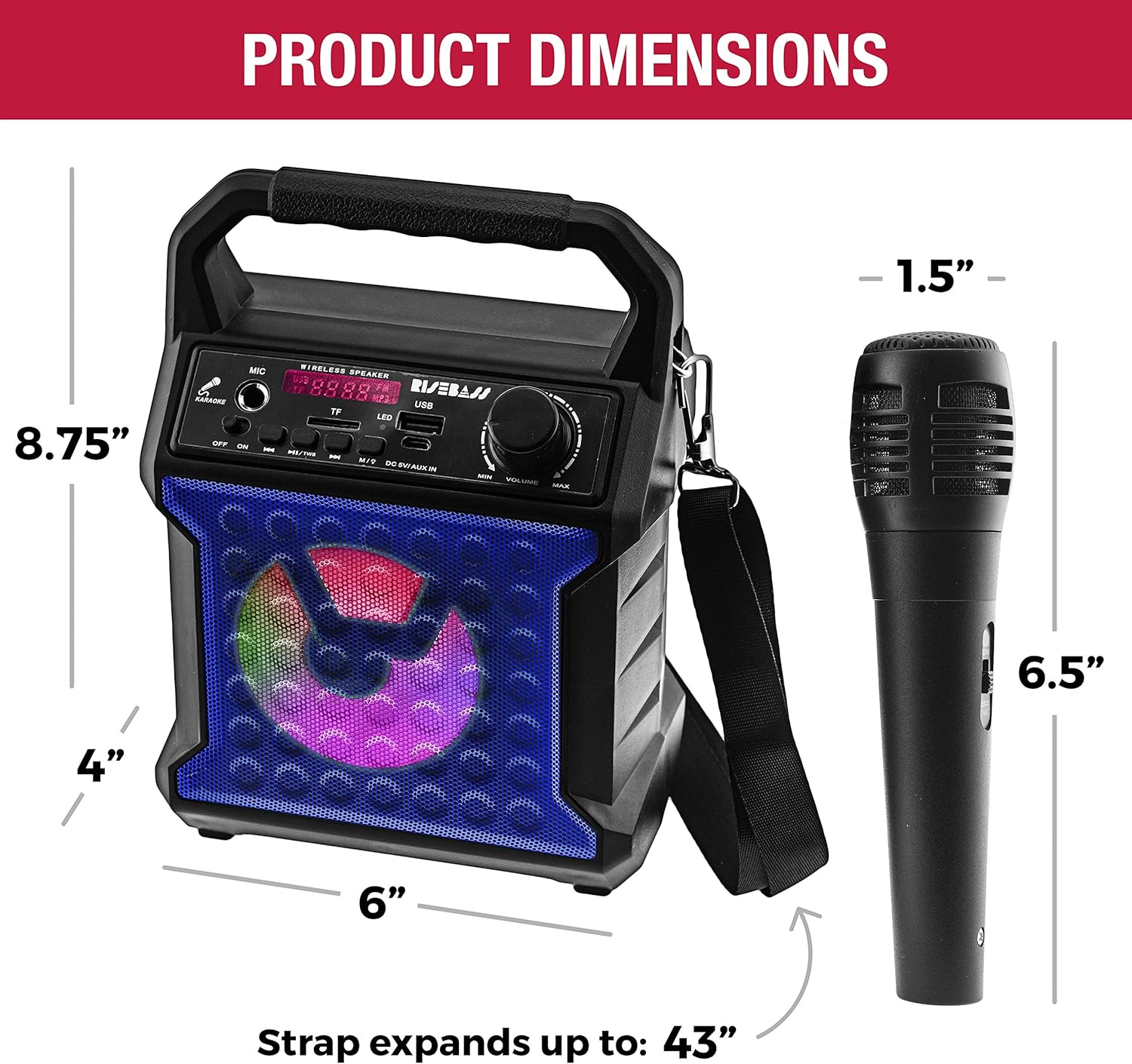
| Dimensioni del prodotto | 4 x 6 x 8.75 pollici |
| Connettività | Bluetooth, USB, SD/TF Card, AUX-in, FM Radio |
| Conteggio parlanti | 1 |
| Tipo di batteria | Litio (incluso) |
| Caratteristiche speciali | Portable, Rechargeable, Wireless, Built-in Microphone, LED Lighting Effects, All-in-One Sound System |
Garanzia e supporto
For warranty information or technical support, please refer to the contact details provided with your product packaging or visit the official RISEBASS webluogo. Conserva la ricevuta di acquisto per eventuali richieste di garanzia.


