1. Introduzione
This user manual provides detailed instructions for the operation and maintenance of the VOLTCRAFT SDM-2125 Coating Thickness Gauge. This device is designed for high-precision and non-destructive measurements of coating thickness on both ferrous and non-ferrous metal substrates. It automatically detects the substrate material and determines the coating thickness using magnetic flux or eddy current principles.
The SDM-2125 weighs approximately 180 g and can store up to 500 data groups. It features a clear display that indicates whether measured values are within set limits (green for within limits, red for below limit, yellow for exceeding limit). For energy efficiency, the device automatically switches off after five minutes of inactivity. It supports both single-point and multi-point measurements, and its advanced algorithm for calculating measurement averages ensures quick and accurate results.

Figura 1: Fronte view dello spessimetro VOLTCRAFT SDM-2125, che mostra il display e i pulsanti di controllo.
2. Caratteristiche principali
- Dual-Purpose Measurement: Suitable for both ferrous and non-ferrous metals.
- Principi di misurazione: Utilizes both magnetic flux and eddy current measurement methods.
- Rilevamento automatico del substrato: Automatically identifies the underlying material (ferrous or non-ferrous).
- Archiviazione dati: Capable of storing up to 500 data groups for comprehensive analysis.
- Flexible Measurement Modes: Offers two measurement options: single-point measurement or continuous multi-point measurement.
- Limit Value Indication: Visual feedback (green, red, yellow) to indicate if measurements are within, below, or above set limits.
- Spegnimento automatico: Conserves battery life by automatically powering down after five minutes of inactivity.

Figure 2: The SDM-2125 displaying a measurement reading, highlighting its clear digital interface.
3. Impostazione
3.1 Disimballaggio e ispezione
- Carefully remove the SDM-2125 device and all accessories from the packaging.
- Inspect the device for any signs of damage during transit. If damage is found, do not proceed with setup and contact customer support.
- Verify that all components listed in the packing list are present. This typically includes the main unit, calibration foils, and a zero-calibration plate.
3.2 Installazione della batteria
The SDM-2125 requires batteries for operation. (Note: Batteries are not included with the device.)
- Individuare il vano batteria sul retro del dispositivo.
- Aprire il coperchio del vano batterie.
- Inserire le batterie necessarie, assicurandosi che la polarità sia corretta come indicato all'interno del vano.
- Chiudere saldamente il coperchio del vano batterie.
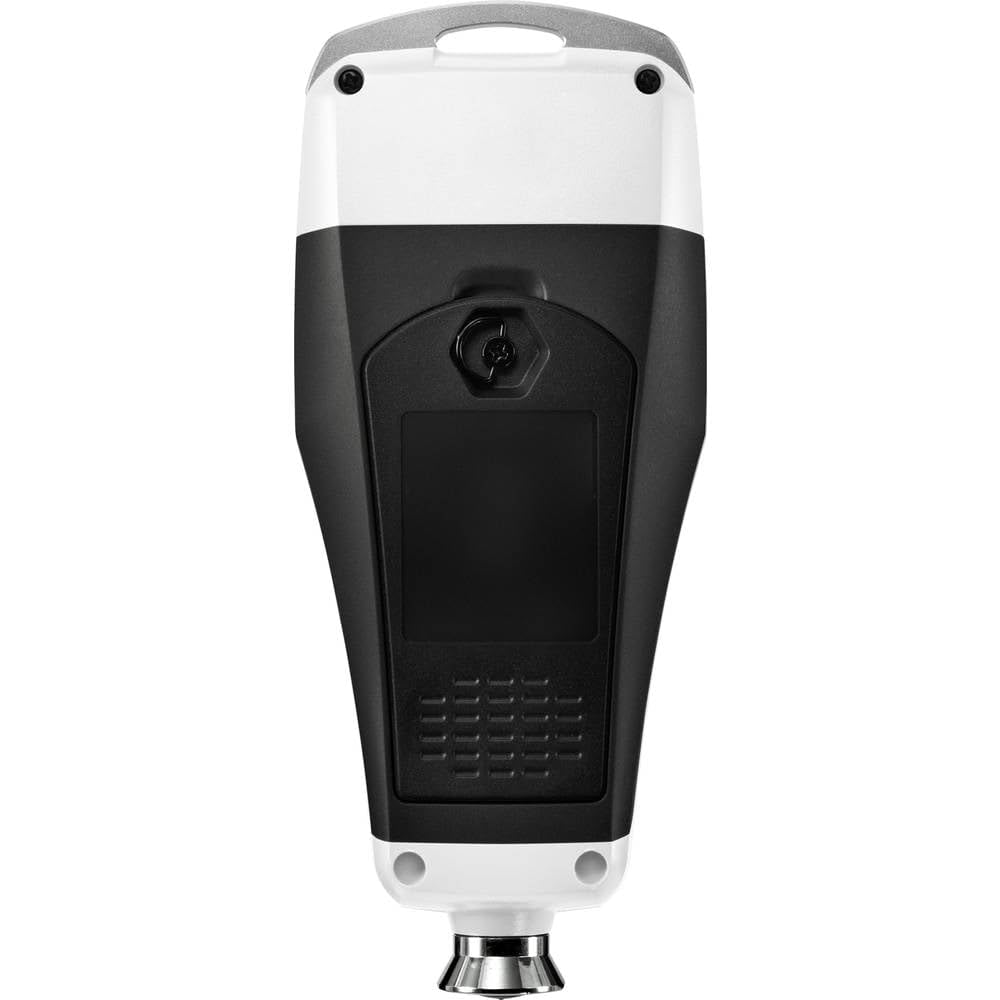
Figura 3: Posteriore view of the SDM-2125, illustrating the battery compartment location.
3.3 Accensione iniziale e calibrazione
- Premere il pulsante di accensione per accendere il dispositivo.
- Perform a zero-point calibration on a bare, uncoated metal substrate (ferrous and non-ferrous, if applicable) provided with the device. Follow the on-screen instructions or refer to the quick start guide for specific calibration steps.
- Calibrate with the included calibration foils of known thickness to ensure accuracy across the measurement range.
4. Funzionamento
4.1 Misurazione di base
- Assicurarsi che il dispositivo sia acceso e calibrato.
- Place the probe of the gauge firmly and perpendicularly onto the coated surface to be measured.
- The device will automatically detect the substrate material (Fe for ferrous, NFe for non-ferrous) and display the coating thickness reading.
- Observe the color indicator on the display for limit value status (green, red, or yellow).
4.2 Modalità di misurazione
The SDM-2125 supports different measurement modes:
- Modalità di misurazione singola: For individual readings at specific points. Press the probe, read the value, then lift the probe.
- Modalità di misurazione continua: For scanning a surface and obtaining multiple readings rapidly. Keep the probe in contact and slide it across the surface. The device will continuously update the reading.
4.3 Archiviazione e richiamo dei dati
The device can store up to 500 data groups.
- To save a measurement, refer to the device's specific button functions (e.g., a 'Save' or 'Memory' button).
- To recall stored data, navigate through the memory function using the designated buttons. The device typically displays statistics like average, minimum, and maximum values for stored groups.

Figure 4: The SDM-2125 showing a measurement value, demonstrating its capability to display various data points including number of readings, average, min, and max.
5. Manutenzione
5.1 Pulizia
- Pulire regolarmente la parte esterna del dispositivo con un panno morbido e asciutto.
- Per lo sporco ostinato, una leggera damp È possibile utilizzare un panno con un detergente delicato, ma assicurarsi che nessun liquido entri nel dispositivo.
- Pay special attention to keeping the measurement probe clean and free of debris, as this can affect accuracy.
- Non utilizzare detergenti abrasivi, solventi o prodotti chimici aggressivi.
5.2 Conservazione
- Quando non si utilizza il dispositivo per lunghi periodi, rimuovere le batterie per evitare perdite e danni al dispositivo.
- Store the device in its original case or a protective pouch to prevent scratches and impacts.
- Conservare in un luogo fresco e asciutto, lontano dalla luce solare diretta, da temperature estreme e da elevata umidità.
5.3 Controllo della calibrazione
- Periodically check the calibration of the device using the provided calibration foils and zero-calibration plate.
- Recalibrate if readings are inconsistent or if the device has been subjected to significant temperature changes or impacts.
6. Risoluzione Dei Problemi
| Problema | Possibile causa | Soluzione |
|---|---|---|
| Il dispositivo non si accende. | Le batterie sono scariche o installate in modo errato. | Controllare la polarità delle batterie; sostituirle con batterie nuove. |
| Letture imprecise. | Probe is dirty; device needs calibration; incorrect measurement surface. | Clean the probe; perform calibration; ensure surface is flat and clean. |
| Device displays "OL" (Over Limit) or "Err". | Measurement exceeds range; sensor error. | Ensure coating thickness is within 0-1250 µm range; restart device. If error persists, contact support. |
| Automatic shut-off too soon. | Device is idle for 5 minutes. | This is normal operation. Interact with the device to keep it active. |
7. Specifiche
| Attributo | Dettaglio |
|---|---|
| Produttore | VOLTCRAFT |
| Numero di parte | VC-11197635 |
| Peso dell'articolo | 130 grammi |
| Dimensioni del prodotto | Dimensioni: 6.5 x 3.5 x 15.2 cm |
| Numero di modello | VC-11197635 |
| Fonte di alimentazione | Alimentato a batteria |
| Quantità del pacchetto | 1 |
| Caratteristiche speciali | Misuratore di spessore del materiale |
| Batterie incluse | NO |
| Batterie richieste | NO |
| Campo di misura | 0 - 1250 µm |
8. Garanzia e supporto
For warranty information, technical support, or service inquiries regarding your VOLTCRAFT SDM-2125 Coating Thickness Gauge, please refer to the warranty card included with your product or visit the official VOLTCRAFT websito.
You can also contact the seller, Conrad Electronic SE, for assistance with your purchase.
Risorse online:
- VOLTCRAFT Official Websito: www.voltcraft.com (General link, specific link not provided in input)
- Conrad Electronic SE Seller Page: Informazioni sul venditore


