1. Introduzione
Thank you for choosing the ABKO CWS120 True Wireless Earbuds. This manual provides essential information for the proper setup, operation, and maintenance of your device. Please read it thoroughly before use to ensure optimal performance and longevity.
The ABKO CWS120 earbuds feature a compact, lightweight design with a fabric-textured charging cradle. They deliver high-quality stereo sound through 6mm dynamic drivers and offer a stable connection via Bluetooth 5.0. With IPX4 waterproofing, they are suitable for various activities.
2. Contenuto della confezione
Si prega di verificare che tutti gli articoli elencati di seguito siano inclusi nel pacchetto:
- 1 X CWS120 Earbud Set (Left and Right)
- 1 X Charging Cradle
- 1 X USB-C type Charging Cable
- 3 X Ear Tip Sets (Small, Medium, Large)
- 1 X Manuale utente
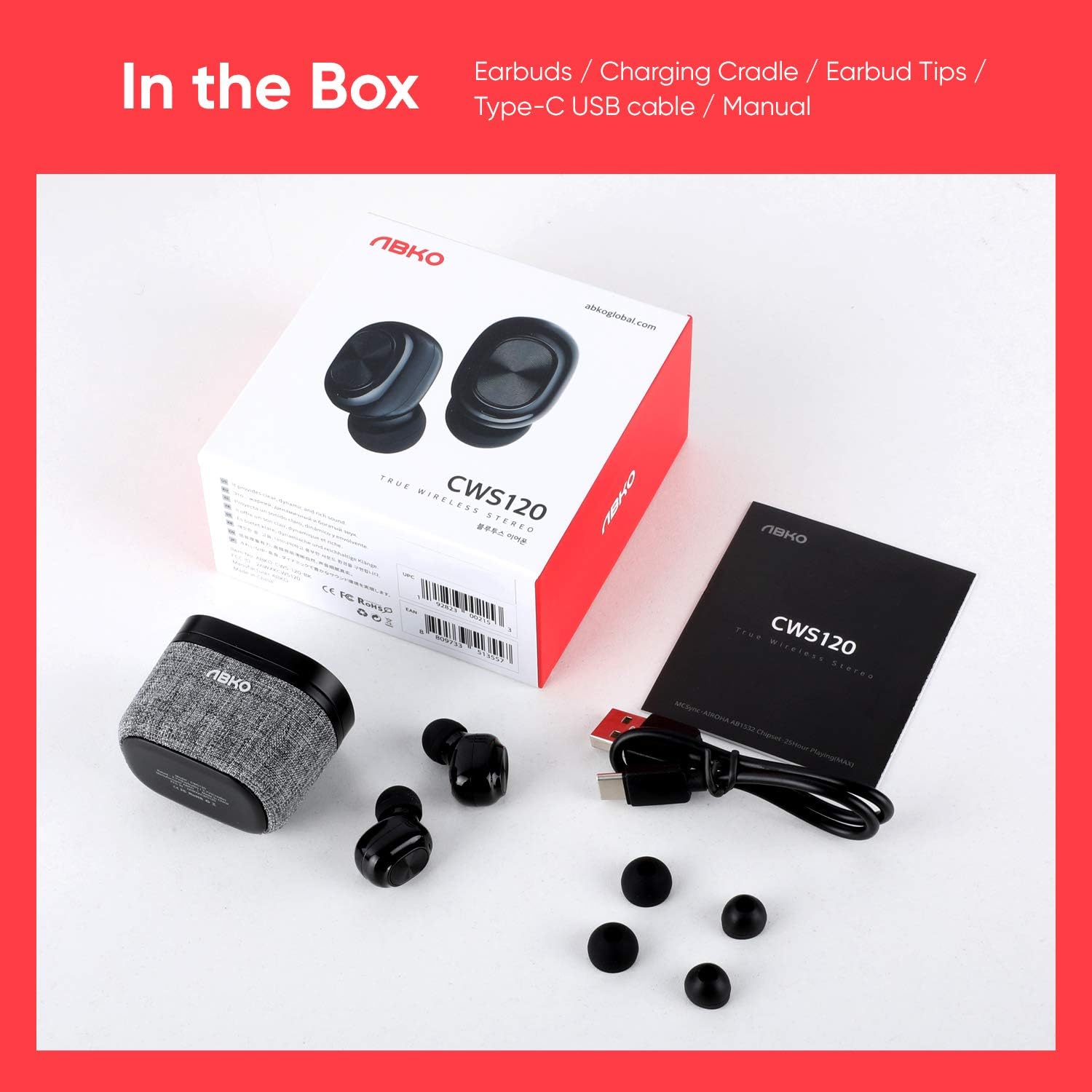
3. Prodotto finitoview
The ABKO CWS120 earbuds are designed for comfort and high-quality audio. The charging cradle features a unique fabric texture.

Each earbud is equipped with a 6mm dynamic driver to deliver clear and rich stereo sound, enhancing your listening experience.

The earbuds are ultra-lightweight, with each earbud weighing approximately 4.5g and the cradle weighing 36g, making them comfortable for extended wear and easy to carry.

4. Impostazione
4.1. Charging the Earbuds and Cradle
- Carica iniziale: Before first use, fully charge both the earbuds and the charging cradle.
- Ricarica auricolari: Place the earbuds into the charging cradle. Ensure they are correctly seated; the indicator lights on the earbuds will illuminate to show charging status.
- Base di ricarica: Connect the provided USB-C cable to the charging port on the cradle and the other end to a USB power source (e.g., wall adapter, computer USB port). The cradle's indicator light will show charging status.
- Tempo di ricarica: The cradle takes approximately 2 hours to fully charge, and the earbuds take about 1 hour.
4.2. Associazione con un dispositivo
The ABKO CWS120 earbuds feature one-step auto-pairing for convenience.
- Accensione: Open the charging cradle lid. The earbuds will automatically power on and enter pairing mode.
- Attiva Bluetooth: Sul tuo smartphone o altro dispositivo abilitato Bluetooth, vai alle impostazioni Bluetooth e assicurati che il Bluetooth sia attivato.
- Seleziona dispositivo: Look for "CWS120" in the list of available devices and select it to connect.
- Conferma: Once connected, you will hear an audio prompt from the earbuds, and the device's Bluetooth settings will show "CWS120" as connected.
- Riconnessione: After the initial pairing, the earbuds will automatically connect to the last paired device when removed from the cradle and Bluetooth is active on the device.

5. Istruzioni per l'uso
5.1. Multi-Function Button (MFB) Controls
Each earbud features a Multi-Function Button (MFB) for controlling various functions:
- Accensione: Open the charging cradle lid (automatic).
- Spegni: Place earbuds back into the charging cradle and close the lid (automatic).
- Riproduci/Pausa: Un solo tocco su uno degli auricolari.
- Rispondi/Termina chiamata: Un singolo tocco su uno degli auricolari durante una chiamata in arrivo.
- Rifiuta chiamata: Durante una chiamata in arrivo, tenere premuto uno dei due auricolari per 2 secondi.
- Traccia successiva: Tocca due volte l'auricolare destro.
- Traccia precedente: Tocca due volte l'auricolare sinistro.
- Attiva l'Assistente Vocale (Siri/Google): Tocca tre volte uno degli auricolari.

5.2. Indossare gli auricolari
The earbuds are designed with a 120-degree angle for an ergonomic fit. Insert each earbud gently into your ear canal and rotate slightly to ensure a secure and comfortable seal. Choose the ear tips that best fit your ears for optimal sound quality and comfort.
6. Manutenzione
6.1. Pulizia
- Pulisci regolarmente gli auricolari e i contatti di ricarica con un panno morbido, asciutto e privo di lanugine.
- Rimuovere i gommini auricolari e pulirli con acqua e sapone neutro, se necessario. Assicurarsi che siano completamente asciutti prima di riapplicarli.
- Non utilizzare prodotti chimici aggressivi o materiali abrasivi per la pulizia.
6.2. Conservazione
When not in use, always store the earbuds in their charging cradle to protect them and keep them charged.
6.3. Resistenza all'acqua (IPX4)
The ABKO CWS120 earbuds are IPX4 waterproof, meaning they are resistant to splashing water from any direction. This makes them suitable for workouts and light rain. However, they are not designed for submersion in water or exposure to strong jets of water.

7. Risoluzione Dei Problemi
If you encounter issues with your ABKO CWS120 earbuds, please refer to the following common solutions:
| Problema | Possibile soluzione |
|---|---|
| Gli auricolari non si associano/connettono |
|
| Un solo auricolare funzionante |
|
| Nessun suono o volume basso |
|
| Problemi di ricarica |
|
8. Specifiche
Key technical specifications for the ABKO CWS120 True Wireless Earbuds:
- Risposta in frequenza: Frequenza di campionamento:
- Versione Bluetooth: BT5.0 è un'auto a motore.
- Bluetooth professionalefile: HFP/HSP/A2DP/AVRCP
- Codec audio: AAC / SBC
- Charging Time (Cradle): Circa 2 ore
- Tempo di ricarica (auricolari): Circa 1 ora
- Tempo di riproduzione (auricolari): Fino a 5 ore
- Tempo di riproduzione totale (con custodia di ricarica): Fino a 25 ore
- Cradle Battery Spec.: 3.7V / 500mAh
- Earbud Battery Spec.: 3.7V / 50mAh
- Distanza di operazione: 10 metri (33 piedi)
- Tasso impermeabile: Grado di protezione IPX4
- Porta di ricarica: Tipo USB-C
- Peso dell'auricolare: 4.5 g (circa)
- Peso della culla: 36 g (circa)
- Metodo di controllo: Tocco
9. Informazioni sulla sicurezza
- Non smontare, riparare o modificare il prodotto.
- Tenere il prodotto lontano da temperature estreme, luce solare diretta e fiamme libere.
- Evitare di esporre il prodotto a forti campi magnetici.
- Non utilizzare il prodotto ad alto volume per periodi prolungati per evitare danni all'udito.
- Tenere fuori dalla portata dei bambini e degli animali domestici.
- Smaltire il prodotto e la batteria in modo responsabile, nel rispetto delle normative locali.
10. Garanzia e supporto
ABKO products are designed and manufactured to the highest quality standards. For warranty information, technical support, or customer service inquiries, please refer to the warranty card included in your package or visit the official ABKO websito. Conservare la prova d'acquisto per eventuali reclami in garanzia.


