1. Introduzione
The Mackie Onyx8 8-Channel Premium Analog Mixer with USB is a compact solution designed for live audio, home recording, and content creation. It features 24-Bit / 96kHz multitrack recording capabilities, award-winning Onyx mic preamps, and an ultra-low-noise design for high-fidelity sound. This mixer includes powerful DSP effects, British-style Perkins EQ, a full-color display, and integrated recording and playback from an SD card. The Onyx8 is engineered to provide the necessary tools for capturing high-quality audio performances.
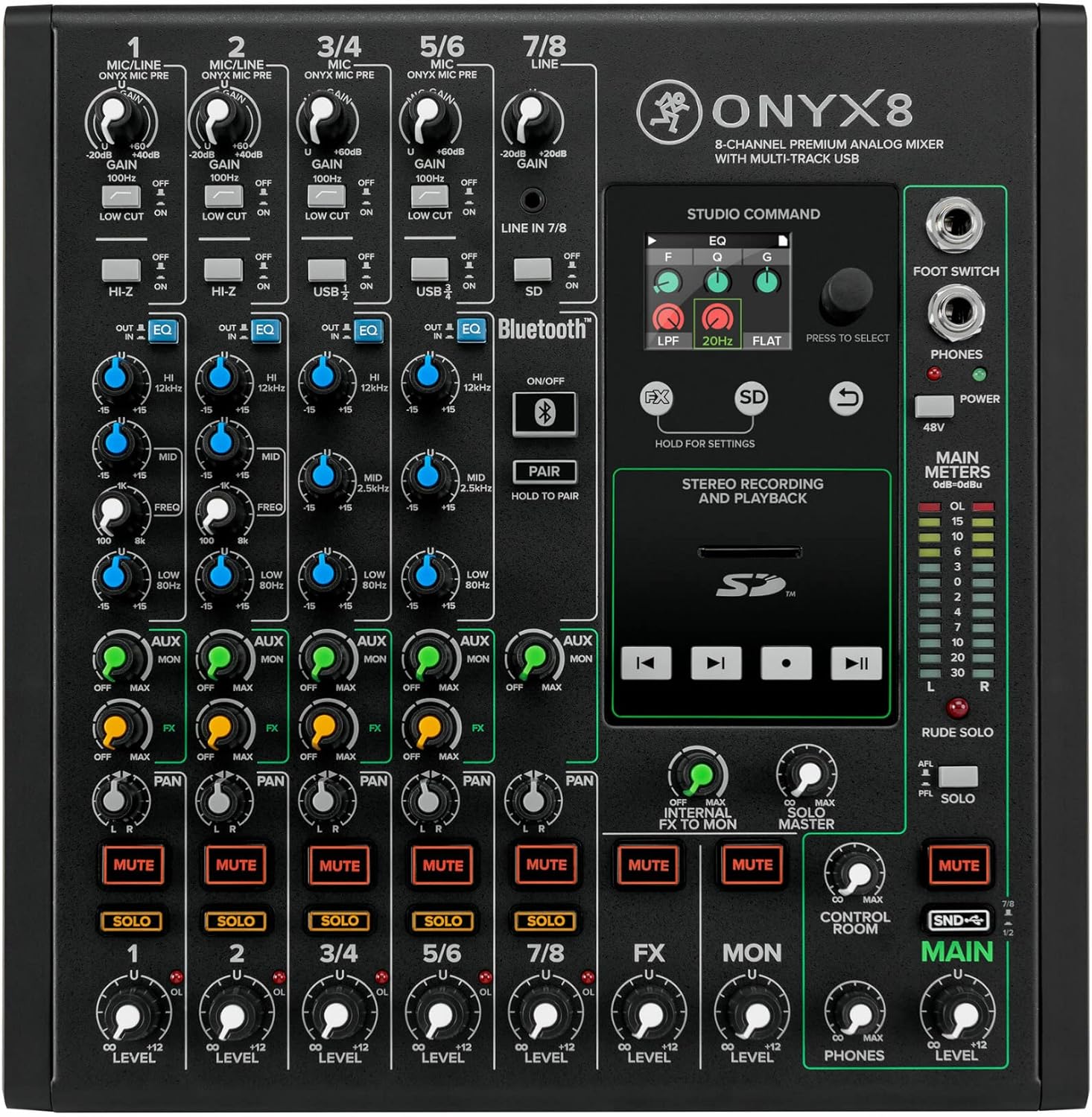
Figura 1.1: Dall'alto verso il basso view of the Mackie Onyx8 mixer, highlighting its comprehensive control layout.
2. Impostazione
2.1 Disimballaggio e ispezione
Estrarre con cautela il mixer dall'imballaggio. Ispezionare l'unità per verificare eventuali segni di danni che potrebbero essersi verificati durante il trasporto. Conservare l'imballaggio per eventuali trasporti o rimessaggio futuri.
2.2 Collegamento di alimentazione
Connect the supplied power cord to the mixer's power input on the rear panel and then to a suitable AC power outlet. Ensure the power switch is in the OFF position before connecting.

Figure 2.1: Rear panel connections of the Onyx8, including the power input and main outputs.
2.3 Collegamenti audio
Connect your microphones, instruments, and other audio sources to the appropriate input channels. The Onyx8 features XLR/TRS combo jacks for microphone and line inputs, as well as dedicated line inputs for stereo channels.
- Ingressi microfono (canali 1-4): Utilizzare cavi XLR per i microfoni.
- Ingressi di linea (canali 1-8): Use 1/4-inch TRS or TS cables for line-level devices. Channels 1 and 2 also feature Hi-Z inputs for direct instrument connection.
- Uscite principali: Connect your studio monitors or PA system to the Main Outputs using XLR or 1/4-inch TRS cables.
- Uscite della sala di controllo: Connect secondary monitors or headphones amplifier to these outputs.

Figure 2.2: Detail of the input jacks, including XLR/TRS combo inputs and insert points.
2.4 Connessione USB
For multitrack recording and playback with a computer, connect a USB cable from the mixer's USB port to your computer. Install any necessary drivers as prompted by your operating system or as directed by Mackie's official support websito.
3. Funzionamento del mixer
3.1 Controlli dei canali
Each input channel on the Onyx8 features a set of controls for adjusting the audio signal:
- Guadagno: Regola la sensibilità di ingresso per microfoni o segnali di livello di linea.
- Taglio basso: Attiva un filtro passa-alto per rimuovere i rumori indesiderati a bassa frequenza.
- EQ (Equalizzatore): Provides control over the high, mid (with sweepable frequency), and low frequencies to shape the tone of each channel.
- Invio Aux: Routes a portion of the channel signal to external effects processors or monitor mixes.
- Invio FX: Routes a portion of the channel signal to the internal effects processor.
- Pan: Positions the channel signal within the stereo field (left to right).
- Disattiva audio: Silences the channel output.
- Solo: Isolates the channel for monitoring through headphones or control room outputs without affecting the main mix.
- Livello: Adjusts the overall output level of the channel to the main mix.

Figure 3.1: Detail of the British-style Perkins EQ section.
3.2 Internal Effects Processor
The Onyx8 includes a built-in DSP effects engine. Use the FX send controls on each channel to route signal to the effects. The full-color display allows selection and adjustment of various effects such as delay, echo, reverb, chorus, and flanger.

Figure 3.2: The Studio Command display for selecting and adjusting internal effects.
3.3 Connettività Bluetooth
The mixer features integrated Bluetooth for wireless audio playback. To pair a device, press and hold the "PAIR" button until the indicator flashes, then select "Onyx8" from your device's Bluetooth settings.

Figure 3.3: Bluetooth controls for wireless audio streaming.
3.4 SD Card Recording and Playback
The Onyx8 allows direct stereo recording and playback to/from an SD card. Insert a formatted SD card into the slot. Use the transport controls (Play, Record, Stop) on the mixer's control surface to manage audio files.

Figure 3.4: SD card slot and transport controls for recording and playback.
3.5 Mix principale e monitoraggio
Adjust the Main Level fader to control the overall output volume. Monitor your mix using headphones connected to the PHONES jack or through studio monitors connected to the Control Room outputs. The main meters provide visual feedback of the output levels.
4. Manutenzione
To ensure the longevity and optimal performance of your Mackie Onyx8 mixer, follow these maintenance guidelines:
- Pulizia: Use a soft, dry cloth to clean the exterior of the mixer. Avoid abrasive cleaners, solvents, or waxes.
- Protezione dalla polvere: Quando non lo si utilizza, tenere coperto il mixer per evitare l'accumulo di polvere, soprattutto sui fader e sulle manopole.
- Ventilazione: Ensure proper airflow around the unit. Do not block ventilation openings.
- Magazzinaggio: If storing for an extended period, disconnect power and store in a cool, dry place, preferably in its original packaging.
5. Risoluzione Dei Problemi
This section addresses common issues you might encounter with your Onyx8 mixer. For more detailed troubleshooting, refer to the full user manual available online.
5.1 Nessuna uscita audio
- Controlla la potenza: Ensure the mixer is powered on and the power LED is illuminated.
- Livelli del volume: Verify that all channel levels, main fader, and monitor levels are turned up appropriately.
- Connessioni: Confirm all audio cables are securely connected to the correct inputs and outputs.
- Muto/Solo: Check that no channels or the main mix are muted or in solo mode inadvertently.
5.2 USB Interface Issues
- Installazione del driver: Ensure the correct USB drivers for the Onyx8 are installed on your computer. Visit the Mackie websito per i driver più recenti.
- Cavo USB: Try a different USB cable and ensure it is securely connected.
- Impostazioni del computer: Verify that the Onyx8 is selected as the audio input/output device in your computer's sound settings and DAW software.
- Ricomincia: Try restarting both the mixer and your computer.
5.3 Effects Not Working as Expected
- FX Send Levels: Check that the FX send knobs on the individual channels are turned up.
- FX Master Level: Ensure the FX master level control is adjusted.
- Selezione degli effetti: Verify that an effect is selected on the display and its parameters are set correctly. Note that the effects may default to a specific setting upon power-up.
6. Specifiche
| Caratteristica | Dettaglio |
|---|---|
| Numero di modello | Onice8 |
| Numero di canali | 8 |
| Peso dell'articolo | 9.6 libbre |
| Dimensioni del prodotto | 10.98 x 10.51 x 4.49 pollici |
| Interfaccia Hardware | Bluetooth, Secure Digital Card, USB 2.0 |
| Fonte di alimentazione | Elettrico con cavo |
| Tecnologia di connettività | USB |
| Prima data disponibile | 25 gennaio 2021 |
7. Garanzia e supporto
For detailed warranty information and technical support, please refer to the official Mackie website or the full user manual. A PDF version of the user manual is available for download.
- Manuale utente ufficiale (PDF): Scarica qui
- Mackie Store: Visit the Mackie Store on Amazon