Introduzione
The Verizon Wireless Qi Fast Charging Pad provides a convenient and efficient way to wirelessly charge your compatible devices. Designed for speed and reliability, this charging pad is optimized to deliver fast charging to a wide range of Qi-enabled smartphones, including models from Apple, Samsung, and Google. Its compact design and user-friendly features make it an ideal charging solution for home or office use.
Cosa c'è nella scatola
- 1 x Verizon Wireless Qi Fast Charging Pad
- 1 cavo USB
- 1 x Manuale utente (questo documento)
Caratteristiche
- Ricarica rapida: Optimized for rapid charging of compatible Qi-enabled devices.
- Indicatore di ricarica a LED: Fornisce una conferma visiva dello stato di carica.
- Silicone Grip Surface: Helps prevent devices from slipping during charging.
- Compatibilità della custodia: Capable of charging through most phone cases.
- Conforme alle norme di sicurezza: Halogen-free and complies with Restriction of Hazardous Substances (RoHS).
- Certificato: Made for Google and Qi-certified for reliable performance.
Prodotto finitoview
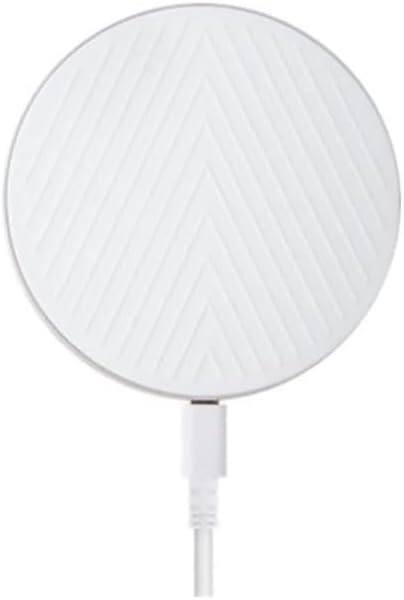
Figura 1: in alto view of the Verizon Wireless Qi Fast Charging Pad. This image displays the circular white charging pad with a distinctive chevron pattern on its surface, and a white USB cable extending from its side.

Figura 2: lato view of the Verizon Wireless Qi Fast Charging Pad. This image highlights the slim, circular profile of the charging pad, revealing its minimalist design and the subtle charging port on its edge.
Specifiche
| Attributo | Valore |
|---|---|
| Dimensioni del prodotto | 3 x 2 x 4 pollici |
| Peso dell'articolo | 7.8 once |
| Numero di modello | WC10WGGL |
| Marca | Verizon |
| Tecnologia di connettività | Senza fili |
| Tipo di connettore | Senza fili |
| Dispositivi compatibili | Qi-enabled Smartphones (Apple, Samsung, Google) |
| Modelli di telefono compatibili | iPhone 8 or later, Samsung Galaxy S6 or later, Google Pixel 3/3 XL or later |
| Componenti inclusi | 1 Pad di ricarica wireless |
| Caratteristica speciale | Charging Indicator, Fast Charging |
| Colore | Bianco |
| Ingresso volumetage | 9 Volt |
| Tipo di montaggio | Supporto da tavolo |
Impostare
- Disimballare: Carefully remove the charging pad and its cable from the packaging.
- Connetti alimentazione: Plug the USB cable from the charging pad into a compatible USB wall adapter (not included) or a powered USB port. Ensure the power source provides sufficient output for fast charging (e.g., a Quick Charge 2.0/3.0 or Power Delivery adapter).
- Posizionamento: Place the charging pad on a flat, stable surface, away from direct sunlight, heat sources, and liquids.
- Accensione: Once connected to power, the LED indicator on the charging pad may briefly illuminate to confirm it is ready.
Istruzioni per l'uso
- Posiziona dispositivo: Center your Qi-enabled smartphone on the surface of the charging pad. The silicone grip surface will help keep your device in place.
- Conferma addebito: The LED indicator on the charging pad will illuminate (e.g., turn solid blue or green) to indicate that your device is charging. Your phone's screen should also show a charging icon or notification.
- Posizionamento ottimale: If charging does not begin immediately, slightly adjust the position of your phone on the pad until the charging indicator activates.
- Charging Through Cases: The pad is designed to charge through most phone cases. However, very thick cases, cases with metal, or cases containing magnets may interfere with charging and might need to be removed.
- Ricarica completata: Once your device is fully charged, the charging pad may stop charging or the LED indicator may change color (refer to your phone's display for exact charge status).
Manutenzione
- Pulizia: Disconnect the charging pad from power before cleaning. Use a soft, dry, lint-free cloth to wipe the surface. Do not use abrasive cleaners, solvents, or chemical sprays.
- Magazzinaggio: When not in use, store the charging pad in a cool, dry place, away from extreme temperatures and humidity.
- Maneggiare con cura: Avoid dropping the charging pad or subjecting it to strong impacts, as this may damage internal components.
Risoluzione dei problemi
| Problema | Soluzione |
|---|---|
| Il dispositivo non si carica. |
|
| La ricarica è lenta. |
|
| LED indicator is off or blinking. |
|
Informazioni sulla sicurezza
- Non smontare, modificare o riparare il dispositivo.
- Keep the charging pad away from water, moisture, and extreme temperatures.
- Avoid placing metallic objects (e.g., coins, keys, credit cards) on the charging pad, as this can cause overheating or damage.
- Do not use the charging pad in environments with high humidity or near flammable materials.
- This product is halogen-free and complies with the Restriction of Hazardous Substances (RoHS).
Garanzia e supporto
For warranty information or technical support, please refer to the official Verizon Wireless webo contattare il servizio clienti. Conservare la ricevuta d'acquisto come prova d'acquisto per eventuali reclami in garanzia.
Verizon Customer Support: https://www.verizon.com/support/


