1. Introduzione
This manual provides comprehensive instructions for the KPREPUBLIC MXRSKEY 60U Mechanical Keyboard. Please read this manual thoroughly before using the product to ensure proper operation and longevity.
The MXRSKEY 60U is a 60% mechanical keyboard featuring Outemu switches and single-color mixed LED backlighting. It supports multimedia combination keys for enhanced functionality. Please note that this keyboard is not hot-swappable and does not feature RGB backlighting; each row has a single, fixed color LED.
2. Contenuto della confezione
Si prega di verificare che tutti gli articoli siano presenti nel pacco:
- KPREPUBLIC MXRSKEY 60U Mechanical Keyboard
- Cavo USB-C
- Manuale dell'utente (questo documento)
3. Specifiche
| Caratteristica | Descrizione |
|---|---|
| Disposizione della tastiera | 60% Compatto |
| Tipo di interruttore | Outemu Mechanical Switches (Black Switch variant) |
| Materiale del copritastiera | ABS Doubleshot Keycaps |
| Retroilluminazione | Single Color Mixed LED (Each row with one fixed color) |
| Connettività | USB-C (Detachable cable) |
| Caratteristiche speciali | Multimedia Combination Keys, Non-hot-swappable switches |
| Produttore | KPREPUBLIC |
| Numero di modello | MXRSKEY 60U |
4. Guida all'installazione
4.1 Collegamento della tastiera
- Locate the USB-C port on the back or side of the MXRSKEY 60U keyboard.
- Insert one end of the provided USB-C cable into the keyboard's USB-C port.
- Insert the other end of the USB-A connector into an available USB port on your computer.
- La tastiera verrà riconosciuta automaticamente dal sistema operativo. In genere non sono necessari driver aggiuntivi.
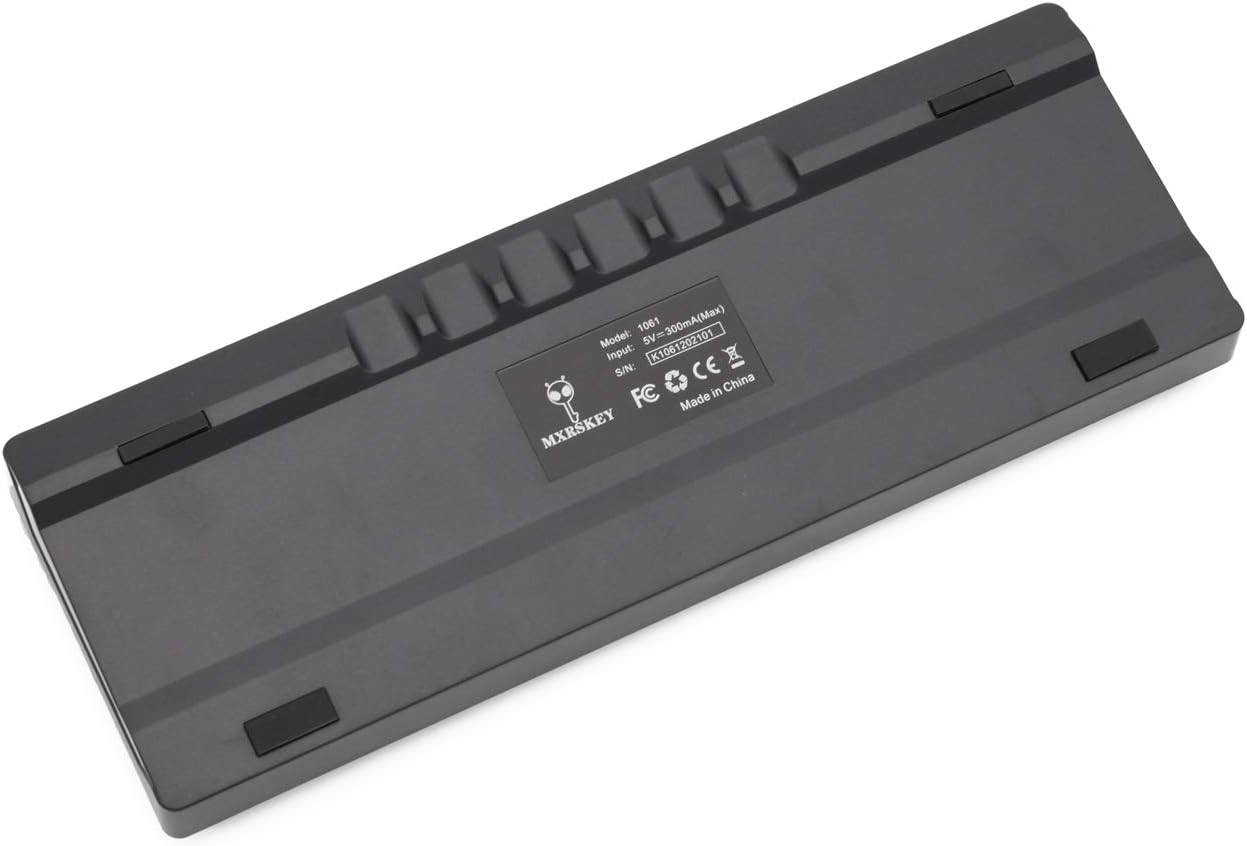
Immagine: Posteriore view of the MXRSKEY 60U keyboard, highlighting the USB-C port for connection and the stable rubber feet.
5. Istruzioni per l'uso
5.1 Funzioni di base della tastiera
The MXRSKEY 60U is a standard QWERTY layout 60% keyboard. All standard alphanumeric and symbol keys function as expected.

Immagine: in alto view of the MXRSKEY 60U keyboard, showcasing its compact 60% layout and the single-color mixed LED backlighting.
5.2 Combinazioni di tasti funzione (FN)
Due to its compact 60% layout, many functions are accessed via the Function (FN) key in combination with other keys. Refer to the table below for common FN key combinations.
| Tasto Combinato | Funzione | Nota |
|---|---|---|
| FN+TAB | Ripristina tastiera | |
| FN+Esc | ~ | |
| NV+1 | F1 | |
| NV+2 | F2 | |
| NV+3 | F3 | |
| NV+4 | F4 | |
| NV+5 | F5 | |
| NV+6 | F6 | |
| NV+7 | F7 | |
| NV+8 | F8 | |
| NV+9 | F9 | |
| NV+10 | F10 | |
| NV+11 | F11 | |
| NV+12 | F12 | |
| FN+[ | Luminosità- | |
| FN+] | Luminosità+ | |
| FN+; | Velocità- | |
| FN+' | Velocità+ | |
| FN+? | ↑ | |
| FN+Alt | ← | |
| FN+Menu | ↓ | |
| FN+Ctrl | → | |
| FN+L | Back Lit Effect Change | |
| FN+Backspace | Close Back lit | |
| Tasti multimediali | ||
| FN+LA | Pausa | |
| FN+S | Precedente | |
| FN+D | Prossimo | |
| FN+F | Muto | |
| Tasto F+G | Volume+ | |
| FN+H | Vol- | |
| FN+J | Inserire | |
| FN+K | Casa | |
| FN+L Win | Blocco vittoria | |
| FN+L | PGUP | |
| Tasto FN+N | DEL | |
| FN+M | FINE | |
| FN+ | PGDN | |
| FN+; | PRT | |
| FN+O | SCR | |
| FN+P | PS | |
Table: FN key combinations for various functions, including multimedia controls and navigation.

Image: Close-up of the keyboard's keycaps, illustrating the legends for primary and FN-accessed functions.
5.3 Controllo della retroilluminazione
The MXRSKEY 60U features single-color mixed LED backlighting. You can adjust the brightness and change the lighting effect using FN key combinations.
- VN + [: Riduce la luminosità della retroilluminazione.
- NV+]: Aumenta la luminosità della retroilluminazione.
- FN+ ;: Riduce la velocità/l'effetto della retroilluminazione.
- FN + ': Aumenta la velocità/l'effetto della retroilluminazione.
- FN+L: Change backlight effect.
- FN + Backspace: Turn off backlight.

Image: The keyboard with its single-color mixed LED backlighting active, showing the distinct color zones per row.
6. Manutenzione e cura
6.1 Pulizia della tastiera
- Scollegare la tastiera dal computer prima di pulirla.
- Utilizzare un panno morbido e privo di lanugine leggermente dampPulire i tasti e il telaio con acqua o una soluzione detergente delicata.
- Per rimuovere polvere e detriti tra i tasti, utilizzare aria compressa.
- Evitare l'uso di prodotti chimici aggressivi, detergenti abrasivi o umidità eccessiva, poiché potrebbero danneggiare la tastiera.
6.2 Conservazione
Quando non viene utilizzata per lunghi periodi, conservare la tastiera in un luogo asciutto e fresco, lontano dalla luce solare diretta e da temperature estreme.
7. Risoluzione Dei Problemi
| Problema | Possibile causa | Soluzione |
|---|---|---|
| La tastiera non risponde | Collegamento del cavo allentato, porta USB errata, problema con il driver di sistema. | Ensure the USB-C cable is securely connected to both the keyboard and the computer. Try a different USB port. Restart your computer. |
| Retroilluminazione non funzionante | Retroilluminazione disattivata, luminosità impostata al minimo. | Press FN + ] to increase brightness. Press FN + L to cycle through effects. Press FN + Backspace to toggle backlight. |
| Alcuni tasti non funzionano | Detriti sotto il tasto, malfunzionamento dell'interruttore. | Use compressed air to clear debris. As switches are not hot-swappable, contact support if the issue persists. |
| FN key combinations not working | Incorrect combination, temporary software glitch. | Refer to the "Function (FN) Key Combinations" table. Try resetting the keyboard (FN+TAB). |
8. Garanzia e supporto
For warranty information and technical support, please refer to the official KPREPUBLIC websito o contattare il rivenditore. Conservare la ricevuta d'acquisto per eventuali reclami in garanzia.
Manufacturer: KPREPUBLIC
Data di prima disponibilità: 9 febbraio 2021
Per ulteriore assistenza, visitare: KPREPUBLIC Brand Store on Amazon