1. Introduzione
Welcome to the user manual for your Blackmagic Design Pocket Cinema Camera 6K Pro. This document provides essential information for setting up, operating, maintaining, and troubleshooting your camera. The Pocket Cinema Camera 6K Pro is a high-performance digital film camera designed for cinematic quality video and high-resolution still photography.
2. Cosa c'è nella scatola
Verificare che tutti gli elementi siano presenti prima di procedere con la configurazione:
- Blackmagic Design Pocket Cinema Camera 6K Pro (Canon EF)
- Alimentazione elettrica
- Battery (NP-F570 type)
- DaVinci Resolve Studio Activation Key
3. Guida all'installazione
3.1. Installazione della batteria
The Blackmagic Pocket Cinema Camera 6K Pro uses NP-F570 type batteries. To install the battery, locate the battery compartment on the side of the camera grip. Open the compartment cover, insert the battery with the contacts facing inward, and close the cover securely.

Immagine: Lato view of the Blackmagic Pocket Cinema Camera 6K Pro, highlighting the ergonomic grip where the battery is housed.
3.2. Attacco dell'obiettivo
This camera features a Canon EF mount. To attach a compatible lens, align the red dot on the lens with the red dot on the camera's lens mount. Gently insert the lens and rotate it clockwise until it clicks into place. To remove, press the lens release button and rotate the lens counter-clockwise.
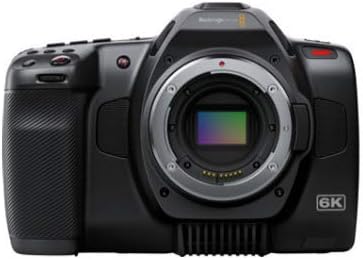
Immagine: Frontale view of the Blackmagic Pocket Cinema Camera 6K Pro, displaying the Canon EF lens mount.
3.3. Media Card Insertion
The camera supports CFast and SD UHS-II cards. Locate the card slots on the side of the camera. Insert the CFast card into the larger slot and the SD card into the smaller slot, ensuring the correct orientation. Press firmly until the card locks into place.
3.4. Accensione
Press and hold the power button located on the top of the camera until the screen illuminates. The camera will boot up and display the main interface.
4. Utilizzo della fotocamera
4.1. Controlli di base e interfaccia
The camera features a 5-inch touchscreen display for navigating menus and adjusting settings. Physical buttons are provided for quick access to essential functions such as ISO, Shutter Angle, White Balance, and Record.
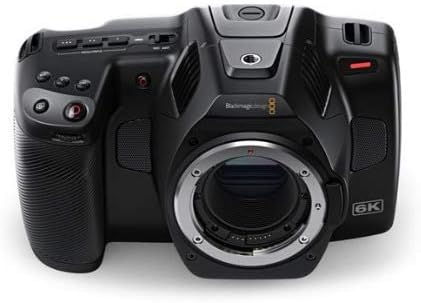
Immagine: Frontale view of the Blackmagic Pocket Cinema Camera 6K Pro, highlighting the various control buttons and the integrated screen.
4.2. Registrazione video
The camera supports video capture resolutions up to 6K RAW (6144 x 3456) and ProRes 422. To begin recording, press the dedicated record button. Adjust resolution, frame rate, and codec settings via the touchscreen menu. The camera offers 13 stops of dynamic range for high-quality cinematic footage.
4.3. Capturing Still Images
Press the dedicated stills button to capture high-resolution still images. Images are saved as uncompressed 21.2-megapixel DNG frames, providing maximum image quality for post-processing and printing.
4.4. Using Built-in ND Filters
The 6K Pro model includes motorized IR ND filters (2, 4, and 6 stops). These filters reduce the amount of light entering the camera, allowing for wider apertures in bright conditions without overexposure. Access and control the ND filters through the camera's menu or dedicated buttons.
4.5. Impostazioni ISO
The camera features dual native ISO up to 25,600, optimized for minimizing noise across various lighting conditions. The native ISO of 400 is suitable for well-lit environments, while the secondary high base ISO of 3200 is ideal for low-light shooting.
4.6. Storage and Data Transfer
Record directly to CFast or SD UHS-II cards. For extended recording times or direct capture to external drives, utilize the high-speed USB-C Expansion Port. Files can be transferred to a computer via USB-C or by removing the media cards.
5. Manutenzione
5.1. Pulizia
- Corpo macchina fotografica: Utilizzare un panno morbido e asciutto per pulire il corpo della fotocamera. Per lo sporco ostinato, un panno leggermenteamp cloth can be used, followed by a dry cloth. Avoid abrasive cleaners.
- Obiettivo e sensore: Use a professional lens cleaning kit. For the sensor, use a sensor cleaning swab and solution specifically designed for camera sensors. Always refer to lens manufacturer guidelines for cleaning.
- Schermo: Use a microfiber cloth designed for electronics screens.
5.2. Conservazione
Store the camera in a cool, dry place away from direct sunlight and extreme temperatures. Use a protective case to prevent dust and physical damage. If storing for extended periods, remove the battery.
5.3. Cura della batteria
Charge batteries fully before use. Avoid completely draining batteries regularly to prolong their lifespan. Store batteries in a cool, dry place. If not used for a long time, charge them to about 50% capacity every few months.
6. Risoluzione Dei Problemi
This section addresses common issues you might encounter with your Blackmagic Pocket Cinema Camera 6K Pro.
| Problema | Possibile causa | Soluzione |
|---|---|---|
| La fotocamera non si accende. | Dead or improperly inserted battery; faulty power supply. | Assicurarsi che la batteria sia completamente carica e inserita correttamente. Provare ad alimentare il dispositivo con l'adattatore CA. |
| Camera does not turn off with power switch. | Problema software. | Remove and reinsert the battery to force a restart. Check for firmware updates. |
| La registrazione si interrompe inaspettatamente. | Slow media card; card full; overheating. | Use high-speed CFast or UHS-II SD cards. Check available storage. Ensure adequate ventilation around the camera. |
| Blue tint on LCD screen. | Known display calibration issue. | This may be a characteristic of some units. Blackmagic Design may release firmware updates to address display calibration. The issue typically does not affect recorded footage or HDMI output. |
| Images appear noisy in low light. | Incorrect ISO setting. | Ensure you are using the appropriate dual native ISO (3200 for low light) and proper exposure. |
7. Specifiche tecniche
| Caratteristica | Specificazione |
|---|---|
| Numero di modello | CINECAMPOCHDEF06P |
| Dimensioni del sensore | Super 35 |
| Risoluzione nativa | 6144x3456 |
| Gamma dinamica | 13 Fermate |
| Doppio ISO nativo | Fino a 25,600 |
| Filtri ND integrati | 2, 4, 6 Stop IR ND Filters |
| Risoluzione di acquisizione video | 720p, 4K, 6K RAW |
| Formato di acquisizione video | Blackmagic Raw, ProRes 422 |
| Still Image Format | 21.2MP DNG |
| Formato audio supportato | WAV, AAC, MP3 |
| Tipo di memoria flash | CFast, SD UHS-II |
| Tecnologia di connettività | USB-C |
| Dimensioni dello schermo | 5 pollici |
| Tecnologia del sensore fotografico | CMOS |
| Apertura massima | apertura f/2 |
| Peso dell'articolo | 2.73 libbre |
| Dimensioni del prodotto | 9.1 x 9.1 x 9.1 pollici |
| Batterie richieste | 1 batteria al litio metallico |
8. Garanzia e supporto
Your Blackmagic Design Pocket Cinema Camera 6K Pro is covered by a manufacturer's warranty. For detailed warranty terms and conditions, please refer to the documentation included with your product or visit the official Blackmagic Design website. For technical support, firmware updates, and additional resources, please visit the Blackmagic Design support page online.
Risorse online:
- Blackmagic Design Official Websito: www.blackmagicdesign.com
- Pagina di supporto: www.blackmagicdesign.com/support


