1. Introduzione
This manual provides instructions for the Sharp Digital Alarm Clock, Model SPC547AJAMZ. This device features an easy-to-read LED display, a high-speed USB charging port, and essential alarm functions. Please read this manual thoroughly before use to ensure proper operation and to maximize the product's lifespan.

Figure 1: Sharp Digital Alarm Clock (Model SPC547AJAMZ) front view.
2. Caratteristiche del prodotto
The Sharp Digital Alarm Clock offers the following key features:
- Display di facile lettura: Large, clear green LED digits for visibility from a distance.
- High-Speed USB Charging Port: Un 2 AMP USB port for rapid charging of compatible devices such as smartphones and tablets.
- Volume di allarme regolabile: Select between high and low alarm volume settings.
- Funzionamento semplice: Intuitive button controls for setting time and alarm.
- Batteria di backup: Mantiene le impostazioni dell'ora e della sveglia durante lo spegnimentotages (requires 2 AAA batteries, not included). The display will be blank during battery backup mode, but the internal clock will continue to run, and the alarm will sound at the set time.

Figure 2: Alarm clock with a smartphone connected to the USB charging port.
3. Contenuto della confezione
Verificare che tutti gli articoli siano presenti nel pacco:
- Sharp Digital Alarm Clock (Model SPC547AJAMZ)
- Adattatore di alimentazione CA.
- Manuale dell'utente (questo documento)
Nota: le 2 batterie AAA di riserva non sono incluse e devono essere acquistate separatamente.
4. Informazioni sulla sicurezza
Si prega di osservare le seguenti precauzioni di sicurezza:
- Non esporre l'unità all'acqua o a umidità eccessiva.
- Evitare di posizionare l'unità vicino a fonti di calore o alla luce diretta del sole.
- Utilizzare solo l'adattatore di alimentazione CA fornito.
- Non tentare di smontare o modificare l'unità.
- Tenere fuori dalla portata dei bambini.
- Garantire un'adeguata ventilazione attorno all'unità.
5. Impostazione
5.1 Collegamento di alimentazione
- Collegare l'adattatore di alimentazione CA alla presa DC IN situata sul retro della sveglia.
- Collegare l'altra estremità dell'adattatore di alimentazione CA a una presa a muro standard (120 V CA, 60 Hz).
- The display will illuminate, and the clock will be ready for time setting.
5.2 Installazione della batteria di backup
Per garantire che le impostazioni di ora e sveglia vengano mantenute durante un'interruzione di correntetage:
- Individuare il vano batterie nella parte inferiore dell'unità.
- Aprire il coperchio del vano batterie.
- Inserire due (2) batterie AAA nuove, rispettando la polarità corretta (+ e -) come indicato all'interno del vano.
- Chiudere saldamente il coperchio del vano batterie.
Note: Batteries are for backup only. The clock display will not be lit during a power outage when operating on battery backup, but the internal clock will continue to run, and the alarm will sound at the set time.
6. Istruzioni per l'uso
Familiarize yourself with the control buttons located on the top of the unit:
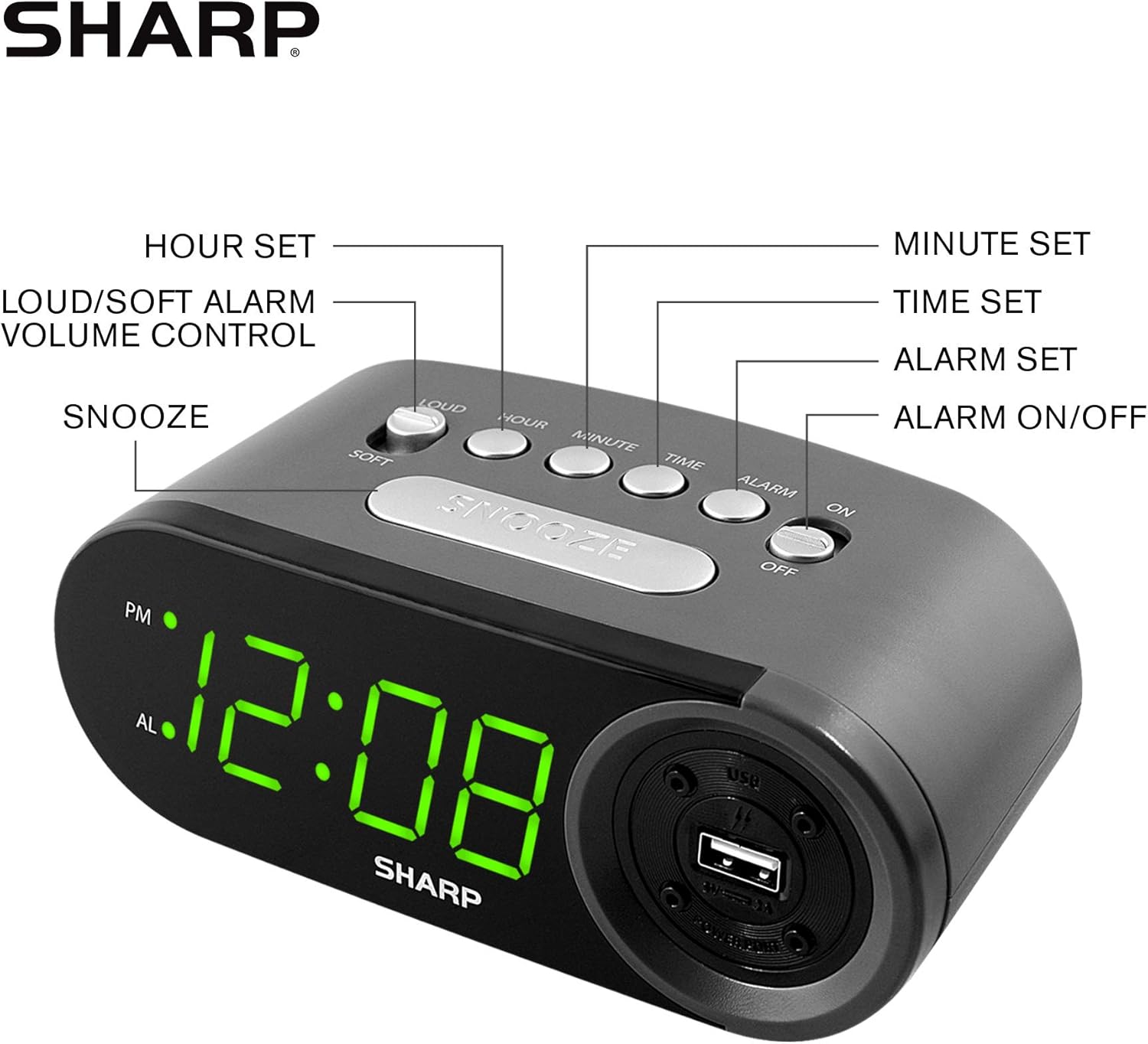
Figure 3: Top panel controls and their functions.
6.1 Impostazione dell'ora corrente
- Premere e tenere premuto il tasto TEMPO button until the display begins to flash.
- Premere il tasto ORA ripetutamente il pulsante per impostare l'ora. Osservare l'indicatore PM per le ore pomeridiane.
- Premere il tasto MINUTO ripetutamente il pulsante per impostare i minuti.
- Una volta impostato il tempo desiderato, premere il tasto TEMPO nuovamente il pulsante per confermare e uscire dalla modalità di impostazione dell'ora.
6.2 Impostazione dell'ora della sveglia
- Premere e tenere premuto il tasto ALLARME button until the alarm time display begins to flash. The "AL" indicator will also flash.
- Premere il tasto ORA button repeatedly to set the alarm hour. Observe the PM indicator.
- Premere il tasto MINUTO button repeatedly to set the alarm minutes.
- Una volta impostata l'ora desiderata per la sveglia, premere il tasto ALLARME nuovamente il pulsante per confermare e uscire dalla modalità di impostazione della sveglia.
6.3 Attivazione/disattivazione dell'allarme
- Per attivare l'allarme ON, fai scorrere il ALLARME ON / OFF switch to the "ON" position. The "AL" indicator will appear on the display.
- Per attivare l'allarme SPENTO, fai scorrere il ALLARME ON / OFF switch to the "OFF" position. The "AL" indicator will disappear.
6.4 Funzione posticipa
Quando suona la sveglia, premere il tasto grande POSTICIPARE pulsante. L'allarme si interromperà temporaneamente e suonerà di nuovo dopo circa 9 minuti.
6.5 Arresto dell'allarme
To stop the alarm completely after it sounds (without using snooze), slide the ALLARME ON / OFF switch to the "OFF" position. The alarm will reset for the next day if the switch is moved back to "ON".
6.6 Regolazione del volume della sveglia
Premere il tasto LOUD/SOFT button to toggle between high and low alarm volume settings.
6.7 Utilizzo della porta di ricarica USB
Il 2 AMP USB charging port is located on the right side of the unit.
- Connect your device's USB charging cable (not included) to the USB port on the alarm clock.
- Collega l'altra estremità del cavo allo smartphone, al tablet o ad altri dispositivi compatibili alimentati tramite USB.
- Ensure the alarm clock is connected to AC power for the USB port to function.
Note: Charging speed may vary depending on your device and cable.
7. Manutenzione
To keep your alarm clock in optimal condition:
- Pulizia: Pulire l'unità con un panno morbido e asciutto. Non utilizzare detergenti abrasivi o solventi.
- Sostituzione della batteria: Replace AAA backup batteries annually or when the battery low indicator (if present) appears, to ensure reliable backup functionality.
- Magazzinaggio: Se si conserva l'unità per un periodo prolungato, rimuovere le batterie di riserva per evitare perdite.
8. Risoluzione Dei Problemi
| Problema | Possibile causa | Soluzione |
|---|---|---|
| Il display dell'orologio è vuoto. | Nessuna alimentazione CA; alimentazione spentatage; unit unplugged. | Ensure AC adapter is securely plugged into the unit and a working wall outlet. Check for power outages. |
| L'allarme non suona. | Alarm is not activated; alarm time is incorrect; volume is too low. | Slide ALARM ON/OFF switch to "ON". Verify alarm time is set correctly. Adjust alarm volume using the LOUD/SOFT button. |
| La porta di ricarica USB non funziona. | Clock not connected to AC power; device not compatible; faulty cable. | Ensure the clock is plugged into AC power. Try a different USB cable or device to confirm compatibility. |
| Impostazioni di ora/sveglia perse dopo lo spegnimentotage. | Le batterie di riserva sono scariche o non installate. | Install two fresh AAA batteries in the battery compartment, ensuring correct polarity. |
9. Specifiche
- Marca: Affilato
- Modello: SPC547AJAMZ
- Tipo di visualizzazione: LED digitale (verde)
- Fonte di energia: Elettrico con cavo (CA 120 V, 60 Hz)
- Batteria di backup: 2 batterie AAA (non incluse)
- Porta di ricarica USB: 2 AMP (5V)
- Dimensioni del prodotto: Circa 6.2" L x 2.3" A x 3.25" P
- Peso dell'articolo: Circa 9.6 once
- Materiale: Plastica
- Codice UPC: 049353006000

Figura 4: Dimensioni del prodotto.
10. Garanzia e supporto
10.1 Informazioni sulla garanzia
This Sharp product is covered by a limited manufacturer's warranty. For specific warranty terms and conditions, please refer to the warranty card included with your purchase or visit the official Sharp websito. Conserva la ricevuta d'acquisto come prova d'acquisto.
10.2 Assistenza clienti
If you have any questions, require assistance, or need to report an issue with your Sharp Digital Alarm Clock, please contact Sharp customer support. Contact details can typically be found on the official Sharp websito o sulla confezione del prodotto.
Per maggiori informazioni, visita il Sharp Store su Amazon.


