Introduzione
This manual provides comprehensive instructions for the setup, operation, maintenance, and troubleshooting of your Cherry MX 3.0 S Wired Mechanical Gaming Keyboard. Designed for gamers and professionals, this keyboard combines robust construction with advanced features for an optimal typing and gaming experience. Please read this manual thoroughly to ensure proper use and longevity of your device.

Figura 1: Dall'alto verso il basso view of the Cherry MX 3.0 S Wired Mechanical Gaming Keyboard, showcasing its full-size layout and RGB backlighting.
Caratteristiche del prodotto
- CHERRY MX RED SILENT Switches: Patented damping minimizes actuation noise while maintaining the linear MX RED actuation feel. These switches are characterized by smooth operation and precise input transmission, ideal for quiet environments.
- Premium Aluminum Housing: Elegantly extruded aluminum housing integrates original CHERRY MX switches, ensuring high quality and stability. The screw-less design contributes to its timeless aesthetic.
- Full N-Key Rollover and Anti-Ghosting: Prevents unwanted inputs, double letters, or missing characters, ensuring accurate and reliable performance during intense gaming sessions or rapid typing.
- Retroilluminazione RGB personalizzabile: Features a full RGB color display with onboard memory for 5 dynamic layouts. Textured keycaps provide vibrant illumination options with over 16 million colors.
- Costruzione durevole: Robust quality with an abrasion-resistant keycaps (double plastic-injected or lasered) and a detachable mini-USB B cable for superior longevity. Includes four rubberized feet for enhanced stability.
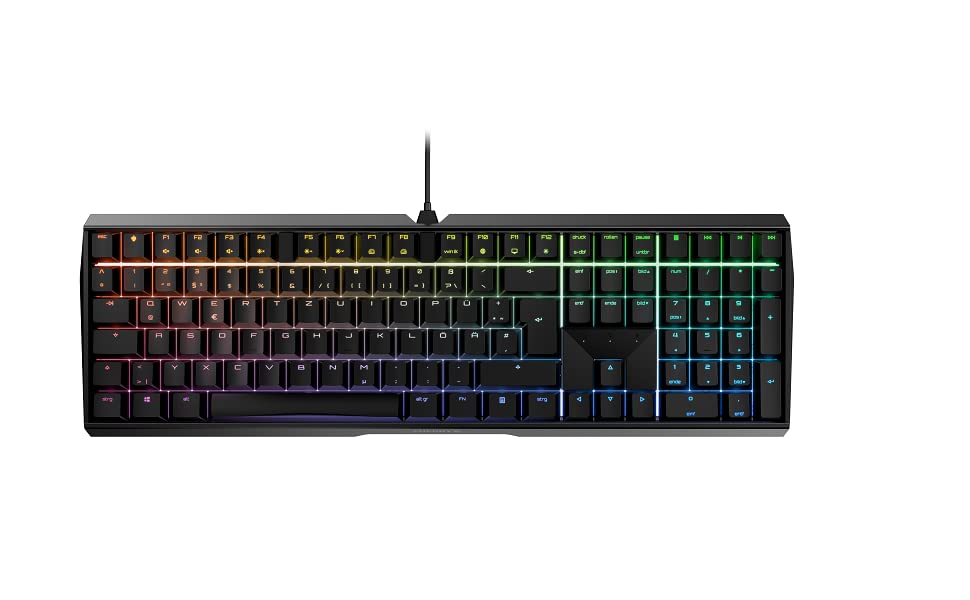
Figure 2: The Cherry MX 3.0 S keyboard displaying its customizable RGB backlighting.
Contenuto della confezione
Si prega di verificare che tutti gli articoli siano presenti nel pacco:
- Cherry MX 3.0 S Wired Mechanical Gaming Keyboard
- USB Cable (detachable)
- Manuale dell'utente (questo documento)
Impostare
1. Collegamento della tastiera
- Locate the detachable USB cable provided with your keyboard.
- Connect the mini-USB B end of the cable to the port on the back of the Cherry MX 3.0 S keyboard.
- Collegare l'estremità USB-A del cavo a una porta USB disponibile sul computer o sulla console di gioco.
- La tastiera dovrebbe essere riconosciuta automaticamente dal sistema operativo. In genere non sono necessari driver aggiuntivi per le funzionalità di base.

Figura 3: Posteriore view of the keyboard, highlighting the detachable USB cable connection point.
2. Installazione del software (facoltativa)
For advanced customization of RGB lighting and other features, Cherry may provide optional software. Please visit the official Cherry website for the latest software downloads and installation instructions. This software allows for personalized RGB settings and pattern options beyond the onboard memory.
Operazione
Funzioni di base della tastiera
The Cherry MX 3.0 S functions as a standard full-size keyboard. All keys operate as labeled. The MX Red Silent switches provide a linear feel with minimal noise, suitable for both typing and gaming.
Personalizzazione dell'illuminazione RGB
The keyboard features onboard memory for up to 5 dynamic RGB lighting layouts. Specific key combinations (often involving the 'Fn' key) can be used to cycle through pre-programmed effects or adjust brightness. Refer to the quick start guide or the official Cherry software for detailed instructions on customizing lighting profiles.
Caratteristiche speciali
- N-Key Rollover (NKRO) and Anti-Ghosting: This keyboard supports full N-Key Rollover, meaning every key press is registered independently, even when multiple keys are pressed simultaneously. Anti-ghosting ensures that no unintended key presses occur.
- WIN Key Lockout: For gaming, the Windows key can be disabled to prevent accidental interruptions during gameplay. This function is typically activated via a specific key combination (e.g., Fn + Windows key). The indicator light for the Windows key may change color (e.g., red) when disabled.

Figure 4: A user's hand demonstrating typing on the keyboard, highlighting the keycap design.
Manutenzione
Pulizia
Per mantenere le prestazioni e l'aspetto della tastiera:
- Scollegare la tastiera dal computer prima di pulirla.
- Utilizzare un panno morbido e privo di lanugine leggermente dampened with water or a mild cleaning solution to wipe down the keycaps and housing. Avoid harsh chemicals or abrasive materials.
- Per rimuovere polvere e detriti tra i tasti, utilizzare aria compressa o una piccola spazzola.
Assistenza generale
Avoid exposing the keyboard to excessive moisture, extreme temperatures, or direct sunlight. Do not attempt to disassemble the keyboard, as this may void your warranty.
Risoluzione dei problemi
If you encounter issues with your Cherry MX 3.0 S keyboard, please refer to the following common solutions:
| Problema | Possibile soluzione |
|---|---|
| La tastiera non risponde | Ensure the USB cable is securely connected to both the keyboard and the computer. Try a different USB port or a different computer to isolate the issue. |
| Illuminazione RGB non funzionante o errata | Check the keyboard's onboard lighting controls (Fn key combinations). If using software, ensure it is installed correctly and updated. Restart the software and/or computer. |
| Le chiavi non vengono registrate o digitate due volte | Ensure the keyboard is clean and free of debris. If the issue persists, it may indicate a hardware problem. |
| Spacebar squeaks | This can sometimes be resolved by carefully removing the spacebar and applying a very small amount of lubricant (e.g., lightweight valve oil, not WD-40) to the stabilizers. Exercise caution to avoid damaging components. |
For further assistance, please visit the official Cherry support websito o contattare il loro servizio clienti.
Specifiche
| Caratteristica | Dettaglio |
|---|---|
| Dimensioni del prodotto | 16.93 x 5.51 x 1.42 pollici |
| Peso dell'articolo | 2.25 libbre |
| Produttore | CILIEGIA |
| Numero modello articolo | G80-3874HWAUS-0 |
| Tecnologia di connettività | USB-A |
| Descrizione della tastiera | Tastiera da gioco meccanica |
| Usi consigliati | Gaming, Home Office, Office, Programming |
| Caratteristiche speciali | Backlit, Customizable Display Keys, Lighting, MX Red Silent Switches |
| Colore | Bianco (come il modello attuale) |
| Numero di chiavi | 109 |
| Retroilluminazione della tastiera | Colore RGB |
| Stile | Classico |

Figure 5: The Cherry MX 3.0 S keyboard, highlighting its German engineering and design.
Garanzia e supporto
Cherry products are manufactured to high-quality standards and come with a manufacturer's warranty. For detailed information regarding warranty terms, technical support, and service, please visit the official Cherry webo contattare direttamente l'assistenza clienti. Conservare la ricevuta d'acquisto come prova d'acquisto per eventuali reclami in garanzia.
Official Cherry Websito: www.cherry.de


