Introduzione
This manual provides comprehensive instructions for the installation, operation, and maintenance of your AeroCool Miragebk ATX PC Case. The Miragebk features an ARGB LED strip on the front panel, a hinged tempered glass side panel, and a 12 cm ARGB fan, designed for optimal component visibility and cooling performance.
Contenuto della confezione
- AeroCool Miragebk ATX PC Case
- Accessory kit (screws, standoffs, cable ties)
- Manuale dell'utente (questo documento)
Informazioni sulla sicurezza
Si prega di leggere e comprendere tutte le istruzioni di sicurezza prima di installare o utilizzare questo prodotto. La mancata osservanza di queste istruzioni potrebbe causare lesioni personali o danni al prodotto.
- Scollegare sempre l'alimentazione dalla presa a muro prima di eseguire qualsiasi installazione o manutenzione.
- Evitare di esporre la custodia alla luce diretta del sole o vicino a fonti di calore.
- Keep the case away from water and excessive humidity.
- Handle the tempered glass panel with care to prevent breakage.
- Garantire una messa a terra adeguata per evitare rischi elettrici.
Configurazione e installazione
Follow these steps to set up your AeroCool Miragebk PC case and install components.
1. Preparazione del caso
- Posizionare la custodia su una superficie piana e stabile.
- Carefully open the hinged tempered glass side panel. This panel provides full access to the interior.
- Remove any protective films from the glass and other surfaces.

Figura 1: Fronte view of the AeroCool Miragebk PC case, showcasing the ARGB LED strip and tempered glass panel.
2. Installazione della scheda madre
- Installare la schermatura I/O nell'apertura posteriore del case.
- Allineare la scheda madre ATX, Micro ATX o Mini ITX con i distanziatori all'interno del case.
- Fissare la scheda madre utilizzando le viti fornite.
3. Installazione dell'alimentatore
- Install the power supply unit (PSU) into the dedicated compartment at the bottom of the case.
- Fissare l'alimentatore con le viti dalla parte posteriore del case.
4. Installazione dell'unità di archiviazione (HDD/SSD)
The case supports up to 7 HDDs and SSDs.
- Locate the drive bays or mounting points.
- Mount your 2.5" SSDs or 3.5" HDDs using the appropriate screws.
5. Installazione della scheda grafica (GPU)
Il case supporta schede grafiche lunghe fino a 356 mm.
- Rimuovere le coperture degli slot di espansione necessari nella parte posteriore del case.
- Inserisci la scheda grafica nello slot PCIe della scheda madre.
- Fissare la scheda grafica con le viti.
6. Cooling System Installation (Fans/Liquid Cooling)
The case supports up to 8 fans and liquid cooling on the front, top, and rear.
- Install additional fans as needed for optimal airflow.
- For liquid cooling, mount radiators to the designated areas (front, top, or rear).
- The case includes one 12 cm ARGB fan.
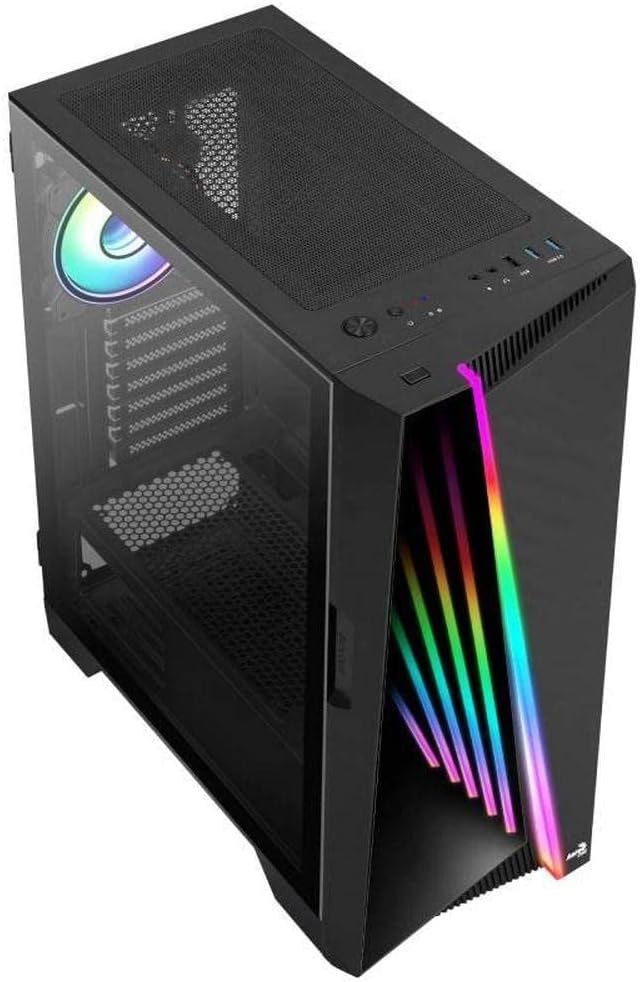
Figura 2: Angolato view of the AeroCool Miragebk PC case, highlighting the top mesh for ventilation and the front panel design.
7. Gestione dei cavi
Utilizzare i ritagli per il passaggio dei cavi e i punti di fissaggio dietro il vassoio della scheda madre per gestire i cavi e migliorare il flusso d'aria e l'estetica.
8. Chiusura del caso
Once all components are installed and cables are managed, close the tempered glass side panel and secure it.
Istruzioni per l'uso
I / O del pannello frontale
The top panel of the AeroCool Miragebk provides convenient access to essential ports and controls:
- Pulsante di accensione: Turns the PC on/off.
- Pulsante di reset: Riavvia il PC.
- Pulsante di controllo LED: Cycles through ARGB lighting modes or syncs with the motherboard.
- Porte USB 3.0 (x2): Per il trasferimento dati ad alta velocità.
- Porta USB 2.0 (x1): Per dispositivi USB standard.
- HD Audio & Microphone Jacks: Per l'ingresso e l'uscita audio.
Controllo dell'illuminazione ARGB
The ARGB lighting on the front panel and included fan can be controlled in two ways:
- Pulsante di controllo LED: Press the dedicated LED button on the top panel to cycle through various pre-set ARGB lighting effects.
- Sincronizzazione della scheda madre: Connect the ARGB lighting to a compatible 3-pin +5V ARGB header on your motherboard. This allows software control of 16.8 million colors and synchronization with other ARGB components. The Mirage control hub supports up to 6 ARGB fans and 2 additional 3-pin ARGB accessories.
Manutenzione
Una manutenzione regolare aiuta a garantire prestazioni ottimali e longevità del case del tuo PC.
- Filtri antipolvere: Periodically remove and clean the dust filters (if present) to maintain good airflow and prevent dust buildup inside the case.
- Pulizia esterna: Pulire le superfici esterne con un panno morbido, damp panno. Evitare detergenti abrasivi o solventi.
- Pulizia interna: Use compressed air to remove dust from internal components and fans. Ensure the PC is powered off and unplugged before cleaning.
- Vetro temperato: Clean the tempered glass panel with a microfiber cloth and a glass cleaner designed for electronics.
Risoluzione dei problemi
If you encounter issues with your AeroCool Miragebk case, refer to the following common solutions:
- Il PC non si accende:
- Assicurarsi che l'alimentatore sia correttamente collegato alla presa a muro e acceso.
- Verify all internal power cables (24-pin ATX, CPU, GPU) are securely connected.
- Check that the front panel power switch cable is correctly connected to the motherboard.
- Illuminazione ARGB non funzionante:
- Confirm the ARGB cables are correctly connected to the motherboard's 3-pin +5V ARGB header or the internal control hub.
- If using motherboard sync, ensure the motherboard's ARGB software is installed and configured correctly.
- Try pressing the LED control button on the top panel to see if pre-set modes function.
- Flusso d'aria scarso/surriscaldamento:
- Check if all installed fans are spinning correctly.
- Pulire eventuali filtri antipolvere e componenti interni.
- Ensure proper fan orientation (intake/exhaust) for optimal airflow.
Specifiche
| Caratteristica | Dettaglio |
|---|---|
| Marca | AeroCool |
| Nome del modello | MIRAGEBK |
| Tipo di caso | Tower (Semitower) |
| Compatibilità della scheda madre | ATX, Micro ATX, Mini ITX |
| Materiale | Vetro temperato |
| Colore | Nero |
| Peso dell'articolo | 12.98 libbre |
| Dimensioni del prodotto (LxWxH) | 19.65 x 8.5 x 16.46 pollici |
| Numero di porte USB 3.0 | 2 |
| Numero di porte USB 2.0 | 1 |
| Tipo di montaggio dell'alimentatore | Montaggio inferiore |
| Metodo di raffreddamento | Aria |
| Dimensioni della ventola (inclusa) | 12 Centimeters (ARGB) |
| Altezza massima del dissipatore della CPU | 162mm |
| Lunghezza massima della GPU | 356mm |
| Alloggiamenti unità | 7 (HDDs and SSDs) |
Garanzia e supporto
For warranty information or technical support, please refer to the official AeroCool webo contattare il servizio clienti. Conservare la prova d'acquisto per eventuali reclami in garanzia.


