1. Introduzione
This manual provides comprehensive instructions for the installation, operation, and maintenance of your Comelit Quadra Mini Wi-Fi 2-Wire Video Intercom Kit. This system is designed to enhance home security and communication by allowing visitors to ring the doorbell and communicate with occupants, with the added convenience of hands-free operation and Wi-Fi connectivity.
Please read this manual thoroughly before installation and use to ensure proper functioning and to prevent damage to the device.
2. Informazioni sulla sicurezza
Osservare le seguenti precauzioni di sicurezza per evitare lesioni e danni al prodotto:
- L'installazione deve essere eseguita da personale qualificato in conformità con i codici e le normative elettriche locali.
- Scollegare l'alimentazione prima di eseguire qualsiasi procedura di installazione, cablaggio o manutenzione.
- Non esporre l'unità esterna a getti d'acqua diretti né immergerla in acqua.
- Non aprire il dispositivo casings unless instructed to do so by this manual or Comelit technical support.
- Use only original Comelit accessories and spare parts.
- Tenere i materiali di imballaggio fuori dalla portata dei bambini.
3. Contenuto della confezione
The Comelit Quadra Mini Wi-Fi 2-Wire Video Intercom Kit includes the following components:
- 1x Quadra Outdoor Unit (Doorbell Panel)
- 1x Mini Hands-Free Wi-Fi Monitor (Indoor Unit)
- 1x Alimentatore
- 1x Line Termination Board
- Accessori di montaggio (viti, tasselli)
- Manuale di istruzioni (questo documento)
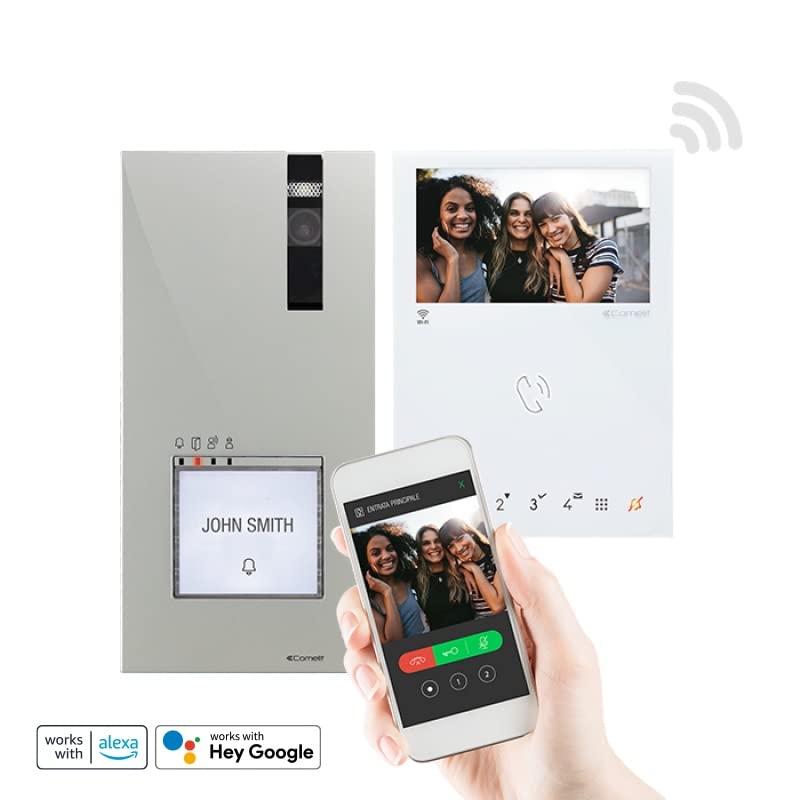
Figura 1: Oltreview of the Comelit Quadra Mini Wi-Fi 2-Wire Video Intercom Kit components.
4. Prodotto finitoview
4.1. Quadra Outdoor Unit
The Quadra outdoor unit features an HD color wide-angle camera for clear visitor identification. It can be configured with 1 to 4 call buttons, allowing for multiple apartment or user calls. Four signaling LEDs indicate the status: call sent, door open activated, audio activated, and line busy. It incorporates a 1/4" CMOS detector and is powered via the bus line. Its robust design (IP54-IK08 rated) ensures durability against environmental factors. Dimensions: 95x195x28 mm.
4.2. Mini Hands-Free Wi-Fi Monitor
The indoor Mini monitor is a hands-free color unit with a 4.3-inch (16:9) LCD screen, offering a resolution of 480x272 pixels. It features 8 sensitive keys and 4 programmable buttons for various functions. Users can adjust brightness, audio volume, and ringtone volume directly from the monitor. Its Wi-Fi capability allows for remote interaction via a compatible smartphone application.
4.3. Unità di alimentazione
The power supply unit is designed to power the outdoor unit, the electric strike (door lock release), and the indoor monitor. It accepts an input voltage of 110-240 V AC and provides a 33 V DC output. This unit occupies 6 DIN modules in an electrical panel.
5. Configurazione e installazione
The Comelit Quadra Mini Wi-Fi kit is pre-programmed and ready for use, simplifying the installation process. This system uses a 2-wire bus connection for communication and power.
5.1. Schema elettrico
Refer to the detailed wiring diagram provided in the separate installation guide for specific connections. Ensure all connections are secure and correctly polarized. The 2-wire bus connects the outdoor unit, indoor monitor, and power supply.
5.2. Montaggio dell'unità esterna
- Choose a suitable mounting location at eye level, protected from direct heavy rain if possible, though the unit is IP54-IK08 rated.
- Mark drilling points using the mounting template (if provided).
- Praticare i fori e inserire i tasselli.
- Connect the 2-wire bus cable and any electric strike wiring to the outdoor unit terminals.
- Fissare l'unità esterna alla parete utilizzando le viti fornite.
5.3. Montaggio del monitor interno
- Select an indoor location for the monitor, typically near the main entrance or in a central area.
- Montare la staffa del monitor alla parete.
- Connect the 2-wire bus cable to the monitor terminals.
- Fissare il monitor alla sua staffa.
5.4. Installazione dell'alimentatore
Install the power supply unit in your electrical panel (6 DIN modules). Connect the 110-240 V AC input and the 33 V DC output to the 2-wire bus system as per the wiring diagram.
5.5. Accensione iniziale e configurazione
- Once all components are wired and mounted, apply power to the system.
- The system is pre-programmed for basic operation. Test the call function from the outdoor unit to the indoor monitor.
- For Wi-Fi connectivity, download the Comelit app on your smartphone and follow the in-app instructions to pair your monitor.
- Configure call buttons on the outdoor unit if more than one is used, referring to the detailed programming guide.
6. Istruzioni per l'uso
6.1. Rispondere a una chiamata
- Quando un visitatore preme il pulsante di chiamata sull'unità esterna, il monitor interno squilla e visualizza l'immagine del visitatore.
- Premere il tasto Risposta button (typically a phone icon) on the monitor to establish two-way hands-free communication.
- Per terminare la chiamata, premere il tasto Termina chiamata button (typically a red phone icon).
6.2. Sblocco porta
- Durante una chiamata, o quando viewing the outdoor unit camera, press the Apriporta button (typically a key icon) to activate the electric strike and open the door/gate.
- The door open activated LED on the outdoor unit will illuminate.
6.3. Impostazioni monitor
Use the sensitive keys and programmable buttons on the Mini monitor to access and adjust settings:
- Luminosità: Regola la luminosità dello schermo per una resa ottimale viewing.
- Volume audio: Control the volume of the two-way communication.
- Volume suoneria: Set the desired volume for incoming calls.
- Pulsanti programmabili: Refer to the advanced settings guide for customizing the 4 programmable buttons (e.g., for additional camera views, intercommunication, or auxiliary functions).
6.4. Connettività Wi-Fi e app per smartphone
- Ensure your Mini monitor is connected to your home Wi-Fi network as per the setup instructions.
- Download the official Comelit app from your smartphone's app store.
- Follow the app's instructions to pair your monitor. This typically involves scanning a QR code displayed on the monitor or entering a pairing code.
- Once paired, you can receive calls, view the outdoor unit camera, and open the door remotely from your smartphone.
7. Manutenzione
Regular maintenance ensures the longevity and optimal performance of your video intercom system:
- Pulizia: Utilizzare un morbido, damp cloth to clean the outdoor unit camera lens and the indoor monitor screen. Do not use abrasive cleaners or solvents.
- Connessioni: Periodically check all wiring connections for tightness and signs of corrosion. Ensure the 2-wire bus connections are secure.
- Aggiornamenti software: Check the Comelit app or website for any available firmware updates for your monitor to ensure you have the latest features and security enhancements.
- Protezione ambientale: While the outdoor unit is robust, ensure it is not subjected to extreme physical impact or prolonged exposure to harsh chemicals.
8. Risoluzione Dei Problemi
If you encounter issues with your Comelit video intercom kit, refer to the table below for common problems and solutions:
| Problema | Possibile causa | Soluzione |
|---|---|---|
| Nessuna immagine sul monitor interno | No power to the system; Loose wiring connection; Faulty outdoor unit camera. | Check power supply and circuit breaker. Verify 2-wire bus connections. Contact technical support if problem persists. |
| Nessun audio durante la chiamata | Audio volume too low; Loose wiring; Faulty microphone/speaker. | Adjust audio volume on the monitor. Check 2-wire bus connections. |
| L'apertura della porta non funziona | Incorrect wiring to electric strike; Faulty electric strike; Insufficient power from power supply. | Verify electric strike wiring. Test electric strike independently. Ensure power supply is functioning correctly. |
| Wi-Fi connection unstable or not connecting | Segnale Wi-Fi debole; password Wi-Fi errata; problemi con il router. | Ensure monitor is within Wi-Fi range. Re-enter Wi-Fi password. Restart your home router. |
If the problem persists after attempting these solutions, please contact Comelit technical support.
9. Specifiche
| Caratteristica | Dettaglio |
|---|---|
| Produttore | Comelit Immotec |
| Riferimento modello | 8451V/BM |
| Marca | Comelit |
| Tecnologia di connettività | Senza fili (Wi-Fi) |
| Dispositivi compatibili | Smartphone |
| Fonte di alimentazione | Electric Cable (110-240 V AC input, 33 V DC output) |
| Tipo di montaggio | Montaggio a parete |
| Risoluzione di registrazione video | 720p (HD) |
| Dimensioni unità esterna | Dimensioni: 95x195x28 mm |
| Grado di protezione IP dell'unità esterna | IP54-IK08 |
| Schermo monitor interno | 4.3 inch / 16:9 LCD (480x272 pixels) |
| Usi consigliati | Sorveglianza |
| Peso | 1 chilogrammo |
| Quantità di articoli | 1 |
| Disponibilità dei pezzi di ricambio | Informazioni non disponibili sui pezzi di ricambio |
10. Garanzia e supporto
Comelit products are manufactured to high-quality standards. For specific warranty terms and conditions, please refer to the warranty card included with your product or visit the official Comelit websito. Conservare la prova d'acquisto per eventuali reclami in garanzia.
For technical assistance, troubleshooting beyond this manual, or spare parts inquiries, please contact Comelit customer support through their official websito o le informazioni di contatto fornite nella documentazione del prodotto.