Introduzione
This manual provides detailed instructions for the operation and maintenance of your Casio W736H Series Digital Watch, model W-736H-5AV. Please read this manual thoroughly to ensure proper use and to fully utilize all features of your watch. Keep this manual for future reference.
Prodotto finitoview
The Casio W736H Series Digital Watch is designed for durability and functionality, featuring a 1/100 second stopwatch, countdown timer, daily alarm with vibration, dual time, and a Super Illuminator LED light. It also boasts 100-meter water resistance and a 10-year battery life.
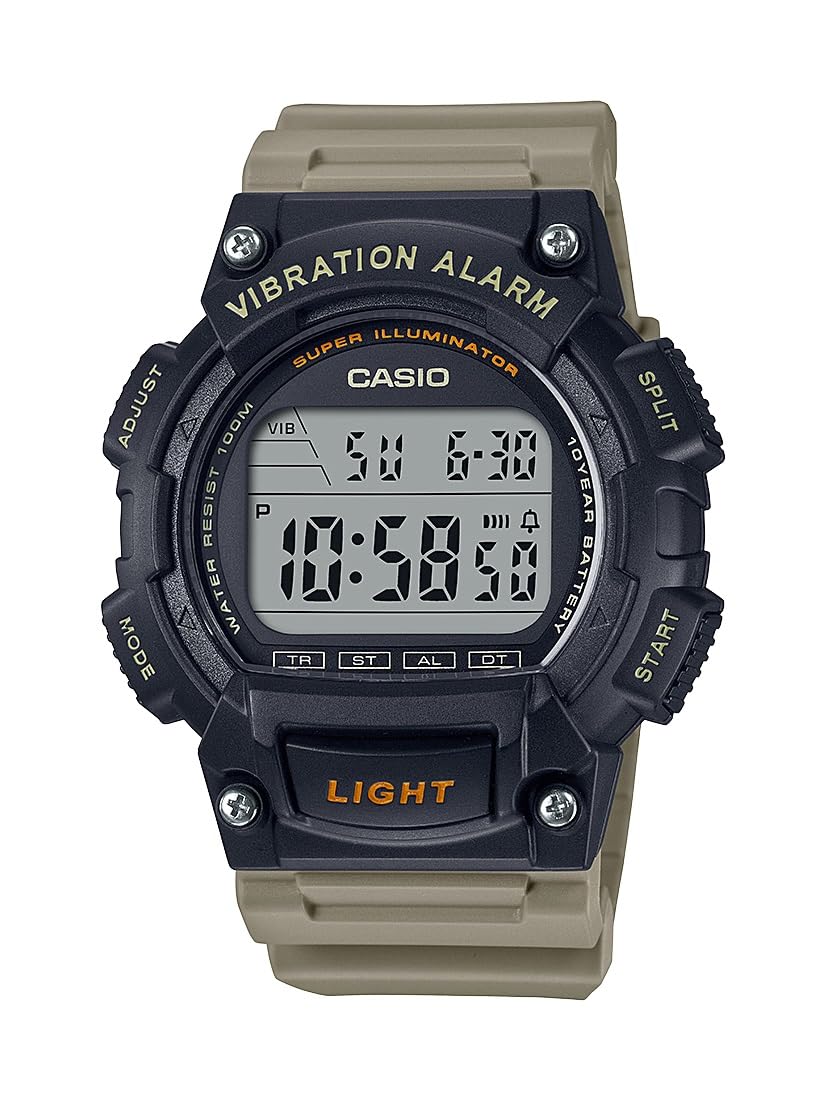
Image: Casio W736H Series Digital Watch, model W-736H-5AV. The watch features a digital display, four side buttons labeled 'ADJUST', 'MODE', 'SPLIT', 'START', and a front button labeled 'LIGHT'.
Funzioni dei pulsanti
- REGOLA (in alto a sinistra): Utilizzato per entrare e uscire dalle modalità di impostazione e per confermare le impostazioni.
- MODALITÀ (in basso a sinistra): Cycles through different watch modes (Timekeeping, Stopwatch, Countdown Timer, Alarm, Dual Time).
- SPLIT / START (Top Right): In Stopwatch mode, used for split/lap timing. In other modes, may function as a start button or for value adjustment.
- START / RESET (Bottom Right): Used to start/stop functions or to reset values. Also used for value adjustment in setting modes.
- LIGHT (Front Bottom): Attiva la retroilluminazione a LED Super Illuminator.
Impostare
Impostazione dell'ora e della data
- In modalità cronometraggio, tenere premuto il tasto REGOLARE finché i secondi non iniziano a lampeggiare, indicando la schermata di impostazione.
- Premere il tasto MODALITÀ button to cycle through the settings in the following order: Seconds → DST (Daylight Saving Time) → Hour → Minute → Year → Month → Day.
- Utilizzare il START / RESET (Bottom Right) and SPLIT / START (Top Right) buttons to adjust the flashing value.
- START / RESET: Aumenta il valore.
- SPLIT / START: Decreases the value (or cycles through options).
- Una volta configurate tutte le impostazioni, premere il tasto REGOLARE button to exit the setting screen and return to Timekeeping Mode.
Formato 12/24 ore
In modalità cronometraggio, premere il tasto START / RESET pulsante per passare dal formato orario a 12 ore a quello a 24 ore.
Modalità operative
Premere il tasto MODALITÀ pulsante per scorrere le varie modalità dell'orologio:
- Modalità di indicazione dell'ora
- Modalità cronometro (ST)
- Countdown Timer Mode (TR)
- Modalità sveglia (AL)
- Dual Time Mode (DT)
Modalità cronometro
Il cronometro misura il tempo trascorso, i tempi parziali e due arrivi.
- Dalla modalità di cronometraggio, premere MODALITÀ until 'ST' appears on the display.
- Premere START / RESET (Bottom Right) to start the stopwatch.
- Premere START / RESET di nuovo per fermare il cronometro.
- Per azzerare il cronometro, premere SPLIT / START (Top Right) while it is stopped.
- For split times, press SPLIT / START while the stopwatch is running. The display will show the split time. Press SPLIT / START di nuovo per tornare alla misurazione del tempo trascorso.
Modalità timer conto alla rovescia
The countdown timer can be set for a period from 1 minute to 24 hours.
- Dalla modalità di cronometraggio, premere MODALITÀ until 'TR' appears on the display.
- Premere e tenere premuto REGOLARE finché l'impostazione dell'ora non lampeggia.
- Utilizzo START / RESET (Bottom Right) and SPLIT / START (Top Right) to set the desired countdown start time (hours and minutes).
- Premere REGOLARE per uscire dalla schermata di impostazione.
- Premere START / RESET per iniziare il conto alla rovescia.
- Premere START / RESET again to pause the countdown. Press it once more to resume.
- To stop and reset the timer, press SPLIT / START mentre il timer è in pausa.
- When the countdown reaches zero, the watch will emit a vibration alarm.
Modalità allarme
The watch features a daily alarm with a vibration alert.
- Dalla modalità di cronometraggio, premere MODALITÀ until 'AL' appears on the display.
- Premere e tenere premuto REGOLARE finché l'impostazione dell'ora non lampeggia.
- Utilizzo START / RESET (Bottom Right) and SPLIT / START (Top Right) to set the alarm hour and minute.
- Premere REGOLARE per uscire dalla schermata di impostazione.
- In modalità Allarme, premere START / RESET to toggle the alarm ON/OFF. An alarm indicator will appear when the alarm is active.
- To stop the alarm once it sounds/vibrates, press any button.
Modalità Dual Time
This mode allows you to keep track of a second time zone.
- Dalla modalità di cronometraggio, premere MODALITÀ until 'DT' appears on the display.
- Premere e tenere premuto REGOLARE finché l'impostazione dell'ora non lampeggia.
- Utilizzo START / RESET (Bottom Right) and SPLIT / START (Top Right) to set the desired hour and minute for the second time zone.
- Premere REGOLARE per uscire dalla schermata di impostazione.
Super Illuminator LED Light
The Super Illuminator LED light provides illumination for the display in low-light conditions.
- Premere il tasto LEGGERO button (front bottom) to illuminate the display.
- The illumination duration is preset and cannot be adjusted.
Manutenzione
Informazioni sulla batteria

Image: A gold and black emblem indicating '10 Year Battery Life'.
This watch is equipped with a long-life battery, designed to last approximately 10 years under normal use. When the display becomes dim or the light function weakens, it indicates that the battery power is low. Battery replacement should be performed by a qualified watch technician to ensure water resistance is maintained.
Resistenza all'acqua
The watch is rated for 100-meter water resistance. This means it is suitable for swimming, showering, and snorkeling. However, it is not suitable for scuba diving. Do not operate buttons while the watch is wet or submerged in water, as this can compromise the water resistance.
Pulizia
Wipe the watch case and band with a soft, dry cloth to remove dirt and moisture. For resin bands, a mild soap solution and water can be used, followed by thorough rinsing and drying. Avoid using harsh chemicals or abrasive cleaners.
Risoluzione dei problemi
- Il display è vuoto o poco luminoso: La batteria potrebbe essere scarica. Valutare la sostituzione della batteria da parte di un professionista.
- L'ora non è corretta: Re-adjust the time and date settings as described in the 'Setup' section. Ensure DST (Daylight Saving Time) is correctly set if applicable.
- Allarme non funzionante: Check if the alarm is activated in Alarm Mode. Ensure the volume/vibration setting is enabled.
- I pulsanti non rispondono: Ensure the watch is not wet. If the issue persists, a reset may be required (consult a service center), or there might be an internal malfunction.
If problems persist after attempting these solutions, please contact a Casio service center for assistance.
Specifiche
- Numero modello: Modello W-736H-5AV
- Moduli: (Not specified in provided data, typically a 4-digit number)
- Resistenza all'acqua: 100 metri (10 BAR)
- Durata della batteria: Approximately 10 years (CR2032 Lithium Metal battery)
- Precisione: ±30 secondi al mese (media)
- Cronometraggio: Hour, minute, second, p.m., month, date, day
- Sistema di calendario: Calendario automatico completo (fino all'anno 2099)
- Cronometro: 1/100-second; measuring capacity: 23:59'59.99''; measuring modes: elapsed time, split time, 1st-2nd place times
- Conto alla rovescia: Measuring unit: 1 second; countdown range: 24 hours; countdown start time setting range: 1 minute to 24 hours (1-minute increments and 1-hour increments)
- Allarme: Daily alarm with vibration alert
- Doppio orario: SÌ
- Illuminazione: Super Illuminator LED backlight
- Dimensioni: 6 x 6 x 4 inches (Product Dimensions as packaged)
- Peso: 3.84 ounces (Product Weight as packaged)
Garanzia e supporto
For warranty information, service, or additional support, please refer to the official Casio website or contact your local authorized Casio dealer. Keep your proof of purchase for warranty claims.
Casio ufficiale Websito: www.casio.com


