1. Introduzione
The Blaupunkt BP 4.0 FHD Dash Cam is a compact and robust in-car video recorder designed to capture your journeys in Full HD. Featuring a 140-degree wide-angle lens, an integrated microphone, and an interior camera, it provides comprehensive coverage for your vehicle. This manual provides essential information for the proper installation, operation, and maintenance of your device.
2. Contenuto della confezione
Si prega di controllare il contenuto della confezione per assicurarsi che siano presenti tutti gli articoli:
- Blaupunkt BP 4.0 FHD Dash Cam (Video Recorder)
- Lente interna
- Mount (Suction Cup Type)
- Cavo di alimentazione (caricabatteria da auto)
- Manuale d'uso

Image 2.1: Contents of the Blaupunkt BP 4.0 FHD Dash Cam package.

Image 2.2: The retail packaging for the Blaupunkt BP 4.0 FHD Dash Cam.
3. Prodotto finitoview
The BP 4.0 FHD Dash Cam features a main unit with a 2-inch display and a separate interior camera. It is designed for easy installation and discreet operation within your vehicle.
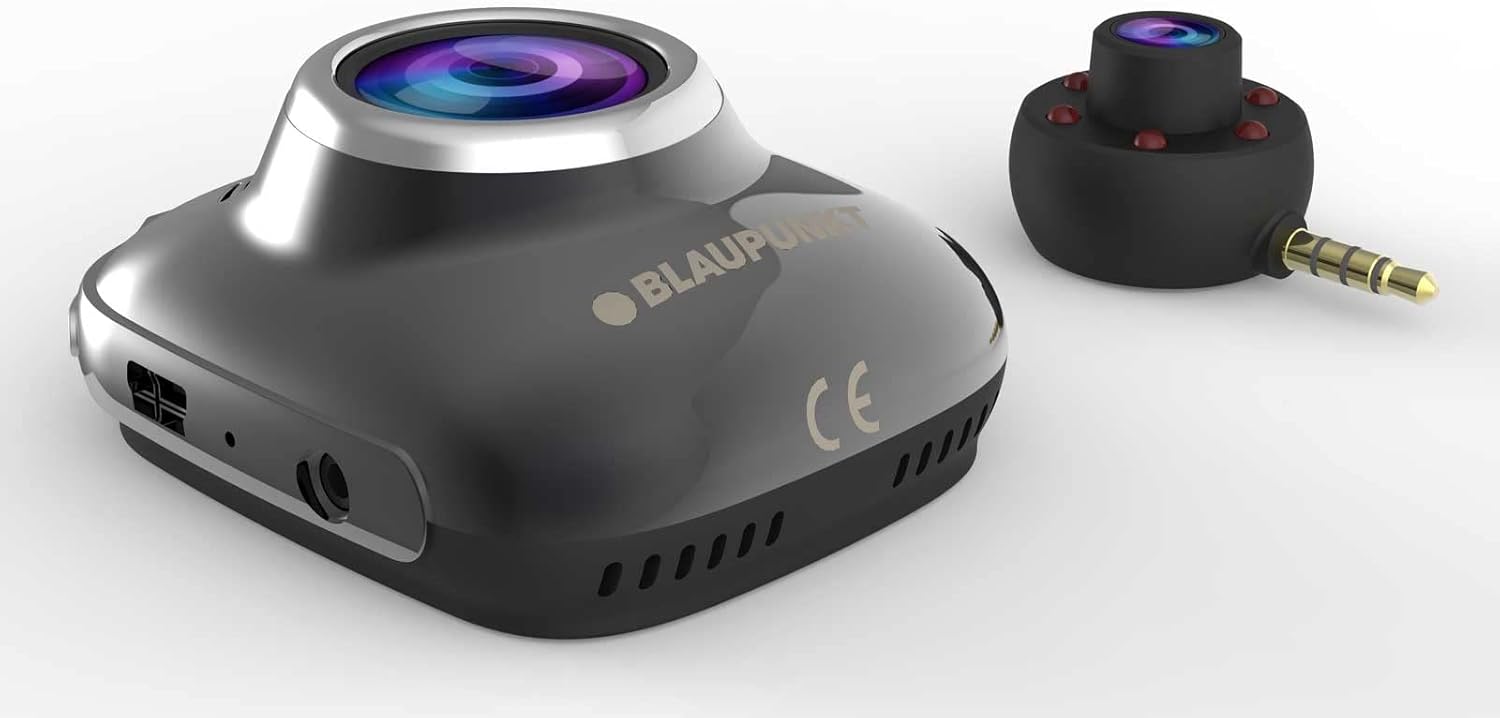
Image 3.1: Main unit and interior camera of the Blaupunkt BP 4.0 FHD Dash Cam.
Caratteristiche principali:
- Doppia lente: Records both front and interior viewcontemporaneamente.
- Grandangolo View: Campo orizzontale di 140 gradi view per una copertura stradale completa.
- Microfono integrato: Captures in-cabin audio.
- Display da 2 pollici: Per vivere view, riproduzione e navigazione nei menu.
- Sensore G: Blocca automaticamente il video files al momento dell'impatto.
- Registrazione in loop: Registra continuamente, sovrascrivendo il più vecchio files quando la scheda di memoria è piena.
- Design durevole: Constructed with zinc alloy for robustness.

Image 3.2: Dimensions of the Blaupunkt BP 4.0 FHD Dash Cam.
4. Installazione
Per una corretta installazione della tua dash cam, segui questi passaggi:
- Preparare la posizione di montaggio: Scegli una posizione sul parabrezza che non ostruisca il tuo view of the road. Clean the area thoroughly to ensure good adhesion for the suction cup mount.
- Fissare il supporto: Fissare il supporto a ventosa nel punto scelto sul parabrezza. Assicurarsi che sia saldamente fissato.
- Montare la Dash Cam: Slide the main dash cam unit onto the mount until it clicks into place. Adjust the angle of the camera to ensure the front lens captures the road ahead clearly.
- Inserire la scheda MicroSD: Insert a high-speed MicroSD card (not included) into the designated slot on the dash cam. Ensure it is inserted correctly until it locks.
- Connect Interior Camera: Plug the interior camera's 3.5mm jack into the auxiliary port on the main dash cam unit. Position the interior camera to capture the vehicle's cabin as desired.
- Connetti alimentazione: Plug the car charger cable into the dash cam's power input port and then into your vehicle's 12V power outlet (cigarette lighter socket). Route the cable neatly along the windshield and dashboard to avoid interference with driving.
- Accendi e prova: Start your vehicle. The dash cam should power on automatically and begin recording. Check the display to confirm both front and interior camera views are visible and recording correctly.
5. Funzionamento di base
Understanding the basic functions of your dash cam will ensure optimal performance.
Accensione/spegnimento:
- Automatico: La dash cam si accenderà automaticamente e inizierà a registrare quando il motore del veicolo verrà acceso (e l'alimentazione verrà fornita alla presa da 12 V).
- Manuale: Per accendere o spegnere manualmente il dispositivo, tenere premuto il pulsante di accensione (solitamente contrassegnato dal simbolo di alimentazione).
Modalità di registrazione:
- Registrazione in loop: The camera records video in continuous loops (e.g., 1, 3, or 5-minute segments). When the memory card is full, the oldest unlocked filevengono sovrascritti automaticamente.
- Sensore G (registrazione di emergenza): In caso di impatto o collisione improvvisa, il G-Sensor integrato rileverà l'evento e bloccherà automaticamente il video corrente file, impedendone la sovrascrittura tramite registrazione in loop.
Navigazione nel menu:
Use the buttons located around the 2-inch display to navigate through the menu options. Common settings include video resolution, loop recording duration, G-Sensor sensitivity, date/time stamp, and format MicroSD card.
6. Manutenzione
Una manutenzione regolare garantisce la longevità e le prestazioni ottimali della tua dash cam.
- Pulizia lenti e schermo: Use a soft, lint-free cloth to gently wipe the camera lenses and the display screen. Avoid abrasive materials or chemical cleaners that could scratch or damage the surfaces.
- Gestione della scheda MicroSD: Periodically format your MicroSD card (at least once a month) to prevent data corruption and ensure smooth recording. Back up any important video files prima della formattazione.
- Controllo della temperatura: Avoid exposing the dash cam to extreme temperatures for extended periods. If your car is parked in direct sunlight on a hot day, consider removing the dash cam to prevent overheating.
- Aggiornamenti del firmware: Controlla il Blaupunkt ufficiale website for any available firmware updates. Keeping your dash cam's firmware up-to-date can improve performance and add new features.
7. Risoluzione Dei Problemi
If you encounter issues with your Blaupunkt BP 4.0 FHD Dash Cam, refer to the following common problems and solutions:
| Problema | Possibile causa | Soluzione |
|---|---|---|
| La dash cam non si accende. | Nessuna alimentazione; cavo difettoso; batteria scarica. | Check car charger connection and vehicle's 12V outlet. Try a different power source or cable. Ensure the internal battery is charged. |
| La registrazione si interrompe o si blocca. | Slow MicroSD card; full MicroSD card; card error. | Use a high-speed (Class 10 or U1/U3) MicroSD card. Format the MicroSD card. Replace the MicroSD card if errors persist. |
| Poor video quality (especially at night). | Dirty lens; low light conditions; windshield glare. | Clean the camera lenses and windshield. Ensure no obstructions. Adjust exposure settings if available. Note that night vision performance can be limited. |
| Interior camera not working. | Loose connection; faulty interior camera. | Ensure the interior camera is securely plugged into the main unit's auxiliary port. If the issue persists, contact support. |
| I pulsanti non rispondono. | Device frozen; software glitch. | Perform a soft reset by pressing the reset button (if available) or by holding the power button for 10-15 seconds. |
8. Specifiche
Detailed technical specifications for the Blaupunkt BP 4.0 FHD Dash Cam:
- Marca: BLAUPUNKT
- Nome modello: BP 4.0 FHD
- Numero modello articolo: BP 4.0 FHD
- Colore: Lega di zinco / Nero
- Dimensioni dello schermo: 2 pollici
- Campo di View: 140 gradi
- Risoluzione di registrazione video: Risoluzione: 1080p, 720p
- Tecnologia di connettività: Ausiliario
- Tipo di montaggio: Supporto a ventosa
- Dispositivi compatibili: Auto, camion
- Componenti inclusi: Cable, Video Recorder, User Manual, Interior Lens, Mount
- Produttore: BLAUPUNKT
- Data di prima disponibilità su Amazon.com.be: 6 giugno 2022
- Disponibilità ricambi: Informazioni non disponibili
- Aggiornamenti software garantiti fino al: Informazioni non disponibili
9. Garanzia e supporto
For warranty information and customer support, please refer to the warranty card included in your product package or visit the official Blaupunkt websito. I termini e le condizioni di garanzia specifici possono variare in base alla regione e al rivenditore.


