1. Introduzione
This manual provides detailed instructions for the setup, operation, and maintenance of your new Richmat Wireless Remote Control. This remote is designed to operate specific adjustable bed bases from Mlily, Bedtech, and Mattress Firm. Please read this manual thoroughly before use to ensure proper functionality.
Nota importante sulla compatibilità:
- This remote is compatible only with Mlily, Bedtech, or Mattress Firm 3000 Richmat bases that originally featured a remote identical to the ones pictured (white or black versions).
- Minor button label variations may exist (e.g., M3 button as a flat button, flat button as under bed light, anti-snore as TV lounge on certain Classic Brands remotes). These are functional equivalents.
- This remote will NOT work if your original remote had a Bluetooth logo in the bottom right corner.
- This remote will NOT work if your original remote had a flashlight button on the top row or other button icons/words not listed here.
2. Informazioni sulla sicurezza
- Tenere il telecomando lontano dall'acqua e dall'umidità eccessiva.
- Non esporre il telecomando alla luce solare diretta o a temperature estreme.
- Do not attempt to disassemble or repair the remote control yourself. Contact qualified service personnel.
- Tenere le batterie fuori dalla portata dei bambini. In caso di ingestione, consultare immediatamente un medico.
- Smaltire le batterie usate secondo le normative locali.
3. Contenuto della confezione
Upon opening your package, please verify that you have received the following item:
- Richmat Wireless Remote Control (White or Black version)
4. Prodotto finitoview e controlli
The Richmat Wireless Remote Control provides a clear layout for operating your adjustable bed base. You may receive either a white or black version of the remote, both offering identical functionality.

Figure 1: White and Black Remote Control Versions. You will receive one of these two versions based on current inventory. Both versions function identically.
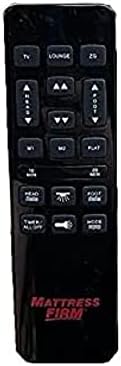
Figure 2: White Remote Control (Example with Mlily branding). This image displays the button layout and functions.

Figure 3: Black Remote Control (Example with Mattress Firm branding). This image displays the button layout and functions.
Funzioni dei pulsanti:
- TV / LOUNGE / ZG (Zero Gravity): Preset positions for watching TV, lounging, or achieving a zero-gravity posture.
- HEAD UP/DOWN Arrows: Regolare la testiera del letto verso l'alto o verso il basso.
- FOOT UP/DOWN Arrows: Regolare la sezione piedi del letto verso l'alto o verso il basso.
- M1 / M2: Memory preset buttons to save and recall your favorite bed positions.
- PIATTO: Riporta il letto in una posizione completamente piana.
- 10 MINUTI / 20 MINUTI: Timer buttons for massage functions (if applicable to your base).
- HEAD / FOOT Massage: Activates or adjusts massage intensity for the head or foot sections.
- TIMER / TUTTO SPENTO: Turns off all active functions, including massage and under-bed lighting.
- LIGHT (Under Bed Light): Toggles the under-bed lighting on or off.
- DIREZIONI: Cycles through different massage modes (if applicable).
Note: Button labels and specific functions may vary slightly depending on the adjustable base model. Refer to your adjustable base's manual for full details on its features.
5. Istruzioni per la configurazione e l'associazione
To use your new Richmat Wireless Remote Control, it must first be paired with your adjustable bed base. The pairing process is typically straightforward.
5.1. Installazione della batteria
- Individuare il vano batterie sul retro del telecomando.
- Far scorrere per aprire il coperchio della batteria.
- Insert the required batteries (typically AAA, check markings inside the compartment) according to the polarity indicators (+ and -).
- Chiudere bene il coperchio della batteria.
5.2. Associazione del telecomando
The exact pairing procedure may vary slightly depending on your adjustable bed base model. Generally, the steps involve:
- Assicurare l'alimentazione: Make sure your adjustable bed base is plugged into a working power outlet.
- Locate Pairing Button: Find the pairing button on the control box of your adjustable bed base. This box is usually located under the bed frame, near the head or foot end. It may be labeled "PAIR," "SYNC," or have a small button.
- Activate Pairing Mode on Base: Press and hold the pairing button on the control box for approximately 3-5 seconds until you hear a beep or see an indicator light flash. This indicates the base is in pairing mode.
- Activate Pairing Mode on Remote: While the base is in pairing mode (within 10-20 seconds), press and hold the "FLAT" button on your new remote control. Some remotes may require pressing and holding the "HEAD UP" and "FOOT DOWN" buttons simultaneously, or a dedicated "PAIR" button if present.
- Conferma associazione: Release the button(s) on the remote when the indicator light on the control box stops flashing or you hear another beep, signifying successful pairing.
- Funzionalità di prova: Test all remote functions (head/foot adjustment, flat, presets) to ensure proper operation.
If you encounter difficulties, refer to the original instruction manual for your specific adjustable bed base model for precise pairing instructions.
6. Istruzioni per l'uso
Once paired, your Richmat Wireless Remote Control allows you to easily adjust your bed to your desired comfort position.
- Adjusting Head/Foot: Premere e tenere premuto il tasto TESTA SU/GIÙ or FOOT UP/DOWN arrows to move the respective sections. Release the button when the desired position is reached.
- Posizione piatta: Premere il tasto PIATTO button to return the bed to a completely flat position.
- Posizioni preimpostate: Premere TV, SALA, O ZG (Zero Gravity) to move the bed to these pre-programmed comfort positions.
- Saving Memory Presets (M1/M2):
- Adjust the bed to your desired position.
- Premere e tenere premuto il tasto M1 or M2 button for approximately 3 seconds until the bed slightly moves or the remote indicates the position is saved.
- To recall a saved position, simply press the M1 or M2 pulsante.
- Massage Functions (if applicable):
- Premere HEAD Massage or FOOT Massage to activate the massage for the respective section. Press again to cycle through intensity levels or modes.
- Utilizzare il 10 MIN or 20 MIN buttons to set a timer for the massage function.
- Premere MODALITÀ to change massage patterns.
- Under Bed Light: Premere il tasto LEGGERO button to turn the under-bed light on or off.
- Tutto spento: Premere TIMER / TUTTO SPENTO to stop all active functions.
7. Manutenzione
7.1. Sostituzione della batteria
When the remote control's range decreases or buttons become unresponsive, it's time to replace the batteries.
- Aprire il coperchio del vano batterie sul retro del telecomando facendo scorrere.
- Rimuovere le vecchie batterie.
- Insert new batteries (e.g., AAA) ensuring correct polarity (+ and -).
- Chiudere bene il coperchio della batteria.
- Smaltire le vecchie batterie in modo responsabile secondo le normative locali.
7.2. Pulizia
Per pulire il telecomando, utilizzare un panno morbido e asciutto. Non utilizzare detergenti liquidi, spray o materiali abrasivi, poiché potrebbero danneggiare la superficie o i componenti interni del telecomando.
8. Risoluzione Dei Problemi
| Problema | Possibile causa | Soluzione |
|---|---|---|
| Il telecomando non risponde. |
|
|
| Bed base only moves in one direction or partially. |
|
|
| La portata del telecomando è scarsa. |
|
|
If troubleshooting steps do not resolve the issue, please refer to the support section for further assistance.
9. Specifiche
- Numero modello: 685650227221
- Produttore: Richmat
- Dispositivi compatibili: Mlily, Bed Tech, or Mattress Firm 3000 Richmat adjustable bases (specific models HJH55, Classic Brands Innova NU203CB, and others featuring identical remote as pictured).
- Numero massimo di dispositivi supportati: 1 (one remote per base)
- Opzioni colore: White, Silver (Black)
- Caratteristica speciale: Design ergonomico
10. Informazioni sulla garanzia
Specific warranty details for this Richmat Wireless Remote Control are not provided in the product information. Please refer to the documentation that came with your adjustable bed base or contact the original seller/manufacturer of the remote for warranty terms and conditions.
11. Assistenza clienti
If you require further assistance, have questions, or need to report an issue that cannot be resolved using the troubleshooting guide, please contact the seller or manufacturer of your adjustable bed base or the remote control.
For purchases made through Amazon, you may contact the seller, UTAH RUSTIC FURNITURE, via your Amazon order history for support.