1. Introduzione
The EPOMAKER SKYLOONG SK21 Numpad is a versatile and programmable mechanical numeric keypad designed to enhance productivity for various tasks, including data entry, gaming, and programming. It features high-quality PBT keycaps, RGB backlighting, and a detachable Type-C interface for convenient connectivity.
This manual provides detailed instructions for setting up, operating, and maintaining your SK21 Numpad, along with troubleshooting tips and product specifications.
2. Impostazione
2.1 Contenuto della confezione
- EPOMAKER SKYLOONG SK21 Numpad
- Cavo USB di tipo C.
- Manuale dell'utente (questo documento)
- Keycap Puller (may vary)
- Switch Puller (may vary, for hot-swappable versions)

Image: Contents of the EPOMAKER SKYLOONG SK21 Numpad package, showing the numpad, USB cable, and additional tools.
Video: An unboxing video for the EK21 VIA Numeric Keypad, demonstrating the contents and initial setup.
2.2 Collegamento del tastierino numerico
- Locate the USB Type-C port on the back or side of the SK21 Numpad.
- Connect one end of the provided USB Type-C cable to the numpad.
- Collegare l'altra estremità del cavo USB a una porta USB disponibile sul computer.
- The numpad will automatically be recognized by your operating system (Windows/macOS).

Image: The EPOMAKER SKYLOONG SK21 Numpad showing its Type-C interface and a connected USB cable.
Video: Demonstrates connecting the Kisnt Mechanical Number Pad with a detachable cable to a computer.
3. Istruzioni per l'uso
3.1 Basic Numpad Functions
The SK21 Numpad functions as a standard numeric keypad. Press the number keys (0-9), arithmetic operators (+, -, *, /), and Enter key for data input. The "Num Lock" key toggles the numeric keypad function.

Image: The EPOMAKER SKYLOONG SK21 Numpad featuring a red and black keycap color scheme.
3.2 Retroilluminazione RGB
The SK21 Numpad features 16.8 million colors RGB backlighting with multiple effects. You can customize lighting effects using the dedicated driver software. Connect the numpad via USB to access and update lighting settings.
Video: Demonstrates the backlight settings and various RGB lighting effects on a Kisnt Number Pad.
3.3 Tasti programmabili e macro
The SK21 Numpad is fully programmable, allowing for macro creation and key remapping across three definable layers (FN1/FN2/FN3). Download the driver software from the official EPOMAKER website to customize these settings. The built-in flash memory saves your configurations for offline use.
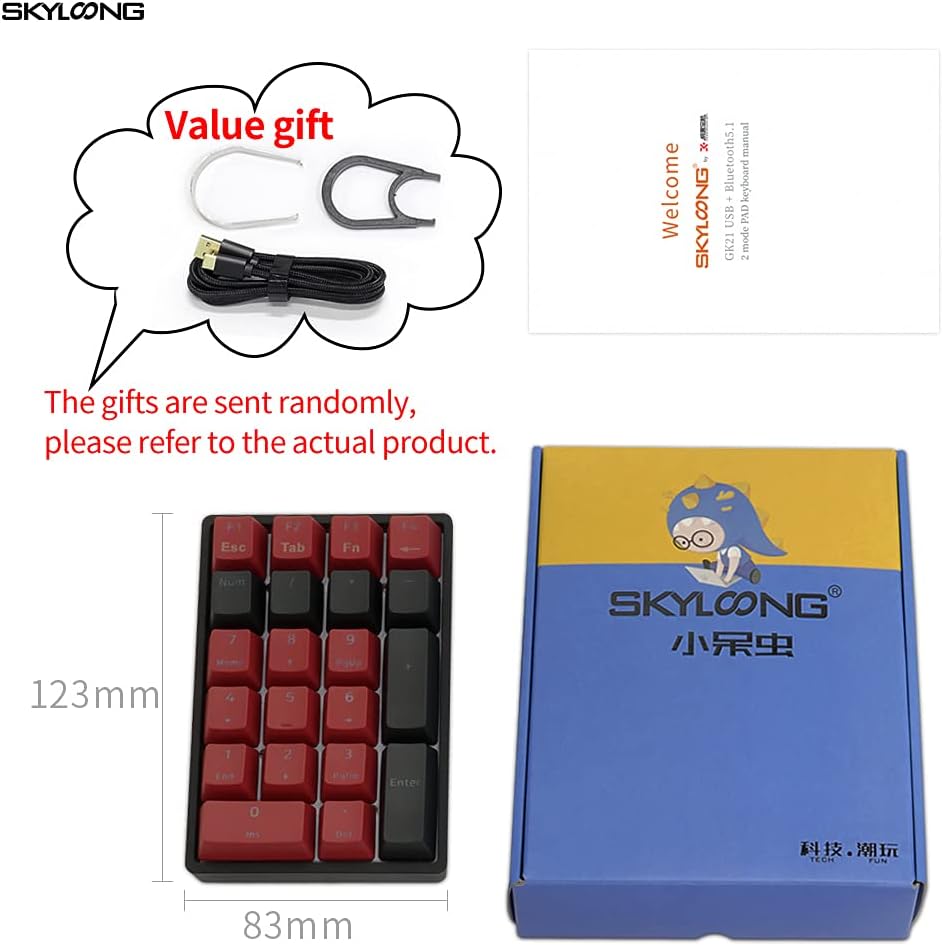
Image: Screenshot of the EPOMAKER SKYLOONG SK21 Numpad driver software, showing options for key remapping, macro creation, and RGB lighting customization.
The rotary knob can also be programmed for various functions, such as volume control or scrolling. Refer to the driver software for available options.
4. Manutenzione
4.1 Pulizia del tastierino numerico
- Disconnect the numpad from your computer before cleaning.
- Utilizzare un panno morbido e privo di lanugine leggermente dampcon acqua o una soluzione detergente delicata per pulire i tasti e casing.
- Evitare di spruzzare liquidi direttamente sul tastierino numerico.
- For deeper cleaning, you can use a keycap puller to remove keycaps and clean underneath with compressed air or a small brush.
4.2 Sostituzione dei tasti e degli interruttori
The SK21 Numpad features PBT keycaps that are durable and oil-resistant. If you wish to replace them, use the provided keycap puller to gently remove the existing keycaps. Align the new keycaps with the switch stems and press down firmly until they click into place.
For hot-swappable versions (only for optical switches), use a switch puller to carefully remove switches. Insert new compatible optical switches by aligning the pins with the PCB sockets and pressing down until they are seated.
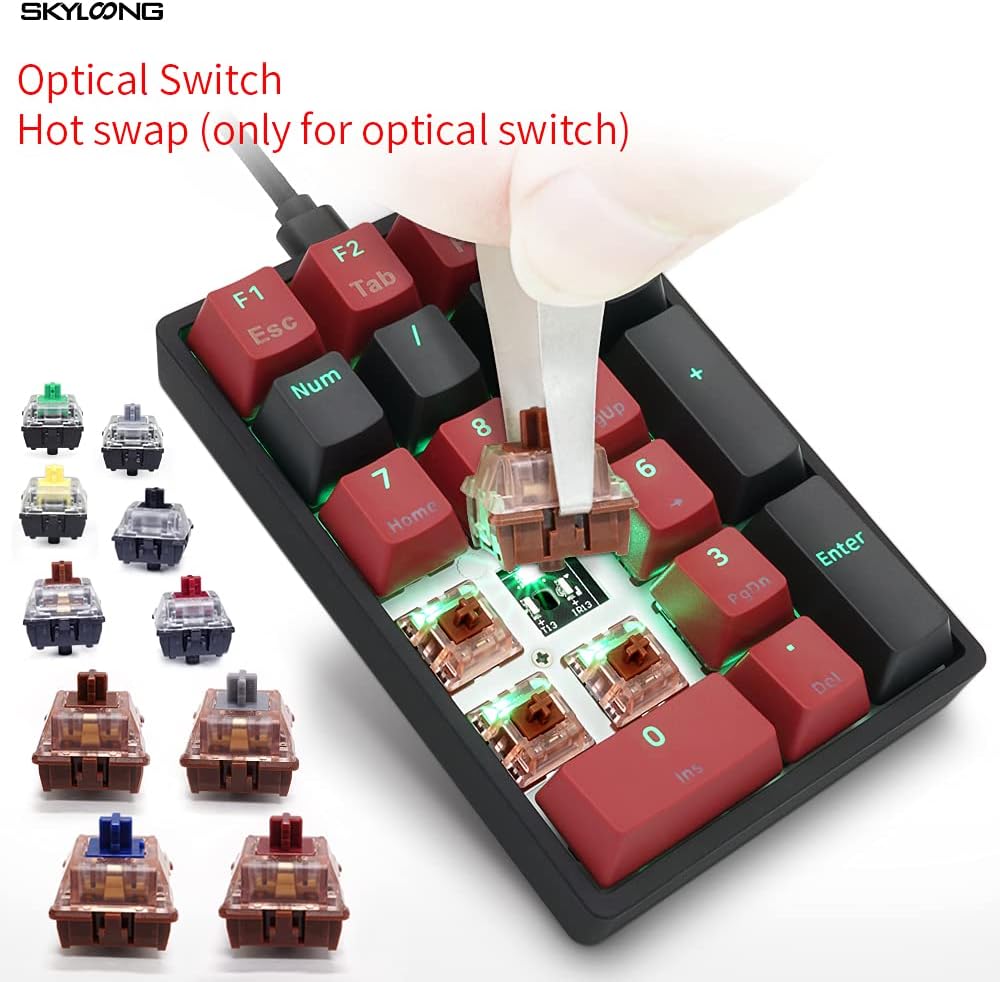
Image: The EPOMAKER SKYLOONG SK21 Numpad demonstrating the hot-swappable optical switches, with a switch being removed.
5. Risoluzione Dei Problemi
5.1 Il tastierino numerico non risponde
- Ensure the USB cable is securely connected to both the numpad and your computer.
- Try connecting the numpad to a different USB port on your computer.
- Test the numpad on another computer to determine if the issue is with the numpad or your system.
- Riavvia il computer.
5.2 Retroilluminazione RGB non funzionante/errata
- Ensure the numpad is connected via USB, as some lighting features may require a wired connection or sufficient power.
- Check the lighting settings in the EPOMAKER driver software.
- Update the numpad's firmware using the latest version from the official EPOMAKER websito.
5.3 Tasti non registrati o digitati due volte
- If using a hot-swappable version, ensure the switch is fully seated in its socket. Gently press down on the keycap or switch to ensure proper contact.
- Clean any debris or dust from around and under the affected keycaps.
- If the issue persists, consider replacing the affected switch (for hot-swappable models).
6. Specifiche
| Caratteristica | Dettaglio |
|---|---|
| Modello | SKYLOONG SK21 |
| Chiavi | Layout a 21 tasti |
| keycaps | OEM professionistafile Tasti PBT |
| Interruttori | Gateron Optical Brown (or other available optical switches) |
| Retroilluminazione | 16.8 Million Colors RGB SMD Light |
| Interfaccia | USB di tipo C staccabile |
| Programmabilità | Fully programmable with 3 FN macro layers (VIA compatible) |
| MCU | 32-bit M3 MCU with 8M Flash Memory |
| Compatibilità | Windows e macOS |
| Dimensioni | Circa 5.98 x 5.08 x 2.01 pollici (confezione) |
| Peso | Circa 11.3 once |
| Componenti inclusi | Cavo USB |
7. Garanzia e supporto
Per informazioni sulla garanzia e supporto tecnico, fare riferimento al sito ufficiale EPOMAKER webo contattare direttamente il servizio clienti. Conservare la prova d'acquisto per eventuali reclami in garanzia.
Negozio ufficiale EPOMAKER: Negozio EPOMAKER su Amazon


