1. Introduzione
Thank you for choosing the PROXTEND X502 Full HD Webcam. This manual provides detailed instructions to help you set up, operate, and maintain your webcam for optimal performance. The X502 is designed to deliver clear 1080p video at 30 frames per second, featuring an omni-directional microphone and automatic low light correction for various lighting conditions.
2. Contenuto della confezione
Si prega di verificare che tutti gli articoli siano presenti nel pacco:
- PROXTEND X502 Full HD Webcam (PX-CAM007)
- Integrated Universal Mounting Clip
- Manuale dell'utente (questo documento)
3. Impostazione
Follow these steps to set up your PROXTEND X502 WebCamera:
- Montaggio del WebCamera:
IL webcam features an integrated universal mounting clip. You can place the webcam sulla parte superiore del monitor del computer, dello schermo del laptop o di una superficie piana. Regolare la clip per tenere saldamente la webcam in position. The webcam also supports mini tripod mounting (tripod not included).
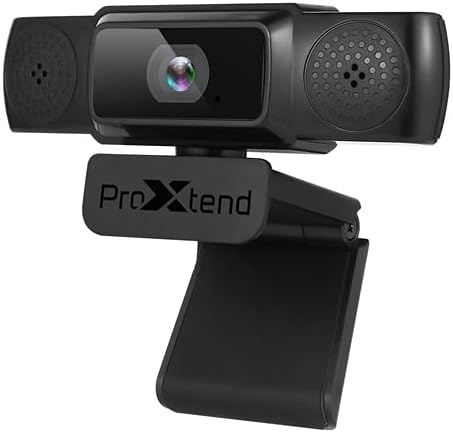
Image: The PROXTEND X502 Full HD Webcam shown with its universal mounting clip, suitable for monitors or flat surfaces.
- Connessione al computer:
Collegare il cavo USB dal webcam in una porta USB disponibile sul tuo computer. La webcam is plug-and-play, meaning your operating system should automatically detect and install the necessary drivers. No additional software installation is typically required.
- Driver Installation Verification:
After connecting, allow a few moments for your computer to recognize the device. You can verify successful installation in your operating system's Device Manager (Windows) or System Information (macOS) under 'Cameras' or 'Imaging Devices'.
4. Istruzioni per l'uso
Una volta il webcam is set up, you can begin using it with various applications:
- Selezione del WebCamera:
Open your preferred video conferencing, streaming, or recording application (e.g., Zoom, Microsoft Teams, Skype, OBS Studio). Navigate to the application's video and audio settings. Select "PROXTEND X502" as your camera and microphone input device.

Immagine: Frontale view of the PROXTEND X502 Full HD Webcam, highlighting the lens and integrated microphones.
- Qualità video:
IL webcam automatically adjusts for optimal image quality, including auto-focus and auto low light correction. Ensure adequate lighting for the best video performance. The 1920x1080p resolution at 30fps provides clear and smooth video.
- Qualità audio:
The integrated omni-directional microphone captures sound from all directions. Position yourself appropriately to ensure your voice is clearly picked up. Most applications allow you to adjust microphone input levels in their audio settings.
5 Caratteristiche
Key features of the PROXTEND X502 Full HD Webcam include:
- Sensore di immagine CMOS da 1/2.7"
- 2 Megapixel
- Resolution: 1920x1080 at 30 frames per second
- Microfono omnidirezionale
- Clip di montaggio universale
- Mini Tripod Support
- Correzione automatica in condizioni di scarsa illuminazione
6. Specifiche
Detailed technical specifications for the PROXTEND X502 Full HD WebCamera:

Image: A visual representation of the PROXTEND X502 Full HD Webcam's key features and technical specifications.
| Caratteristica | Specificazione |
|---|---|
| Sensore di immagine | 1/2.7" CMOS Image Sensor |
| Megapixel | 2 MP |
| Risoluzione massima | 1920x1080 |
| Risoluzione video | 1920x1080 |
| FPS massimi | 30 fotogrammi al secondo |
| Formato di decodifica video | H.264/MJPG |
| Modalità di esposizione | Auto |
| Bilanciamento del bianco | Auto |
| Guadagno | Auto |
| Compensazione della scarsa illuminazione | Auto |
| Viewangolo di ing | 77° |
| Distanza focale | 10 cm all'infinito |
| Tipo di messa a fuoco | Auto |
| Microfono | Omnidirezionale |
| Audio samptasso di ling | 1 canale 16 bit 16 K 32 K 44.1 K 48 K |
| Formato audio | PCM, compatibile UAC 1.0 |
| Interfaccia | USB 2.0 |
| Lunghezza del cavo | 1.5 metri |
| Sistema operativo compatibile | Windows XP, Windows 7 (32bit/64bit), Windows 8, Windows 10, Android V5.0 or higher OS, MAC OS 10.6 or higher |
| Dimensioni del prodotto | Dimensioni: 12.7 x 7.62 x 5.08 cm |
| Peso del prodotto | 453.59 grammi |
7. Risoluzione Dei Problemi
If you encounter issues with your PROXTEND X502 Webcam, prova le seguenti soluzioni:
- Nessuna immagine/video:
- Assicurarsi che il cavo USB sia collegato saldamente a entrambi i dispositivi webcam e il tuo computer.
- Prova una porta USB diversa sul tuo computer.
- Riavvia il computer.
- Check your application's settings to ensure the PROXTEND X502 is selected as the video input.
- Verify that no other application is currently using the webCamera.
- Nessun audio/Microfono non funzionante:
- Ensure the PROXTEND X502 is selected as the microphone input in your application's audio settings.
- Controlla le impostazioni audio del tuo computer per assicurarti che il microfono sia attivato e non disattivato.
- Adjust the microphone input level in your system or application settings.
- Scarsa qualità video:
- Ensure sufficient lighting in your environment.
- Pulisci il webdelicatamente la lente della camma con un panno morbido e privo di lanugine.
- Check your internet connection speed if streaming, as bandwidth can affect video quality.
8. Manutenzione
Per garantire la longevità e le prestazioni ottimali del tuo webCamera:
- Pulizia: Pulisci delicatamente il webcam lens with a soft, dry, lint-free cloth. Avoid using harsh chemicals or abrasive materials.
- Magazzinaggio: Quando non è in uso, conservare il webconservare in un luogo pulito e asciutto, lontano da temperature estreme e dalla luce solare diretta.
- Gestione: Evita di far cadere il webcamma o sottoponendola a forti urti.
9. Garanzia e supporto
The PROXTEND X502 Full HD Webla cam è dotata di un Garanzia di 7 anno, ensuring peace of mind regarding your purchase. For warranty claims, technical support, or any inquiries not covered in this manual, please refer to the contact information provided with your product packaging or visit the official PROXTEND websito.
10. Informazioni sulla conformità
This device complies with relevant regulatory standards for electronic equipment. For detailed compliance information, please refer to the product packaging or the official PROXTEND websito.


