Introduzione
Thank you for choosing the Cecotec BigDry 9000 Professional Dehumidifier. This manual provides essential information for the safe and efficient operation, maintenance, and troubleshooting of your new appliance. Please read this manual thoroughly before use and keep it for future reference.
This dehumidifier is designed to significantly reduce humidity levels in your environment, contributing to improved comfort and preventing issues caused by excessive moisture, such as mold growth or damage to furniture. With its advanced features, including Wi-Fi control and a large capacity tank, it offers a convenient and effective solution for humidity management.
Istruzioni di sicurezza
Quando si utilizzano apparecchi elettrici, seguire sempre le precauzioni di sicurezza di base per ridurre il rischio di incendi, scosse elettriche e lesioni.
- Assicurarsi che l'apparecchio sia posizionato su una superficie stabile e piana.
- Non utilizzare il deumidificatore vicino all'acqua o in ambienti eccessivamente umidi.
- Tenere l'apparecchio lontano da fonti di calore e luce solare diretta.
- Non ostruire le prese d'aria o le uscite. Assicurarsi che vi sia spazio sufficiente attorno all'unità per un corretto flusso d'aria.
- Unplug the dehumidifier from the power outlet before cleaning, maintenance, or when not in use.
- Do not use if the power cord or plug is damaged. Contact qualified service personnel for repair.
- Questo apparecchio è destinato esclusivamente all'uso in ambienti interni.
- Non permettere ai bambini di giocare con il deumidificatore.
- Importante: Dopo il trasporto, lasciare l'unità in posizione verticale per almeno 24 ore prima di collegarla alla presa di corrente. Ciò consente al refrigerante di depositarsi.
Prodotto finitoview
Componenti
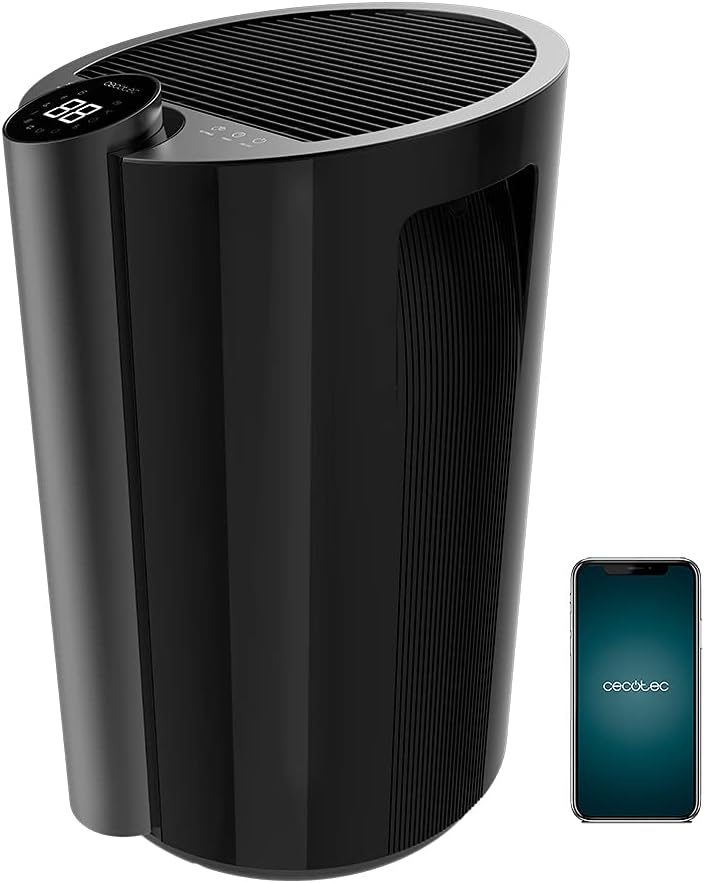
- Pannello di controllo con display a LED
- Griglia di ingresso dell'aria
- Griglia di uscita dell'aria
- Water Tank (4.5 Liters)
- Wheels for portability
- Maniglia integrata
- Cavo di alimentazione
- Filtro dell'aria
Caratteristiche principali
- Elevata capacità di deumidificazione: Up to 20 liters per day.
- Grande serbatoio dell'acqua: 4.5-liter removable tank minimizes emptying frequency.
- Controllo Wi-Fi: Manage settings remotely via your smartphone.
- Ampia copertura: Effective for areas up to 90 m² (250 m³/h).
- Full Tank Warning: Prevents overflows and conserves energy.
- Umidità regolabile: Set desired ambient humidity between 40% and 80%.
- Display a LED: Shows current ambient humidity, temperature, and selected settings.
- Controlli touch: Interfaccia intuitiva e facile da usare.
- Timer programmabile: Up to 12 hours with automatic shut-off.
- Due velocità: Low and High dehumidification speeds.
- Funzionamento silenzioso: Designed for minimal noise disruption.
- Filtro dell'aria: Improves air quality by preventing large particle entry.
- Portabilità: Equipped with wheels and a handle for easy movement.
Impostare
- Disimballaggio: Estrarre con cautela il deumidificatore dall'imballaggio. Conservare il materiale di imballaggio per un eventuale stoccaggio o trasporto futuro.
- Posizionamento: Place the dehumidifier on a firm, level surface in the desired room. Ensure there is at least 20 cm (8 inches) of space around all sides of the unit for proper air circulation. Avoid placing it against walls or furniture that could obstruct airflow.
- Standby iniziale: After transport, it is crucial to let the dehumidifier stand upright for a minimum of 24 hours before plugging it into a power outlet. This allows the refrigerant fluid to stabilize, preventing potential damage to the compressor.
- Collegamento elettrico: Collegare il cavo di alimentazione a una presa elettrica con messa a terra. Assicurarsi che il volumetage corrisponde alle specifiche dell'unità.
- Installazione del serbatoio dell'acqua: Ensure the water tank is correctly inserted into its compartment. The unit will not operate if the tank is not properly seated or is full.
- Configurazione Wi-Fi (facoltativa):
- Download the official Cecotec app on your smartphone.
- Crea un account o accedi.
- Follow the in-app instructions to add your BigDry 9000 dehumidifier. This typically involves pressing the Wi-Fi button on the unit for 5 seconds to enter pairing mode. Note that the device requires a 2.4 GHz Wi-Fi network.

Istruzioni per l'uso
Pannello di controllo Fineview

- Pulsante ON/OFF: Premere per accendere o spegnere l'unità.
- Pulsante MODE: Cycle through different operating modes (e.g., continuous dehumidification, auto mode).
- Pulsante VELOCITÀ VENTOLA: Adjust fan speed between Low and High.
- SETTINGS Button: Used to set the desired humidity level. Press repeatedly to cycle through humidity percentages (40% - 80%).
- Pulsante TIMER: Set the automatic shut-off timer (up to 12 hours).
- Display a LED: Shows current ambient humidity, temperature, and selected settings.
Funzionamento di base
- Accensione: Press the ON/OFF button to start the dehumidifier. The LED display will show the current ambient humidity.
- Imposta l'umidità desiderata: Press the SETTINGS button to select your target humidity level. The unit will operate until the desired humidity is reached, then cycle on and off to maintain it.
- Regola la velocità della ventola: Press the FAN SPEED button to switch between low and high fan speeds. Lower speed provides quieter operation, while higher speed offers faster dehumidification.
- Imposta timer: Press the TIMER button to set the desired operating duration (e.g., 1 hour, 2 hours, up to 12 hours). The unit will automatically turn off after the set time.
- Controllo Wi-Fi: If connected to Wi-Fi, use the Cecotec app on your smartphone to control all functions remotely.
Manutenzione
Una manutenzione regolare garantisce prestazioni ottimali e prolunga la durata del deumidificatore.
Svuotamento del serbatoio dell'acqua

- When the water tank is full, the unit will automatically stop operating and an indicator light (or message on the LED display) will alert you.
- Estrarre con cautela il serbatoio dell'acqua dalla parte anteriore dell'unità.
- Svuotare l'acqua raccolta.
- Slide the empty tank back into its position until it clicks securely. The unit will resume operation.
Pulizia del filtro dell'aria
- It is recommended to clean the air filter every two weeks or more frequently depending on usage and air quality.
- Spegnere il deumidificatore e scollegarlo dalla presa di corrente.
- Locate and remove the air filter (refer to your specific model's diagram for exact location, usually at the back or side).
- Clean the filter using a vacuum cleaner to remove dust and debris. For heavier dirt, wash it gently with lukewarm water and a mild detergent.
- Lasciare asciugare completamente il filtro all'aria prima di reinserirlo nell'unità. Non utilizzare un'asciugatrice o esporre il filtro a fonti di calore dirette.
- Reinserire il filtro asciutto e ricollegare l'unità.
Pulizia generale
- Pulire l'esterno del deumidificatore con un panno morbido, damp panno. Non usare detergenti abrasivi o solventi.
- Assicurarsi che non penetri acqua nei componenti elettrici.
Risoluzione dei problemi
Prima di contattare l'assistenza clienti, consultare la seguente guida alla risoluzione dei problemi più comuni.
| Problema | Possibile causa | Soluzione |
|---|---|---|
| Il deumidificatore non si accende. | Nessuna alimentazione; serbatoio dell'acqua pieno o inserito in modo errato. | Controllare il collegamento elettrico; svuotare e reinserire correttamente il serbatoio dell'acqua. |
| Nessuna raccolta d'acqua o bassa deumidificazione. | Ambient humidity too low; Air filter clogged; Room temperature too low; Unit size too small for room. | Increase target humidity setting; Clean air filter; Ensure room temperature is above 5°C (41°F); Consider a larger unit for the space. |
| L'unità è rumorosa. | Unità non posizionata su una superficie piana; Filtro dell'aria intasato; Ostruzione nella ventola. | Posizionare su una superficie piana; pulire il filtro dell'aria; controllare e rimuovere eventuali ostruzioni. |
| Problemi di connessione Wi-Fi. | Incorrect Wi-Fi password; Router too far; Only supports 2.4 GHz network. | Verify password; Move unit closer to router; Ensure your Wi-Fi is 2.4 GHz. |
Specifiche
| Caratteristica | Specificazione |
|---|---|
| Marca | Cecotec |
| Numero di modello | 05655 |
| Colore | Black - Bigdry 9000 Professional Black Connected |
| Capacità di deumidificazione | 20 litri/giorno |
| Capacità del serbatoio dell'acqua | 4.5 litri |
| Energia | 320 Watt |
| Area di copertura | Up to 90 m² (250 m³/h) |
| Timer | Up to 12 hours (automatic shut-off) |
| Numero di velocità | 2 (Basso, Alto) |
| Dimensioni (L x P x A) | Dimensioni: 38.1 x 60.5 x 38.3 cm |
| Peso dell'articolo | 14 chilogrammi |
| Caratteristiche speciali | Wi-Fi Control, Timer, High Dehumidification Capacity |
Garanzia e supporto
Cecotec products are manufactured to the highest quality standards. For warranty information and customer support, please refer to the official Cecotec websito o contattare direttamente il servizio clienti.
- Disponibilità ricambi: 10 anni (come da specifiche del prodotto).
- For technical assistance, troubleshooting beyond this manual, or warranty claims, please visit www.cecotec.com oppure contattare il rivenditore autorizzato locale.


