1. Introduzione e oltreview
This manual provides detailed instructions for the operation and maintenance of your Casio G-Shock GMA-S2100-4A2DR Analog-Digital Watch. Designed for durability and functionality, this watch features a shock-resistant structure and 200-meter water resistance, making it suitable for various activities.
The GMA-S2100-4A2DR model features a compact and slim design, characterized by its octagonal bezel, flat face, and simple bar hour markers. It incorporates a Carbon Core Guard structure for enhanced protection.

Immagine 1.1: Davanti view of the Casio G-Shock GMA-S2100-4A2DR watch. This image displays the watch's pink analog-digital dial, octagonal bezel, and matching pink resin strap. The digital display shows "6.30" and "36".
2. Caratteristiche principali
- Display analogico-digitale: Combines traditional analog hands with a digital display for versatile timekeeping.
- Resistenza agli urti: Built with G-Shock's renowned shock-resistant structure to withstand impacts and vibrations.
- Resistenza all'acqua fino a 200 metri: Suitable for swimming, snorkeling, and other water sports, but not for deep diving.
- Struttura di protezione del nucleo in carbonio: Enhances durability and protection of the watch module.
- Doppia luce LED: Provides illumination for both the analog and digital displays in low-light conditions.
- Ora mondiale: Displays the current time in 31 time zones (48 cities + coordinated universal time).
- Cronometro: 1/100-second stopwatch with measuring capacity up to 23:59'59.99''.
- Conto alla rovescia: Measuring unit: 1 second; Countdown range: 24 hours.
- Daily Alarms: Five daily alarms with one snooze alarm.
- Hand Shift Feature: Moves the analog hands away from the digital display for easier viewing.
- Mineral Glass: Durable and scratch-resistant dial glass material.
- Resin Case and Band: Lightweight and comfortable pink resin material.
3. Watch Components and Controls
Familiarize yourself with the main components and buttons of your watch:
- A (Adjust) Button: Utilizzato per accedere e uscire dalle modalità di impostazione.
- B (Light) Button: Attiva la retroilluminazione a LED.
- C (Mode) Button: Cycles through different modes (Timekeeping, Stopwatch, Countdown Timer, Alarm, World Time).
- D (Start) Button: Used to start/stop stopwatch, set values, or toggle features.

Immagine 3.1: Lato sinistro view of the watch, highlighting the 'Adjust' and 'Mode' buttons on the left side of the case.
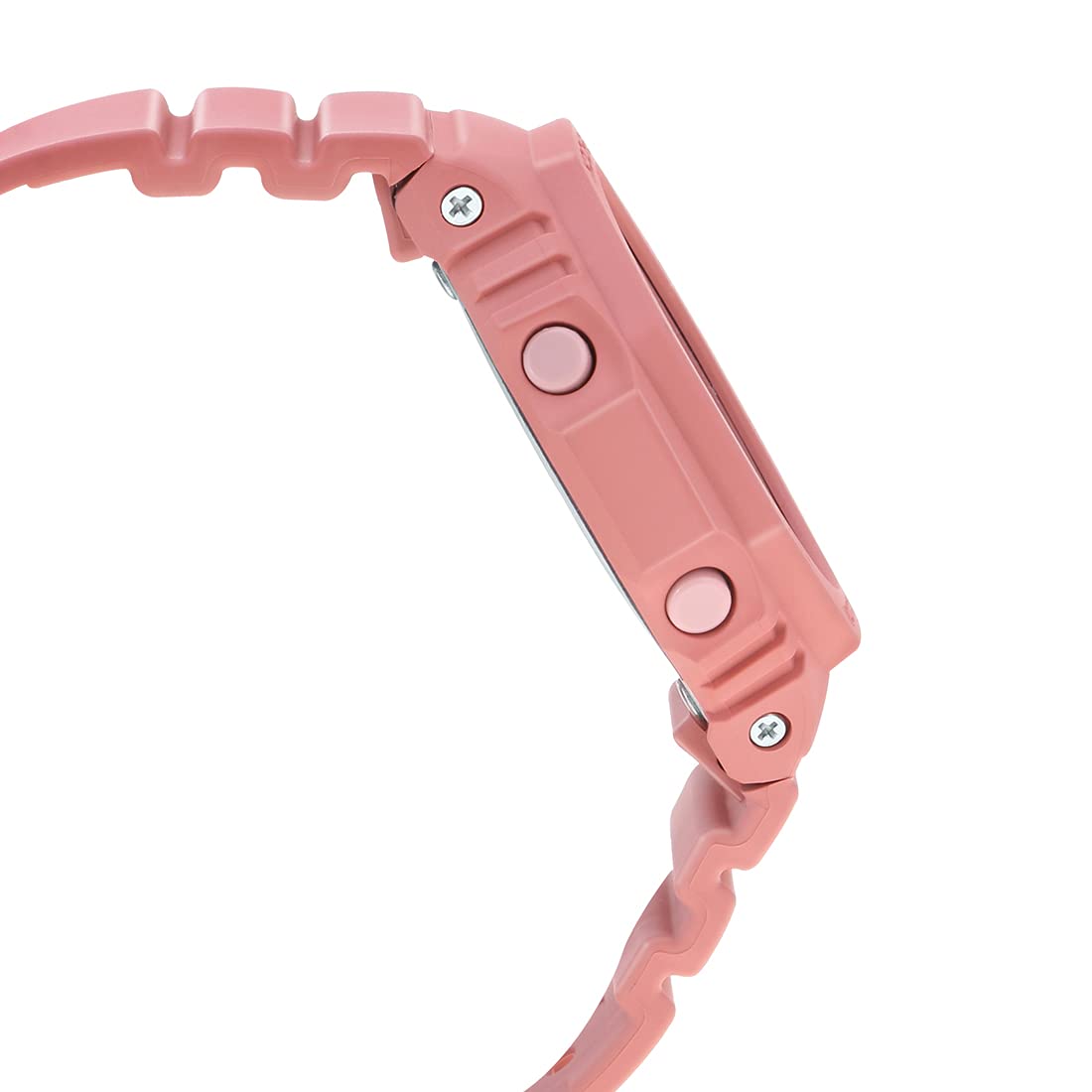
Immagine 3.2: Lato destro view of the watch, highlighting the 'Light' and 'Start' buttons on the right side of the case.
4. Configurazione iniziale
4.1 Setting the Home City and Time Zone
- In modalità cronometraggio, tenere premuto il tasto A (Adjust) button until the city code starts to flash on the digital display.
- Utilizzare il D (Start) E B (Light) pulsanti per selezionare il codice della città di residenza desiderato.
- Premere il tasto C (Mode) button to cycle through other settings like DST (Daylight Saving Time) and 12/24-hour format. Adjust these using D (Start) or B (Light).
- To set the digital time, press C (Mode) until the hour or minute digits flash. Use D (Start) E B (Light) per adattarsi.
- Premere A (Adjust) to exit the setting mode. The analog hands will automatically adjust to the digital time.
4.2 Correzione della posizione iniziale della mano
If the analog hands do not match the digital time, you may need to correct their home position:
- In modalità cronometraggio, tenere premuto il tasto A (Adjust) per circa cinque secondi finché non appare "H.SET" e la lancetta delle ore inizia a lampeggiare.
- Utilizzare il D (Start) button to advance the minute hand and the B (Light) button to advance the hour hand until both are aligned at 12 o'clock.
- Premere A (Adjust) to confirm and exit. The hands will then move to the current time.
5. Operating the Watch Functions
Modalità di navigazione 5.1
Premere il tasto C (Mode) button to cycle through the different modes in the following order:
- Modalità di indicazione dell'ora
- Modalità ora mondiale
- Modalità allarme
- Modalità timer conto alla rovescia
- Modalità cronometro
5.2 Funzione cronometro
- Entrare in modalità cronometro premendo il tasto C (Mode) pulsante.
- Premere il tasto D (Start) pulsante per avviare il cronometro.
- Premere D (Start) di nuovo per fermare.
- Premere il tasto A (Adjust) pulsante per azzerare il cronometro.
5.3 Conto alla rovescia
- Enter Countdown Timer Mode by pressing the C (Mode) pulsante.
- Tieni premuto il tasto A (Adjust) finché l'impostazione dell'ora non lampeggia.
- Utilizzo D (Start) E B (Light) per impostare il tempo di conto alla rovescia desiderato.
- Premere A (Adjust) per uscire dalla modalità di impostazione.
- Premere D (Start) to start the countdown. An alarm will sound when the countdown reaches zero.
5.4 Funzione di allarme
- Entrare in modalità Allarme premendo il tasto C (Mode) pulsante.
- Utilizzo D (Start) to scroll through the five alarms (AL1 to AL5) and the snooze alarm (SNZ).
- Per impostare una sveglia, tenere premuto il tasto A (Adjust) finché l'ora della sveglia non lampeggia.
- Utilizzo D (Start) E B (Light) per impostare l'ora e i minuti.
- Premere A (Adjust) per uscire dalla modalità di impostazione.
- Premere D (Start) per attivare/disattivare la sveglia.
5.5 Ora mondiale
- Entrare nella modalità Ora mondiale premendo il tasto C (Mode) pulsante.
- Utilizzo D (Start) E B (Light) to scroll through different city codes and view i loro tempi attuali.
- To swap your Home City time with the World Time City time, hold down the A (Adjust) button for approximately three seconds.
5.6 Double LED Light
Premere il tasto B (Light) button to illuminate the watch face. The illumination duration can be configured in the Timekeeping Mode settings.
5.7 Hand Shift Feature
If the analog hands obstruct the digital display, press the C (Mode) E D (Start) buttons simultaneously to temporarily move the hands. Press any button to return them to normal timekeeping.
6. Manutenzione e cura
6.1 Resistenza all'acqua
Your Casio G-Shock GMA-S2100-4A2DR is water-resistant up to 200 meters. This means it is suitable for recreational diving, swimming, snorkeling, and other water sports. However, it is non suitable for saturation diving.
- Non azionare i pulsanti quando l'orologio è bagnato o immerso in acqua.
- Dopo l'esposizione all'acqua salata, sciacquare l'orologio con acqua dolce e asciugarlo.
- Evitare di esporre l'orologio ad acqua calda o vapore, poiché ciò potrebbe danneggiare le guarnizioni.
6.2 Pulizia
Per mantenere l'aspetto del tuo orologio:
- Wipe the watch case and band with a soft, dry cloth regularly.
- For stubborn dirt, use a soft brush with mild soap and water, then rinse thoroughly and dry.
- Evitare l'uso di detergenti chimici o solventi, poiché possono danneggiare i materiali in resina.
6.3 Sostituzione della batteria
The watch is powered by a Silver Oxide battery. When the display becomes dim or functions become erratic, it may be time for a battery replacement. It is recommended to have the battery replaced by an authorized Casio service center to ensure proper water resistance and functionality.
7. Risoluzione Dei Problemi
- Ora errata: Ensure your Home City and DST settings are correct. Perform a Hand Home Position Correction if analog hands are misaligned.
- Il display è vuoto o poco luminoso: La batteria potrebbe essere scarica. Valutare la sostituzione della batteria da parte di un professionista.
- I pulsanti non rispondono: Ensure the watch is not in a locked mode (if applicable, though not a feature of this model). If wet, dry thoroughly before use.
- Acqua all'interno dell'orologio: Portare immediatamente l'orologio presso un centro di assistenza autorizzato. Non tentare di asciugarlo da soli.
8. Specifiche
| Caratteristica | Dettaglio |
|---|---|
| Numero di modello | GMA-S2100-4A2DR |
| Tipo di visualizzazione | Analogico-Digitale |
| Materiale della cassa | Resin (Carbon Core Guard Structure) |
| Materiale della fascia | Resina |
| Materiale del vetro del quadrante | Vetro minerale |
| Resistenza all'acqua | 200 metri |
| Fonte di alimentazione | Battery Powered (Silver Oxide) |
| Dimensioni (LxWxH) | Dimensioni: 20.5 x 1.1 x 4.3 cm |
| Peso dell'articolo | 41 grammi |
| Paese di origine | Thailandia |

Immagine 8.1: Watch dimensions illustration. This image provides a visual comparison of the watch's size (46.2 mm length) against a standard credit card (54 mm width).
9. Garanzia e supporto
Your Casio G-Shock GMA-S2100-4A2DR watch comes with a manufacturer's warranty. Please refer to the warranty card included with your purchase for specific terms and conditions, including warranty period and coverage details.
For technical support, service, or warranty claims, please contact an authorized Casio service center or visit the official Casio websito per informazioni sui contatti.
10. Video di prodotto
10.1 Casio G-Shock GMA-S2100-4A2DR Product Overview
10.1 video: Questo video fornisce una panoramica generaleview of the Casio G-Shock GMA-S2100-4A2DR watch, showcasing its design, color, and key features such as the resin case and band, round dial, and water resistance. It highlights the watch's suitability for casual wear.
10.2 Casio G-Shock GMA-S2100-4A2DR 360-Degree View
10.2 video: This video offers a comprehensive 360-degree rotation view of the Casio G-Shock GMA-S2100-4A2DR watch, allowing users to observe its design from all angles, including the dial, case, strap, and buckle clasp.


