1. Introduzione
This manual provides detailed instructions for the setup, operation, and maintenance of your EMOS Select Wireless Weather Station. This professional weather station offers a comprehensive overview of environmental conditions, including time, weather forecast, air pressure, temperature, and moon phases. Its intuitive touchscreen display allows for easy interaction with both internal and external sensors.

Image 1.1: EMOS Select Wireless Weather Station with its external sensor.
2. Contenuto della confezione
Si prega di verificare che tutti gli articoli elencati di seguito siano presenti nel pacco:
- EMOS Select Weather Station Main Unit
- Adattatore di alimentazione CA.
- Sensore esterno wireless
- Manuale di istruzioni
Nota: 5x AAA batteries (2 for the outdoor sensor, 3 for the main unit backup) are required and not included in the package.
3. Impostazione
3.1 Installazione della batteria
- Sensore esterno: Open the battery compartment on the back of the wireless outdoor sensor. Insert 2x AAA batteries, ensuring correct polarity (+/-). Close the compartment securely.
- Unità principale: Open the battery compartment on the back of the main weather station unit. Insert 3x AAA batteries, ensuring correct polarity (+/-). These batteries serve as backup power.
3.2 Alimentazione dell'unità principale
For continuous display illumination and optimal functionality, connect the provided AC power adapter to the main unit and plug it into a power outlet. The backup batteries will retain settings during power outages.
3.3 Posizionamento del sensore esterno
Place the wireless outdoor sensor in a location that provides accurate environmental readings, away from direct sunlight and precipitation. The sensor is water-resistant (IPX4) but should be protected from extreme weather conditions for longevity. It can be installed up to 100 meters from the main unit, ensuring a stable radio connection.

Image 3.1: Recommended placement of the outdoor sensor within 100 meters of the main unit.
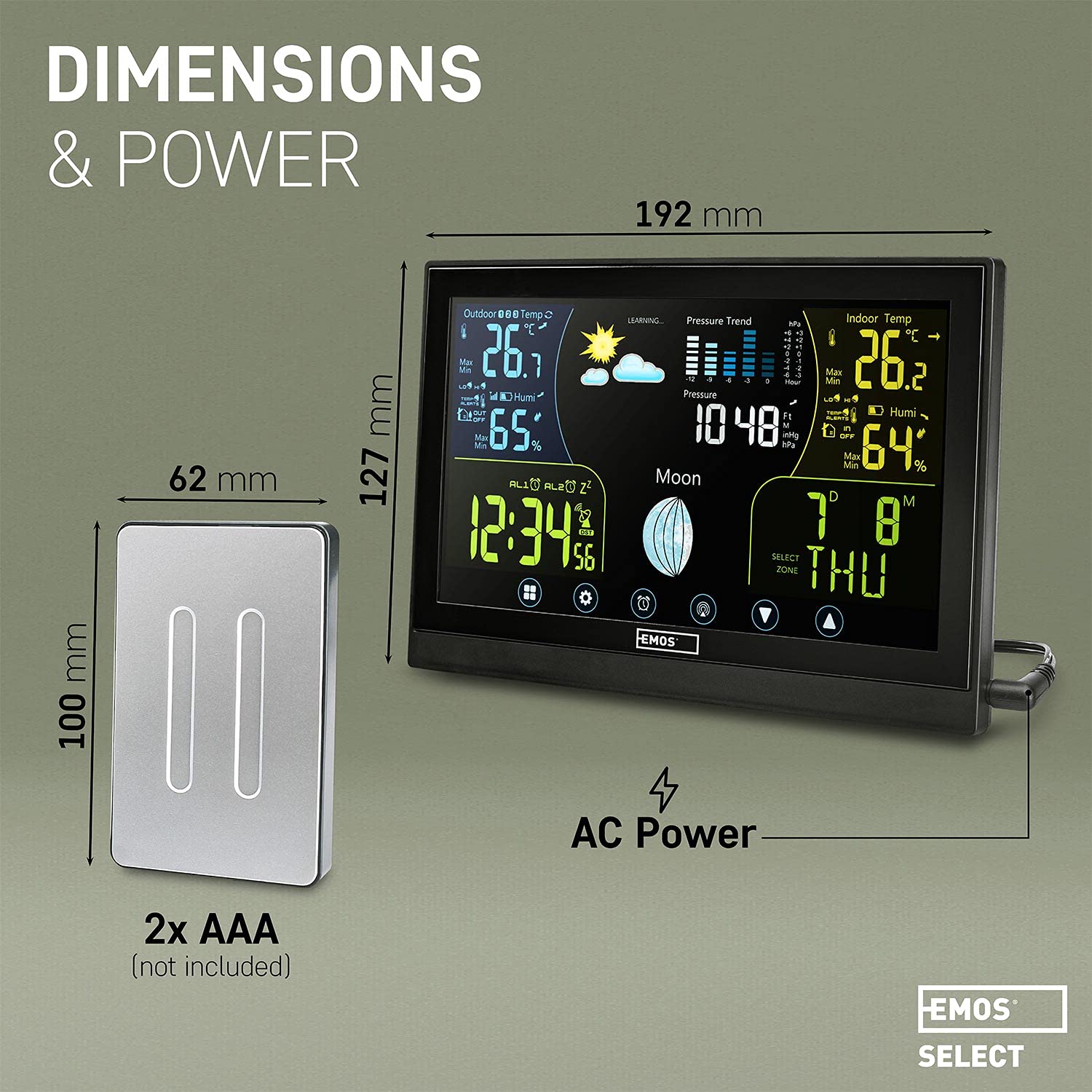
Image 3.2: The outdoor sensor features an IPX4 water-resistant design.
3.4 Initial Synchronization and Learning Phase
Upon powering on both units, the weather station will automatically attempt to connect with the outdoor sensor and synchronize the time via a radio signal (DCF). The system will enter a "LEARNING" phase for approximately 14 days. During this period, it collects local atmospheric data to refine its weather forecast accuracy. The "LEARNING" indicator on the display will disappear once this phase is complete, and the forecast accuracy will improve to approximately 75%.
4. Istruzioni per l'uso
4.1 Fine displayview
The color touchscreen display provides a clear interface for all weather data and settings. Key information areas include:
- Outdoor Metrics: Temperatura e umidità dal sensore esterno.
- Indoor Metrics: Temperature and humidity from the main unit's internal sensors.
- Previsioni del tempo a 24 ore: Icon-based prediction based on collected data.
- Andamento della pressione: Barometric pressure readings and historical trend.
- Tempo: Radio-controlled time display.
- Current Moon Phase: Graphical representation of the moon's phase.
- Data e giorno: Data e giorno della settimana correnti.

Immagine 4.1: Dettagliata view of the weather station's clear display interface.
4.2 Controlli touchscreen
The display features touch-sensitive buttons located at the bottom for navigation and settings adjustments. Gently tap the icons to access different functions or modify parameters.

Image 4.2: Demonstrating interaction with the touch-sensitive buttons.
4.3 Impostazioni di ora e data
The integrated radio-controlled clock (DCF) automatically sets and updates the time and date, including adjustments for daylight saving time. Manual adjustment is typically not required.
4.4 Letture di temperatura e umidità
The station displays current indoor and outdoor temperatures and humidity levels. The outdoor sensor provides readings from -50°C to +70°C with an accuracy of ±2°C, and humidity from 1% to 99% with an accuracy of 5%.

Image 4.3: Current indoor and outdoor temperature and humidity readings.
4.5 Barometro e previsioni del tempo
The internal barometer measures atmospheric pressure, contributing to the 24-hour weather forecast displayed with intuitive icons. The forecast becomes more accurate after the initial 14-day learning period.

Image 4.4: The 24-hour weather forecast and moon phase display.
4.6 Luminosità dello schermo
When the main unit is powered by the AC adapter, the display offers multiple adjustable brightness levels. If operating solely on backup batteries, the display backlight will illuminate for approximately 5 seconds after a button press to conserve power.
5. Manutenzione
5.1 Sostituzione della batteria
Replace batteries in both the main unit and the outdoor sensor when low battery indicators appear on the display. Always use new AAA batteries and ensure correct polarity.
5.2 Pulizia
To clean the display and unit casing, utilizzare un panno morbido, asciutto o leggermente damp cloth. Avoid using abrasive cleaners, solvents, or chemical agents, as these can damage the surfaces.
6. Risoluzione Dei Problemi
- Sensore esterno non connesso:
Ensure the outdoor sensor is within the 100-meter range of the main unit. Check that both units have fresh batteries installed with correct polarity. Remove any major obstructions between the sensor and the main unit. - Radio Signal (DCF) Issues / Incorrect Time:
The radio signal for time synchronization (DCF) can be affected by location, thick walls, or electronic interference. Try repositioning the main unit to a different area, preferably near a window, and away from other electronic devices. Allow time for the unit to re-acquire the signal. - Inaccurate Weather Forecasts:
The weather station requires a 14-day learning period to optimize its forecast accuracy. During and immediately after this period, minor discrepancies may occur. Ensure the outdoor sensor is placed correctly for accurate data collection. - Display Not Visible / Dim:
Ensure the AC power adapter is securely connected for continuous and bright display illumination. If operating on backup batteries, the backlight is temporary and will turn off after a few seconds to conserve power.
7. Specifiche
| Marca | EMO |
| Riferimento modello | ES5001 |
| Fonte di alimentazione | AC Adapter (main unit), Battery (main unit backup & outdoor sensor) |
| Batterie richieste | 5x AAA (3 for main unit backup, 2 for outdoor sensor) |
| Tecnologia di connettività | Frequenza radio |
| Caratteristiche speciali | Wireless, Wall Clock, Alarm Clock, Touchscreen Display |
| Dimensioni dell'unità principale | 192 mm (larghezza) x 127 mm (altezza) |
| Dimensioni del sensore esterno | 100 mm (height) x 62 mm (width) |
| Peso del prodotto | 530 grammi |
| Intervallo di temperatura esterna | -50°C to +70°C (Accuracy: ±2°C) |
| Intervallo di umidità esterna | 1% to 99% (Accuracy: 5%) |
| Gamma di sensori esterni | Fino a 100 metri |
| Water Resistance (Sensor) | Grado di protezione IPX4 |

Image 7.1: Dimensions and power details of the weather station components.
8. Garanzia e supporto
For information regarding product warranty, technical support, or service inquiries, please refer to the documentation provided at the point of purchase or visit the official EMOS websito. Conserva la ricevuta d'acquisto come prova d'acquisto.


