1. Introduzione
Thank you for choosing the Qoltec 51556 65W Power Adapter. This manual provides essential information for the safe and efficient use of your new power adapter. Please read this manual thoroughly before using the product and keep it for future reference.
This AC adapter is designed to provide reliable power for compatible Lenovo laptop models featuring a square tip plug. It can serve as a primary or backup power supply for your device, offering 65W of usable power.
2. Informazioni sulla sicurezza
Per garantire un funzionamento sicuro ed evitare danni, osservare le seguenti precauzioni di sicurezza:
- Non esporre l'adattatore ad acqua, umidità o temperature estreme.
- Evitare di far cadere o di sottoporre l'adattatore a forti urti.
- Non smontare o tentare di riparare l'adattatore da soli. Rivolgersi a personale qualificato.
- Assicurarsi che la presa di corrente sia caricatage corrisponde ai requisiti di input dell'adattatore.
- Scollegare l'adattatore dalla presa di corrente quando non lo si utilizza per lunghi periodi.
- Keep the adapter away from heat sources and ensure proper ventilation during use.
- This adapter is equipped with advanced protections against overvoltage, short-circuit, overload, and thermal issues to enhance safety.
3. Prodotto finitoview
The Qoltec 51556 Power Adapter is a compact and efficient power solution. It includes the main adapter unit, a power cable, and a Velcro strap for cable management.
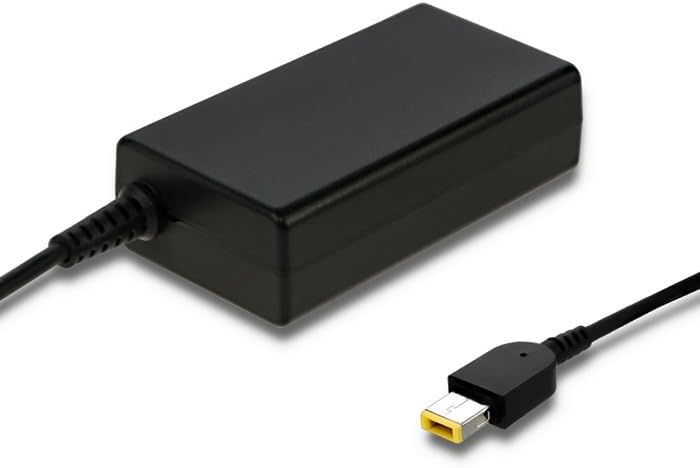
Figure 3.1: Qoltec 65W Power Adapter. This image shows the main adapter unit, a black rectangular block, with its integrated output cable ending in a yellow-tipped square connector, designed for compatible Lenovo laptops.
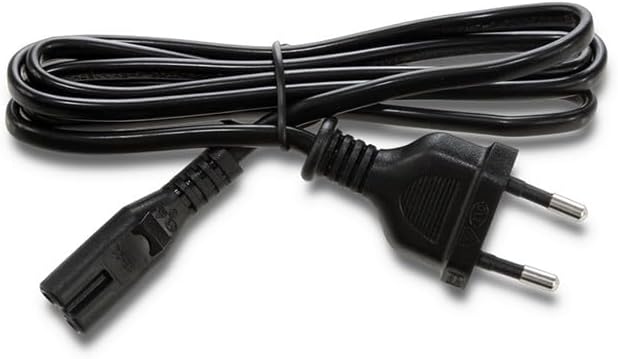
Figure 3.2: Detachable Power Cable. This image displays the black power cable, which connects the adapter to the wall outlet. It features a standard two-prong European plug on one end and a C5 (cloverleaf) connector on the other, which plugs into the adapter.
The adapter is designed for high energy efficiency and performance, ensuring fast and reliable charging for your laptop.
4. Impostazione
- Collegare il cavo di alimentazione: Insert the C5 (cloverleaf) connector of the detachable power cable firmly into the corresponding port on the Qoltec 51556 power adapter.
- Connetti al laptop: Plug the square tip connector of the adapter's output cable into the power input port of your compatible Lenovo laptop. Ensure it is fully inserted.
- Collegare alla presa di corrente: Insert the two-prong plug of the power cable into a standard, grounded wall power outlet.
- Verifica connessione: Once connected, your laptop should indicate that it is receiving power or charging.
5. Operativo
Once properly set up, the Qoltec 51556 Power Adapter will automatically begin supplying power to your laptop and charging its battery. No additional user interaction is typically required for basic operation.
- The adapter is designed for continuous use as a primary or backup power source.
- Monitor your laptop's charging indicator to confirm proper power delivery.
- For optimal battery health, avoid frequently draining your laptop battery completely before recharging.
6. Manutenzione
- Pulizia: Scollegare l'adattatore da tutte le fonti di alimentazione prima di pulirlo. Utilizzare un panno morbido e asciutto per pulire la superficie. Non utilizzare detergenti liquidi o spray.
- Magazzinaggio: When not in use, store the adapter in a cool, dry place. Use the included Velcro strap to neatly manage the cables.
- Gestione: Avoid bending or crimping the cables excessively, as this can damage the internal wires. Always grasp the plug when disconnecting from an outlet, rather than pulling the cable.
7. Risoluzione Dei Problemi
| Problema | Possibile causa | Soluzione |
|---|---|---|
| Il portatile non si carica. | Adapter not properly connected to power outlet or laptop. | Ensure all connections are secure and fully inserted. Try a different power outlet. |
| L'adattatore è caldo. | Normal operation under load; poor ventilation. | Ensure the adapter is in a well-ventilated area and not covered. If excessively hot or emitting smoke/smell, disconnect immediately. |
| Laptop not recognizing adapter. | Incompatible laptop model; damaged adapter/cable. | Verify your laptop model requires a 65W adapter with a square tip. Inspect cables for damage. |
8. Specifiche
| Caratteristica | Dettaglio |
|---|---|
| Marca | Qoltec |
| Numero di modello | 51556 |
| Potenza in uscita | 65 Watt |
| Colore | Nero |
| Compatibilità | Individual Lenovo laptop models with square tip plug |
| Ingresso volumetage | Standard AC (details not specified, typical for region) |
| Protezioni | Sovravoltage, Short-circuit, Overload, Thermal Protection |
9. Garanzia e supporto
Warranty information for the Qoltec 51556 Power Adapter is typically provided at the point of purchase or can be found on the official Qoltec websito. Conservare la prova d'acquisto per eventuali reclami in garanzia.
For technical support, troubleshooting assistance beyond this manual, or warranty inquiries, please contact Qoltec customer service or the retailer from whom you purchased the product. Contact details are usually available on the manufacturer's official websito o confezione del prodotto.


