1. Introduzione
Thank you for choosing the CHONCHOW US801 Gaming Keyboard and Mouse Combo. This manual provides detailed instructions for setting up, operating, and maintaining your new peripheral set. Please read this manual carefully before use to ensure optimal performance and longevity of your product.

Image: The CHONCHOW US801 Gaming Keyboard and Mouse Combo, showcasing its full-size layout and ergonomic design.
2. Contenuto della confezione
The CHONCHOW US801 Gaming Keyboard and Mouse Combo package includes:
- 1 x CHONCHOW US801 Wired Gaming Keyboard
- 1 x CHONCHOW US801 Wired Gaming Mouse
- 1 x Manuale utente (questo documento)
3. Istruzioni per l'installazione
The CHONCHOW US801 Gaming Keyboard and Mouse Combo is a plug-and-play device. No additional drivers or software are typically required for basic functionality.
- Collegare la tastiera: Locate an available USB 2.0 port on your computer, laptop, or gaming console. Insert the USB connector of the keyboard into the port.
- Collega il mouse: Locate another available USB 2.0 port. Insert the USB connector of the mouse into the port.
- Riconoscimento del sistema: Your operating system (Windows, Mac OS, Xbox, PS4) should automatically detect and install the necessary drivers. This process may take a few moments. A notification typically appears once the device is ready for use.
- Initial Functionality Test: After installation, test the keyboard by typing and the mouse by moving the cursor and clicking buttons to ensure they are working correctly.
Note on Initial Connection:
In rare cases, after connecting the USB cable, the keyboard backlight may not illuminate fully or correctly. This can occur due to static electricity or repeated disconnections/reconnections causing signal issues with the operating system. If this happens, please wait patiently for approximately 20 seconds for the keyboard's light control chip to restart. If the issue persists, ensure your computer is connected to the internet, then reconnect the keyboard and wait for the "driver installation is complete" notification. If problems continue, refer to the Troubleshooting section or contact customer support.
4. Keyboard Features and Operation
4.1. Controllo della retroilluminazione
The keyboard features adjustable RGB backlighting with multiple modes and brightness levels.
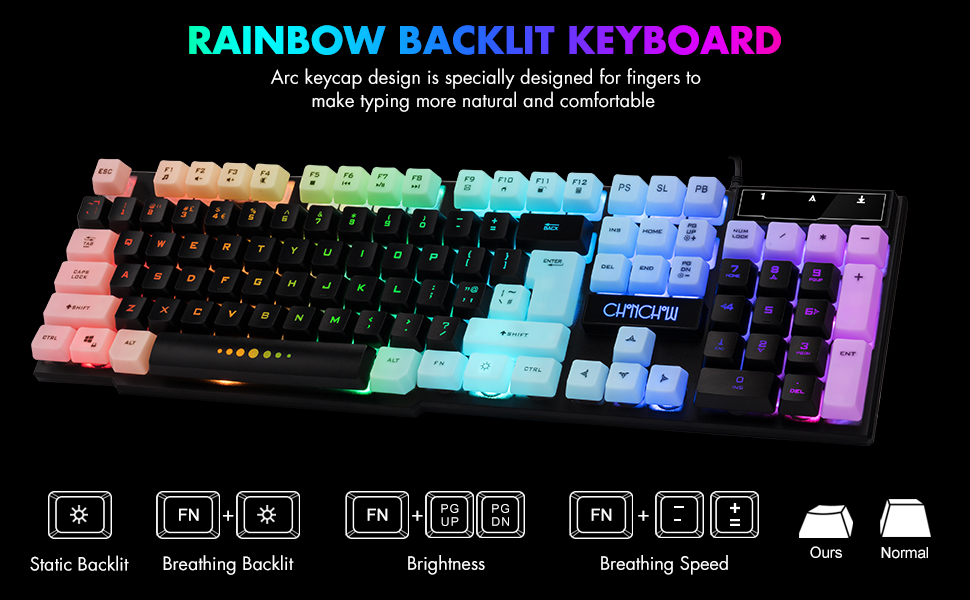
Image: Visual guide for controlling keyboard backlighting, showing key combinations for various effects.
- Attiva/disattiva la retroilluminazione: Premere il tasto Lampadina key (usually located near the right Ctrl key).
- Switch Backlight Mode (Breathing/Static): Premere FN + Lampadina chiave.
- Regola luminosità: Premere FN + PG UP to increase brightness, or FN + PG DN per diminuire la luminosità.
- Regola la velocità della respirazione: Premere FN + + to increase breathing speed, or FN + - to decrease breathing speed.
4.2. Tasti multimediali
The keyboard includes 12 multimedia function shortcut keys for quick access to common functions.

Image: Layout of the keyboard highlighting the 12 multimedia function keys and their corresponding FN key combinations.
| Combinazione di tasti | Funzione |
|---|---|
| Tasto F1 | Lettore musicale |
| Tasto F2 | Abbassa il volume |
| Tasto F3 | Alza il volume |
| Tasto F4 | Muto |
| Tasto F5 | Riproduci/Interrompi |
| Tasto F6 | Traccia precedente |
| Tasto F7 | Riproduci/Pausa |
| Tasto F8 | Traccia successiva |
| Tasto F9 | |
| Tasto F10 | Web Casa |
| Tasto F11 | Schermata di blocco |
| Tasto F12 | Calcolatrice |
4.3. Chiavi anti-ghosting
The keyboard features 19 anti-ghosting keys, ensuring that multiple key presses are registered simultaneously, which is crucial for gaming.

Image: The keyboard layout with 19 anti-ghosting keys visually indicated.
4.4. Blocco tasti WIN
The Windows key can be disabled to prevent accidental presses during gaming sessions.

Image: Close-up of the Windows key with an overlay indicating its lock function.
- Disable/Enable WIN Key: Premere FN + VINCITA chiave.
5. Mouse Features and Operation
The gaming mouse features 7-color breathing LED lighting and adjustable DPI settings.

Image: The CHONCHOW gaming mouse displaying its 7-color LED breathing light effect.
5.1. Regolazione DPI
The mouse offers four levels of DPI sensitivity to suit different tasks and preferences.
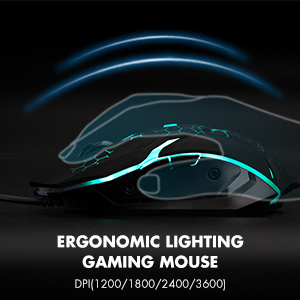
Image: The ergonomic design of the gaming mouse, highlighting its lighting and DPI settings.
- Livelli DPI: 1200 / 1800 / 2400 / 3600 DPI.
- Regola DPI: Premere il tasto Pulsante DPI (usually located behind the scroll wheel) to cycle through the available DPI settings.
5.2. Mouse Buttons
The mouse is equipped with 6 buttons for enhanced control:
- Pulsante clic sinistro
- Pulsante clic destro
- Rotellina di scorrimento (cliccabile)
- Pulsante DPI
- Pulsante Avanti
- Pulsante Indietro
6. Compatibilità
The CHONCHOW US801 Gaming Keyboard and Mouse Combo offers wide compatibility with various operating systems and devices.
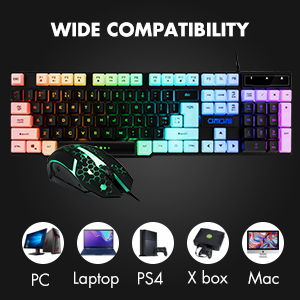
Image: Icons representing various compatible devices including PC, Laptop, PS4, Xbox, and Mac.
- Sistemi operativi: Windows 2000 / 2003 / XP / Vista / Win7 / Win8 / Win10
- Dispositivi: PC, Computer, Laptop, PS4, Xbox, Mac
7. Manutenzione
Una corretta manutenzione garantisce la longevità e le prestazioni ottimali della tastiera e del mouse.
- Pulizia: Use a soft, dry cloth to wipe down the surfaces of the keyboard and mouse. For deeper cleaning, especially for dust under keycaps, the keycaps are removable. Gently pull them off for cleaning and press them back into place. Avoid using harsh chemicals or abrasive materials.
- Fuoriuscite: The keyboard features drainage holes to help mitigate damage from minor spills. In case of a liquid spill, immediately disconnect the keyboard from your device, turn it upside down to drain, and allow it to dry completely before reconnecting.
- Magazzinaggio: Conservare la tastiera e il mouse in un luogo fresco e asciutto, lontano dalla luce solare diretta e da temperature estreme.
8. Risoluzione Dei Problemi
If you encounter issues with your CHONCHOW US801 Gaming Keyboard and Mouse Combo, please refer to the following common solutions:
- Tastiera/mouse non rispondono:
- Ensure both USB cables are securely plugged into your device's USB ports.
- Try connecting the keyboard and mouse to different USB ports.
- Riavvia il computer o la console di gioco.
- Provare i dispositivi su un altro computer per escludere problemi specifici del sistema.
- Backlight Issues (Not Bright / Partially Lit):
- Wait approximately 20 seconds after connecting; the keyboard's light control chip may be restarting due to static electricity or repeated connections.
- Ensure your computer is connected to the internet, then reconnect the keyboard. Wait for the "driver installation is complete" notification.
- Regola la luminosità utilizzando FN + PG SU/PG DN.
- Tasti non registrati/fantasma:
- Assicurarsi che la tastiera sia pulita e priva di detriti sotto i tasti.
- Verify that the WIN key lock is not accidentally engaged if you are experiencing issues with the Windows key.
- Il cursore del mouse salta o è irregolare:
- Pulisci il sensore ottico nella parte inferiore del mouse.
- Assicurati di utilizzare il mouse su una superficie adatta (ad esempio un tappetino per mouse).
- Se il cursore è troppo sensibile, impostare un valore DPI più basso.
If the problem persists after attempting these steps, please contact CHONCHOW customer support for further assistance.
9. Specifiche
| Caratteristica | Dettaglio |
|---|---|
| Marca | CHONCHOW |
| Numero di modello | US801 |
| Tecnologia di connettività | USB cablato |
| Disposizione della tastiera | 104-Keys Full Size |
| Retroilluminazione della tastiera | RGB (Rainbow Backlit) |
| Caratteristiche speciali della tastiera | 19 Anti-Ghosting Keys, 12 Multimedia Keys, WIN Key Lock, Ergonomic, Removable Keycaps |
| Livelli DPI del mouse | 1200 / 1800 / 2400 / 3600 DPI |
| Pulsanti del mouse | 6 Buttons (Left, Right, Forward, Backward, DPI, Scroll Wheel) |
| Retroilluminazione del mouse | LED a 7 colori che respirano |
| Dimensioni del prodotto (tastiera) | 17 x 5.1 x 1.3 pollici |
| Peso dell'articolo | 1.94 libbre |
| Materiale | Plastica |
10. Garanzia e supporto
CHONCHOW stands behind the quality of its products. Your CHONCHOW US801 Gaming Keyboard and Mouse Combo is covered by the following:
- 30-Day Refund or Replacement: Per qualsiasi problema riscontrato entro 30 giorni dall'acquisto.
- 12-Month After-Sales Service: For quality-related problems within 12 months of purchase.
For friendly and easy-to-reach support, please contact our customer service team. Refer to your purchase documentation or the CHONCHOW official websito per i contatti.

