Introduzione
Thank you for choosing the Continu.us R230D2 Master TV Remote. This remote control is specifically designed to provide comprehensive control over RCA and Continu.us brand televisions, including access to commercial menus. Its intuitive layout ensures ease of use for all essential TV functions.

Figura 1: Fronte view of the R230D2 Master TV Remote, showing all buttons.
Impostare
Before using your new remote, you will need to install batteries.
Installazione della batteria
- Individuare il vano batterie sul retro del telecomando.
- Far scorrere il coperchio del vano batteria verso il basso e sollevarlo.
- Inserire due (2) batterie AA, assicurandosi che i terminali positivo (+) e negativo (-) siano allineati con i segni all'interno del vano.
- Richiudere il coperchio del vano batteria facendolo scorrere in posizione finché non scatta in posizione.

Figura 2: Indietro view of the R230D2 Master TV Remote, illustrating the battery compartment.
Utilizzo iniziale
The R230D2 Master TV Remote is pre-programmed for RCA and Continu.us televisions and typically requires no code entry or complex synchronization. Simply point the remote at your television and press the ENERGIA button. If the TV responds, the remote is ready for use.
Istruzioni per l'uso
This section details the functions of the buttons on your R230D2 remote control.
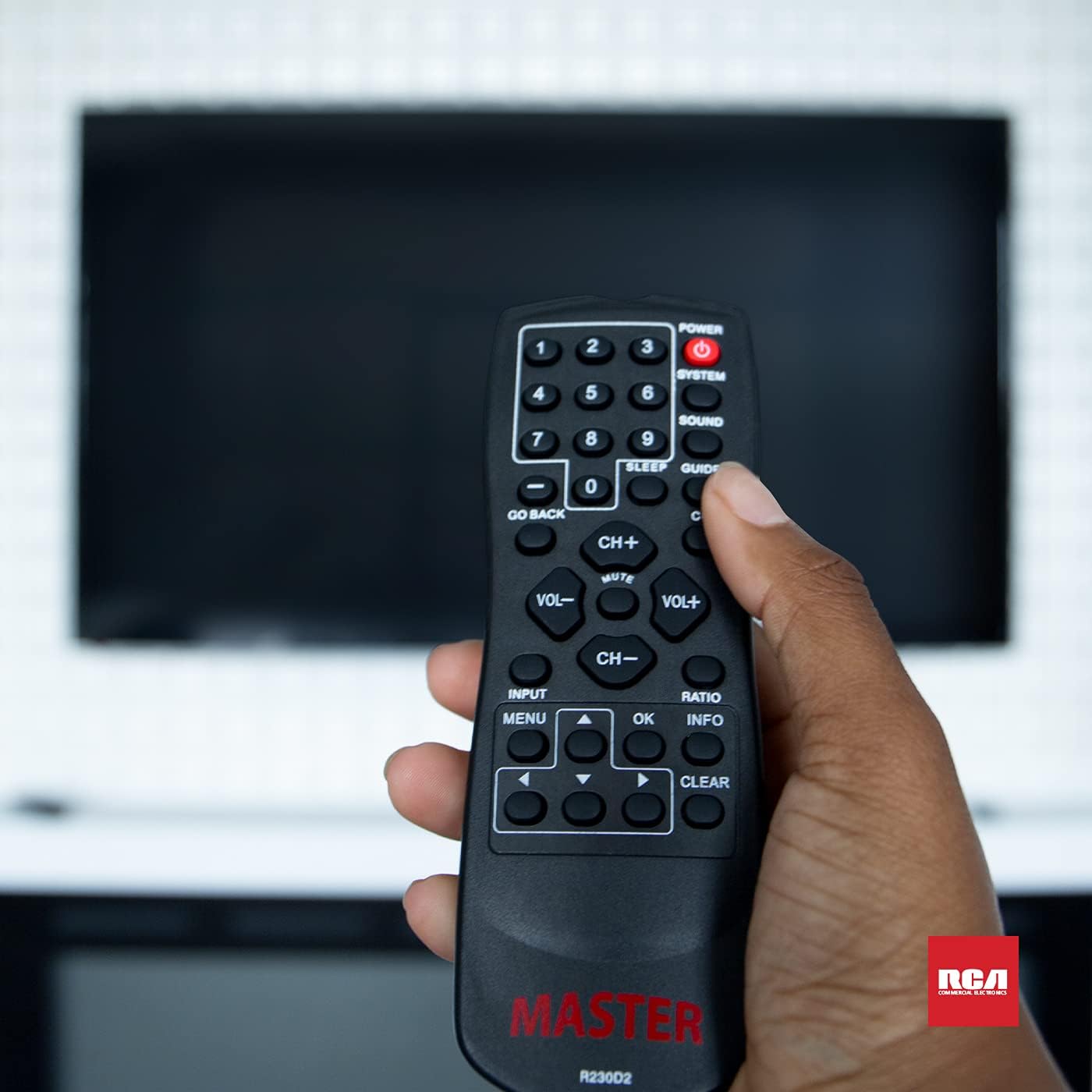
Figure 3: Using the R230D2 Master TV Remote with a television.
- ENERGIA: Accende o spegne la televisione.
- SISTEMA: Accesses system-specific functions or menus.
- SUONO: Adjusts sound modes or settings.
- GUIDA: Visualizza la guida elettronica ai programmi (EPG).
- SONNO: Sets a timer for the TV to automatically turn off.
- CC (sottotitoli): Attiva o disattiva i sottotitoli.
- TORNA INDIETRO: Ritorna al canale o alla schermata del menu precedente.
- Pulsanti numerici (0-9): Inserire direttamente i numeri dei canali.
- CH+ / CH-: Cambia canale in su o in giù.
- VOL + / VOL-: Increases or decreases volume.
- MUTE: Disattiva o riattiva l'audio del televisore.
- INGRESSO: Seleziona la sorgente di ingresso (ad esempio, HDMI 1, AV).
- MENU: Apre il menu principale del televisore.
- OK: Confirms a selection or enters a submenu.
- INFORMAZIONI: Visualizza informazioni sul programma o sull'input corrente.
- RAPPORTO: Regola le proporzioni dello schermo.
- CHIARO: Clears input or exits certain functions.
- Frecce di navigazione (su, giù, sinistra, destra): consente di navigare tra i menu e le opzioni.
Accessing Commercial Menus
The R230D2 remote is designed to access commercial menus on compatible RCA and Continu.us televisions. The specific button or sequence to access these menus may vary by TV model. Typically, this function is integrated within the SISTEMA or MENU buttons, or a combination thereof. Refer to your television's specific user manual for detailed instructions on accessing its commercial menu features.
Manutenzione
Per garantire la longevità e le prestazioni ottimali del tuo telecomando, segui queste semplici linee guida per la manutenzione:
- Pulizia: Pulisci il telecomando con un panno morbido e asciutto. Per lo sporco ostinato, strofina leggermenteampPulire il panno con acqua o con un detergente delicato e non abrasivo. Non utilizzare prodotti chimici aggressivi né immergere il telecomando in liquidi.
- Sostituzione della batteria: Replace batteries when the remote's response becomes sluggish or stops working. Always replace both batteries at the same time with new AA batteries. Do not mix old and new batteries, or different types of batteries.
- Magazzinaggio: Conservare il telecomando in un luogo fresco e asciutto, lontano dalla luce solare diretta, da temperature estreme e da elevata umidità.
- Evitare gocce: Proteggere il telecomando dagli urti fisici, poiché le cadute possono danneggiare i componenti interni.
Risoluzione dei problemi
If you encounter issues with your R230D2 remote, try the following solutions:
- Il telecomando non risponde:
- Controllare che le batterie siano inserite correttamente, rispettando la polarità corretta.
- Sostituire le batterie con batterie nuove.
- Assicurarsi che non vi siano ostacoli tra il telecomando e il sensore a infrarossi del televisore.
- Assicuratevi di trovarvi nel raggio d'azione effettivo del ricevitore IR del televisore.
- TV Not Turning On/Off:
- Verificare che la TV sia collegata a una presa di corrente funzionante.
- Try turning the TV on/off using its physical power button.
- Funzioni specifiche non funzionanti:
- Some functions may require the TV's menu to be open or a specific input selected.
- Assicurarsi che il telecomando sia puntato direttamente verso la TV.
- Il telecomando continua a non funzionare:
- Se il telecomando è caduto di recente o è stato esposto all'umidità, potrebbero essersi verificati danni interni.
- Per ulteriore assistenza, contattare l'assistenza clienti.
Specifiche
| Caratteristica | Dettaglio |
|---|---|
| Marca | Continua.us |
| Numero di modello | R230D2 |
| Dispositivi compatibili | RCA and Continu.us Televisions |
| Tecnologia di connettività | Infrarossi |
| Fonte di alimentazione | 2 batterie AA (non incluse) |
| Peso dell'articolo | 1.76 once |
| Dimensioni del prodotto | 6 x 2 x 1 pollici |
| Numero massimo di dispositivi supportati | 1 |
Garanzia e supporto
Continu.us products are designed and tested to high standards. We pride ourselves on offering excellent customer support.
Assistenza clienti
If you require assistance with your R230D2 Master TV Remote, our support and technical team are available to help. Please reach out via phone or email for any pressing issues or questions.
For the most up-to-date contact information, please visit the official Continu.us websito o fare riferimento alla confezione del prodotto.
Informazioni sulla garanzia
Specific warranty details for the R230D2 remote are typically provided with the product packaging or can be found on the Continu.us official websito. Conservare la prova d'acquisto per eventuali reclami in garanzia.