Introduzione
This manual provides essential information for the safe and efficient use of your Mophie Universal Wireless Charging Stand. Please read these instructions carefully before use and retain them for future reference.
The Mophie Universal Wireless Charging Stand is designed to wirelessly charge Qi-enabled smartphones in both portrait and landscape orientations. It delivers up to 15W fast charging and is compatible with lightweight phone cases up to 3mm thick.
Contenuto della confezione
Verifica che tutti gli articoli siano presenti nel tuo pacco:
- Mophie Universal Wireless Charging Stand
- Approx. 1.5M Wall Adapter
- Guida Rapida
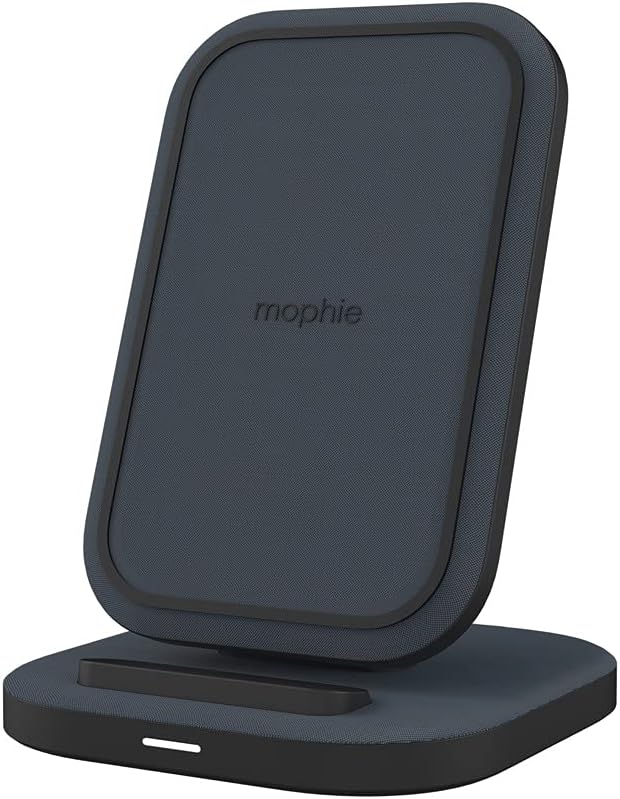
Image: The Mophie Universal Wireless Charging Stand with its power adapter and quick-start guide.
Istruzioni di installazione
- Collegare l'adattatore di alimentazione: Insert the small end of the provided 1.5M wall adapter cable into the power input port on the back of the charging stand.
- Collegare all'alimentazione: Plug the wall adapter into a suitable electrical outlet.
- Posizionamento: Place the charging stand on a flat, stable surface, such as a desk or nightstand. Ensure there is adequate ventilation around the stand.
Image: The Mophie Wireless Charging Stand ready for use, showing the power cable connected.
Istruzioni per l'uso
The Mophie Universal Wireless Charging Stand is designed for simple operation.
- Posiziona il tuo dispositivo: Position your Qi-enabled smartphone directly onto the charging surface of the stand. The phone can be placed in either portrait or landscape orientation.
- Verifica della ricarica: Your device should indicate that it is charging. The stand is equipped with an LED indicator (if present, typically a small light on the base) that illuminates to confirm charging.
- Compatibilità della custodia: The stand can charge through lightweight phone cases up to 3mm thick. For optimal charging performance, remove thicker cases or cases containing metal.

Image: A smartphone placed vertically on the Mophie charging stand, indicating active charging.

Image: A smartphone placed horizontally on the Mophie charging stand, indicating active charging.
The stand features Ricarica wireless veloce da 15 W, optimized for compatible Apple and Samsung devices, ensuring quick power delivery.
Manutenzione
- Pulizia: Disconnect the power adapter before cleaning. Use a soft, dry, lint-free cloth to wipe the surface of the charging stand. Do not use abrasive cleaners, solvents, or aerosol sprays.
- Magazzinaggio: Quando non viene utilizzato per lunghi periodi, conservare il supporto di ricarica in un luogo fresco e asciutto, lontano dalla luce solare diretta e da temperature estreme.
- Evitare i liquidi: Tenere il supporto di ricarica lontano dall'acqua e da altri liquidi.

Immagine: Un dettaglio view of the premium fabric finish on the Mophie charging stand.
Risoluzione dei problemi
If you encounter issues with your Mophie Universal Wireless Charging Stand, refer to the following common problems and solutions:
| Problema | Possibile causa | Soluzione |
|---|---|---|
| Il dispositivo non si carica o si carica lentamente. |
|
|
| LED indicator is blinking. |
|
|
| Stand feels warm during charging. | Funzionamento normale. | A slight warmth during wireless charging is normal. If it becomes excessively hot, discontinue use and contact support. |
The Mophie charging stand includes built-in protezione da sovraccarico E rilevamento di oggetti estranei per garantire un funzionamento sicuro.
Specifiche
| Numero di modello | 401305903 |
| Marca | Mofie |
| Tecnologia di connettività | Wireless (compatibile con Qi) |
| Potenza di uscita | Ricarica rapida fino a 15 W |
| Compatibilità dei casi | Charges through lightweight cases up to 3mm thick |
| Ingresso volumetage | 230 Volts (via included wall adapter) |
| Amprabbia | 0.07 Amps |
| Colore | Nero |
| Peso dell'articolo | 14 once (circa 397 grammi) |
| Dimensioni del pacco | 7.95 x 4.33 x 3.19 pollici |
| Lunghezza del cavo | Approx. 1.5 meters (wall adapter cable) |
| Dispositivi compatibili | Qi-enabled smartphones including Apple iPhone (11, 12, 13, 14, 15 series, etc.), Samsung Galaxy (S22, S23 series, etc.), Google Pixel (7, 8 series, etc.). |
Informazioni sulla garanzia
Specific warranty details for the Mophie Universal Wireless Charging Stand are typically provided with the product packaging or available on the official Mophie website. Please refer to the documentation included with your purchase or visit mophie.com/support for the most current warranty terms and conditions.
Assistenza clienti
For further assistance, technical support, or to inquire about replacement parts, please contact Mophie customer service through their official websito:
- Websito: mophie.com/support
- Refer to the Quick-Start Guide for any additional contact information.


