1. Introduzione
The ION Audio Boombox Deluxe Stereo is a versatile audio system designed to provide a range of listening experiences. It combines classic audio playback options with modern connectivity, featuring an AM/FM radio, a cassette player, Bluetooth streaming, and USB/Micro SD card playback. This manual provides detailed instructions for setting up, operating, and maintaining your device.

Figura 1: Fronte view of the ION Audio Boombox Deluxe Stereo, showcasing its dual speakers, cassette deck, and radio tuner display.
2. Cosa c'è nella scatola
- Boombox Deluxe Unit
- Cavo di alimentazione
- Guida Rapida
3. Impostazione
3.1 Alimentazione dell'unità
The Boombox Deluxe can be powered using the included AC power cable or by batteries for portable use. Insert the AC power cable into the AC IN port on the back of the unit and plug it into a standard wall outlet. For battery operation, open the battery compartment (typically on the bottom or back) and insert the required D-cell batteries (not included), ensuring correct polarity.
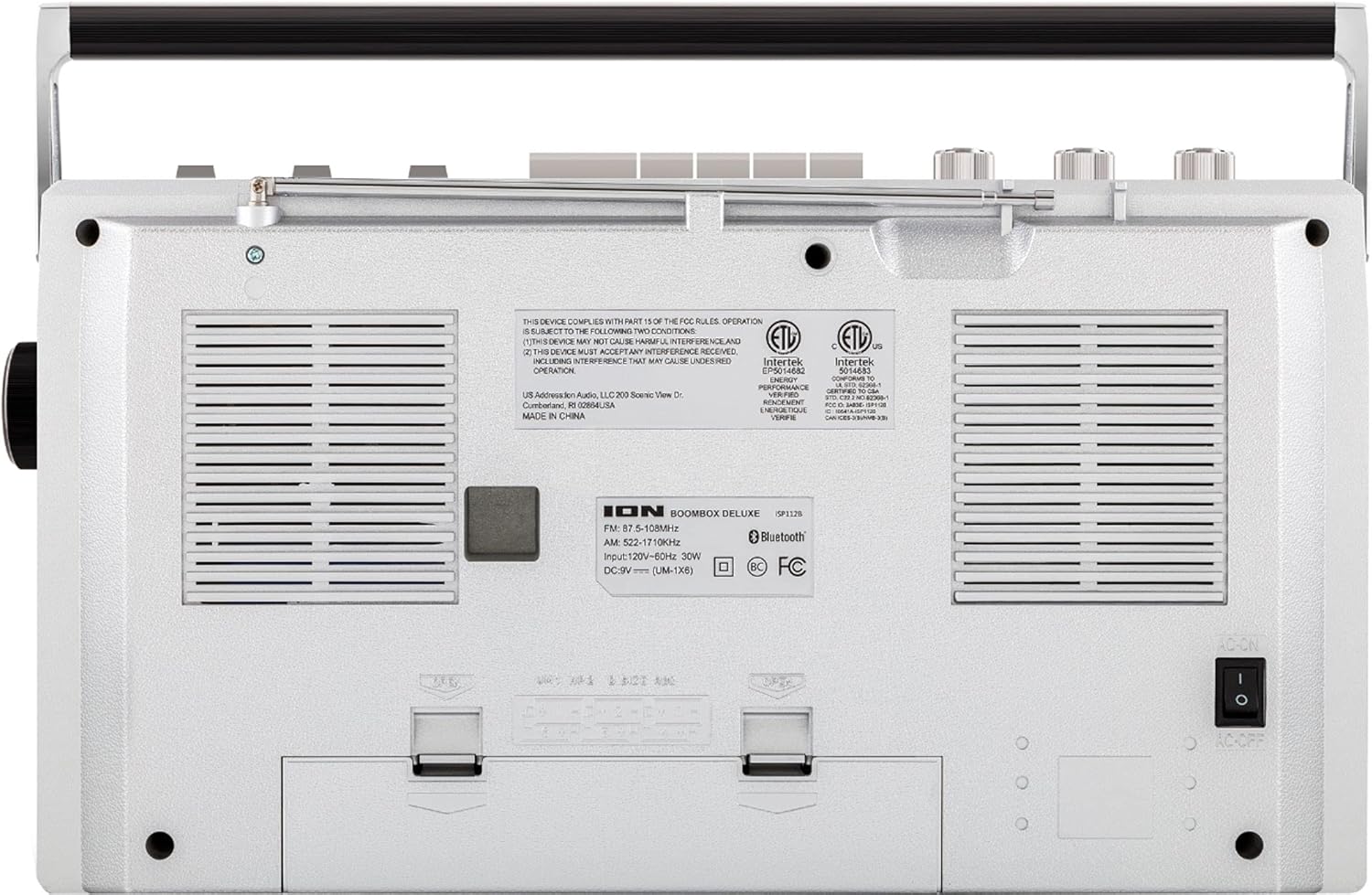
Figure 2: Rear panel of the Boombox Deluxe, highlighting the AC power input and battery compartment location.
3.2 Regolazione dell'antenna
For optimal AM/FM radio reception, extend the telescopic antenna located on the top of the unit. Adjust its position for the clearest signal.
4. Istruzioni per l'uso
4.1 Controlli generali
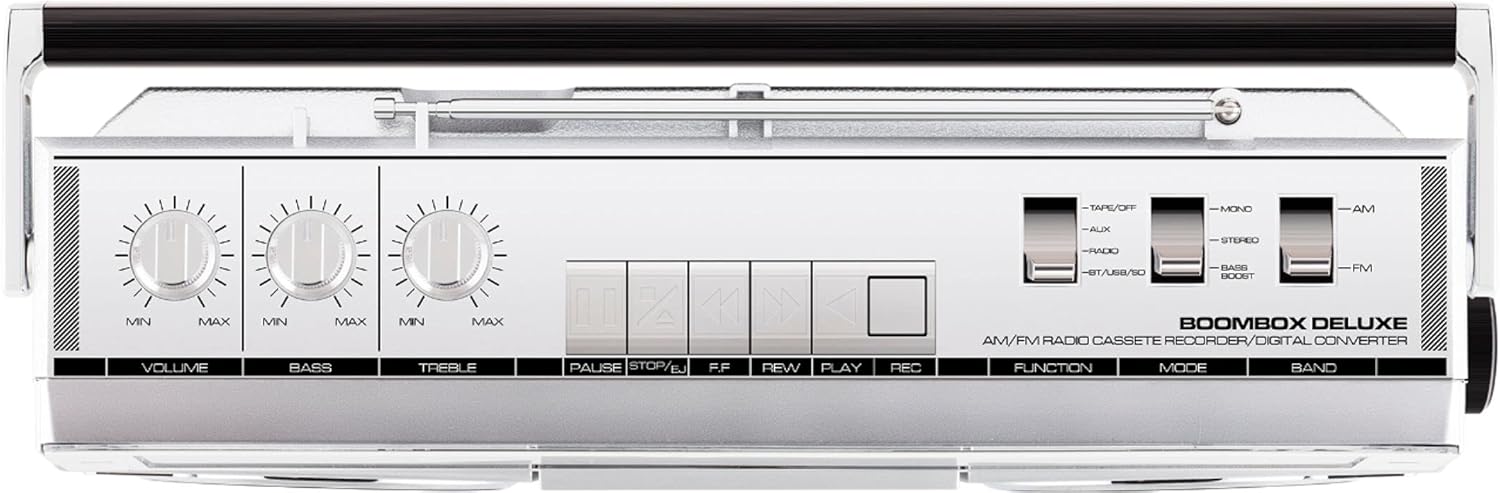
Figure 3: Top panel controls, including Volume, Bass, Treble knobs, and cassette playback buttons.
- Manopola del volume: Regola il livello di uscita audio complessivo.
- Manopola dei bassi: Regola l'uscita audio a bassa frequenza.
- Manopola degli alti: Regola l'uscita audio ad alta frequenza.
- Interruttore di funzione: Selects between Tape/Off, Aux, Radio, and BT/USB/SD modes.
- Interruttore di modalità: Selects between Mono, Stereo, and Bass Boost audio modes.
- Cambio di banda: Selects between AM and FM radio bands.
4.2 Funzionamento della radio
- Imposta il Funzione Switch to 'Radio'.
- Imposta il Interruttore di banda to 'AM' or 'FM'.
- Utilizzare il Manopola di sintonia to select your desired radio station. The frequency will be displayed on the tuner scale.
4.3 Funzionamento del lettore di cassette
- Imposta il Funzione Switch to 'Tape/Off'.
- Premere il tasto Arresta/Espelli pulsante per aprire lo scomparto della cassetta.
- Insert a cassette tape with the open edge facing upwards. Close the compartment.
- Premere il tasto Giocare pulsante per iniziare la riproduzione.
- Utilizzo Rewind (REW) E Avanti veloce (FF) pulsanti per navigare nel nastro.
- Premere Pausa per interrompere temporaneamente la riproduzione. Premere di nuovo per riprenderla.
- Premere Arresta/Espelli per interrompere la riproduzione ed espellere il nastro.
- To record, ensure the Funzione Switch is set to 'Tape/Off' and press the Record (REC) pulsante contemporaneamente al Giocare pulsante.
4.4 Connettività Bluetooth

Figure 4: Side panel with USB and Micro SD card slots, and playback controls for digital media.
- Imposta il Funzione Switch to 'BT/USB/SD'. The unit will enter Bluetooth pairing mode, indicated by a flashing LED.
- On your Bluetooth-enabled device (e.g., smartphone, tablet), search for 'ION Boombox Deluxe' in the Bluetooth settings.
- Select 'ION Boombox Deluxe' to pair. Once connected, a confirmation tone will sound, and the LED will stop flashing.
- You can now stream audio from your device to the Boombox Deluxe. Use your device's controls or the boombox's playback buttons (Play/Pause, Next/Previous Track) for media control.
4.5 Riproduzione USB/Micro SD
- Imposta il Funzione Switch to 'BT/USB/SD'.
- Insert a USB flash drive or Micro SD card (with compatible audio files) into the respective slot on the side of the unit.
- L'unità rileverà automaticamente e inizierà a riprodurre l'audio files.
- Use the playback control buttons (Play/Pause, Next/Previous Track, Delete) on the side panel to manage your music.
4.6 Ingresso ausiliario

Figure 5: Side panel with headphone output and auxiliary input jacks.
- Imposta il Funzione Switch to 'Aux'.
- Collegare un dispositivo audio esterno (ad esempio, lettore MP3, lettore CD) al AUX IN jack utilizzando un cavo audio da 3.5 mm (non incluso).
- Audio from the connected device will play through the boombox speakers. Control playback from your external device.
5 Caratteristiche
- Integrated Stereo System with Dual Speakers
- Streaming senza fili Bluetooth
- AM/FM Radio Tuner
- Cassette Player/Recorder
- Riproduzione tramite USB e scheda Micro SD
- Auxiliary Input for External Devices
- Adjustable Bass and Treble Controls
- Portable Design with Carry Handle
6. Specifiche
| Specificazione | Dettaglio |
|---|---|
| Marca | Audio ION |
| Modello | Boombox Deluxe |
| Tecnologia di connettività | Bluetooth, USB |
| Tipo di altoparlante | Stereo |
| Fonte di alimentazione | Battery Powered (D-cell), AC Power |
| Colore | Nero, Argento |
| Peso dell'articolo | 8.93 libbre |
| Dimensioni del pacco | 18.1 x 11.1 x 7.6 pollici |
7. Risoluzione Dei Problemi
- Nessun potere:
Ensure the AC power cable is securely connected to both the unit and a working power outlet. If using batteries, check that they are inserted correctly and are not depleted. - Scarsa ricezione radio:
Fully extend the telescopic antenna and adjust its position. Try relocating the unit to an area with better signal reception, away from potential interference sources like other electronic devices. - Cassette Tape Not Playing/Recording:
Ensure the tape is inserted correctly and the cassette compartment is fully closed. Check that the tape is not tangled or damaged. For recording, ensure both Play and Record buttons are pressed simultaneously. - Bluetooth non si connette:
Make sure the Boombox Deluxe is in 'BT/USB/SD' mode and in pairing mode (flashing LED). Ensure Bluetooth is enabled on your external device and it is within range (typically 30 feet). Try unpairing and re-pairing the device. - No Sound from USB/Micro SD:
Verify that the USB drive or Micro SD card is inserted correctly and contains compatible audio files (e.g., MP3). Ensure the volume is turned up on the boombox.
8. Manutenzione
- Pulizia: Utilizzare un panno morbido e asciutto per pulire l'esterno dell'unità. Non utilizzare detergenti liquidi o solventi.
- Cura del registratore a cassette: Pulire periodicamente le testine del nastro e i rulli di pressione con un batuffolo di cotone leggermente dampened with isopropyl alcohol to ensure optimal playback and recording quality.
- Conservazione della batteria: Se l'unità non verrà utilizzata per un periodo prolungato, rimuovere le batterie per evitare perdite e danni.
9. Garanzia e supporto
This product is offered as an Amazon Renewed item. Amazon Renewed products are professionally inspected and tested to work and look like new. If you are not satisfied with your purchase, renewed products are eligible for replacement or refund under the Amazon Renewed Guarantee. For specific details regarding the Amazon Renewed Guarantee, please refer to the Amazon Renewed program terms and conditions on the Amazon websito.
For further assistance or technical support, please contact ION Audio customer service or refer to their official websito per le risorse di supporto.


