Introduzione
This manual provides detailed instructions for the setup, operation, maintenance, and troubleshooting of your KALINCO Smart Watch P22. Please read this guide thoroughly to ensure proper use and to maximize the features of your device.
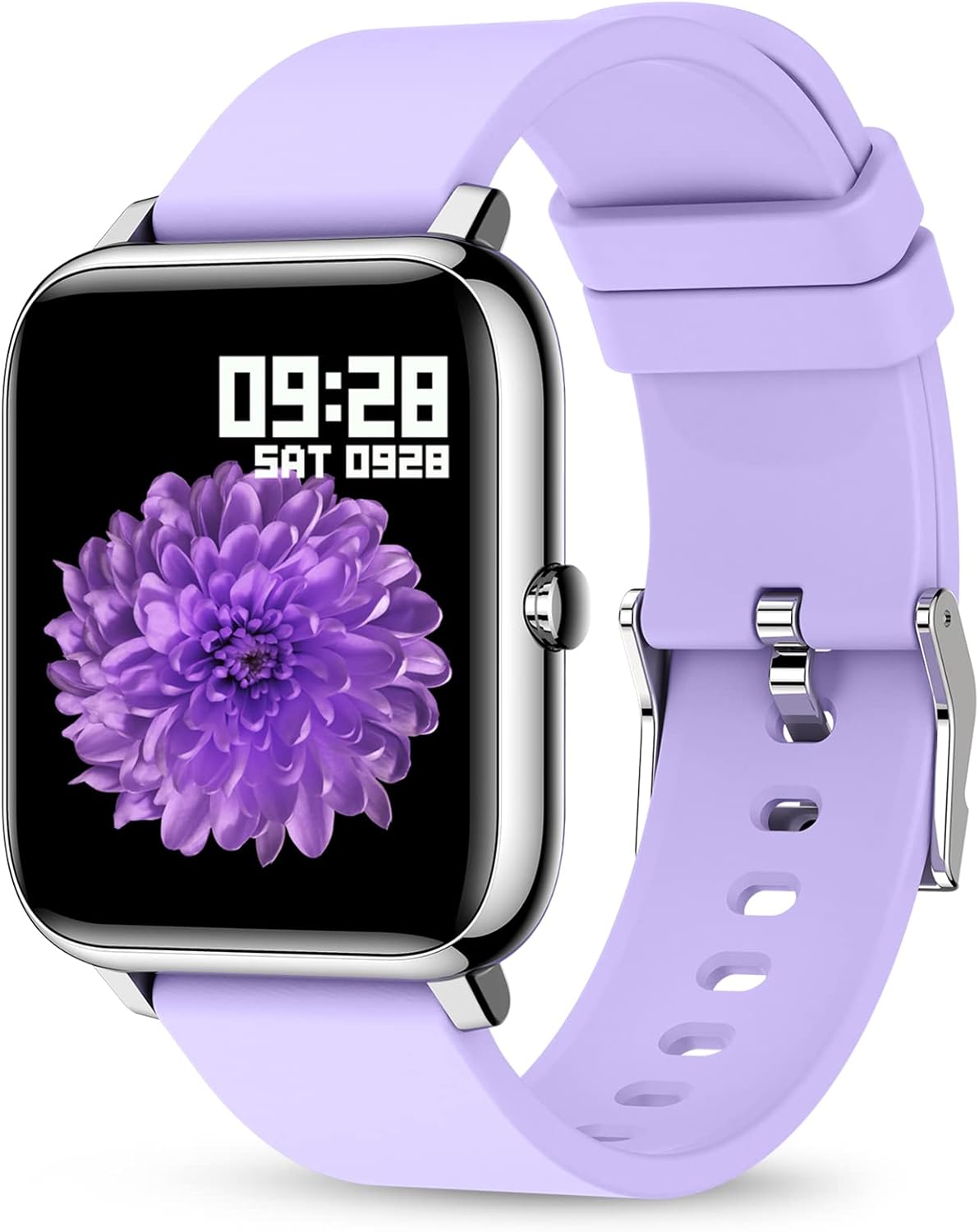
The KALINCO Smart Watch P22, featuring a vibrant display and comfortable purple silicone strap.
Impostare
1. Cosa c'è nella scatola
- KALINCO Smart Watch P22
- Cavo di ricarica
- Silicone Purple Band
- Manuale dell'utente (questo documento)
2. Carica del dispositivo
Before initial use, fully charge your KALINCO Smart Watch P22. Connect the magnetic charging cable to the charging contacts on the back of the watch and plug the USB end into a low-power USB port (e.g., computer USB port or a standard 5V/1A USB adapter). Avoid using fast chargers as they can accelerate battery aging.
A full charge typically takes approximately 2.5 hours. The watch can be used for up to 7 days on a single charge and has a standby time of over 30 days.

Ensure the magnetic contacts are properly aligned for charging.
3. Installazione e associazione dell'app
Per sbloccare tutte le funzionalità del tuo smartwatch, scarica e installa HeroBandIII app on your smartphone. The app is compatible with iOS 9.0/Android OS 4.4 or above.
- Scan the QR code provided in the quick start guide or search for "HeroBandIII" in your phone's app store.
- Apri l'app e segui le istruzioni sullo schermo per creare un account o accedere.
- Abilita il Bluetooth sul tuo smartphone.
- In the HeroBandIII app, navigate to the device pairing section and select your KALINCO P22 watch from the list of available devices.
- Conferma la richiesta di associazione sia sul telefono che sull'orologio.
Once paired, the watch will synchronize data with the app, allowing you to view detailed activity and health metrics.
4. Personalizzazione del quadrante dell'orologio
Personalize your watch by changing the watch face through the HeroBandIII app.
- Apri l'app HeroBandIII sul tuo smartphone.
- Navigate to the 'Watch Face' or 'Dial Settings' section.
- Choose from over 200 built-in watch faces or select a picture from your phone's gallery to create a custom watch face.
- Adjust text color and time position as desired.
- Save your selection to apply it to your watch.

Customize your watch face using the HeroBandIII app.
Utilizzo dello smartwatch
1. Navigazione di base
The KALINCO Smart Watch P22 features a 1.4-inch full-touch LCD screen for intuitive interaction. Swipe across the screen to navigate through menus and tap to select options. The side button typically serves as a home or back button.
2. Monitoraggio delle attività
The watch tracks various activities throughout the day and offers specific modes for different sports.
- Attività giornaliera: Monitora i passi, la distanza, le calorie bruciate e i minuti attivi.
- Modalità Sportive: Includes 7 types of sports: Walking, Running, Cycling, Skipping, Badminton, Basketball, and Football. Select the appropriate mode before starting an activity for more accurate tracking.

Monitor your daily activity and progress.

Choose from 7 dedicated sports modes for accurate tracking.
3. Monitoraggio della salute
L'orologio fornisce un monitoraggio continuo dei principali parametri sanitari. Nota: i dati raccolti da questo dispositivo sono solo di riferimento e non possono essere utilizzati per diagnosi o trattamenti medici.
- Frequenza cardiaca: Monitora la frequenza cardiaca durante tutto il giorno. View detailed graphs and trends in the HeroBandIII app.
- Pressione sanguigna: Provides blood pressure readings. For best accuracy, ensure the watch is worn snugly on your wrist.
- Ossigeno nel sangue (SpO2): Misura i livelli di saturazione dell'ossigeno nel sangue.
- Monitoraggio del sonno: Automatically monitors your sleep patterns, distinguishing between deep sleep, light sleep, and awake times.

Heart rate and sleep monitoring features.

Monitoraggio della pressione sanguigna e dell'ossigeno nel sangue.

Automatic sleep tracking provides insights into your rest.
4. Notifiche e avvisi
Rimani connesso ricevendo le notifiche direttamente sul tuo polso.
- Promemoria dei messaggi: Receive alerts for incoming calls, text messages, and notifications from social media apps (e.g., Facebook, Instagram, LinkedIn, Skype, Twitter).
- Incoming Call Alert: The watch will vibrate to notify you of incoming calls. You cannot answer calls directly from the watch.
- Promemoria sedentario: The watch can remind you to move if you have been inactive for an extended period.

Receive message and call notifications on your wrist.

Stay informed with smart notifications from your connected apps.

The sedentary alert reminds you to take a break and move.
5. Altre caratteristiche pratiche
- Timer e cronometro: Access these tools directly from your watch for various timing needs.
- Wake-up Gesture: Raise your wrist to automatically wake the screen. You can set the screen time duration (5 to 20 seconds) in the app.
- Trova telefono: Use this feature to locate your paired smartphone if it's nearby.
- Controllo della musica: Controlla la riproduzione musicale sul tuo smartphone (riproduci, metti in pausa, salta i brani) direttamente dall'orologio.
- Visualizzazione meteo: View condizioni meteorologiche attuali e previsioni.
- Controllo remoto della telecamera: Use your watch as a remote shutter button for your smartphone camera.
- Do Not Disturb & Alarm Clock: Set quiet hours and multiple alarms through the app.

Access music control, weather, and remote camera functions.

Raise your wrist to wake the screen and adjust brightness.

Manage Do Not Disturb mode and set alarms for your daily routine.
6. Resistenza all'acqua
The KALINCO Smart Watch P22 features IP67 water resistance. This means it is protected against dust and can withstand immersion in water up to 1 meter for up to 30 minutes. You can wear it while washing hands or in light rain, but it is not suitable for swimming, showering with hot water, or diving.

The watch is resistant to splashes and brief immersion.
Manutenzione
1. Pulizia dell'orologio
Pulisci regolarmente l'orologio e il cinturino per prevenire irritazioni cutanee e mantenere il dispositivo funzionale.
- Pulisci lo schermo e il corpo dell'orologio con un panno morbido eamp, panno privo di pelucchi.
- For the silicone strap, you can use mild soap and water, then rinse thoroughly and dry completely before wearing.
- Evitare l'uso di prodotti chimici aggressivi o materiali abrasivi, poiché potrebbero danneggiare l'orologio.
2. Cura della batteria
Per prolungare la durata della batteria:
- Charge the watch using low-power USB ports.
- Evitare di scaricare completamente la batteria frequentemente.
- Conservare l'orologio in un luogo fresco e asciutto quando non lo si utilizza per lunghi periodi.
Risoluzione dei problemi
If you encounter issues with your KALINCO Smart Watch P22, refer to the following common solutions:
1. Inaccurate Heart Rate or Blood Pressure Readings
- Ensure the watch is worn snugly on your wrist, but not uncomfortably tight. A loose fit can lead to inaccurate readings.
- Ensure the sensor on the back of the watch is clean and free from debris.
- Remember that these readings are for reference and not medical-grade.
2. "No Data" for Sleep Function
- Check if the watch is worn correctly and comfortably during sleep. If it's too loose or too tight, it might affect sensor data collection.
- Clear the cache memory for the HeroBandIII app on your smartphone.
- Ensure the watch battery is sufficiently charged before sleep.
3. Not Receiving Text Messages or Notifications
- Verify that Bluetooth is enabled on your smartphone and the watch is successfully paired with the HeroBandIII app.
- Check notification settings within the HeroBandIII app to ensure message and app alerts are enabled.
- On your smartphone, ensure that notifications for the relevant apps are set to display previews or banners. If your phone does not display a notification, the watch will not receive it.
- Assicurarsi che l'orologio non sia in modalità "Non disturbare".
4. Problemi di connettività
- Riavvia sia lo smartphone che lo smartwatch.
- Try unpairing and re-pairing the watch through the HeroBandIII app.
- Ensure the HeroBandIII app has all necessary permissions on your smartphone.

Access app settings for troubleshooting and customization.
Specifiche
| Caratteristica | Dettaglio |
|---|---|
| Numero di modello | P22 |
| Dimensioni dello schermo | 1.4 pollici |
| Tipo di schermo | LCD, Full-touch |
| Sistema operativo | Android, iOS (Compatible with iOS 9.0+/Android OS 4.4+) |
| Tecnologia di connettività | Bluetooth |
| Capacità della batteria | 180 milioneamp Ore (polimero di litio) |
| Durata della batteria | Up to 7 days (typical use), 30+ days (standby) |
| Tempo di ricarica | Circa 2.5 ore |
| Resistenza all'acqua | Grado di protezione IP67 |
| Caratteristiche speciali | Heart Rate Monitor, Blood Pressure Monitor, Oxymeter (SpO2), Activity Tracker, Notifications, Sleep Monitor, Gesture Control, Sedentary Reminder, Time Display, Music/Camera Control, Calorie Tracker, Step Counter, Alarm Clock |
| GPS | Tramite Smartphone |
| Dimensioni del prodotto | 0.01 x 3.54 x 0.67 pollici |
| Peso dell'articolo | 3.52 once |
Garanzia e supporto
1. KALINCO Promise
KALINCO is committed to customer satisfaction and product quality:
- 30 Days Trial: Enjoy a trial period for your product.
- Sostituzione entro 365 giorni: We offer a replacement within 365 days for qualifying issues.
- Risposta rapida 24 ore su 24: Il nostro team di supporto si impegna a rispondere alle richieste entro 24 ore.
2. Risorse aggiuntive
- For more detailed information, you can refer to the official Guida per l'utente (PDF).
- Review importante Informazioni sulla sicurezza (PDF).
For further assistance, please contact KALINCO customer support through the contact information provided with your purchase or on the official KALINCO websito.


