Introduzione
This manual provides detailed instructions for the installation, operation, and maintenance of your Thermalright AXP-90 X53 Low Profile CPU Air Cooler. Please read this manual thoroughly before installation and use to ensure proper functionality and longevity of the product. The AXP-90 X53 is designed for compact systems requiring efficient cooling within a limited space.
Caratteristiche principali
- Design compatto: Premium-quality low-profile CPU cooler with a total height of 53mm, ideal for small form factor builds.
- Ampia compatibilità: Supports Intel sockets 115X/1200 and AMD AM4 platforms.
- Dissipazione del calore migliorata: Features 4x6mm heat pipes for efficient thermal transfer.
- Funzionamento silenzioso: Equipped with a 90mm TL-9015 PWM fan, designed for low noise levels (≤22.4dBA).
- Costruzione robusta: All-metal platform with a backplate fastener and secondary reflow soldering process for durability and reliable contact.
Configurazione e installazione
Proper installation is crucial for optimal cooling performance. Follow these steps carefully.
Video: AXP90 X53 Air Cooler Series Installation Tutorial. This video demonstrates the complete installation process for Intel 115X/1200 and AMD AM4 sockets.
- Preparare il frigorifero:
Remove the protective plastic sticker from the cooler's base before applying thermal compound. Ensure the heat pipes are clean and free of debris.
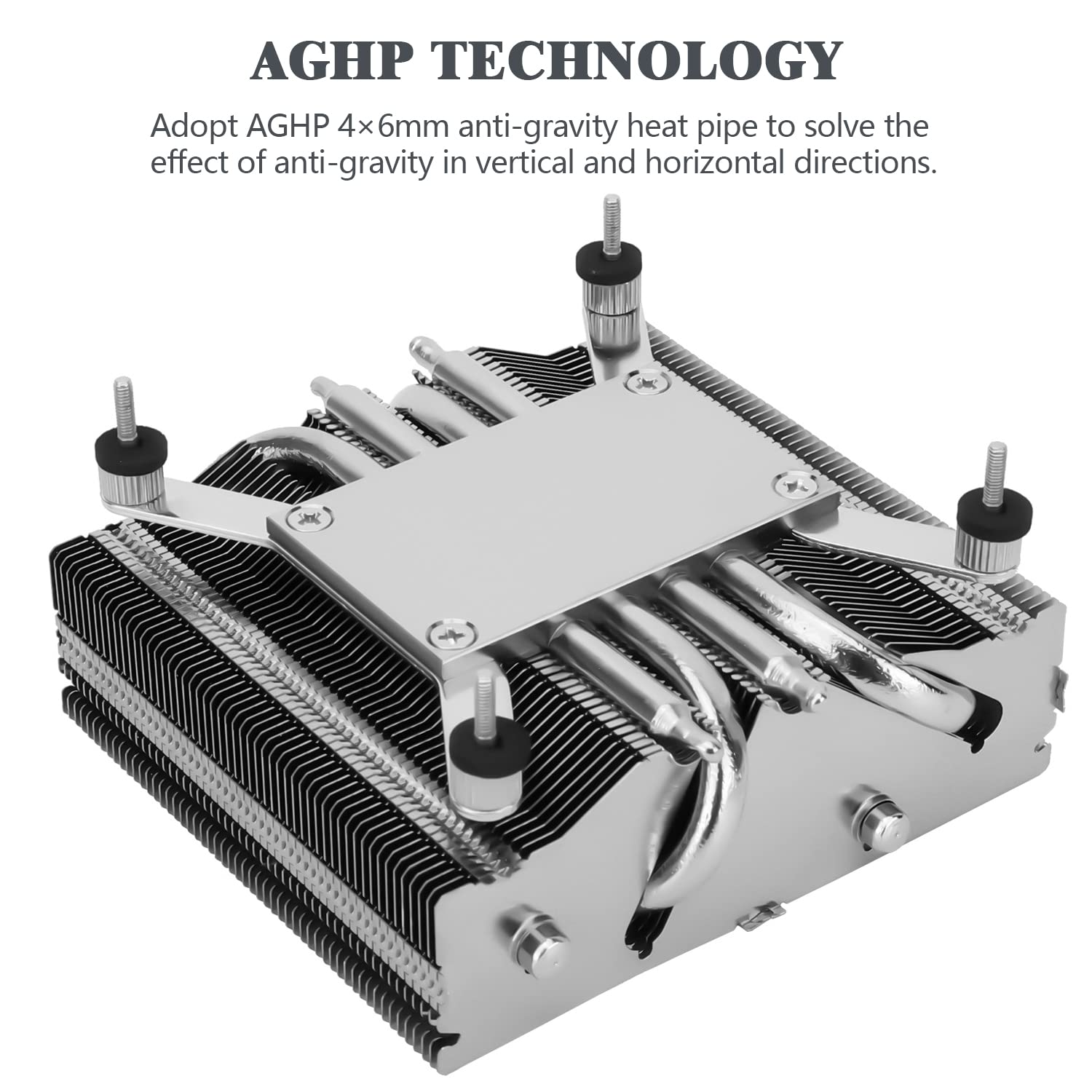
Immagine: The base of the AXP-90 X53 cooler, highlighting the AGHP (Anti-Gravity Heat Pipe) technology for efficient heat transfer in various orientations.
- Applicare il composto termico:
Apply a small, pea-sized amount of thermal compound to the center of your CPU's integrated heat spreader (IHS). Do not spread it manually; the pressure from the cooler will distribute it evenly.
- Installare la piastra posteriore:
For Intel sockets, ensure the backplate is oriented correctly (LGA115X/1200 side facing the motherboard). For AMD AM4, use the AM4 side. Place the backplate on the backside of the motherboard, aligning the mounting holes.

Immagine: Components of the AXP-90 X53 cooler, including the down-flow CPU cooler, AMD/Intel platform backplate, and TF7 thermal paste.
- Montare il dispositivo di raffreddamento:
Carefully place the heatsink onto the CPU, ensuring the mounting screws pass through the motherboard holes and align with the backplate. Be mindful of the heatsink's airflow direction relative to your case's airflow.

Immagine: Lato view of the AXP-90 X53 cooler, illustrating its compact 53mm total height, designed for ITX motherboard compatibility.
- Fissare il frigorifero:
From the backside of the motherboard, secure the backplate and heatsink using the four hex nuts. Tighten them in a diagonal pattern until snug, but do not overtighten to avoid damaging the motherboard or CPU socket.
- Connetti la ventola:
Connect the 4-pin PWM fan header to the CPU_FAN socket on your motherboard. Ensure the connection is secure.

Immagine: The TL-9015 92mm slim profile fan, which pairs with the AXP-90 X53 cooler for efficient and quiet operation.
Istruzioni per l'uso
Once installed, the Thermalright AXP-90 X53 operates automatically, controlled by your motherboard's PWM fan settings. Ensure your system's BIOS/UEFI settings are configured to manage the CPU fan speed based on temperature for optimal cooling and noise balance.
- Avvio iniziale: Monitor CPU temperatures during the first boot and under load to confirm proper installation and thermal compound application.
- Impostazioni BIOS/UEFI: Access your motherboard's BIOS/UEFI to adjust fan curves if you desire a different balance between cooling performance and noise levels.
- Flusso d'aria del sistema: Ensure adequate case airflow to support the cooler's performance. Proper intake and exhaust fans in your PC case will significantly impact overall system temperatures.
Manutenzione
Regular maintenance helps maintain optimal performance and extends the lifespan of your CPU cooler.
- Rimozione della polvere: Pulire periodicamente la polvere dalle alette del dissipatore e dalle pale della ventola utilizzando aria compressa o una spazzola morbida. L'accumulo di polvere può ostacolare il flusso d'aria e ridurre l'efficienza di raffreddamento.
- Ispezione della ventola: Check the fan for any signs of wear, damage, or unusual noise. Ensure the fan spins freely without obstruction.
- Composto termico: While not frequently required, consider reapplying thermal compound every few years or if you notice a significant increase in CPU temperatures.
Risoluzione dei problemi
If you encounter issues with your Thermalright AXP-90 X53 cooler, refer to the following common problems and solutions:
- Temperature elevate della CPU:
- Assicurarsi che il dissipatore sia montato saldamente e che sia completamente a contatto con la CPU.
- Verificare che il composto termico sia stato applicato correttamente e uniformemente.
- Check for dust buildup on the heatsink fins and fan.
- Confirm that the fan is spinning and connected to the CPU_FAN header.
- Review BIOS/UEFI fan settings to ensure the fan curve is appropriate for your CPU's thermal load.
- La ventola non gira:
- Check the fan cable connection to the motherboard's CPU_FAN header.
- Assicurarsi che la ventola non sia ostruita da cavi o altri componenti.
- Test the fan on a different fan header if available, or try a different fan to isolate the issue.
- Rumore eccessivo della ventola:
- Controllare che le viti della ventola non siano allentate o che non vi siano vibrazioni.
- Clean any dust or debris from the fan blades.
- Regola le impostazioni della velocità della ventola nel BIOS/UEFI per un funzionamento più silenziosofile se le temperature lo consentono.
Specifiche

Immagine: Detailed dimensions of the AXP-90 X53 cooler, showing its 94.5mm width, 95mm length, and 53mm total height (38mm heatsink + 15mm fan).
| Caratteristica | Specificazione |
|---|---|
| Dimensioni del prodotto | 94.5 mm (Lunghezza) x 95 mm (Larghezza) x 53 mm (Altezza) |
| Heatsink Dimensions | 94.5 mm (Lunghezza) x 95 mm (Larghezza) x 38 mm (Altezza) |
| Peso del dissipatore di calore | 300g |
| Tubi di calore | 4 x 6mm units |
| Modello di fan | TL-9015 PWM Fan |
| Dimensioni della ventola | 92 mm (Lunghezza) x 92 mm (Larghezza) x 15 mm (Altezza) |
| Peso del ventilatore | 55g |
| Velocità nominale della ventola | 2700 giri/min ± 10% |
| Rated Noise | ≤22.4 dBA |
| Capacità del flusso d'aria | 42.58 CFM (MAX) |
| Pressione statica | 1.33 mm/H₂O (MAX) |
| Corrente nominale | 0.18 A |
| Volume nominaletage | 12V CC |
| Tipo di connettore di alimentazione | 4-Pin PWM |
| Cuscinetto del ventilatore | Cuscinetto idraulico |
| Thermal Power Capability | 150W |
| Prese compatibili | Intel: LGA 1150/1151/1155/1851/1200; AMD: AM4 |
Garanzia e supporto
Thermalright products are manufactured to high-quality standards. For specific warranty information, please refer to the warranty card included with your product or visit the official Thermalright website. For technical support or inquiries, please contact Thermalright customer service through their official channels.


