1. Finitaview
The Nokia XR20 is a rugged 5G smartphone designed for durability and performance. This manual provides essential information for its setup, operation, and maintenance.

Immagine 1.1: Fronte e retro view of the Nokia XR20 5G smartphone.
Caratteristiche principali:
- Design robusto: MIL-STD-810H compliant, IP68 dust and water resistance, Corning Gorilla Glass Victus.
- Display: 6.67-inch FHD+ (1080x2400) display.
- Telecamera: 48MP main camera with 13MP ultrawide lens, 8MP front camera.
- Prestazione: Qualcomm Snapdragon 480 5G processor, 6GB RAM, 128GB internal storage (expandable up to 512GB with MicroSD).
- Connettività: 5G, Wi-Fi 6, Bluetooth 5.1, NFC, GPS.
- Batteria: 4630 mAh battery with 18W wired and 15W wireless charging support.
- Sistema operativo: Android 11 (upgradable to Android 14), with guaranteed OS upgrades and security updates.
2. Per iniziare
2.1. Disimballaggio e contenuto della confezione
Prima di iniziare, assicurati che tutti gli articoli siano presenti nel pacco:

Image 2.1: Contents of the Nokia XR20 package, including the phone, power adapter, USB-C cable, SIM tray ejector, and screen protector.
- Nokia XR20 Smartphone
- Adattatore di alimentazione
- Cavo USB di tipo C.
- Espulsore del vassoio SIM
- Pellicola protettiva per lo schermo (pre-applicata o inclusa)
2.2. Inserimento delle schede SIM e MicroSD
- Individuare il vassoio della scheda SIM/MicroSD sul lato del telefono.
- Inserire lo strumento di espulsione del vassoio SIM nel piccolo foro accanto al vassoio e premere con decisione finché il vassoio non fuoriesce.
- Place your Nano-SIM card(s) and/or MicroSD card into the designated slots on the tray. Ensure the gold contacts face downwards. The Nokia XR20 supports Dual SIM functionality.
- Spingere con cautela il vassoio nel telefono finché non scatta in posizione.
2.3. Ricarica iniziale e accensione
- Connect the USB Type-C cable to the phone's charging port and the power adapter. Plug the adapter into a wall outlet.
- Lasciare caricare il telefono per almeno 30 minuti prima del primo utilizzo o finché l'indicatore della batteria non mostra una carica sufficiente.
- To power on, press and hold the Power button (located on the side) until the Nokia logo appears.
2.4. Compatibilità del vettore
The Nokia XR20 is an unlocked device compatible with all GSM carriers, including AT&T, Boost, Cricket, H2O Wireless, Metro, Net10, Simple Mobile, T-Mobile, and Tracfone. It is not compatible with Verizon. Please confirm 5G network availability with your preferred carrier.

Image 2.2: The Nokia XR20 is compatible with various GSM carriers.
3. Using Your Phone
3.1. Navigazione di base
The Nokia XR20 runs on Android 11 (upgradable). Navigate using on-screen gestures or the navigation bar at the bottom of the display.
- Schermata iniziale: Scorri verso sinistra o verso destra per accedere alle diverse schermate iniziali.
- Cassetto delle applicazioni: Scorri verso l'alto dalla parte inferiore dello schermo per view tutte le applicazioni installate.
- Notifiche e impostazioni rapide: Scorri verso il basso dalla parte superiore dello schermo per accedere alle notifiche e ai pulsanti delle impostazioni rapide.
3.2. Funzioni della fotocamera
The Nokia XR20 features a dual rear camera system (48MP main, 13MP ultrawide) and an 8MP front camera.

Image 3.1: The Nokia XR20 features a 48MP dual camera system with ZEISS optics.
- Apri l'applicazione Fotocamera dalla schermata iniziale o dal cassetto delle applicazioni.
- Tocca il pulsante di scatto per scattare una foto.
- Scorri verso sinistra o verso destra su viewfinder to switch between photo, video, and other modes (e.g., Portrait, Night, Panorama).
- Tocca l'icona di commutazione della fotocamera per passare dalla fotocamera posteriore a quella anteriore e viceversa.
- Utilize the 13MP ultrawide lens for broader landscape shots or group photos.
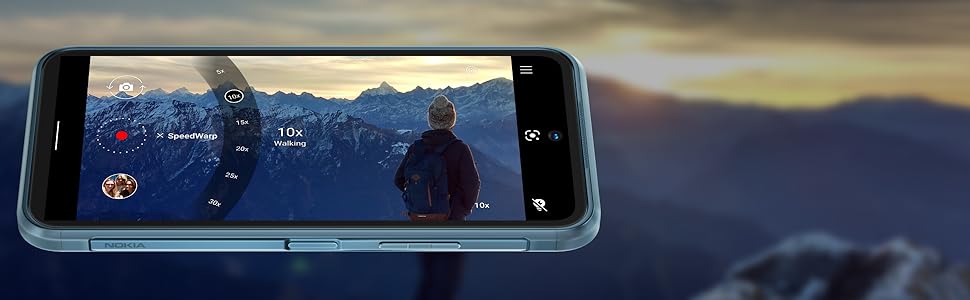
Image 3.2: The camera interface offers various modes and settings for capturing photos and videos.
3.3. Connettività 5G
The Nokia XR20 supports 5G networks, offering faster download and upload speeds where available. Ensure your SIM card and mobile plan support 5G.

Image 3.3: Experience superfast 5G connectivity for quick data transfers.
3.4. Assistente Google
Access Google Assistant by saying "Hey Google" or by long-pressing the dedicated Google Assistant button on the side of the device. Use it for voice commands, information retrieval, and smart home control.

Image 3.4: Google Assistant provides hands-free help and information.
3.5. Sensore di impronte digitali
The fingerprint sensor is integrated into the side power button for convenient and secure unlocking. To set it up, go to Impostazioni > Sicurezza > Sblocco con impronta digitale e seguire le istruzioni sullo schermo.
4. Cura e manutenzione
4.1. Caratteristiche di durata
The Nokia XR20 is built to withstand challenging environments:
- Grado di protezione IP68: Fornisce protezione contro l'ingresso di polvere e l'immersione in acqua fino a 1.5 metri per 60 minuti.
- Conforme a MIL-STD-810H: Tested against military standards for drops, temperature extremes, and other environmental factors.
- Corning Gorilla Glass Victus: The display is protected by the toughest Gorilla Glass available, offering enhanced scratch and drop resistance.

Image 4.1: The Nokia XR20 is designed to be water-resistant.
4.2. Pulizia del dispositivo
To clean your Nokia XR20, use a soft, lint-free cloth. For stubborn dirt or smudges, slightly dampen the cloth with water. Avoid using harsh chemicals, abrasive cleaners, or compressed air, as these can damage the device's protective coatings or seals.
4.3. Aggiornamenti software
Nokia provides 2 years of OS upgrades and up to 4 years of monthly security updates for the XR20 to ensure your device remains secure and up-to-date with the latest features.

Image 4.2: Regular software updates ensure your phone remains secure and performs optimally.
4.4. Cura della batteria
The Nokia XR20 is equipped with a 4630 mAh non-removable battery. To maximize battery life:
- Evitare temperature estreme.
- Use the provided charger or a compatible 18W wired or 15W wireless charger.
- Optimize screen brightness and disable unnecessary features like GPS or Bluetooth when not in use.
5. Risoluzione Dei Problemi
This section addresses common issues you might encounter with your Nokia XR20.
5.1. Il dispositivo non si accende
- Assicurati che la batteria sia carica. Collega il telefono al caricabatterie e attendi qualche minuto prima di provare ad accenderlo di nuovo.
- Per eseguire un riavvio forzato, tenere premuto il pulsante di accensione per almeno 10-15 secondi.
5.2. Problemi di connettività di rete
- Check if your SIM card is correctly inserted (refer to Section 2.2).
- Verify that your mobile data is enabled in Quick Settings or Impostazioni > Rete e Internet > Rete mobile.
- Ensure your device is compatible with your carrier (refer to Section 2.4).
- Riavvia il telefono.
5.3. Problemi di ricarica
- Ensure the charging cable and adapter are securely connected to both the phone and the power outlet.
- Try using a different compatible USB-C cable and power adapter.
- Ispezionare la porta di ricarica per verificare che non vi siano detriti o danni.
5.4. Lo schermo non risponde
- Eseguire un riavvio forzato tenendo premuto il pulsante di accensione per 10-15 secondi.
- Se il problema persiste, contatta l'assistenza clienti.
6. Specifiche tecniche

Image 6.1: Physical dimensions and weight of the Nokia XR20.
| Caratteristica | Specificazione |
|---|---|
| Numero di modello | TA-1371 |
| Dimensioni | 171.6 x 81.5 x 10.6 mm (6.76 x 3.21 x 0.42 pollici) |
| Peso | 248 g (8.75 once) |
| Sistema operativo | Android 11 (aggiornabile ad Android 14) |
| Processore | Qualcomm SM4350 Snapdragon 480 5G (8 nm) Octa-core |
| Memoria RAM | 6 GB |
| Memoria interna | 128 GB |
| Archiviazione espandibile | MicroSDXC up to 512 GB (uses shared SIM slot) |
| Display | 6.67 inches IPS LCD, 1080 x 2400 pixels (FHD+), 20:9 ratio, Corning Gorilla Glass Victus |
| Telecamera posteriore | 48 MP, f/1.8 (wide) + 13 MP, f/2.4 (ultrawide) with ZEISS optics |
| Fotocamera frontale | 8 MP, f/2.0 (grandangolare) |
| Batteria | Li-Po 4630 mAh, non rimovibile |
| Ricarica | 18W wired, 15W wireless |
| Connettività | Wi-Fi 802.11 a/b/g/n/ac/6, Bluetooth 5.1, NFC, GPS (L1+L5), USB Type-C 3.0 |
| Sensori | Side-mounted Fingerprint, Accelerometer, Gyro, Proximity, Compass, Barometer |
| Durata | IP68 dust/water resistant, MIL-STD-810H compliant, Corning Gorilla Glass Victus |
7. Garanzia e supporto
7.1. Garanzia del produttore
The Nokia XR20 comes with a manufacturer's warranty. Please refer to the warranty card included in your product packaging or visit the official Nokia websito per termini e condizioni dettagliati, tra cui il periodo di copertura e le procedure di assistenza.
7.2. Assistenza clienti
Per ulteriore assistenza, supporto tecnico o richieste di assistenza, visitare il sito ufficiale di supporto Nokia website or contact their customer service helpline. Contact information can typically be found on the Nokia websito o nella documentazione del prodotto.


