1. Introduzione
The Verizon 4G LTE Network Extender (Model SLS-BU102) is designed to enhance 4G LTE cellular signal coverage within buildings. This enterprise-grade small cell device connects to your existing internet connection to create a secure tunnel back to Verizon's core network, generating a strong LTE signal. It provides in-building coverage for multiple users, ensuring seamless cellular connectivity where outdoor signals may be weak.
This manual provides detailed instructions for the setup, operation, and maintenance of your Network Extender.
2. Contenuto della confezione
Verifica che tutti gli articoli elencati di seguito siano inclusi nel tuo pacchetto:
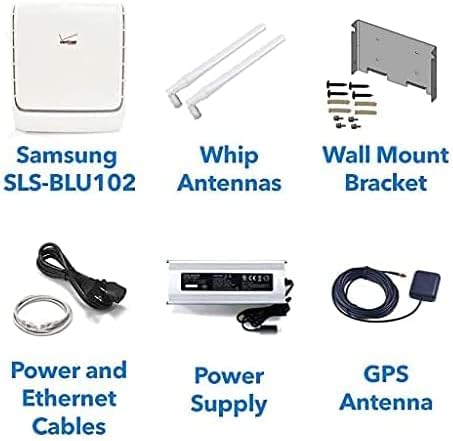
Image 2.1: Package contents including the Network Extender unit, antennas, wall mount, cables, power supply, and GPS antenna.
- Verizon 4G LTE Network Extender Unit (SLS-BU102)
- Whip Antennas (2 units)
- Staffa di montaggio a parete
- Cavo di alimentazione
- Cavo Ethernet
- Unità di alimentazione
- Antenna GPS
- Manuale di istruzioni (questo documento)
3. Prodotto finitoview
The Verizon 4G LTE Network Extender is a compact device designed for easy integration into various environments. It features two omnidirectional whip antennas for signal transmission and reception, and a multi-colored LED indicator to display its operational status.

Immagine 3.1: anteriore view of the Verizon 4G LTE Network Extender with attached whip antennas.
3.1 componenti chiave
- Unità principale: The core device that processes and amplifies the 4G LTE signal.
- Whip Antennas: Two external antennas that rotate 360 degrees for optimal signal coverage.
- Indicatore LED: A single multi-colored LED on the device indicates its connectivity status.
- Porte: Includes ports for power, Ethernet, and GPS antenna connection.
4. Configurazione e installazione
The Network Extender is designed for simple plug-and-play installation. Follow these steps to set up your device:
4.1 Considerazioni sul posizionamento
- Place the unit in a central location within the desired coverage area.
- Ensure proximity to a power outlet and an active internet connection (router/modem).
- For optimal GPS signal acquisition, place the GPS antenna near a window or in an area with clear sky view.
4.2 Fasi di connessione
- Collegare le antenne: Screw the two whip antennas onto the designated ports on the Network Extender. Adjust their orientation for best coverage.
- Collegare l'antenna GPS: Connect the GPS antenna cable to the GPS port on the Network Extender. Position the GPS antenna as described in 4.1.
- Connettiti a Internet: Use the provided Ethernet cable to connect the Network Extender's LAN port to an available LAN port on your internet router or modem.
- Connetti alimentazione: Plug the power supply into the Network Extender's power input, then plug the power cable into a wall outlet.
- Accensione: The device will automatically power on and begin its startup sequence. Observe the LED indicator for status.

Immagine 4.1: posteriore view of the Network Extender showing mounting points and approximate dimensions (in inches and millimeters).
4.3 Montaggio a parete (opzionale)
The Network Extender can be wall-mounted using the included bracket. Refer to Image 4.1 for anchor bolt hole dimensions and placement. Ensure the mounting surface is suitable to support the device's weight (approximately 10 pounds).
5. Istruzioni per l'uso
Once successfully set up, the Network Extender will automatically begin providing enhanced 4G LTE coverage. It operates by creating a secure connection to Verizon's network over your internet connection.
5.1 Coverage and Capacity
- A single unit provides a coverage area of up to 75,000 square feet.
- Supports up to 42 simultaneously active users.
- Supports up to 200 idle users per device.
- Multiple devices can be deployed to create a larger "super-cell" coverage area of up to 150,000 square feet.
5.2 Automatic Hand-off
When users enter the building, their devices will automatically "hand off" from the outdoor cellular network to the Network Extender's coverage zone, ensuring continuous and strong signal.
5.3 Local Administration Interface
The Network Extender supports an embedded web server, allowing for customization of IP settings and monitoring of connected devices. This interface can display currently connected users and historical capacity utilization over a 24-hour period.
6. Manutenzione
The Verizon 4G LTE Network Extender requires minimal maintenance. Keep the device in a clean, dry environment and ensure proper ventilation. Avoid blocking the ventilation grilles. Do not attempt to open or repair the device yourself, as this will void any warranty.
- Controllare regolarmente i collegamenti dei cavi per accertarsi che siano saldi.
- Spolverare periodicamente l'unità con un panno morbido e asciutto.
- Ensure the device is not exposed to extreme temperatures or direct sunlight.
7. Risoluzione Dei Problemi
Questa sezione affronta i problemi più comuni e le relative soluzioni.
7.1 Stato dell'indicatore LED
The Network Extender features a single multi-colored LED that indicates its operational status. Refer to the official Verizon documentation or the local administration interface for a detailed explanation of specific LED colors and patterns.
- Nessun segnale / Segnale debole: Ensure all cables (Ethernet, power, GPS) are securely connected. Verify your internet connection is active. Check GPS antenna placement for clear sky view.
- Il dispositivo non si accende: Check the power cable connection and the wall outlet. Try a different outlet.
- Intermittent Service: Check your internet connection stability. Ensure the Network Extender is not obstructed or placed near sources of interference.
Se i problemi persistono, contattare il supporto tecnico.
8. Specifiche
| Caratteristica | Dettaglio |
|---|---|
| Modello | SLS-BU102 |
| Coverage Area (Single Device) | Fino a 75,000 mq. |
| Coverage Area (Multiple Devices) | Up to 150,000 sq. ft. (super-cell) |
| Active User Capacity | Fino a 42 utenti simultanei |
| Idle User Capacity | Up to 200 idle users |
| Standard di comunicazione wireless | 4G LTE, 802.11ac (for internal Wi-Fi router functionality, if applicable) |
| Supporto MIMO | 2x2 MIMO |
| Connettività | Ethernet (IPsec tunnel to Verizon network) |
| Consumo energetico | Design a basso consumo energetico |
| Dimensioni (approssimative) | 10.60 x 8.98 x 2.95 pollici (269.3 x 228.2 x 75 mm) |
| Peso dell'articolo | 10 libbre |
| Dispositivi compatibili | Smartphone, Tablet, Laptop, Wi-Fi enabled devices |
9. Garanzia e supporto
This product is offered as an Amazon Renewed item. For specific warranty details, please refer to the Amazon Renewed program terms and conditions at the time of purchase. Technical support is available to assist with activation, setup, and any usage issues you may encounter.
For technical assistance, please contact Verizon customer support or the Amazon Renewed support channel.


