1. Introduzione
The Hama MW-650 is a versatile 6-button optical wireless mouse designed for multi-device use. It offers flexible connectivity options via a 2.4 GHz USB-A receiver and Bluetooth, allowing seamless switching between up to three devices. The optical sensor provides precise cursor control, and adjustable DPI settings cater to various user preferences. This manual provides detailed instructions for setup, operation, maintenance, and troubleshooting to ensure optimal performance of your device.
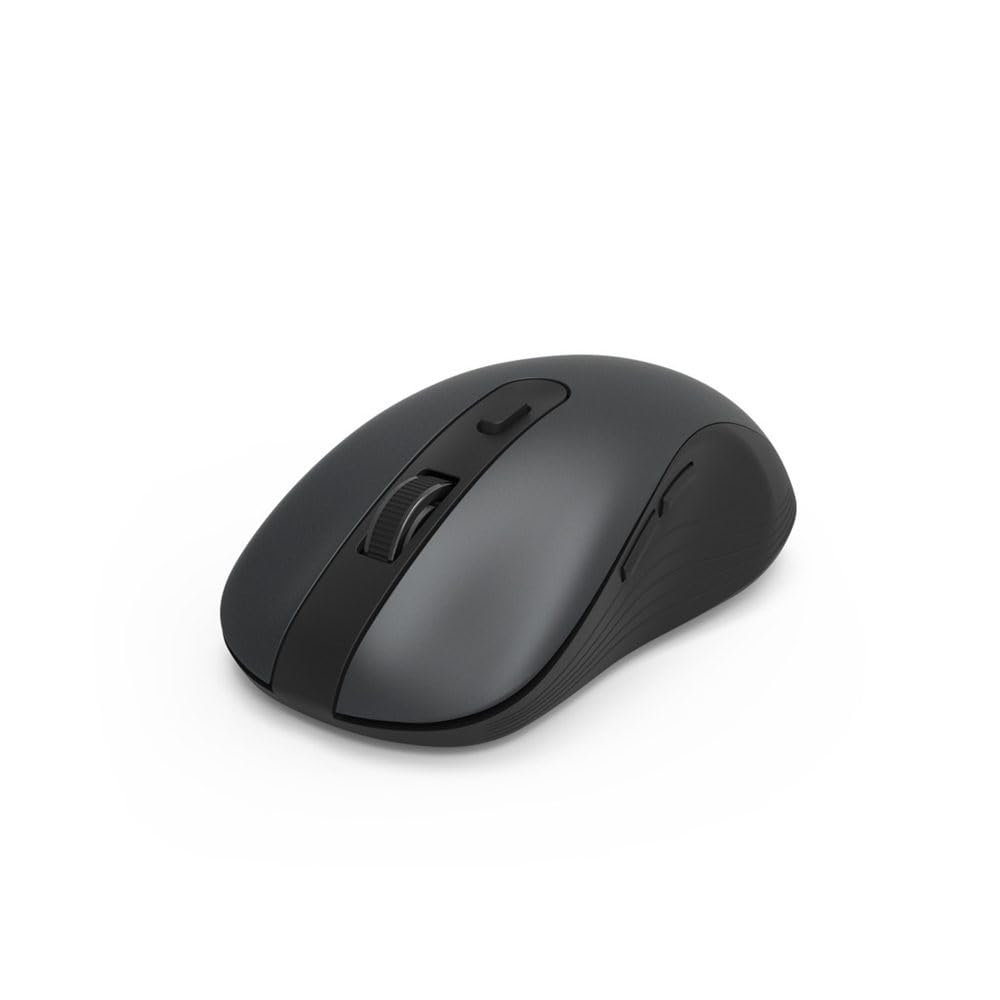
Image 1.1: Hama MW-650 Wireless Mouse (Top View)
2. Contenuto della confezione
Si prega di controllare la confezione per verificare la presenza dei seguenti elementi:
- 1 x Hama MW-650 6-Button Optical Wireless Mouse
- 1 x ricevitore USB-A
- 2 x AA Mignon Batteries
- 1 x Manuale di istruzioni (questo documento)

Image 2.1: Hama MW-650 Product Packaging
3. Impostazione
3.1. Installazione della batteria
- Individuare il vano batteria sul lato inferiore del mouse.
- Aprire il coperchio del vano batterie.
- Inserire le due batterie AA Mignon, assicurandosi della corretta polarità (+/-).
- Chiudere saldamente il coperchio del vano batterie.
3.2. Accensione/spegnimento
On the underside of the mouse, slide the ON/OFF switch to the 'ON' position to power on the mouse. Slide it to 'OFF' when not in use to conserve battery life.

Image 3.1: Underside of Hama MW-650 Mouse with ON/OFF Switch and Receiver
3.3. Opzioni di connettività
The Hama MW-650 mouse supports two wireless connection methods: 2.4 GHz via USB-A receiver and Bluetooth.
3.3.1. 2.4 GHz USB-A Receiver Connection
- Remove the USB-A receiver from its storage slot on the underside of the mouse.
- Plug the USB-A receiver into an available USB-A port on your computer or laptop.
- Il sistema operativo dovrebbe rilevare e installare automaticamente i driver necessari.
- The mouse will connect automatically. The LED indicator for BT1/BT2 will not be lit when using the USB receiver.
3.3.2. Connessione Bluetooth
The mouse can connect to two separate Bluetooth devices (BT1 and BT2).
- Assicurarsi che il mouse sia acceso.
- Press the 'BT1' or 'BT2' button on the underside of the mouse to select the desired Bluetooth channel. The corresponding LED will flash slowly.
- To enter pairing mode, press and hold the selected 'BT1' or 'BT2' button for approximately 3 seconds until the LED flashes rapidly.
- Sul tuo dispositivo (PC, laptop, tablet, smartphone), attiva il Bluetooth e cerca nuovi dispositivi.
- Select "Hama MW-650" from the list of available devices to pair.
- Once successfully paired, the LED will stop flashing and remain steadily lit for a few seconds before turning off.
4. Istruzioni per l'uso
4.1. Funzioni di base del mouse
The Hama MW-650 features 6 buttons and a scroll wheel:
- Pulsante sinistro del mouse: Primary function, typically for selecting items or opening links.
- Pulsante destro del mouse: Funzione secondaria, in genere per i menu contestuali.
- Rotella di scorrimento: For scrolling up and down documents or web pagine. Può anche essere premuto per una funzione di clic centrale.
- Pulsante DPI: Situato dietro la rotellina di scorrimento, serve a regolare la sensibilità del cursore.
- Pulsanti Avanti/Indietro: Located on the side of the mouse, typically used for navigating web pagine o cartelle.
4.2. Passaggio da un dispositivo all'altro
The MW-650 mouse allows you to switch between three connected devices (one via USB receiver, two via Bluetooth).
- To switch to a Bluetooth-connected device, press the 'BT1' or 'BT2' button on the underside of the mouse. The corresponding LED will light up briefly.
- To switch to the device connected via the USB receiver, press the 'USB' button (or the button without a BT label) on the underside of the mouse.

Image 4.1: Multi-Device Connectivity Example

Image 4.2: Multi-Device Setup with Monitor
4.3. DPI Sensitivity Adjustment
The mouse offers adjustable DPI (Dots Per Inch) settings to control cursor speed and sensitivity. Press the DPI button located behind the scroll wheel to cycle through the available sensitivities:
- 800 DPI
- 1200 DPI (predefinito)
- 1600 DPI
- 2000 DPI
- 2400 DPI
Each press of the DPI button will change the sensitivity, allowing you to find the setting that best suits your task or preference.
5. Gestione energetica
The Hama MW-650 mouse is designed with intelligent power management features to conserve battery life:
- Modalità di attesa automatica: The mouse will automatically enter a standby mode after a period of inactivity. To wake it up, simply move the mouse or click any button.
- Interruttore On/Off: For extended periods of non-use, slide the ON/OFF switch on the underside of the mouse to the 'OFF' position to completely power down the device and maximize battery life.
6. Cura e manutenzione
6.1. Pulizia
Per mantenere le prestazioni e l'aspetto del mouse:
- Prima di pulirlo, assicurarsi che il mouse sia spento.
- Per pulire la superficie del mouse, utilizzare un panno morbido, asciutto e privo di lanugine.
- Per sporco ostinato, leggermente dampPulire il panno con acqua o una soluzione detergente delicata. Evitare prodotti chimici aggressivi o materiali abrasivi.
- Clean the optical sensor area on the underside of the mouse periodically with a cotton swab to ensure accurate tracking.
6.2. Sostituzione della batteria
Quando le prestazioni del mouse diminuiscono o il mouse smette di rispondere, potrebbe essere il momento di sostituire le batterie.
- Power off the mouse using the ON/OFF switch.
- Aprire il vano batterie sul lato inferiore.
- Remove the old AA batteries and dispose of them according to local regulations.
- Insert new AA Mignon batteries, observing correct polarity.
- Chiudere il vano batterie.
7. Risoluzione Dei Problemi
If you encounter issues with your Hama MW-650 mouse, please refer to the following common solutions:
| Problema | Possibile soluzione |
|---|---|
| Mouse does not respond. |
|
| Il movimento del cursore è irregolare o lento. |
|
| Impossibile passare da un dispositivo all'altro. |
|
| L'associazione Bluetooth non riesce. |
|
8. Specifiche tecniche
| Numero di modello | 00182617 (MW-650) |
| Tecnologia di connettività | 2.4GHz RF (USB-A Receiver), Bluetooth 5.0 |
| Tecnologia di rilevamento del movimento | Ottico |
| Sensibilità DPI | 800 / 1200 / 1600 / 2000 / 2400 DPI (adjustable) |
| Numero di pulsanti | 6 (inclusa la rotellina di scorrimento) |
| Fattore di forma | Destra |
| Fonte di alimentazione | 2 x AA Mignon Batteries (included) |
| Durata della batteria | Fino a 288 giorni (a seconda dell'utilizzo) |
| Sistemi operativi compatibili | Windows 11/10/8/7, Android 4.3 or higher, macOS 10.10 or higher, iOS 13 or higher |
| Dimensioni del prodotto (L x P x A) | 11.3 x 6.3 x 4 cm (4.41 x 2.48 x 1.57 pollici) |
| Peso dell'articolo | 3.62 once |
| Colore | Nero |
9. Garanzia e supporto
Per informazioni sulla garanzia e supporto tecnico, fare riferimento al sito ufficiale Hama webo contattare direttamente il servizio clienti. Conservare la prova d'acquisto per eventuali reclami in garanzia.
- Produttore: Azienda Hama GmbH & Co. KG
- Websito: www.hama.com


